Frame TV + kitchen appliance sync — when the kitchen talks
Eighteen months into the full Samsung Bespoke ecosystem. Long enough to be past the demo phase and into the honest one: which of these cross-appliance routines I actually use, and which were impressive in a YouTube video and useless in a kitchen.
The short version is that a connected appliance, by itself, is a gimmick. A fridge with a screen is a fridge with a screen. What earns the money is the collective behavior — the kitchen noticing what’s happening and routing that information to whatever screen you’re standing near. This is the cookbook of what actually works, and the few things that didn’t.
The architecture
Six connected appliances, the Frame TV, and Home Assistant holding it together:
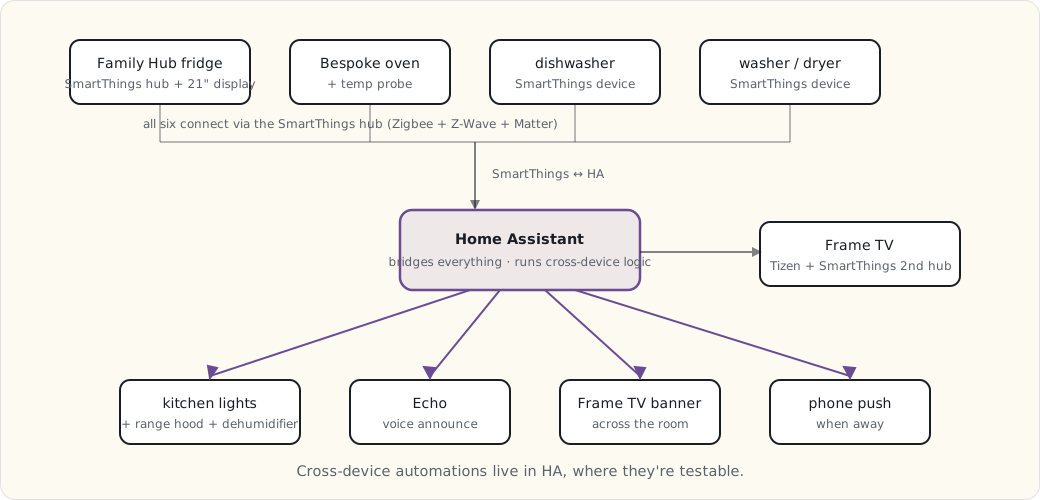
Six SmartThings-natively-controlled appliances, one Tizen-native screen (the Frame), all of them visible to Home Assistant. The cross-device automations live in HA, deliberately — that’s where I can read them, test them, and version them, instead of trusting a vendor’s cloud routine engine I can’t see inside.
Routines that actually run
1. “Cooking mode” — when the oven preheats:
- alias: "Cooking: oven preheating -> kitchen environment"
  trigger:
    - platform: state
      entity_id: oven.bespoke_main
      attribute: status
      to: "preheating"
  action:
    - service: light.turn_on
      data:
        entity_id: light.kitchen
        brightness: 255
        color_temp: 4000   # neutral white for cooking
    - service: switch.turn_on
      data:
        entity_id: switch.kitchen_range_hood
    - service: notify.alexa_media_kitchen
      data:
        message: "Oven preheating. Vent fan on."
Oven starts preheating → kitchen lights jump to neutral white (instead of the warm evening color) → range-hood fan comes on → Echo confirms it out loud. Running daily for a year, no false positives. The neutral-white shift is the small touch I’d miss most — you can actually see what you’re chopping.
2. “Dinner is ready” — when the probe hits target:
- alias: "Cooking: probe target -> multi-screen notification"
  trigger:
    - platform: state
      entity_id: sensor.oven_probe_target_reached
      to: "on"
  action:
    - service: notify.frame_tv
      data:
        title: "Probe target reached"
        message: "{{ states('sensor.oven_probe_temperature') }}F -- ready to pull"
    - service: notify.alexa_media_kitchen
      data:
        message: "The oven probe has reached its target temperature."
    - service: notify.mobile_app_luke_iphone
      data:
        title: "Roast ready"
        message: "Probe at {{ states('sensor.oven_probe_temperature') }}F"
One state change, three screens.
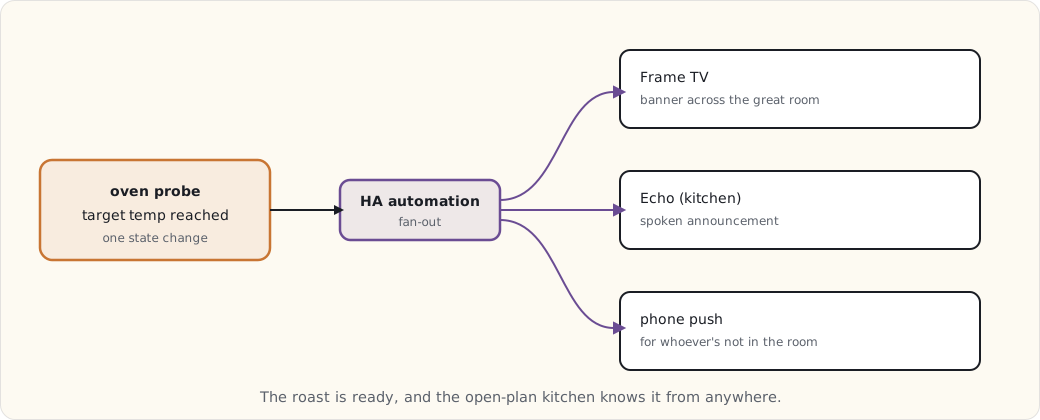
The probe hits target → the Frame TV pops a banner across the great room → the Echo says it → a phone push goes out. In an open-plan kitchen-and-great-room, that’s the difference between “dinner’s ready” landing and a roast sitting five minutes too long. This is the single routine that justified wiring the probe into HA at all.
3. “Recipe display sync” — fridge casts to the Frame:
This one isn’t an HA automation; it’s a SmartThings-native Samsung feature, and credit where due — it works. Tap “send to Frame” on the Family Hub fridge and the recipe page mirrors onto the Frame TV. I read it from the stove, 15 feet away, instead of squinting at the fridge or smearing a phone with flour. Used two or three times a week. The rare vendor feature I didn’t have to rebuild myself.
4. “Humidity event” — dishwasher or washer plus damp air:
- alias: "High humidity: dishwasher OR washer running with damp ambient"
  trigger:
    - platform: state
      entity_id:
        - dishwasher.bespoke
        - washer.bespoke
      to: "running"
  condition:
    - condition: numeric_state
      entity_id: sensor.kitchen_humidity
      above: 55
  action:
    - service: switch.turn_on
      data:
        entity_id: switch.kitchen_dehumidifier
    - service: switch.turn_on
      data:
        entity_id: switch.kitchen_range_hood
        speed: low
When a humidity-generating appliance is running and the kitchen RH is already climbing past 55%, the dehumidifier kicks on and the range hood runs low. The condition matters — I don’t want the dehumidifier roaring every time the dishwasher runs, only when the air’s actually damp. Quietly keeps the kitchen from turning into a sauna.
5. “Laundry done” — with an escalation:
- alias: "Wash done -> notify, then remind"
  trigger:
    - platform: state
      entity_id: washer.bespoke
      to: "finished"
  action:
    - service: notify.mobile_app_luke_iphone
      data:
        title: "Wash cycle done"
        message: "Move to dryer when convenient."
    - delay: "00:30:00"
    - condition: state
      entity_id: washer.bespoke
      state: "finished"     # still sitting there?
    - service: notify.mobile_app_luke_iphone
      data:
        title: "Wash still in the washer -- 30 min"
        message: "Don't let it sit and sour."
Wash finishes → phone push. Thirty minutes later, if the washer’s still reporting “finished” (nobody started a dryer cycle), an escalation push. The two-stage nudge is the only thing that ever broke our habit of leaving a load to sour overnight.
6. “Frame TV art by time of day”:
- alias: "Frame TV art rotation by time of day"
  trigger:
    - platform: time
      at: ["06:00", "12:00", "18:00", "22:00"]
  action:
    - service: media_player.play_media
      data:
        entity_id: media_player.frame_tv
        media_content_type: "image/jpeg"
        media_content_id: >
          {% set hour = now().hour %}
          {% if hour < 12 %}
            https://hass.example.com/local/art/morning.jpg
          {% elif hour < 18 %}
            https://hass.example.com/local/art/daytime.jpg
          {% elif hour < 22 %}
            https://hass.example.com/local/art/evening.jpg
          {% else %}
            https://hass.example.com/local/art/night.jpg
          {% endif %}
Pure cosmetics, but the Frame is on the wall all day in art mode, so it might as well match the light in the room.
What didn’t work
The honest column, because every one of these looked good on paper:
- “Auto-start the washer when the dishwasher finishes” — for off-peak energy. It required loading the washer the night before, on the system’s schedule, not ours. The family resented being told when to do laundry. Removed.
- “Fridge interior camera + AI food-expiration tracking.” The Family Hub claims to do this. The accuracy was low enough to be worse than nothing — it’d flag fresh food and miss spoiled. Dropped the dependency.
- “Start the dishwasher by voice from the Echo.” Works mechanically. But “is it actually loaded and latched?” is a question voice can’t answer, and starting a half-loaded dishwasher is a small flood. Removed on the safety question alone.
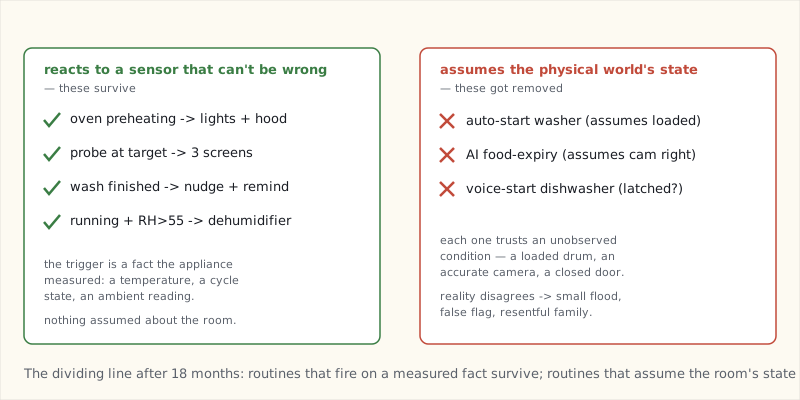
The pattern in all three: automation that assumes the physical world is in a known state — a loaded washer, an accurate camera, a latched door — fails the moment reality disagrees. The routines that survive are the ones reacting to a sensor that can’t be wrong about what it’s reporting.
The Family Hub fridge as the kitchen’s center
The 21” Family Hub display turned into the kitchen’s primary information surface, more than I expected going in:
- Calendars. Two color-coded (mine and my wife’s). The kids check it for after-school stuff.
- Shared shopping list. Voice or touch, syncs to phones.
- Recipe browser, with the cast-to-Frame trick above.
- Interior cameras — glance at what’s in the fridge from across the kitchen without opening the door.
- Family memos, whiteboard-style.
The Frame TV is the secondary surface — cooking content up close, and the great-room display for everything else.
What I’d buy again
- The fridge ($4,800, the 21” model). Yes — for the SmartThings hub and the display, not the cooling.
- The oven ($2,200). Yes. Induction plus the probe alerts, which power the best routine in the house.
- The dishwasher ($1,400). Yes. AutoOpen drying saves the most energy per cycle of anything here.
- The washer/dryer ($1,800 + $1,400). Maybe. The cycle notifications earn their keep; the “AI smart cycle” selection is marginal.
- The Frame TV ($2,300, 65”). Yes — but for the SmartThings hub role, the matte screen, and art mode. The picture quality is good, not best-in-class, and I wouldn’t pay the Frame premium for the TV alone.
What’s next
- The robots post later this year — the Roomba and Braava routines that have been quietly running in the background.
- A long look back across the whole arc of this journal, due in the fall.
- The year-end review, as always, in December.