Frigate + Coral cookbook — eight months of tuning
When I put Frigate behind the PoE cameras last year, the install was the easy part. An afternoon of Docker, a Coral USB stick, a couple of camera URLs, and it was detecting people. It was also detecting the trees, the neighbor’s car, headlights, the Roomba, and — memorably — a squirrel it was 70% sure was a small dog.
Eight months later it sends me about five notifications a day, and every one of them is worth looking at. None of that came from the model. It came from masks, zones, and a per-camera, per-label thresholds table I rebuilt four times. This is the cookbook I wish I’d had on day one.
The setup: Frigate 0.10 stable, five PoE cameras plus one Wi-Fi cam, all detection running through a single Coral USB at 10 fps per stream. (0.11 is in release-candidate right now; I’ve got it on a test box and I’ll get to what it changes at the end.) About 150 detection events a day land in the database; roughly five are worth a push notification. The whole job is closing that gap.
Confidence thresholds — the obvious knob, and its trap
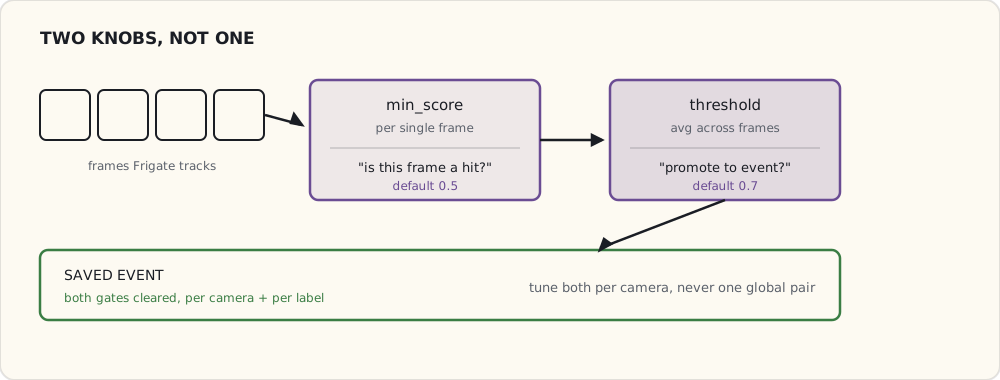
Every label in Frigate has two numbers:
min_score— the minimum classifier confidence for a single frame to count as a detection at all.threshold— the minimum cumulative score, averaged across the frames Frigate tracks the object over, for it to be promoted to a saved “event.”
The defaults are 0.5 / 0.7. The trap is treating them as one global setting. A “person” confidence that’s reasonable on the front porch is paranoid on the backyard cam, which only ever sees one human and a lot of moving foliage. So I tune them per camera and per label:
cameras:
  front_porch:
    objects:
      filters:
        person:
          min_score: 0.5    # default
          threshold: 0.75   # bumped — fewer false person events
        car:
          min_score: 0.4    # lower — distant cars are partly occluded
          threshold: 0.7
        package:
          min_score: 0.55
          threshold: 0.7
        dog:
          min_score: 0.5
          threshold: 0.8    # bumped — dog false positives were high

  backyard:
    objects:
      filters:
        person:
          min_score: 0.5
          threshold: 0.75
        dog:
          min_score: 0.4    # catch the real dog quickly
          threshold: 0.65
        # no car / package — the backyard never sees them
The backyard sees my dog and never sees cars, so its dog thresholds are lower (catch fast) and car/package aren’t tracked at all. Untracked labels are free: Frigate never spends Coral cycles confirming a class you didn’t ask for.
The two numbers do different jobs, and that’s why one global pair never fits the whole house:
Motion masks — kill the work before it runs
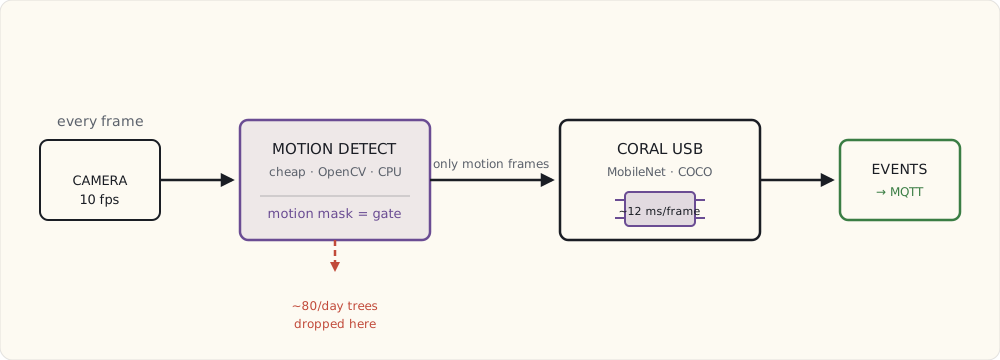
Frigate doesn’t run the Coral on every frame. It runs cheap OpenCV motion detection first, and only frames with motion get handed to the accelerator for object detection. That makes the motion mask your highest-leverage knob: mask out a region and you don’t just suppress its false events, you stop paying for them in inference time.
The backyard, again, is the worst offender. The tree line at the back of the lot moves in every gust of wind, so without a mask, every breeze pushes a mostly-trees frame onto the Coral.
cameras:
  backyard:
    motion:
      mask:
        - "0,0,0,400,800,400,800,0"        # top 50% (trees + sky)
        - "650,400,800,400,800,720,650,720" # neighbor's yard, right edge
Coordinates are pixels in the detect stream (mine is 640×360; scaled here for readability). The mask is a polygon and everything inside it is ignored for motion. After masking the tree line, false-motion events on that camera dropped from ~80/day to ~12/day — and the Coral got the cycles back.
Object masks — kill false detections geometrically
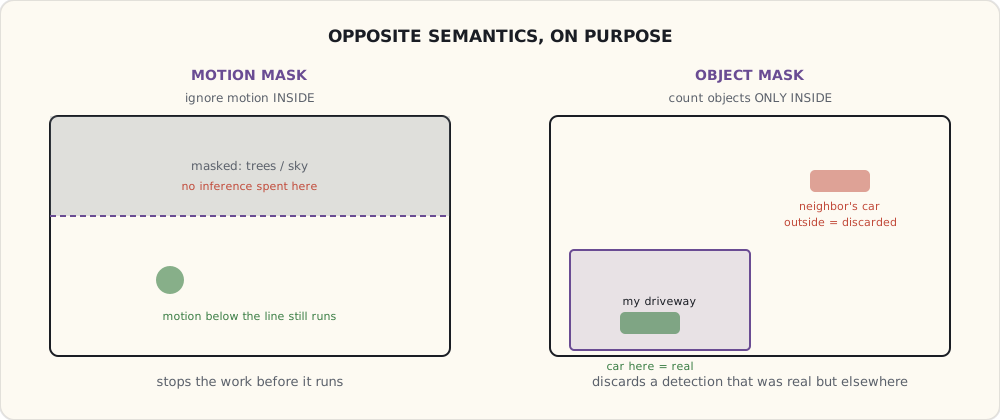
A motion mask stops inference from running in a region. An object mask is the opposite tool: it stops an object that was detected in a region from counting as real.
The driveway is the case that taught me the difference. The neighbor parks at the curb across the street. Frigate detects their car correctly — it really is a car — but I don’t care about cars across the street, only cars in my driveway.
cameras:
  driveway:
    objects:
      filters:
        car:
          mask:
            - "300,500,600,500,600,720,300,720"  # bottom-left = my driveway
            # Object masks are INVERTED vs motion masks:
            # detections OUTSIDE this polygon are discarded.
            # So this counts cars only WITHIN the box.
This took me an embarrassing while to internalize, so I’ll say it plainly: a motion mask means ignore motion here; an object mask means only count objects here. Opposite semantics on purpose, and mixing them up is why my driveway camera spent a month notifying me about the neighbor’s Camry.
Zones — for the “where,” not just the “what”
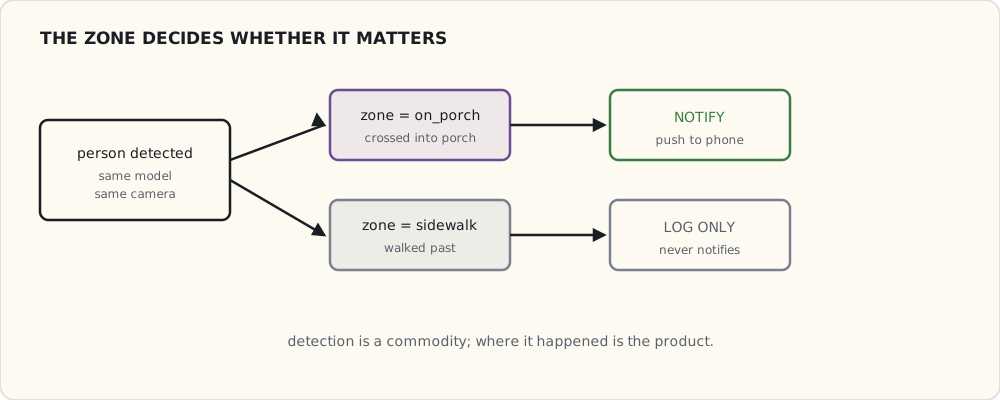
A zone is a named polygon. Frigate publishes an “object entered zone X” event when a tracked object crosses into it, which turns “a person exists” into “a person walked onto the porch” versus “a person walked past on the sidewalk.” That distinction is the whole point of a porch camera.
cameras:
  front_porch:
    zones:
      on_porch:
        coordinates: "100,300,500,300,500,720,100,720"
        objects:
          - person
      sidewalk:
        coordinates: "0,400,800,400,800,500,0,500"
        objects:
          - person
The notification logic lives in Home Assistant, driven off Frigate’s MQTT events:
- alias: "Person entered porch"
  trigger:
    - platform: mqtt
      topic: frigate/events
      payload: "new"
  condition:
    - condition: template
      value_template: >
        {% set e = trigger.payload_json.after %}
        {{ e.camera == "front_porch" and e.label == "person"
           and "on_porch" in e.current_zones }}
  action:
    - service: notify.mobile_app_luke_iphone
      data:
        title: "Person on porch"
        message: "Detected at {{ now().strftime('%H:%M') }}"
“Person on sidewalk” gets logged and never notifies. “Person on porch” puts a card on my phone. Same model, same camera — the zone is what makes one of them matter.
What I actually track, per camera
| Camera | person | car | dog | package |
|---|---|---|---|---|
| Front porch | ✓ | in zone | ✓ | ✓ |
| Doorbell | ✓ | — | — | ✓ |
| Backyard | ✓ | — | ✓ | — |
| Side yard | ✓ | — | — | — |
| Driveway | ✓ | in zone | — | — |
| Garage (Wi-Fi) | ✓ | — | — | — |
The Coral math, because people ask whether one stick is enough: six cameras × 10 fps × ~12 ms of inference per frame is roughly 720 ms of Coral time per second, so the stick sits around 72% utilized. Headroom for one more camera; a seventh means a second Coral.
The false positives that broke me
Every one of these cost me a real notification at a bad time before I fixed it.
- Tree shadows reading as “person.” The MobileNet model Frigate ships (COCO-trained) occasionally calls a dappled tree-shadow pattern a low-confidence person. Fixed by raising
min_scoreto 0.55 for person and masking the tree regions. - Headlights reading as “car” at night. A distant headlight is a small bright blob, and the model is weirdly confident a bright blob is a car. Zone-based car tracking fixed it: only count cars inside the driveway zone, not at street distance.
- The Roomba reading as “person.” First time it ran while I was out, the indoor cam called it a 60%-confidence person and I got a small jolt of adrenaline in a meeting. Pulled person tracking off the indoor cam entirely.
- Squirrels reading as “dog.” The backyard model thinks a squirrel is a very small dog. Raised the dog threshold to 0.65 and added a minimum bounding-box area so squirrel-sized blobs don’t qualify.
What’s still annoying
- The Coral hangs every couple of weeks. Detection just stops; a restart fixes it. I suspect USB power — the stick pulls ~2 W — so it’s going on a powered hub next.
- No native re-identification. A person tracked across the porch cam and then the driveway cam is logged as two unrelated events; Frigate has no concept that it’s the same human walking. The 0.11 release candidate adds sub-labels, which lets you bolt an external recognizer (DeepStack or CompreFace) onto an event and write a name back — but that’s a workaround you wire up yourself, not re-id in the box. True cross-camera identity isn’t here yet.
- No license-plate recognition. The OpenALPR-on-Frigate route exists; I haven’t wired it.
- No “that’s just my kid” face recognition. DeepStack/CompreFace can do it via those same 0.11 sub-labels, but I’m not yet sold the value clears the added complexity.
What I’d tell a team standing this up
- Tune per camera, not globally. One thresholds table for the whole house is how you end up either missing real events or drowning in fake ones. The backyard and the front porch are different problems.
- Reach for the motion mask before the threshold. It’s the only knob that buys you both fewer false events and more inference headroom. Thresholds only trade one kind of error for another.
- Treat zones as the product. Detection is a commodity; “where did it happen” is the part that decides whether a notification is worth sending.
- Budget your accelerator out loud. Do the fps × ms math before you add the camera, not after the Coral starts hanging.
What’s next
The 0.11 release candidate is stable enough on the test box that I’ll cut over the production instance soon — mostly for the sub-labels and the recordings overhaul. The real upgrade I’m waiting on is native cross-camera re-id, whenever it lands. Either way, this is the last big knob in the security-camera layer; the next thing on the bench is wiring the LoRa gateway into the same Home Assistant brain so the garden talks on the same nervous system as the cameras.