SmartThings Edge drivers — Samsung goes local-first
SmartThings announced its Edge driver framework back in September 2021, but for a long stretch it didn't mean much in practice — limited capabilities, sparse docs, mostly Samsung's own internal use. What forced everyone's hand was the other end of the transition: the old Groovy platform was wound down through 2022 and shut off entirely on the last day of that year, so Edge stopped being optional. Three-plus years on, with the rough edges sanded down, the platform is genuinely credible. Local-first is real on SmartThings now.
This is the post about what Edge drivers are, why they matter, and whether they change my long-standing "don't bother with SmartThings" stance.
What an Edge driver is
A SmartThings Edge driver is Lua code that runs on the SmartThings hub itself — the Family Hub fridge, the Frame TV, an Aeotec V3 hub, whatever's acting as your hub. Each driver implements one device protocol — Zigbee, Z-Wave, LAN, Matter — and translates it into SmartThings capabilities.
The difference from what came before is the whole story:
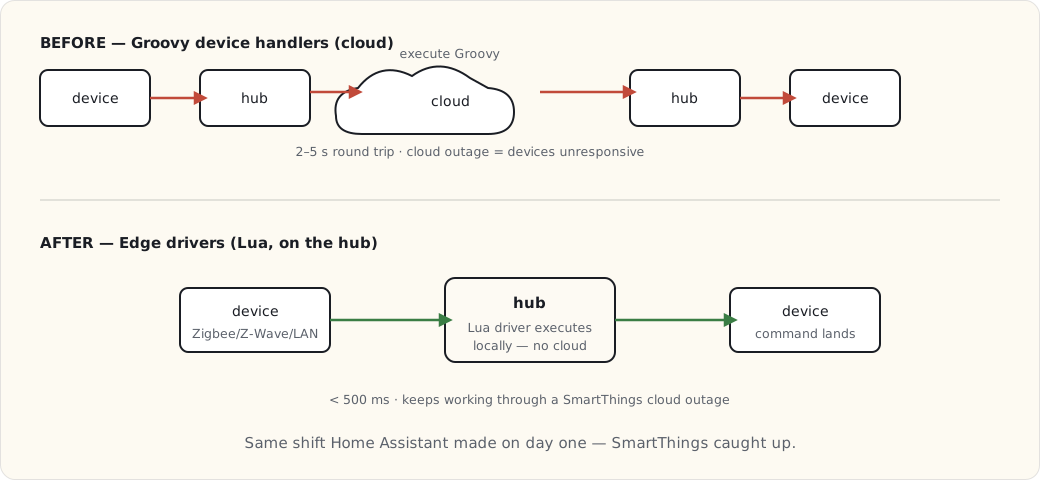
Before Edge: custom device handlers were Groovy scripts running in Samsung's cloud. Every command went device → hub → SmartThings cloud → execute Groovy → cloud → hub → device. Two to five seconds of latency, and a cloud outage meant your light switch didn't work.
After Edge: drivers are Lua, executing on the hub. Device commands go device → hub → device. Under 500 ms, no cloud in the path for device control.
Writing a custom Edge driver
The example I'll walk through is a driver I wrote for a generic Zigbee garage-door controller SmartThings didn't support out of the box.
-- garage_door.lua
local capabilities = require "st.capabilities"
local clusters = require "st.zigbee.zcl.clusters"
local zigbee_driver = require "st.zigbee.driver"

local OnOff = clusters.OnOff

local function refresh(driver, device)
    device:send(OnOff.attributes.OnOff:read(device))
end

local function open(driver, device, command)
    device:send(OnOff.commands.On(device))
end

local function close(driver, device, command)
    device:send(OnOff.commands.Off(device))
end

local function attribute_handler(driver, device, value, zb_rx)
    local state = value.value
    if state then
        device:emit_event(capabilities.doorControl.door.open())
    else
        device:emit_event(capabilities.doorControl.door.closed())
    end
end

local garage_door_driver = {
    NAME = "Generic Zigbee Garage Door",
    zigbee_handlers = {
        attr = {
            [OnOff.ID] = {
                [OnOff.attributes.OnOff.ID] = attribute_handler
            }
        }
    },
    supported_capabilities = {
        capabilities.doorControl,
        capabilities.refresh
    },
    capability_handlers = {
        [capabilities.doorControl.ID] = {
            [capabilities.doorControl.commands.open.NAME] = open,
            [capabilities.doorControl.commands.close.NAME] = close
        },
        [capabilities.refresh.ID] = {
            [capabilities.refresh.commands.refresh.NAME] = refresh
        }
    }
}

return zigbee_driver(garage_door_driver)
About 50 lines. It maps the Zigbee OnOff cluster onto the SmartThings doorControl capability. Deploy it with Samsung's smartthings CLI:
$ smartthings edge:drivers:package . --hub HUB_ID
$ smartthings edge:drivers:install <driverId> --hub HUB_ID
The driver lands on the hub in about 30 seconds. A new device joins; SmartThings matches it to the right driver from its Zigbee fingerprint. (One honest caveat from doing this: a misbehaving Lua driver can crash and take a chunk of your hub's device handling with it until it restarts — local execution means local blast radius. Test on something you don't depend on.)
The local-first guarantees
What Edge actually buys you, concretely:
- Device control runs locally. Sub-500-ms latency, no cloud hop.
- Routines run locally when every device involved is local and the routine uses local-only triggers. The cloud is still needed for cross-device-class routines or cloud-side conditions (weather, presence via phone, that sort of thing).
- Cloud-outage tolerance. Edge devices keep working when the SmartThings cloud is sick. I watched this hold during an outage last year — the local routines kept firing while the app couldn't reach anything.
That architectural shift is exactly what Home Assistant has had since day one. SmartThings caught up to it.
What it changes for me
For my own setup, Edge drivers mean a few things:
- I can write drivers for orphaned devices SmartThings doesn't natively support. The bridged-via-HA stuff, generic Zigbee — all candidates for a small Edge driver if it's worth it.
- Latency on hub-managed devices drops to roughly HA-equivalent.
- The two-hub redundancy in this house (the Family Hub fridge and the Frame TV both being SmartThings hubs) is real, because Edge drivers replicate across hubs.
And for the SmartThings ecosystem more broadly:
- Third-party drivers proliferate. Community drivers on GitHub for the long tail Samsung doesn't cover — Tuya, Sonoff, generic Zigbee.
- SmartThings becomes a real option for non-DIY users. The local-first guarantee removes the single biggest reason I migrated off it in 2017.
- The platform's future is more durable. Cloud-dependent platforms — Wink, old SmartThings — failed when their clouds got sick. Local-first platforms ride that out.
Am I migrating back to SmartThings?
No. Home Assistant has eight years of accumulated automations, custom integrations, ESPHome devices, and LoRa sensors here, none of which port cleanly to SmartThings Edge. That gravity is too strong.
But the multi-hub setup I run now — HA as the primary brain, SmartThings as a local secondary for the Samsung Bespoke appliances — is more robust because the SmartThings side runs locally too. A SmartThings outage no longer takes the kitchen appliances down with it. That's the part that changed, and it's enough to make SmartThings a platform I'd recommend again instead of warn people off.
What this changes about the "right platform" answer
For 2025, the recommendation tree I'd actually give someone:
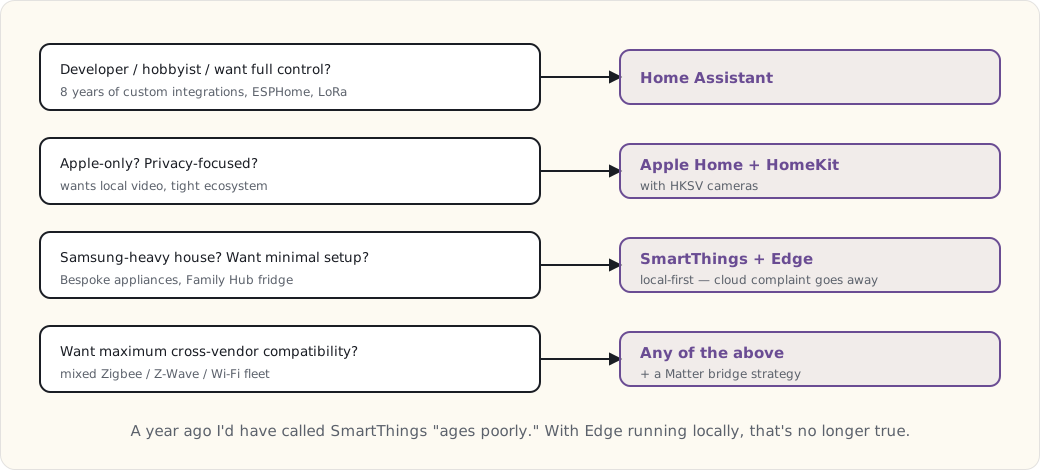
A year ago I'd have flatly called SmartThings a "starts cloud-dependent, ages poorly" platform. With Edge drivers running locally, that's no longer fair to say.
What's next
- A post on bridging HA → SmartThings via Matter, so the SmartThings ecosystem sees HA-managed devices too.
- More custom Edge drivers as I need them — the LoRa garden sensors should be reachable from the Family Hub fridge through an Edge LAN driver, which is the next small project on the bench.