Light switches — Wemo failed, and the no-neutral problem
Eighteen months of controlling Hue bulbs from an app and from voice (more on Echo later this year). The pain point is now obvious: anyone who flips the physical wall switch off renders all the smart-bulb features useless. The bulb is unpowered. The app can't dim it. Schedules don't fire. Voice control can't reach it.
The wall switch has to be smart too. Tonight I'm writing this from a chair after a month of fighting smart-switch options against the wiring of an old house — two of them returned, and a third I haven't been able to buy yet but have read enough about to know it's the answer. Notes from the fight.
Attempt 1: Wemo light switch (Belkin) — failed
I bought a Belkin Wemo light switch first. I already had two Wemo plugs working. Same vendor, same app, same WiFi-only architecture. Should be easy.
It wasn't.
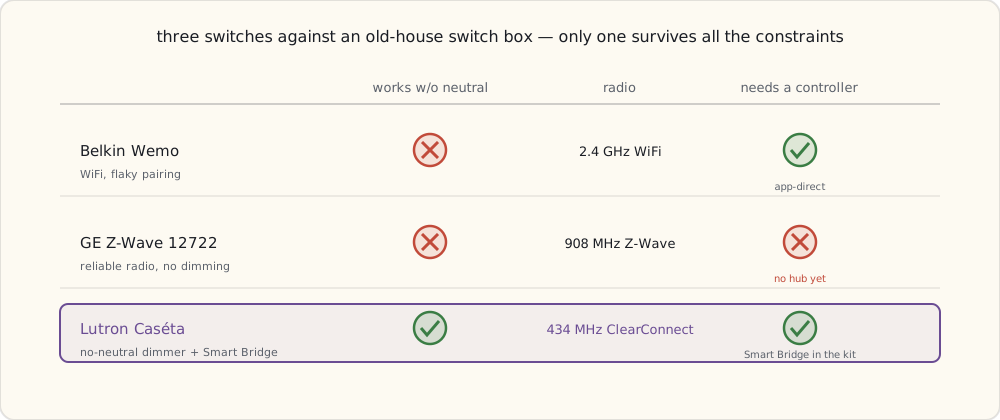
- Installation requires a neutral wire in the switch box. My 1948-built house has hot + load wires in switch boxes but no neutral. The Wemo switch physically won't connect — there's nowhere to bond the white wire.
- Even in switch boxes where I have neutral (one in the kitchen, one in the new addition), the Wemo switch was unreliable. It dropped off WiFi about once a week and required a hardware reset (hold the button for 10 s, re-pair via temporary
WemoNetSSID). Belkin's WiFi stack on the switch was worse than on their plug. - Onboarding required pairing in a temporary
WemoNet.<switchname>SSID — phone joins switch's local WiFi to configure, then switch joins your home WiFi. This worked maybe one time in three.
After three returns, gave up on Wemo for switches.
Why my house doesn't have neutral wires (a tangent)
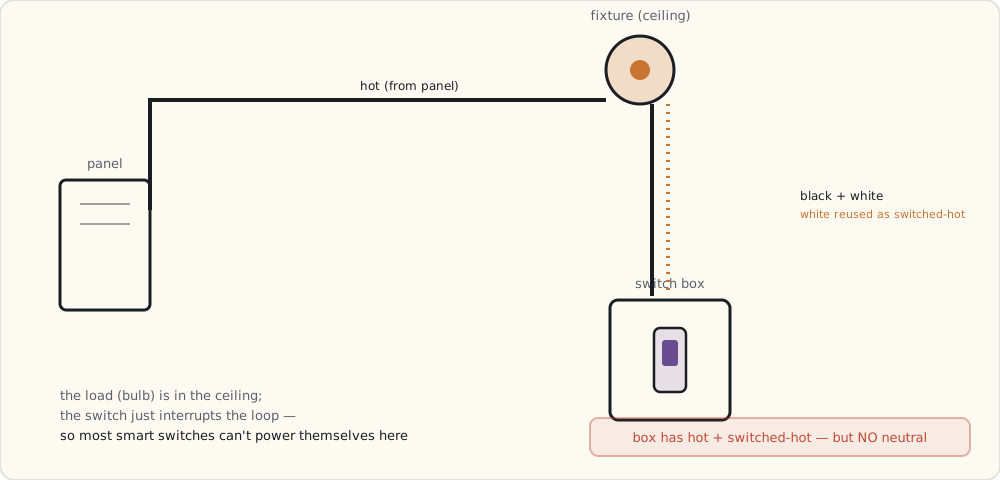
Pre-1970s US residential wiring practice often used a switch loop for single-pole switches: the hot wire runs from the panel to the light fixture; from the fixture, a 2-wire cable (typically black + white) runs down to the switch box; the white wire is reassigned as a switched-hot return path. There's no neutral in the switch box because the circuit doesn't need one — the load (the light) is in the ceiling, the switch is just an interrupter.
When the National Electrical Code 2011 cycle added requirement 404.2(C) — neutral wires required in switch boxes for new construction and major remodels — it was specifically because the smart-switch industry needed it. Old houses are grandfathered. My old house is the problem.
What you can do about it:
- Re-wire the switch loop with a 3-wire cable (black + red + white + ground). Pull a new neutral down to the box. Requires opening walls. Expensive.
- Install a smart relay up at the fixture, where there is a neutral. The smart device goes in the ceiling box; the wall switch becomes a momentary trigger into it. Works, but the relay is hidden and harder to service, and good in-wall micro-relays are thin on the ground right now.
- Use a no-neutral-design smart switch. Very few vendors offer these. Lutron — who've built no-neutral dimmers for decades — are bringing that expertise to a connected line, and it's the option I'm watching most closely.
Attempt 2: GE Z-Wave switch — partial fail
I tried a GE Z-Wave switch next (model 12722, common at the time, a 500-series Z-Wave chip). Z-Wave is more reliable than WiFi for low-bandwidth control: 908 MHz US band, mesh topology, low congestion. On paper it's the right radio for a switch.
Two problems, one of them mine.
- Still requires neutral. Same physical wiring problem as Wemo. Two boxes in the house qualify; the other 14 don't.
- I have nothing to drive it. Z-Wave needs a controller, and I don't own one yet — no Z-Wave hub, no stick. A Z-Wave switch with no Z-Wave brain on the network is just an expensive dumb switch. That gap is exactly the hub-shaped hole I keep coming back to, and it's the thing I expect to fill later this year.
- No native dimming in the 12722 — GE split dimming into a separate model, so it's two SKUs to cover one location.
So the GE switch goes back too: wrong wiring and no controller to make it smart.
Three switches, three sets of constraints — and only one clears all of them:
The fix I'm waiting on: Lutron Caséta
Here's where the month of fighting landed me. The no-neutral wall rules out the WiFi and Z-Wave switches I tried, and the answer — the one I've read the spec sheets cover to cover on but can't buy at retail just yet — is Lutron's new Caséta Wireless line, coming this year. Lutron has made no-neutral dimmers for professional installers for decades; Caséta brings that to a consumer connected system. This is the part where I tell you why I'm confident enough to wait for it instead of rewiring my walls.
Caséta uses Lutron's proprietary ClearConnect Type A protocol, 434 MHz in the US (sub-GHz, a different band than everything else in the house). It's a different architecture from anything else I've installed:
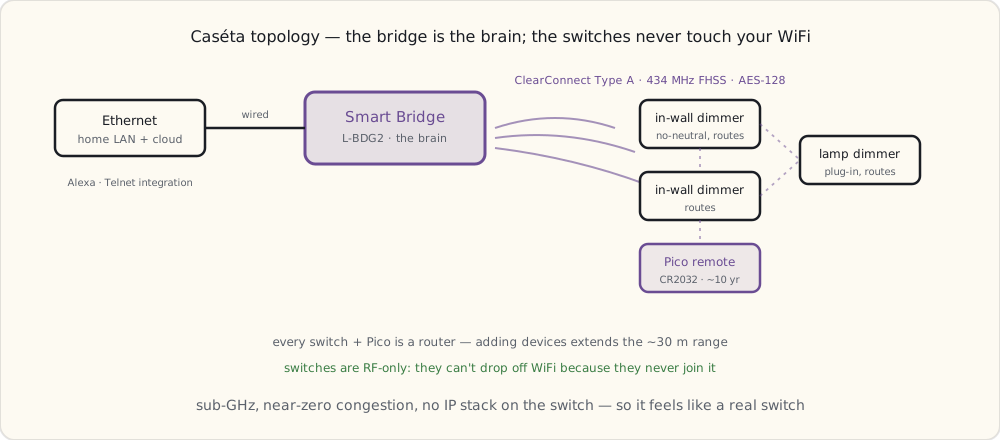
The Smart Bridge is the brain.
Lutron's Smart Bridge connects to Ethernet and speaks ClearConnect to the switches over RF. No WiFi on the switches themselves — they're RF-only. Range: ~30 m from the bridge; mesh-extensible via Pico remotes acting as repeaters.
The protocol — ClearConnect Type A:
- 434.5 MHz band (US). Different from 2.4 GHz (WiFi, Zigbee, BLE) and 908 MHz (Z-Wave). Effectively zero congestion in residential environments.
- Frequency-hopping spread spectrum (FHSS), hops across 32 channels in the 433-435 MHz band.
- AES-128 encryption between bridge and devices, paired at commissioning time.
- Mesh — every Caseta switch and Pico remote is a router, extending range as you add more devices.
- Bridge-to-cloud (for Alexa, future SmartThings integration) over the home WiFi/Ethernet; switches don't touch the home network at all.
The killer feature: no-neutral design.
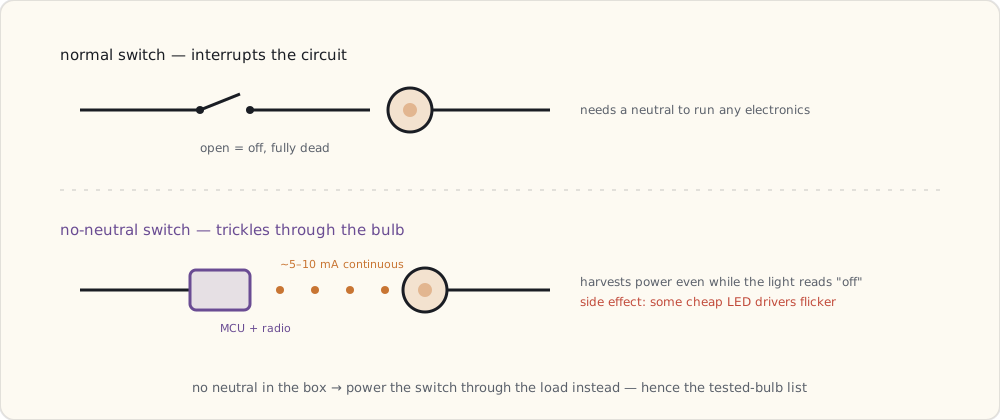
Caséta switches don't need a neutral wire. They run on what Lutron calls "no-neutral dimming" — the switch leaks a small amount of current (~5-10 mA) through the load to power its own electronics. This is the whole reason I'm waiting for it rather than buying anything on the shelf today.
It works because:
- The LED bulbs I run (Hue, plus some standalone LEDs) tolerate the trickle current. Most incandescents would have, too.
- The switch's electronics are deliberately low-power: a small ARM Cortex-M0 plus the 434 MHz radio module pulling sub-100 µA average.
The catch I'm bracing for: it won't work with every LED bulb. Some LEDs flicker because their internal driver circuits can't filter the trickle current cleanly. Lutron publishes a bulb compatibility list, and I fully expect to have to swap a couple of the cheapest LEDs in the house for tested models — the Hue bulbs should be fine; I'm less sure about the bargain Cree bulbs in the office.
Latency should be a non-issue.
ClearConnect Type A is a pure RF protocol — no IP stack on the switch, no cloud round-trip — so the switch should respond in well under a quarter-second and feel like a regular switch. That's the thing IFTTT and cloud WiFi switches can't promise.
The Pico remote is the part that sold me.
Lutron's Pico is a battery-powered button that pairs with the switches — a CR2032 with a claimed ~10-year life, plausible given how rarely a button gets pressed. The pitch is that I can stick a Pico on any wall or drop it in a drawer: one by the bed for the bedside light, one on the couch arm, one in the kitchen. The system treats it as a virtual second switch.
The Pico is what convinced me Lutron understands lighting UX in a way the WiFi vendors don't — a real, placeable physical control, which is exactly the gap I've been complaining about since the bulbs went in.
Cost comparison
| Component | Cost |
|---|---|
| Lutron Smart Bridge (L-BDG2-WH) | $79 |
| Caseta in-wall dimmer (PD-6WCL-WH) | $59 |
| Pico remote (PJ2-2B-GWH-L01) | $15 |
| Plug-in lamp dimmer (PD-3PCL-WH) | $50 |
Wemo or GE Z-Wave switch: $40-45. Caséta's in-wall dimmer is expected around $59. Call the premium ~$15 per switch.
It's worth it, for two reasons that the month of failures made obvious:
- No neutral required. It'll install in any switch box, including the 60-70% of older US homes where the competition physically can't.
- Reliability. Caséta switches won't drop off WiFi, because they don't use WiFi. And ClearConnect isn't new — Lutron has shipped it in their professional RadioRA line since around 2010, so the radio is mature even if the consumer Caséta brand is fresh.
Integration with the rest of the house
The reason I'm not worried about being locked out of my own switches: the Smart Bridge exposes a limited local integration interface — a Telnet socket Lutron documents for their integration partners — so I'll be able to script it from my home server instead of being stuck inside the Lutron app. The command grammar is simple:
#OUTPUT,2,1,75   # Set output 2 to 75% brightness
?OUTPUT,2,1      # Query state of output 2
~OUTPUT,2,1,75   # Response: output 2 is at 75%
That's what I'll point my scripts at once the bridge is on the network. A real JSON API would be nicer; a documented Telnet socket I can reach on the LAN is already more than the cloud-only WiFi switches give me.
What's next
A year and a half in with three vendors, and none of them talk to each other except through IFTTT (slow) or my home-server scripts (brittle). The unification attempt is the next thing I'm chasing — the hub that finally speaks every protocol locally. SmartThings is the one I'm watching: a startup that shipped a dual-radio hub to its Kickstarter backers and is rumored to be heading for retail, maybe with a deep-pocketed acquirer behind it. If that lands, it's the spine the whole house has been missing. More once I've got one in hand.