Wireless cameras and bandwidth — when WiFi cams work
I've been buying PoE cameras exclusively for two years. Tonight I'm writing this from a chair next to a WiFi camera I just installed in the garage, where running Cat6 was going to take a weekend I didn't have.
When the WiFi camera is the right answer.
Why I prefer PoE
For the record:
- Single cable (Cat6) carries both data and power. Cleaner installation.
- No 2.4 GHz airtime competition with the rest of the house.
- Wired reliability: zero packet loss, zero re-association events.
- Higher bitrate possible: 4K @ 25 fps requires ~6 Mbps; PoE handles this without compression compromise.
- Powered from a UPS-backed PoE switch: cameras keep running during power outages if the network does.
- VLAN isolation trivially via the managed switch.
The four cameras I've installed PoE-style work flawlessly because of these properties.
Where PoE breaks down
The garage. The shed. The driveway pole.
To run Cat6 to the garage I'd have to:
- Cut a hole in the basement-ceiling drywall (already done for other runs; once more wouldn't kill me).
- Snake 30 feet of Cat6 through joists.
- Find a route through the brick wall between basement and garage (not done; would require either an exterior path or a long detour through framing).
- Terminate with RJ45 keystones inside an outdoor-rated box.
Estimated time: a full weekend. Cost: $40 of Cat6 + $20 of terminations + a wall-passage drill if I don't have one.
Or: one WiFi camera at $50, screw to the wall, plug into a GFCI outlet, done. 20 minutes.
I picked the 20-minute solution.
The WiFi camera — Reolink Argus 3
Reolink Argus 3 (the plain model, not the Pro — I deliberately wanted the cheaper, lighter-weight one here):
- 1080p (not 4K — bandwidth budget, and frankly enough for a garage).
- WiFi 2.4 GHz only (no 5 GHz on this model — mildly annoying, but it's a low-bitrate cam so it doesn't matter much).
- Rechargeable battery + solar-panel option. Optional always-on USB-C power.
- PIR motion detection + onboard person/vehicle classification.
- RTSP support after a firmware update (RTSP isn't on by default).
- ~$80.
Wired it to USB-C power from a nearby outlet (not running on battery; the garage has constant power). The battery is a backup if the cord gets unplugged.
Where the bandwidth math matters
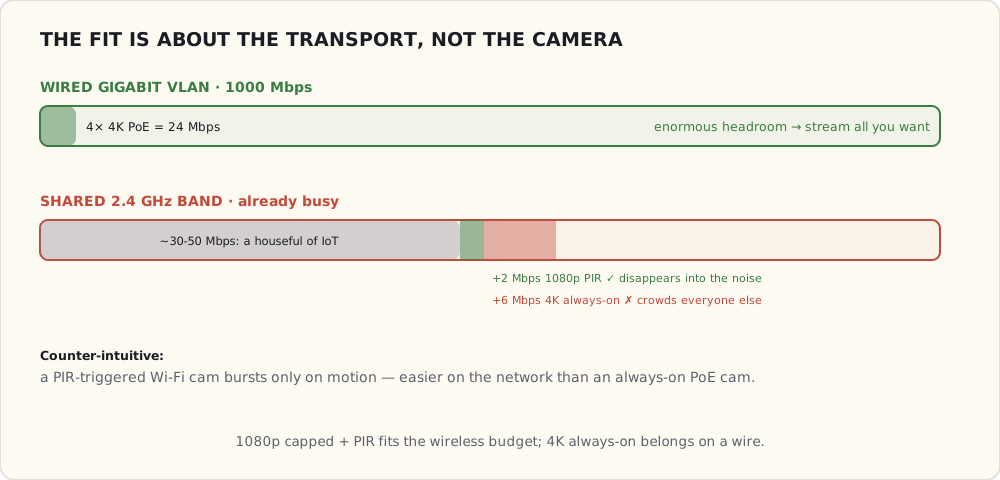
4 PoE cameras at 4K, 25 fps, h.264, bitrate ~6 Mbps each:
- Total camera traffic: 24 Mbps.
- All on a wired Gigabit VLAN. Plenty of headroom.
1 added WiFi camera at 1080p, 15 fps, h.265, bitrate ~2 Mbps:
- Additional traffic on the 2.4 GHz WiFi: 2 Mbps.
- 2.4 GHz currently runs about 30-50 Mbps of total traffic from family devices on the IoT VLAN.
- 2 Mbps additional is ~4-6% of the band's throughput. Not a problem.
If I'd tried to put a 4K WiFi camera here, it'd be 6 Mbps continuous on a band already crowded with ~30 IoT devices. That would impact other devices. The 1080p + h.265 + 15 fps choices on the Argus 3 keep the WiFi cam off the impact radar.
The general rule: WiFi cameras at 1080p or below are fine on a typical home network if you cap bitrate aggressively. 4K WiFi cameras are mostly a bad idea.
What the garage camera actually does
# Frigate config for the Argus 3
cameras:
  garage:
    ffmpeg:
      inputs:
        - path: rtsp://reolink:!secret_pw@192.168.30.40:554/h264Preview_01_main
          roles: [detect, record]
    detect:
      width: 640
      height: 360
      fps: 5    # PIR-triggered, not always-on
    motion:
      mask: garage_door_zone   # exclude door movement from "motion"
    objects:
      track: [person, car, package]
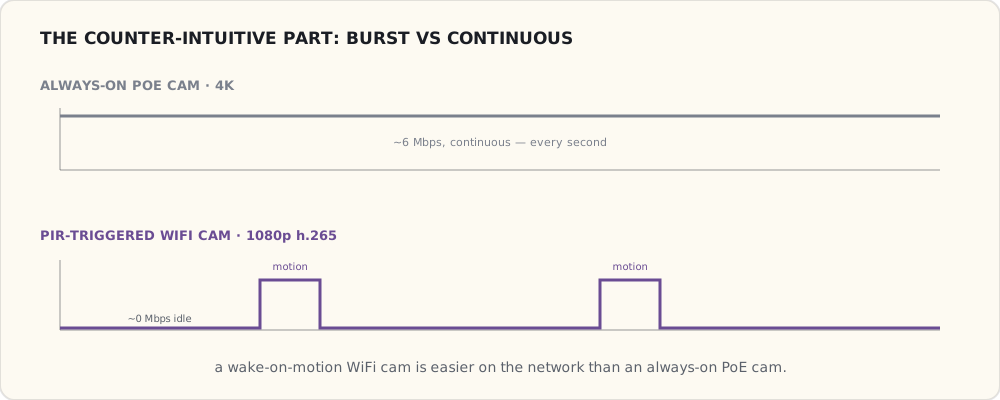
The Argus 3 is PIR-triggered — only streams when motion is detected. Steady-state network usage is near-zero; brief bursts during motion events.
This is actually better for the network than my PoE cams which stream continuously. Counter-intuitive: WiFi cams that wake on motion are easier on bandwidth than always-on PoE cams.
WiFi camera-specific issues
Some annoyances:
- Pairing dance with the Reolink app + temporary AP mode (Approach 1 from the WiFi primer, still alive in 2021). My phone joined the camera's local AP, sent WiFi creds, the camera rejoined home WiFi. Two SSID switches. Worked first try this time, won't always.
- DHCP lease management. Reservation set on my router so the camera has a stable IP. Without it, IP can change on reboot.
- Firmware update over WiFi takes 10+ minutes. PoE cameras' firmware updates are seconds.
- The Reolink "cloud sync" wants to upload events to their servers. VLAN isolation kills this. The Reolink app shows "cloud features unavailable" — fine.
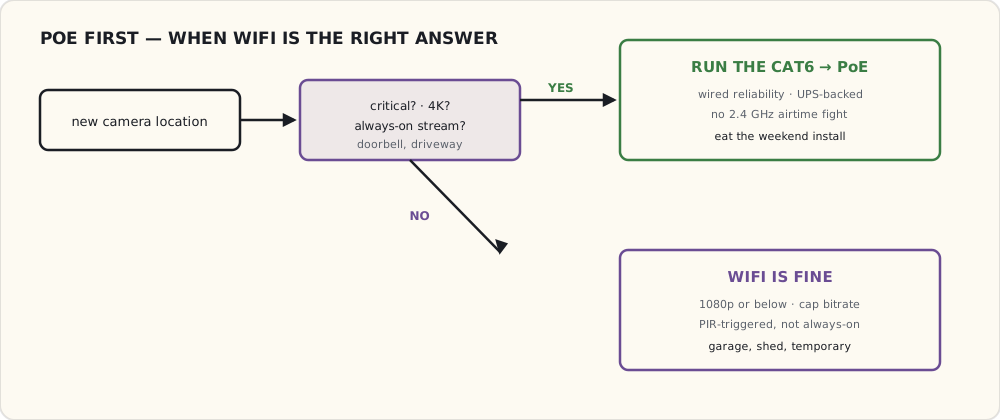
The whole call collapses to a short decision: is this location critical, 4K, or always-on streaming? If yes, eat the install and run the wire. If no, WiFi is the pragmatic answer.
Where I'd still refuse to use WiFi
- The doorbell. Critical. PoE only. No exceptions.
- The driveway cam. Critical, and far from a router — WiFi signal weak.
- Any 4K camera. Bandwidth budget doesn't fit.
- Any always-on streaming camera (vs PIR-triggered). Bandwidth budget.
Where WiFi is fine:
- Convenience cams (garage, garden shed, kid's room "are they actually sleeping" cam).
- Temporary cams (vacation watch, contractor monitoring).
- PIR-triggered low-fps cams for low-priority zones.
What's next
- A second Argus 3 for the back deck where the existing Reolink RLC-820A is dying (replacement under warranty inbound, but I want a temporary).
- A Frigate-side automation: when the WiFi garage cam loses RTSP for more than 60 seconds, alert. Without this, the camera can be offline and I won't notice until I check.
- A "presence in garage" sensor combined with the cam for "did I close the garage" automations. Adding an Aeotec Garage Door Controller this winter — Z-Wave Hall-effect sensor + relay to actuate the door.
PoE is still the answer for everything serious. WiFi is the pragmatic answer for where serious isn't worth the install effort.