Structured wiring + conduit + PoE backbone for framing
Framing done last week. Today I walked the house with the low-voltage installer, signed off every Cat6 run, every conduit, every PoE camera location. Drywall starts Monday.
This is the structured-wiring as-installed.
The numbers
- 42 Cat6 drops (2 more than planned — added one at the dining banquette and one in the master closet).
- 12 conduit runs (smurf tube, 1.5" interior, 2" exterior penetrations).
- 6 PoE camera locations wired (4 to be installed at move-in, 2 reserved).
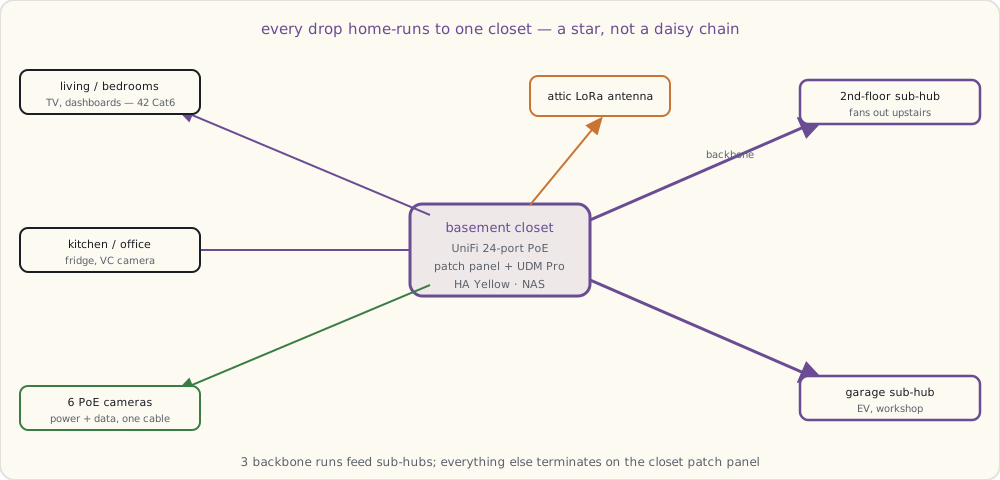
- 3 Cat6 backbone runs from the structured wiring closet to the second-floor hub and the garage hub.
- 1 LoRa gateway antenna run (Cat6 + N-connector coax to the attic — gateway in closet, antenna in attic for range).
- Mailbox sensor pair (22 AWG, 60 feet, conduit to the curbside).
Total cable installed: about 4,200 feet. About $1,400 in materials + labor was included in the construction quote (negotiated up from $800 — the builder's default was 12 drops).
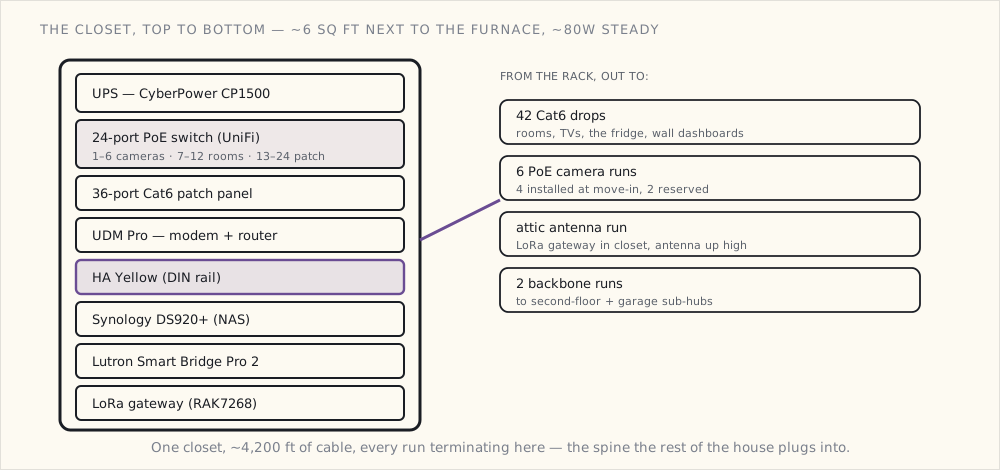
The structured wiring closet — actual layout
+------------------------------------+
| UPS (CyberPower CP1500)           |
+------------------------------------+
| 24-port PoE switch (UniFi)         |
| - Ports 1-6: cameras (PoE)         |
| - Ports 7-12: room drops           |
| - Ports 13-24: reserved / patch    |
+------------------------------------+
| 36-port Cat6 patch panel           |
+------------------------------------+
| Modem + main router (UDM Pro)      |
+------------------------------------+
| HA Yellow (DIN rail mounted)       |
+------------------------------------+
| Synology DS920+ (NAS)              |
+------------------------------------+
| Lutron Smart Bridge Pro 2 (rack)   |
+------------------------------------+
| LoRa gateway (RAK7268)             |
+------------------------------------+
| Power strip + cable management     |
+------------------------------------+
Located in the basement utility room next to the furnace. ~6 sq ft of dedicated closet. HVAC duct stub provides air circulation (the switch + NAS combined dissipate about 80W steady state).
The wiring topology is a home-run star — every drop returns to this one closet rather than chaining room to room:
Conduit runs — what they're reserved for
- Structured wiring closet → attic (1.5"): future runs to dormer-mounted cameras or weather stations.
- Structured wiring closet → garage (1.5"): future EV charger + workshop computer.
- Attic → front roof eave (2"): two PoE cameras + future doorbell PoE.
- Attic → side roof eave (2"): future floodlight cameras.
- Attic → back roof eave (2"): backyard cameras + speaker locations.
- Garage → exterior corner (2"): garage-corner PoE camera + future driveway sensor.
- Basement → mechanical room (1.5"): future smart appliance / Tesla Powerwall comms.
- Mechanical room → pool equipment pad (2"): future pool automation + camera.
- Mailbox conduit (1"): existing 22 AWG; reserved for future cameras + Wi-Fi node.
- Office walls → ceiling (1"): future video-conferencing camera install.
- Living room ceiling → wall (1"): future ceiling speakers (if I change my mind).
- Kitchen wall → ceiling (1"): future kitchen camera.
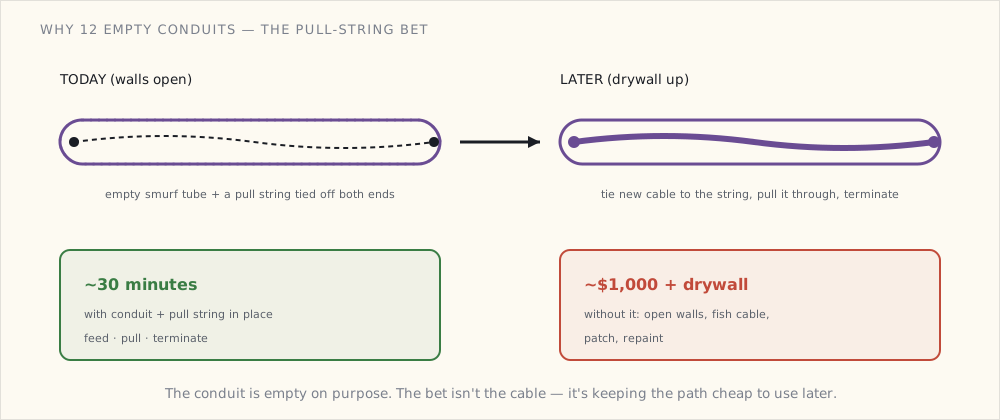
The conduit isn't filled. Each run is empty smurf tube with a pull string. Adding a Cat6 in 2027 means: feed cable + pull string + termination. 30 minutes vs full rewire.
Cat6 termination — what's actually in each room
Per-room, the drops terminate at low-voltage RJ45 keystone wall plates:
Living room (4 drops):
- Behind TV (2 drops: TV + Apple TV)
- Behind soundbar
- Side wall (future camera or game console)

Master bedroom (2 drops):
- Behind TV
- Side wall (future device)

Office (4 drops):
- Desk wall (3: laptop dock, secondary monitor, IP phone)
- Opposite wall (1: video conferencing camera)

Kitchen (3 drops):
- Behind fridge (Samsung Family Hub Ethernet)
- Frame TV wall (for the Frame's One Connect)
- Banquette (future tablet display)

Garage (3 drops):
- Workbench (1)
- EV charger location (1)
- Ceiling for future camera (1)

Each bedroom (2 drops each, 3 bedrooms):
- Behind dresser (TV / future device)
- Wall by closet (future device)

Mechanical room (2 drops):
- HVAC zone controller
- Future Powerwall API or similar
Total: 42 active terminations + ~10 reserved unterminated (cables pulled, pigtail in the wall for future cutover).
Smart switch box prep
Every switch box (about 60 total in the house):
- Neutral wire brought in. NEC 404.2(C) makes this code; my builder's electrician put one in every box per spec.
- 4" deep single-gang boxes throughout (vs the standard 2.5" deep). Allows Lutron Caseta or any current/future smart switch to fit without cramping.
- 5" deep double-gang in the master switch banks (kitchen scenes, living room scenes).
The deeper boxes added ~$2 per box on materials. Builder's electrician thought it was overkill. I disagree.
Smart switch protocol: Lutron Caseta throughout — same as my current house, same Lutron Smart Bridge Pro 2 (the rack-mount version) will manage the whole house.
Outdoor wiring
The exterior of the house has separate considerations:
- PoE cameras at four exterior corners (4× Reolink RLC-820A planned), each on a Cat6 run from the structured wiring closet.
- Soffit-corner spare Cat6 stubs at 4 additional corners (future camera capacity).
- Landscape lighting transformer with a Z-Wave switch.
- The mailbox sensor pair runs in conduit to the curb. Mailbox interior gets a reed switch on the door + an ESP-based sender that sleeps and wakes on door open.
The audit walk
Today the low-voltage installer and I walked every room before drywall:
- Confirmed each drop is in the right wall + at the right height.
- Confirmed conduit pull strings are present + tied off.
- Tested every Cat6 run with a cable tester ($30 device, checks continuity + miswiring).
- Photographed every wall before drywall for as-built documentation.
Three drops failed the tester (one cable nicked during framing, two miswires). Re-terminated on the spot.
What I forgot until the audit
The audit caught two things that would have been retrofits:
- No Cat6 in the powder room. Originally figured a powder room doesn't need it. The installer asked "what about a smart mirror with display?" I added a drop.
- No conduit from the laundry room to the attic. Considered "the laundry room is mostly self-contained." Audit reminded me that a future "is the dryer vent clogged" temperature sensor or air-quality monitor might want a wire path. Added a conduit run.
Two things that I should have caught in the original plan. Caught at the audit instead. Forty minutes of additional labor; would have been a $1000 retrofit later.
What's next
- Drywall, paint, trim: through August.
- Cabinets, appliances: September.
- Move-in target: October.
- First Samsung Family Hub fridge in the new kitchen: October.
- Connected home migration from old house: October-November.
The structured wiring is the foundation. Everything else is software now.