SmartThings starter kit unboxing — first credible hub
Samsung closed the SmartThings acquisition two weeks ago — announced August 14, $200M. SmartThings is now a Samsung subsidiary. They're still shipping the original Kickstarter-era hub (call it v1; rumors are a successor is in design but won't ship until next year at earliest).
I bought the Home Monitoring Kit today ($249): one hub, two Multipurpose Sensors (door/window + motion + temperature), one Arrival Sensor (presence), and one Smart Outlet.
The hub is the centerpiece — first device I've installed that runs two native radios (Zigbee + Z-Wave) and a rules engine. The home-security arc starts here; a dedicated security-automation post follows once the door-and-presence rig has earned my trust. For now, what's in the box and how it works.
SmartThings Hub (v1) — hardware
- ARM Cortex-M3 microcontroller (Atmel SAM3X-class). Modest RAM, a couple megabytes of flash.
- Ethernet only, no WiFi (smart choice — wired backbone is more reliable for a hub).
- Two radios:
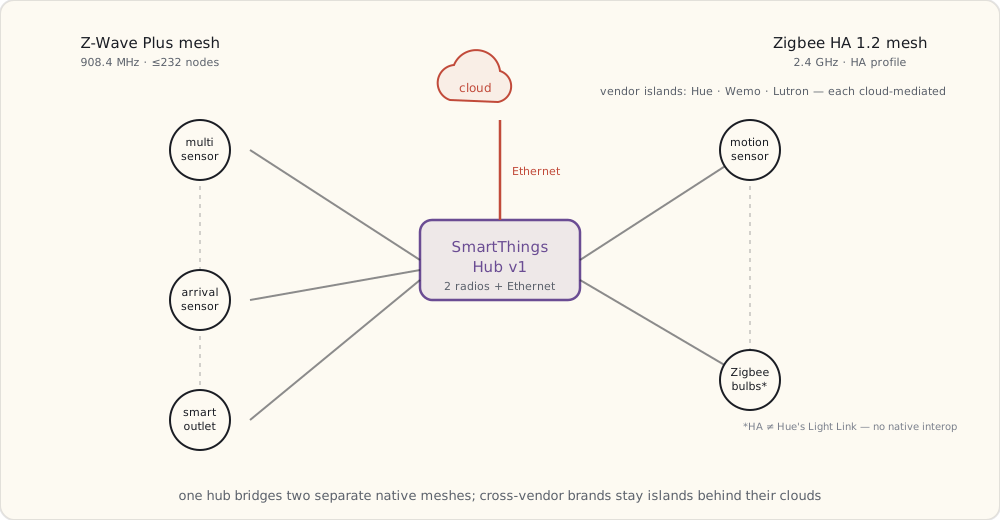
- Zigbee HA 1.2 via NXP JN5168/JN5169-class SoC. 2.4 GHz, profile is Zigbee Home Automation (different from Hue's Light Link profile — they don't natively interop without bridging).
- Z-Wave Plus 500-series via Sigma Designs ZM5101. 908.4 MHz US, mesh, up to 232 nodes per network.
- 4× AA batteries for backup if mains drops.
- Tiny SQLite database for device state cached locally; most state lives in the cloud.
The shape of the thing is one hub straddling two physically separate mesh networks on two different bands, with a wired uplink to the cloud — and the cross-vendor brands sitting outside both meshes as cloud-only islands:
What's in the kit
Multipurpose Sensor (Z-Wave Plus, ×2): model F-MLT-US-2.
- 1.5 × 1.5 × 0.5 inches, CR2450 battery (claimed 2 years).
- Three sensors in one:
- Reed switch (open/close on the included magnet).
- 3-axis accelerometer (vibration + tilt — the sensor knows if the door it's stuck to is vibrating from someone trying to open it, or has been knocked off the wall).
- Thermometer (~±1°C).
- Reports state changes immediately; reports temperature on a 10-minute cadence.
- Z-Wave Plus security: AES-128, network key shared at inclusion time.
Motion Sensor (Zigbee HA): model F-IRM-US-2.
- PIR (passive infrared) detector, 120° FOV, ~5 m range.
- CR2450 battery.
- Configurable cool-down (1-3 min default between event reports — battery-vs-responsiveness tradeoff).
Arrival Sensor (Z-Wave): model F-ARR-US.
- Keyfob-size, CR2450.
- Beacons every 10 s when in range of the hub.
- Hub registers "present" / "not present" based on RSSI threshold + missed-beacon timeout.
- Range ~30 m inside a house, less through walls. Notably less reliable than phone-based presence detection — a dedicated keyfob is one more thing to carry and charge, and phone-GPS geofencing is starting to look like the better long-term answer.
Smart Outlet (Z-Wave): model F-OUT-US.
- 15A wall outlet with Z-Wave radio + power-consumption metering.
- Reports current power consumption + accumulated kWh + on/off state.
- 60-second metering interval by default; configurable down to 10 s.
Pairing a device — what actually happens on the wire
The Multipurpose Sensors come pre-paired with the hub in the box. Adding a third one is illustrative:
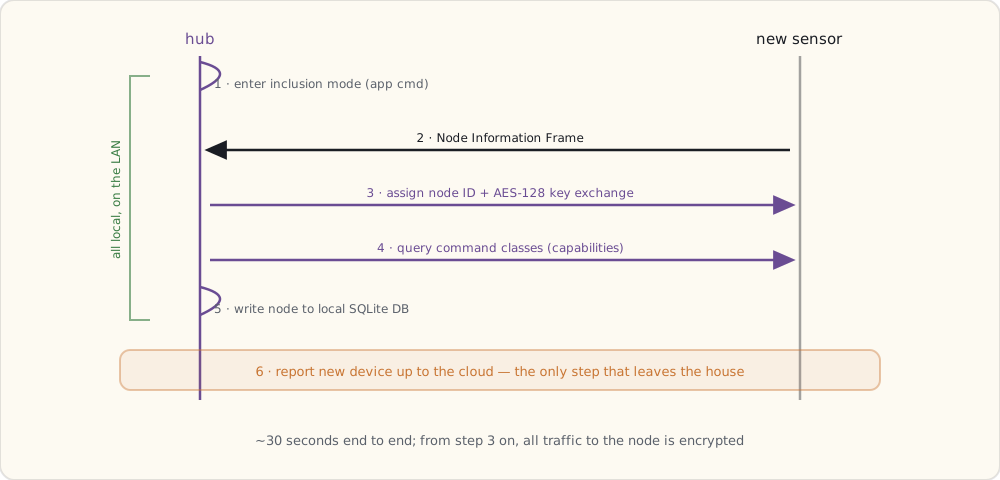
- Hub-side: enter inclusion mode (the SmartThings app sends a Z-Wave
Add Nodecommand to the hub, which starts listening for inclusion broadcasts). - Device-side: power up + press the button (the sensor sends a Z-Wave Node Information Frame (NIF) advertising itself).
- Hub assigns a Node ID (1-232) and provides the network key via the Z-Wave inclusion handshake.
- Z-Wave security exchange (AES-128 key derivation; from this point all traffic to this node is encrypted).
- Hub queries the device's command classes (which capabilities it supports: BasicSet, BinarySensor, Battery, etc.).
- Hub registers the device in its SQLite DB with
nodeId,manufacturerId,productType, declared capabilities. - Hub reports the new device to SmartThings cloud (this is the part that goes through internet).
The whole thing takes ~30 seconds and the LED on the sensor blinks fast → slow → solid green when it's done.
SmartApps — the Groovy platform
The SmartThings rules engine runs SmartApps — Groovy scripts that subscribe to device events and execute actions. The platform is hosted in SmartThings's cloud (more on that limitation below), but the hub can run a small whitelisted subset locally for low-latency reactions.
Example skeleton (heavily simplified):
definition(
  name: "Door + Presence → Alert",
  namespace: "luke",
  author: "Luke",
  description: "If a door opens while nobody is home, send a notification.",
  category: "Safety & Security"
)

preferences {
  section("Door sensors") {
    input "doorSensors", "capability.contactSensor", multiple: true
  }
  section("Presence sensors") {
    input "presenceSensors", "capability.presenceSensor", multiple: true
  }
  section("Notify") {
    input "phone", "phone"
  }
}

def installed() {
  subscribe(doorSensors, "contact.open", doorOpenedHandler)
}

def updated() {
  unsubscribe()
  installed()
}

def doorOpenedHandler(evt) {
  def anyoneHome = presenceSensors.any { it.currentValue("presence") == "present" }
  if (!anyoneHome) {
    sendSms(phone, "Door opened while away: ${evt.device.displayName} at ${evt.date}")
    log.warn "Security: ${evt.device.displayName} opened while away"
  }
}
This is the first security SmartApp I'll write. The full version — tuned against real false alarms — gets its own post once I've lived with it for a while.
What runs locally vs in the cloud (the load-bearing limitation)
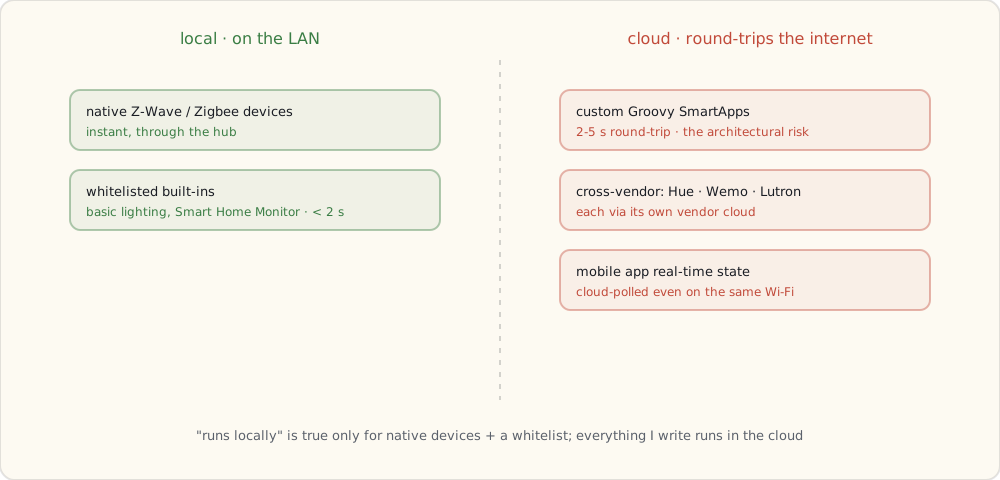
SmartThings's marketing says "runs locally." The reality is much narrower — the v1 hub doesn't have the RAM or flash to host much logic. Practically all of the platform lives in the cloud:
- A handful of vendor-whitelisted built-ins (the SmartLighting baseline, the Smart Home Monitor app): can run mostly on the hub for the simplest event→action paths. Latency
< 2 s. - Custom Groovy SmartApps (anything I write): run in the cloud. Latency 2-5 s round-trip — device → hub → cloud → execute Groovy → cloud → hub → device.
- Mobile app real-time state: always cloud-mediated. Even when phone and hub are on the same WiFi, the mobile app polls SmartThings's cloud (which polls the hub).
- Cross-vendor integrations (Hue, Wemo, Lutron via Caseta cloud): cloud-only. Each vendor's cloud is involved.
The custom-SmartApp-in-the-cloud constraint is the architectural risk here. If Samsung ever migrates the Groovy platform to a different architecture, my custom code will need to be rewritten. For now it's the only path to non-whitelisted automation, so I'm using it.
The first device integrations
Within an hour of unboxing:
- Hue: via SmartThings's Hue integration. Goes through Meethue cloud. 2-3 s latency to change a bulb from SmartThings.
- Wemo: via SmartThings's Wemo integration. Goes through Belkin cloud. 3-5 s latency.
- Lutron Caseta: not natively supported in 2014. I'll have to write a custom Groovy SmartApp that hits the Lutron bridge's Telnet API via a small relay running on my home server. Doable but ugly.
- Native Z-Wave / Zigbee devices: instant, local, in the hub's database.
What this enables
First time I have a single platform that:
- Sees Hue bulbs (cloud-mediated).
- Sees Wemo plugs (cloud-mediated).
- Sees Z-Wave devices (local, native).
- Sees Zigbee HA devices (local, native).
- Has presence detection (Arrival Sensor + later, phone GPS).
- Runs cross-vendor SmartApps (cloud-executed for custom; local for whitelisted).
That's the smart-home unifier I've been waiting two years for. Not perfect. Mostly works.
What's next
Coming up next: a voice assistant in the house, and what it does to the way I control all of this. Then the first dedicated security-automation post, where the door/window + presence combo becomes my first piece of real home security.