Frame TV as household display — art, dashboards, hub
The 65" Frame TV (QN65LS03BAFXZA) has been the great room's center for eight months. Eight months of art-mode-by-default, TV-mode-on-demand, and SmartThings-hub-always-on. Time to write it up.
What the Frame TV actually is
- 4K QLED panel + matte anti-glare finish (intentionally non-shiny — looks like art on the wall when off).
- 5W ambient light sensor — adjusts brightness to match room ambient.
- Tizen 7.0 OS.
- SmartThings Hub built in (Zigbee 3.0 + Z-Wave + Matter Controller + Thread Border Router).
- 4× HDMI + 1× USB.
- One Invisible Connection cable (single thin cable handles power + signal, goes through the wall to a separate One Connect box).
The build-in hub is what made this the great-room TV pick. I evaluated LG OLED (better TV) and Sony Bravia (better motion handling). Both lacked the hub function. Samsung Frame won because of the hub + the art display, not because of TV quality (it's good but not best-in-class).
Art Mode — the killer "off" state
Most TVs when off are black rectangles. The Frame when off displays artwork:
- Browses a Samsung Art Store of ~1500 curated works (subscription: $4.99/mo).
- Or, uploads your own photos / paintings via the SmartThings app.
- Or, displays a slowly-rotating slideshow of personal photos.
Art Mode at 5-7W power draw. Compared to "TV off" at 0W, the always-on draw is real (~$12/yr at typical US electricity rates). Worth it for the room aesthetic.
I'm running a custom art rotation: 20% personal photos (kids), 30% landscape photography, 50% the curated art rotation. Changes every 4 hours.
The SmartThings hub function
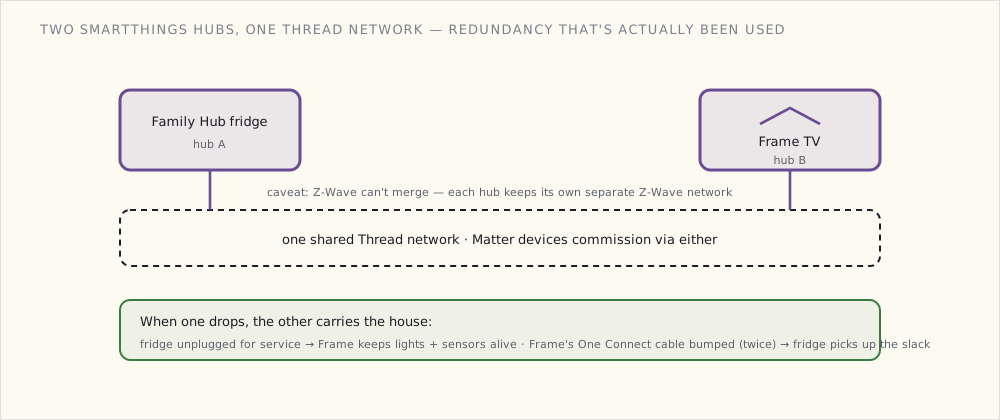
This is the architectural decision. The Frame TV is now the second SmartThings hub in the house (the Family Hub fridge is the first). They form a single multi-hub SmartThings ecosystem:
- Zigbee devices can pair to either hub; routes through whichever is closer.
- Matter devices commission via either; both Thread Border Routers participate in the same Thread network.
- Z-Wave devices: each hub has its own Z-Wave network; can't merge yet.
The redundancy is real: if the fridge needs unplugging for service, the Frame TV's hub keeps lights + sensors running. If the Frame TV's One Connect cable gets bumped (which has happened twice), the fridge's hub picks up the slack.
Casting from devices to the Frame
The Frame supports standard cast protocols:
- Apple AirPlay 2 — iPhone, iPad, Mac.
- Google Cast — Chrome browser, Android, Google Home.
- Samsung SmartView — Samsung devices.
- WebRTC via the integration I'm running in HA (for showing camera feeds).
Daily uses:
- Doorbell camera feed — when the doorbell rings, the Frame shows the camera. Same as the Google Home Hub displays, but on the 65" screen across the room.
- Recipe casting from the Family Hub fridge — cast to Frame, read while cooking from the stove (and the dining table).
- Photo sharing from family iPhones via AirPlay.
- YouTube + Plex via the Tizen native apps.
The Frame also supports HA cast — Home Assistant can push specific dashboard views or camera feeds to the Frame. Configured one for "house arrival mode":
- alias: "First arrival: show greeting on Frame"
  trigger:
    - platform: state
      entity_id: group.family
      from: "not_home"
      to: "home"
  condition:
    - condition: time
      after: "16:00"
      before: "20:00"
  action:
    - service: media_player.play_media
      data:
        entity_id: media_player.frame_tv
        media_content_type: "image/jpeg"
        media_content_id: "https://hass.example.com/local/welcome_home.jpg"
When someone gets home in the late afternoon, the Frame shows a personalized "welcome home" image for 30 seconds, then reverts to art mode.
What the Frame doesn't do well
- Voice control via Bixby. Same as the fridge — disabled.
- Audio quality. The TV speakers are fine for ambient sound, mediocre for actual TV. We run an Apple TV + Sonos Beam underneath the Frame for the audio path.
- Smart-home control via the SmartThings widget. The widget exists; the interface is poor. I use the kitchen iPad mini for direct HA control.
- Tizen apps update without notice. Three apps broke between firmware updates. Frustrating.
The integration loop, expanded
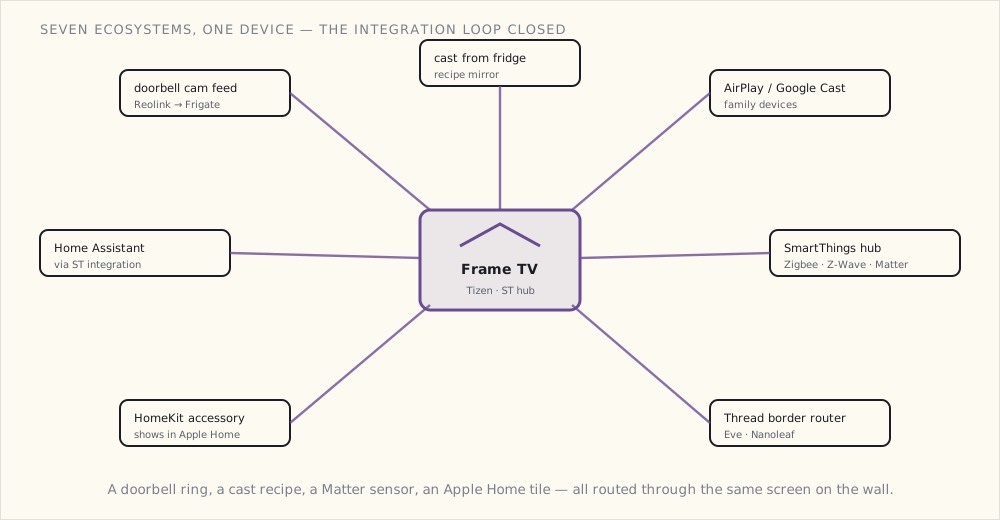
The Frame TV connects more loosely-coupled devices than any other appliance in the house:
- Receives doorbell camera feed (Reolink RVD via Frigate).
- Receives casts from the Family Hub fridge.
- Receives AirPlay/Cast from family devices.
- SmartThings hub for ~30 Zigbee + 5 Z-Wave + 12 Matter devices.
- Thread Border Router for the Eve sensors + Nanoleaf bulbs.
- HomeKit accessory in its own right — Samsung's Tizen sets expose the TV to Apple Home (power, input, volume), so the Frame shows up in the Home app alongside everything else.
- Sends events to HA via the HA SmartThings integration.
Seven different ecosystems participating through this one device. The integration loop closed.
What's next
- Matter's camera gap closing — eventually. Matter 1.2 (last October) and the just-released 1.3 still have no camera device type; the doorbell feed reaching this screen does it the un-Matter way, through Frigate and the HA cast integration. If a future Matter revision ever adds a camera cluster, the Frame TV's Matter Controller role expands a lot. No firm word on when — cameras have been "asked for, not scheduled" for a while now.
- A second Frame TV in the master bedroom (smaller, 50"). Same role; secondary hub.
- The SmartThings Edge driver framework — Samsung's been moving custom drivers to run locally on the hub instead of via the cloud. That's a big enough architectural shift that it's getting its own post once I've lived with it long enough to judge it.
The Frame as the household display surface is the new normal. Not just for movies. For everything.