Picking the Zigbee stack — Zigbee2MQTT vs deCONZ vs ZHA
Three options for running Zigbee on Home Assistant. I've used two; reading enough about the third to compare. This is what I'd tell anyone starting fresh in 2020.
The three stacks
| Stack | Coordinator | UI | Maintained by | Strength |
|---|---|---|---|---|
| Zigbee2MQTT (Z2M) | slaesh CC2652RB / Electrolama zzh! / other CC2652 | Web UI + MQTT | Koen Kanters + large community | Widest device support |
| deCONZ + Phoscon | ConBee II / RaspBee II | Phoscon web app + WebSocket / REST | Dresden Elektronik | Polished UI, vendor-backed |
| ZHA (Zigbee Home Automation) | Most USB sticks | HA built-in | HA core team | Zero add-on overhead |
Coordinator hardware
Three I've used or evaluated:
ConBee II (Dresden Elektronik, ~$40):
- Microchip ATSAMR21 (ARM Cortex-M0+ with an integrated radio) — Zigbee 3.0.
- Plugs directly into the Pi's USB; the bundled USB extension cable matters (plugged straight into a Pi 4, USB3 RF noise wrecks the 2.4 GHz signal).
- Tested range: ~15m through walls.
- Limitation: ~24 direct end-device children (router-extensible beyond that, and the ATSAMR21's RAM is the real ceiling on a big mesh).
slaesh's CC2652RB stick (~$25–30):
- TI CC2652RB chip — Zigbee 3.0. The coordinator a lot of the Z2M community standardized on this year, alongside Electrolama's zzh! (CC2652R).
- USB, external antenna in the box.
- Tested range with the external antenna: ~25m through walls.
- Capacity: 100+ direct children, far more headroom than the old CC2531 it replaces.
- Cheap, well-supported, and — unlike the ConBee — not tied to one vendor's firmware.
Aeotec Z-Stick (Aeotec, ~$60): Z-Wave only — out of scope for Zigbee comparison but worth noting they don't make a Zigbee equivalent.
The architectural difference
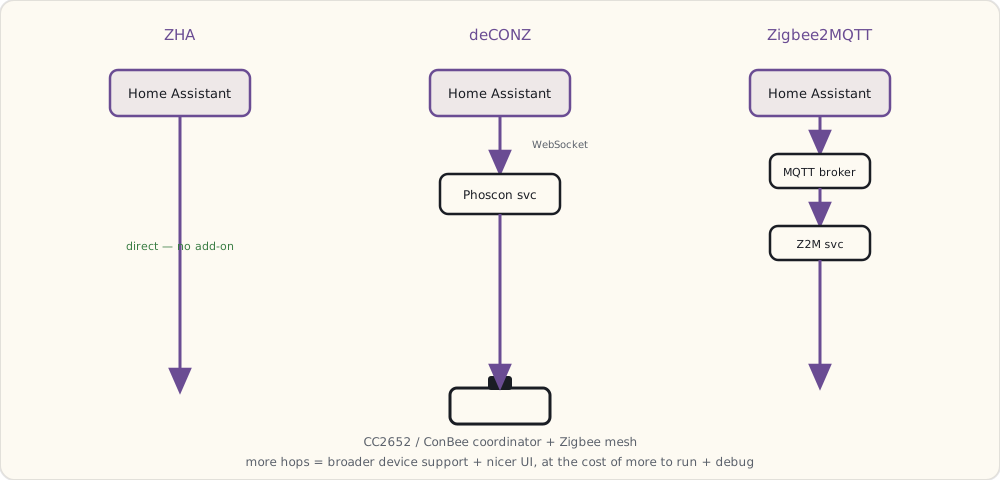
ZHA (built into HA): HA core directly drives the coordinator USB device. No add-on. Network state lives in HA's own database. Pros: no extra process; updates with HA core. Cons: less flexible if you want to migrate to another HA install; UI is HA's default integration view (functional, not great).
deCONZ: a separate service (vendor's Phoscon) running as a Hass.io add-on. HA talks to it over WebSocket. Pros: polished UI; supports the ConBee/RaspBee specifically very well. Cons: vendor lock-in to Dresden Elektronik hardware; community fixes don't land as fast.
Zigbee2MQTT: a separate Node.js service running as a Hass.io add-on. HA talks to it over MQTT (via the Mosquitto broker). Pros: widest device support, community-driven, frequent updates, excellent web UI. Cons: an extra MQTT broker in the chain; debugging MQTT is its own skill.
Z2M's device-support advantage
The killer feature for Z2M is the supported-devices database. As of August 2020, Z2M supports 1,800+ Zigbee devices. The community adds new device definitions weekly. If a vendor ships a quirky Zigbee device (looking at you, Tuya and Aqara), Z2M typically has it working within 2-3 weeks.
ZHA's support is narrower — basically anything that strictly follows the Zigbee HA spec. Tuya and many Aqara devices have non-standard reporting clusters; ZHA handles them poorly.
deCONZ is in the middle — Dresden focuses on widely-deployed devices, less on edge cases.
My setup, as of August
Migrated from deCONZ → Z2M in April (during the local-first migration).
USB stack:
- slaesh CC2652RB with external antenna at the top of the basement closet (signal central)
- 100+ direct children possible; running 22

Device mix:
- 8× Aqara MCCGQ11LM (door/window)
- 6× Aqara DJT11LM (vibration)
- 1× Aqara human-body (motion + lux)
- 1× Aqara WSDCGQ11LM (temp/humidity)
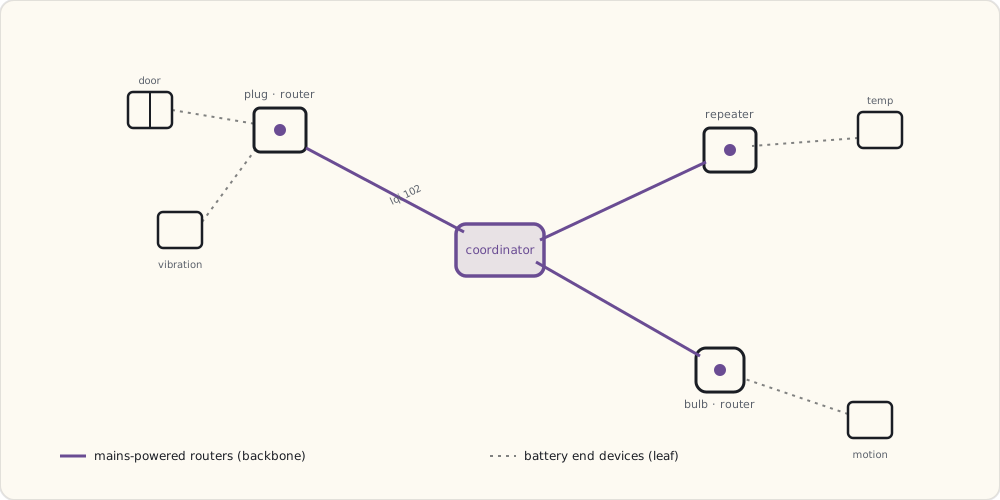
- 2× Aqara wall plug (router function + outlet)
- 1× IKEA TRÅDFRI signal repeater (extends mesh to garage)
- 3× IKEA TRÅDFRI bulb (closet/laundry)

Total: 22 Zigbee devices on the mesh. Healthy at this size.
Z2M's UI shows the full mesh topology — which device is routing for which, signal strength per hop, last-seen timestamp. Hugely useful for debugging.
The MQTT contract
Each Zigbee device gets an MQTT topic:
zigbee2mqtt/aqara_door_kitchen → {"contact": true, "battery": 87, "linkquality": 102, "voltage": 2965}
HA's MQTT integration auto-discovers via MQTT-discovery topic:
homeassistant/binary_sensor/aqara_door_kitchen/contact/config →
  { "name": "Aqara Door Kitchen Contact", "device_class": "door", ... }
Auto-discovery means: pair a new device in Z2M → it appears in HA within seconds, fully configured. No YAML editing. Best UX of the three stacks.
When ZHA is the right pick
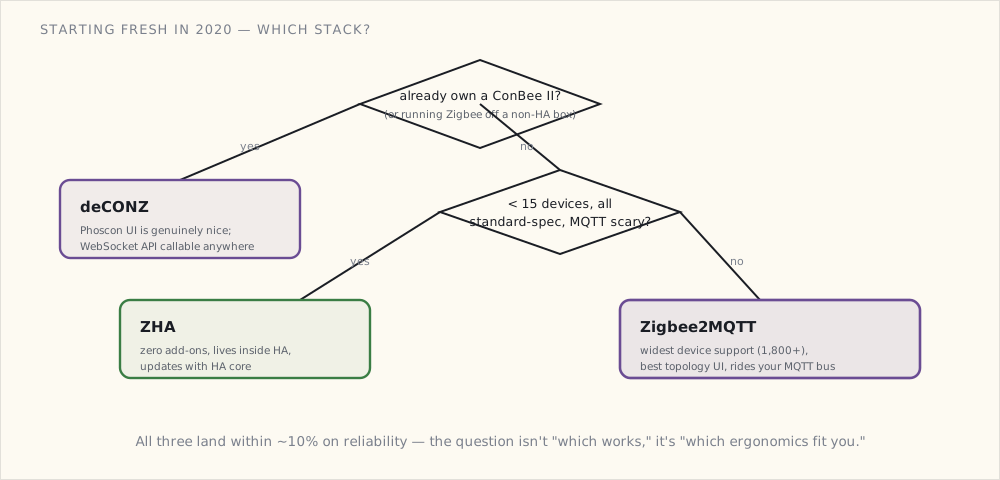
If you're running fewer than 15 Zigbee devices, mostly standard-spec ones (Philips Hue, IKEA, Sonoff), and don't want to maintain an extra add-on: ZHA wins on simplicity. It's right inside HA. Updates with HA. Lower complexity stack to debug.
I'd recommend it specifically for:
- Beginners installing HA for the first time.
- Households with only Hue + IKEA Zigbee.
- Anyone who finds MQTT intimidating.
When deCONZ is right
If you already own a ConBee II, deCONZ's Phoscon UI is genuinely nice. It's also the path I'd recommend for someone running Zigbee from a non-HA platform (because Phoscon's WebSocket API is callable from anywhere).
But if you're starting from scratch with HA, Z2M usually wins.
Boiled down to the two questions that actually decide it:
The hardware path I'd take in 2020
Starting fresh:
1. Buy a slaesh CC2652RB (or Electrolama zzh!) with external antenna: ~$30.
2. Install Home Assistant OS if not already.
3. Install the Mosquitto add-on.
4. Install the Zigbee2MQTT add-on. Point it at /dev/ttyACM0 (or wherever the dongle enumerates).
5. Permit join, pair devices.
6. Add the MQTT integration to HA if not already. Z2M devices appear automatically.
Total time: 45 minutes. Total cost: ~$30 + devices. (Use the USB extension cable — a CC2652 stick jammed straight into a Pi 4's USB3 port picks up enough 2.4 GHz noise to drop packets.)
What's next
- The CC2652 sticks getting easier to buy. Right now the good coordinators (slaesh, Electrolama) are hobbyist small-batch runs that sell out. A commodity, off-the-shelf CC2652 dongle would lower the barrier a lot; I expect one within a year.
- Zigbee + Thread coexistence. Project CHIP — announced last December — will mandate Thread in some devices, and Thread radios share the 2.4 GHz band with Zigbee. Whether they can cohabit a house without stepping on each other is an open question; I'll be watching as the first CHIP drafts land.
- Z2M dropping the old CC2531. The ubiquitous $5 CC2531 stick everyone started on is memory-starved and already strains past ~20 devices. Z2M's clearly steering people to CC2652; I'd expect CC2531 support to wither in 2021.