First Home Assistant install — YAML and local-first
Forecast #1 from 2016 done: Home Assistant is running on a Raspberry Pi 3 in the closet. Eight months later than I told myself I’d install it, finally got around to it tonight.
The install
# Download Hass.io image (HassOS, the all-in-one)
curl -L https://github.com/home-assistant/hassos/releases/download/2.12/hassos_rpi3-2.12.img.gz \
     -o hassos.img.gz

gunzip hassos.img.gz

# Flash to 32GB microSD with Balena Etcher
# (one click; takes 4 minutes)

# Boot Pi, wait 10 minutes for first-boot init
# Hass.io UI now reachable at http://hassio.local:8123/
That’s it. The Pi has Ethernet, no WiFi (don’t want HA’s reliability gated on WiFi). Plugged into the home switch. Eight-minute install from box-open to login screen.
The config model — YAML in source-controlled files
Home Assistant’s configuration lives in /config/configuration.yaml. Everything else (groups, automations, scripts, scenes) is in sibling YAML files referenced from configuration.yaml:
# configuration.yaml
homeassistant:
  name: Home
  latitude: 42.3601
  longitude: -71.0589
  elevation: 6
  unit_system: imperial
  time_zone: America/New_York

http:
  base_url: http://hassio.local:8123

# Web frontend (the states UI)
frontend:

# Hue integration — auto-discovers bridge
hue:
  bridges:
    - host: 192.168.1.42

# SmartThings integration
smartthings:
  app_id: !secret st_app_id
  access_token: !secret st_access_token

# MQTT broker (the Mosquitto add-on, installed separately)
mqtt:
  broker: 127.0.0.1
  port: 1883
  username: hassio
  password: !secret mqtt_password

# Include sibling YAML files
automation: !include automations.yaml
script: !include scripts.yaml
scene: !include scenes.yaml
group: !include groups.yaml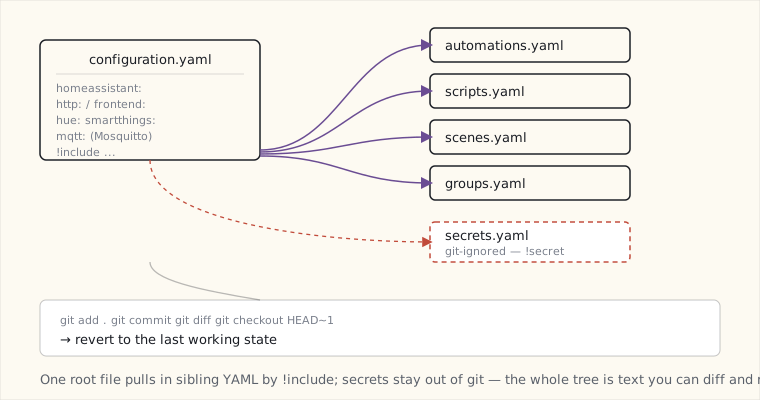
Two things this gives me that SmartThings could not:
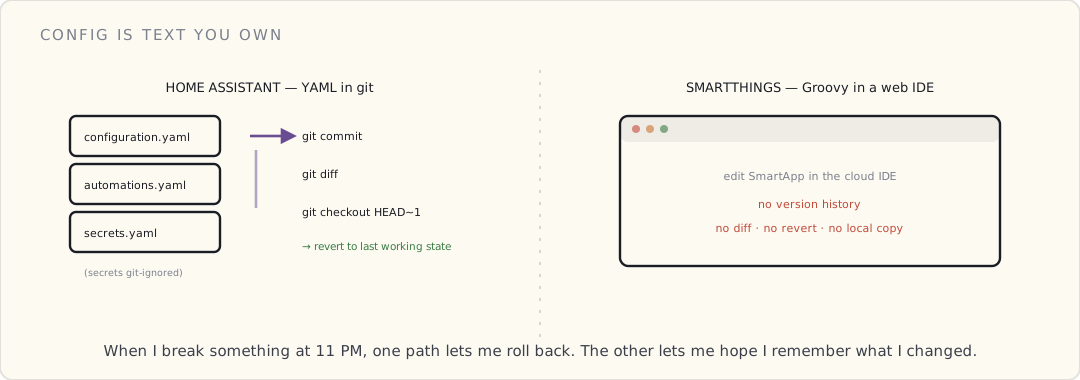
- The config is text. I can commit it to git. I can diff between versions. I can revert. When I break something at 11 PM, I can
git checkout HEAD~1and reboot to the last working state. - Secrets in a separate
secrets.yamlthat doesn’t get committed. Tokens, passwords, geofence locations — none of it goes to the public repo.
This is the developer-grade workflow that SmartThings’s web IDE can’t match.
First integrations, in order
Hue (10 minutes):
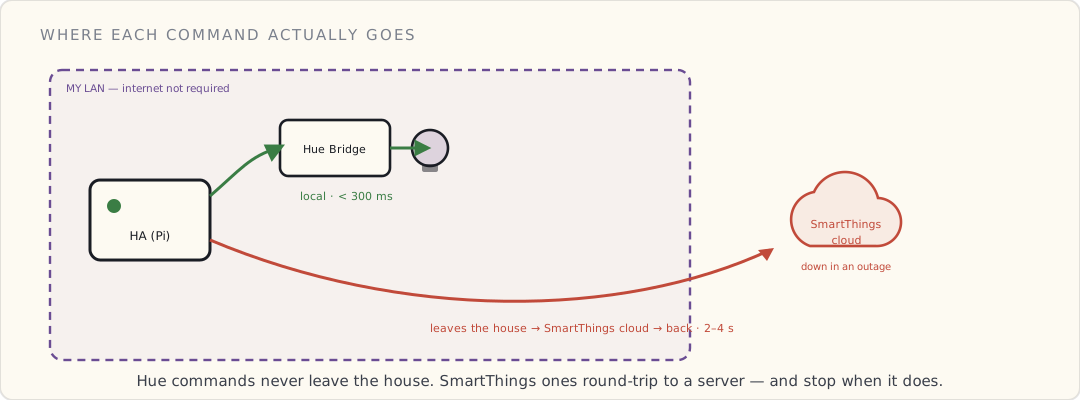
Auto-discovered. Pressed the bridge button, HA picked up the bridge, imported all 12 bulbs + the two Hue Motion sensors. All visible in the HA dashboard. Latency: HA → bridge → bulb is < 300 ms (local, no cloud).
SmartThings (45 minutes — the cloud-coupling problem): SmartThings integration in HA today is cloud-mediated. HA calls SmartThings’s API to read device state and push commands. Not what I wanted — I wanted my SmartThings devices accessible without cloud — but it’s better than nothing. The integration installs as a SmartApp in SmartThings, the SmartApp exposes a webhook URL, HA polls that URL.
Latency through this path: 2-4 seconds. Same as SmartThings’s own cloud-based custom SmartApps. The “local” win for SmartThings devices in HA is a future problem.
Nest (3 minutes): OAuth flow. Nest API. Temperature + humidity + setpoint exposed in HA. Read-only by default; write requires Nest’s “Works with Nest” certification, which I’m skipping.
MQTT broker (Mosquitto add-on, 15 minutes): Installed as a Hass.io add-on. Now I have a local MQTT broker for any future device that speaks MQTT directly (looking at you, ESP-based DIY sensors I keep meaning to build).
The first automation in HA
YAML, not Groovy:
# automations.yaml
- alias: "Front door + nobody home → notify"
  trigger:
    - platform: state
      entity_id: binary_sensor.front_door_contact
      to: "on"
  condition:
    - condition: state
      entity_id: group.family
      state: "not_home"
  action:
    - service: notify.ios_luke_iphone
      data:
        message: "Front door opened, nobody home at {{ now() }}"
The condition block evaluates the family group’s combined presence state — a built-in HA primitive. The notification goes through HA’s iOS app push (no Twilio, no SMS — just a push to the Home Assistant iOS app on my phone).
End-to-end latency: door opens → push notification arrives in < 1.5 seconds. Faster than the SmartThings SMS path. And — critically — this runs locally. If my internet drops, the automation still fires; only the push notification fails (and even that falls back to local Pi → my router’s email gateway if I configure it).
What HA does that SmartThings can’t
- Local execution by default. Hue commands are local. Z-Wave (with the Z-Wave USB stick I haven’t bought yet) would be local. The only cloud-dependent thing in my house tonight is the SmartThings bridge — and that’s because I’m bridging to a cloud-only platform.
- State templates. Jinja2 templating in YAML lets me compute derived values:
- sensor: platform: template sensors: bathroom_dewpoint: value_template: > {% set t = states('sensor.bathroom_temp') | float %} {% set h = states('sensor.bathroom_humidity') | float %} {{ (t - (100 - h) / 5) | round(1) }} - Full Python escape hatch. If YAML isn’t enough, write a Python custom component. The framework is Pythonic, async, well-documented.
- A growing integration library. ~300 integrations as of 0.49. Each release adds 10+ more.
What HA doesn’t do (yet) that SmartThings does
- A great mobile app. The official Home Assistant iOS app exists but is rough and brand-new. SmartThings’s app is polished.
- Cloud-required-features-for-free. Push notifications, off-LAN access, geofencing — all of these are mine to wire up by hand: a port-forward + DDNS + reverse-proxy with Let’s Encrypt for remote access, and a notify platform I configure myself. SmartThings hands you all of that out of the box because it lives in its cloud. (The HA founders have been hinting at an official hosted option to spare people the reverse-proxy dance; nothing’s shipped yet.)
- Native HomeKit/Alexa/Google Home integration. Each requires a custom component + manual config. The integration is there; the polish isn’t.
The Pi 3 holding up?
Tonight: htop shows HA’s Python process at 8% CPU idle, 380 MB RAM. The Pi 3 has 1 GB RAM. Headroom for now. As I add integrations (Z-Wave, dozens more sensors, complex automations), the Pi 3 is going to get tight — 1 GB is the ceiling on the current board, and there’s no higher-memory Pi to upgrade to yet. If HA outgrows the Pi 3, the realistic path is moving it to a small always-on Intel NUC or an old laptop, not a beefier Pi that doesn’t exist.
What I’m doing next
- Buy a Z-Wave USB stick (Aeotec Z-Stick Gen5) for direct Z-Wave on HA, bypassing SmartThings for those devices.
- Migrate the security automation from SmartThings’s cloud Groovy SmartApp to HA local. The latency drop + local-execution guarantee is worth a weekend.
- Set up the Lutron Caseta integration — Lutron’s local Telnet API works with HA. Bypass HomeKit for Caseta control where possible.
- Get the Home Assistant iOS app on both phones for presence detection without the SmartThings cloud loop.
Going local. Slowly.