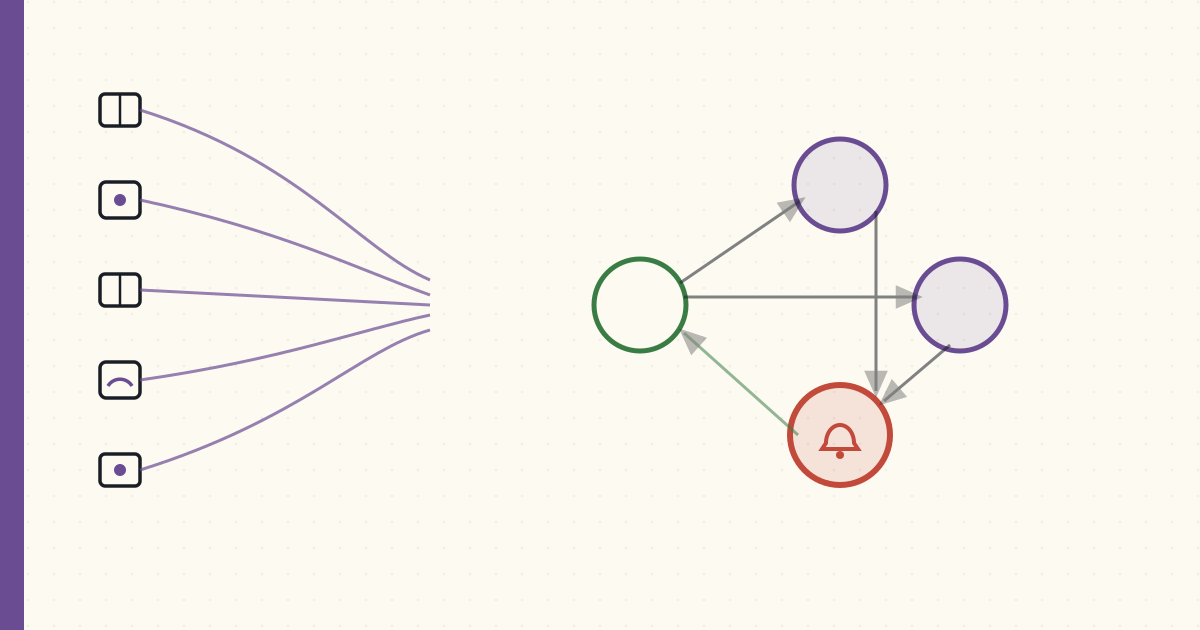
Building the security alarm panel in Home Assistant
Five years of piecemeal security automations. Six door/window contact sensors, two glass-break, six vibration, two presence signals. The automations work but they're disjoint — each "if X happens, do Y" lives separately in YAML. The family interface is "Luke configured something."
Tonight I made it a proper alarm panel.
The model
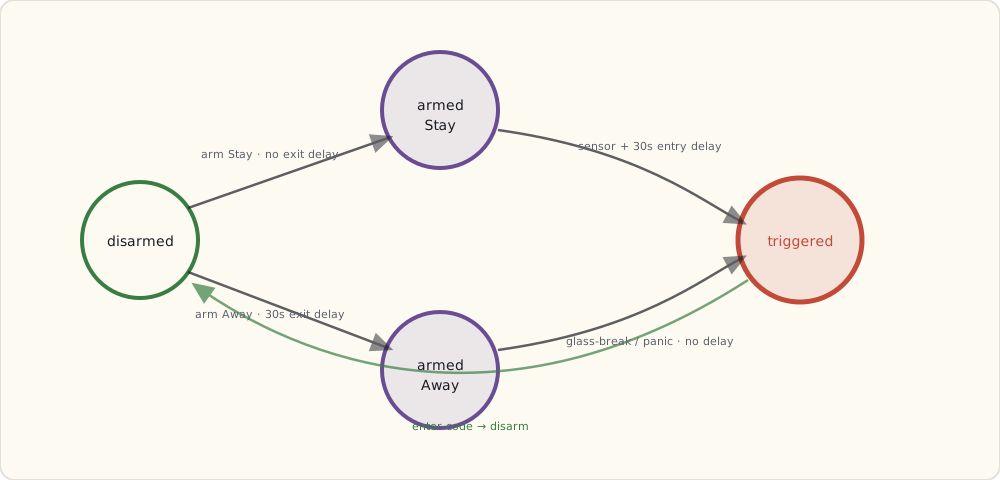
A residential alarm panel has three states + transitions:
disarmed → "Stay" mode (arming when home, perimeter only)
disarmed → "Away" mode (arming when leaving, perimeter + interior motion)
"Stay" or "Away" → "Triggered" (alarm condition met)
"Triggered" → disarmed (with code)
Plus delay windows:
- Exit delay: 30 seconds after arming "Away" before sensors are armed (so you can walk to your car without tripping it).
- Entry delay: 30 seconds after a "trigger" sensor fires before the alarm escalates (so you can disarm when coming home).
- No delay: glass-break and panic events skip the delay window.
HA's alarm_control_panel
HA ships an alarm_control_panel.manual integration that implements exactly this state machine. Configuration in configuration.yaml:
alarm_control_panel:
  - platform: manual
    name: House Alarm
    code: !secret alarm_code
    code_arm_required: false
    arming_time: 30      # exit delay
    delay_time: 30       # entry delay
    trigger_time: 600    # alarm sounds for 10 min
    disarmed:
      trigger_time: 0
    armed_home:
      arming_time: 0     # no exit delay when arming "stay"
      delay_time: 30
    armed_away:
      arming_time: 30
      delay_time: 30
code: is a 4-digit PIN required to disarm. Stored in secrets.yaml. The PIN gets used at the kitchen wall dashboard touch screen or via the Companion App.
Triggering the alarm — automations bridging sensors to the panel
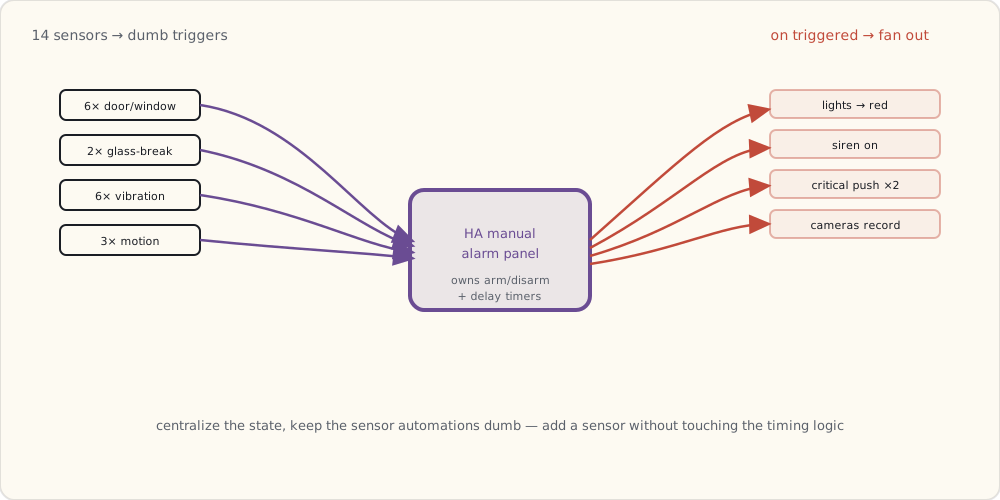
The panel state machine is centralized. The triggers fan out from the existing sensor automations:
- alias: "Alarm: door opened while armed"
  trigger:
    - platform: state
      entity_id:
        - binary_sensor.front_door
        - binary_sensor.back_deck
        - binary_sensor.bulkhead
        - binary_sensor.kitchen_patio
        - binary_sensor.garage_entry
        - binary_sensor.master_window
      to: "on"
  condition:
    - condition: state
      entity_id: alarm_control_panel.house_alarm
      state:
        - "armed_home"
        - "armed_away"
  action:
    - service: alarm_control_panel.alarm_trigger
      data:
        entity_id: alarm_control_panel.house_alarm

- alias: "Alarm: glass break (immediate, skip delay)"
  trigger:
    - platform: state
      entity_id:
        - binary_sensor.glass_break_living
        - binary_sensor.glass_break_master
      to: "on"
  action:
    # Trigger immediately, no entry delay
    - service: alarm_control_panel.alarm_trigger
      data:
        entity_id: alarm_control_panel.house_alarm

- alias: "Alarm: motion in interior while armed away"
  trigger:
    - platform: state
      entity_id:
        - binary_sensor.motion_living_room
        - binary_sensor.motion_kitchen
        - binary_sensor.motion_hallway
      to: "on"
  condition:
    - condition: state
      entity_id: alarm_control_panel.house_alarm
      state: "armed_away"   # only motion-triggers in away mode
  action:
    - service: alarm_control_panel.alarm_trigger
      data:
        entity_id: alarm_control_panel.house_alarm
The state machine in manual handles entry/exit delays. The trigger automations are dumb — they just call alarm_trigger and let HA's state machine handle timing.
What happens when the alarm fires
A separate automation listens for state changes to triggered:
- alias: "Alarm: triggered actions"
  trigger:
    - platform: state
      entity_id: alarm_control_panel.house_alarm
      to: "triggered"
  action:
    # Lights to bright red
    - service: light.turn_on
      data:
        entity_id: group.all_lights
        brightness: 255
        rgb_color: [255, 0, 0]
    # Siren on
    - service: switch.turn_on
      data:
        entity_id: switch.basement_siren
    # Push to both phones, critical priority
    - service: notify.mobile_app_luke_iphone
      data:
        title: "[ALARM] TRIGGERED"
        message: >
          Trigger source: {{ states('input_text.last_trigger_source') }}
          at {{ now() }}
        data:
          push:
            sound:
              name: "default"
              critical: 1
    - service: notify.mobile_app_wife_iphone
      data:
        title: "[ALARM] TRIGGERED"
        message: "Check house immediately."
        data:
          push:
            sound:
              name: "default"
              critical: 1
    # Start camera recording on all PoE cams
    - service: camera.record
      data:
        entity_id: camera.front_porch
        duration: 600
    - service: camera.record
      data:
        entity_id: camera.backyard
        duration: 600
Auto-arming based on presence
The most useful piece: when the last person leaves the geofence, auto-arm Away:
- alias: "Auto-arm Away when last person leaves"
  trigger:
    - platform: state
      entity_id: group.family
      from: "home"
      to: "not_home"
  action:
    - service: alarm_control_panel.alarm_arm_away
      data:
        entity_id: alarm_control_panel.house_alarm

- alias: "Auto-disarm when first person returns"
  trigger:
    - platform: state
      entity_id: group.family
      from: "not_home"
      to: "home"
  action:
    - service: alarm_control_panel.alarm_disarm
      data:
        entity_id: alarm_control_panel.house_alarm
        code: !secret alarm_code
The family doesn't have to remember to arm. They just leave. The alarm arms 30s after the last person crosses the geofence (entry delay configurable). It disarms automatically when the first person returns.
This is the biggest UX upgrade. Before: arming was Luke remembering or asking the kitchen dashboard. After: arming is automatic.
The dashboard — alarm panel card
Lovelace has an alarm-panel-card that shows the state and lets you arm/disarm with a PIN keypad:
- type: alarm-panel
  entity: alarm_control_panel.house_alarm
  states:
    - arm_home
    - arm_away
  name: "House Security"
On the kitchen dashboard, it's a giant card with three buttons (Disarm / Arm Stay / Arm Away). Tap, enter PIN, state changes.
What's still on my list
- Bypass mode: arm with one sensor knowingly "open" (e.g., basement window cracked for ventilation). Need to extend the YAML to handle per-sensor bypass flags.
- Door-left-open warning: if I close the alarm but a door's open, the alarm panel should warn me. Today it silently fails to fully arm.
- A panic button: a physical Z-Wave button (Aeotec Panic Button) on the bedroom nightstand to trigger the alarm immediately.
- Monitored-service integration: would integrate with a real alarm-monitoring service (UL-certified) for the "they call you, then dispatch FD/PD" loop. Probably not — self-monitoring is sufficient and cheaper.
The state machine is the right abstraction. Should have built it three years ago.