Migrating the SmartThings security automation to Home Assistant
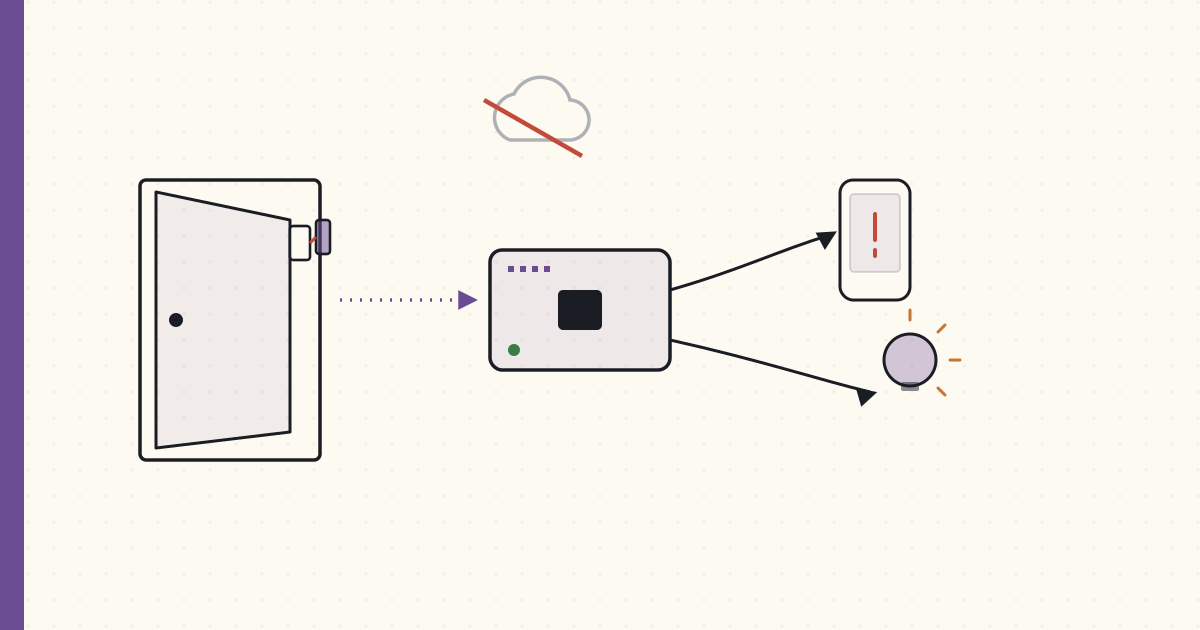
Three months on Home Assistant. The Aeotec Z-Stick Gen5 arrived in September. Time to move the SmartThings security automation over to HA and run it locally.
The Z-Wave migration
Z-Stick Gen5 is a USB Z-Wave 500-series controller — same chip generation as the SmartThings hub's Z-Wave radio. Plug it into the Pi, install the OpenZWave Hass.io add-on, the Z-Wave network is initialized:
# configuration.yaml
zwave:
  usb_path: /dev/ttyACM0
  network_key: !secret zwave_network_key
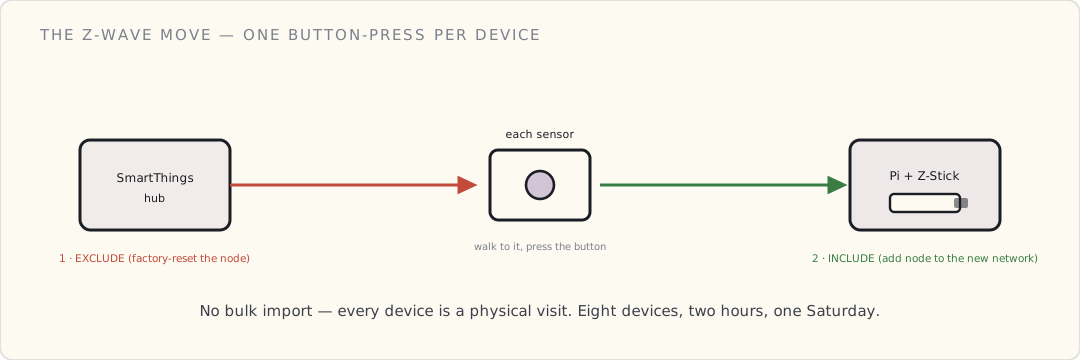
Each device has to be excluded from SmartThings (factory reset Z-Wave-style) and included in the Z-Stick separately. That's the painful part: physically walking up to every sensor, pressing the button, doing the inclusion dance:
- SmartThings IDE → exclude device → button press on sensor → confirmed.
- HA Z-Wave UI → add node → button press on sensor → confirmed.
Migration order:
- Front door Multipurpose sensor (15 min including troubleshooting)
- Basement bulkhead Multipurpose (10 min)
- Aeotec Multisensor 6 × 2 (5 min each — these are wall-powered, easier to access)
- Aeotec Water Leak (10 min)
- 3× GE Z-Wave switches (15 min each — included the air-gap dance)
- Total: 2 hours Saturday morning
After: SmartThings hub has lost all its Z-Wave devices. The Zigbee HA devices still need migration to a different stick (a dresden elektronik ConBee + deCONZ, on order). For now: Hue + Z-Wave on HA, Zigbee non-Hue still on SmartThings.
Rewriting the security SmartApp in HA YAML
The Groovy SmartApp was ~20 lines. The HA equivalent is ~30 lines spread across config files. Slightly more verbose but more composable.
Step 1: define a "family home" group (groups.yaml):
family:
  name: Family
  entities:
    - device_tracker.luke_iphone
    - device_tracker.wife_iphone
There's no person entity in HA yet — that abstraction doesn't exist in 0.49. What I have is the ios component's device tracker: the official Home Assistant iOS app reports each phone's location, and HA derives a home / not_home state from a zone.home GPS geofence (configurable radius, default 100m). A group: of those two device trackers reads home if either phone is home and not_home only when both are away — exactly the "is anyone home?" primitive the security rule needs.
Step 2: define which sensors trigger (using HA's binary_sensor from Z-Wave):
After Z-Wave migration, the Multipurpose sensors expose as binary_sensor.front_door_contact and binary_sensor.bulkhead_contact. Visible in the HA UI.
Step 3: the automation (automations.yaml):
- alias: "Security: door opened while away"
  description: "SMS family + log if a contact sensor opens with nobody home"
  trigger:
    - platform: state
      entity_id:
        - binary_sensor.front_door_contact
        - binary_sensor.bulkhead_contact
      to: "on"
  condition:
    - condition: state
      entity_id: group.family
      state: "not_home"
  action:
    - service: notify.ios_luke_iphone
      data:
        title: "Security alert"
        message: >
          {{ trigger.to_state.attributes.friendly_name }} opened at
          {{ now().strftime('%H:%M') }}. Nobody home.
    - service: notify.ios_wife_iphone
      data:
        title: "Security alert"
        message: >
          {{ trigger.to_state.attributes.friendly_name }} opened at
          {{ now().strftime('%H:%M') }}. Nobody home.
    - service: persistent_notification.create
      data:
        title: "Security event"
        message: "{{ trigger.to_state.attributes.friendly_name }} opened at {{ now() }}"
        notification_id: security_{{ trigger.to_state.entity_id }}_{{ now().timestamp() | int }}
    - service: logbook.log
      data:
        name: "Security"
        message: "{{ trigger.to_state.attributes.friendly_name }} opened, nobody home"
Comparing to the old SmartApp:
| SmartThings (Groovy) | Home Assistant (YAML) | |
|---|---|---|
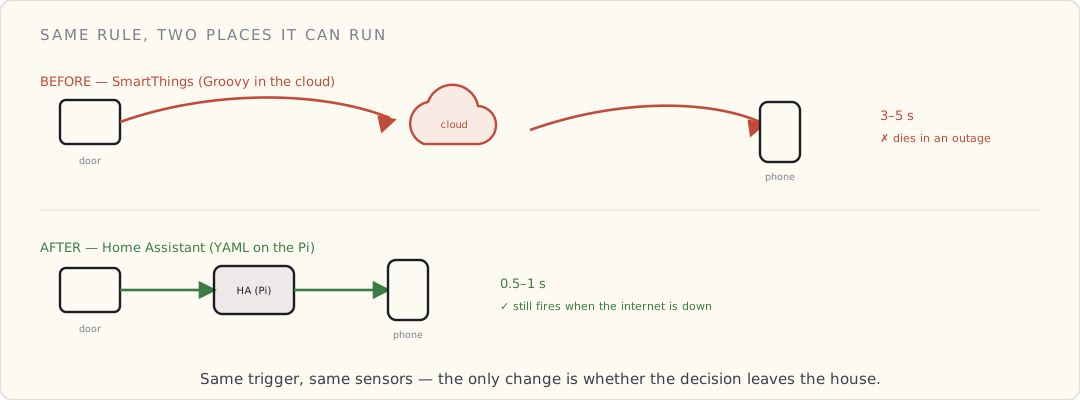
| Door event → notification latency | 3-5 s (cloud round-trip) | 0.5-1 s (local) |
| Works during internet outage | No | Yes (push falls back to local Pi notify if internet down) |
| Where the rule lives | SmartThings cloud | /config/automations.yaml on the Pi (git-tracked) |
| Notification destination | SMS via Twilio | HA iOS app push (free) |
| Logbook / event history | Cloud-side dashboard | Local SQLite database, viewable in HA UI |
| Custom modifications | Edit Groovy in IDE, redeploy | Edit YAML, reload (call-service: homeassistant.reload_core_config) |
What the migration also enabled
Once the door sensors are local, automations get richer. Examples I built this week:
Door opens AND it's after sunset AND nobody home → also turn on hallway light:
- alias: "Security: scare-light if door opens after dark, nobody home"
  trigger:
    - platform: state
      entity_id:
        - binary_sensor.front_door_contact
      to: "on"
  condition:
    - condition: state
      entity_id: group.family
      state: "not_home"
    - condition: sun
      after: sunset
      after_offset: "-00:30:00"
  action:
    - service: light.turn_on
      data:
        entity_id: light.hallway
        brightness: 255
        rgb_color: [255, 255, 255]
    - service: light.turn_on
      data:
        entity_id: light.living_room
        brightness: 200
The intruder walks in, lights go full bright. Whatever they were doing, they're now visible to themselves in a brightly lit hallway. The light reaches the door from the hallway sconce well before they're inside. Psychological deterrent + camera-feed clarity if the front porch cam is recording.
Bulkhead door opens + family home + after midnight → wake-up alert:
Different condition path: same trigger, family-is-home but it's 2 AM, treat as suspicious. Push notification to both phones, lights to 50% in the master bedroom (gentle wake), no scare-bright in the basement (that's where the bulkhead leads — if someone is coming through, you don't tip them off).
- alias: "Security: bulkhead at 2 AM"
  trigger:
    - platform: state
      entity_id: binary_sensor.bulkhead_contact
      to: "on"
  condition:
    - condition: time
      after: "00:00:00"
      before: "06:00:00"
    - condition: state
      entity_id: group.family
      state: "home"
  action:
    - service: notify.ios_luke_iphone
      data:
        title: "Bulkhead opened at 2 AM"
        message: "Family home but someone opened the bulkhead. Check it."
    - service: light.turn_on
      data:
        entity_id: light.master_bedroom
        brightness: 50
What's still on SmartThings
Where everything lives right now, mid-migration:
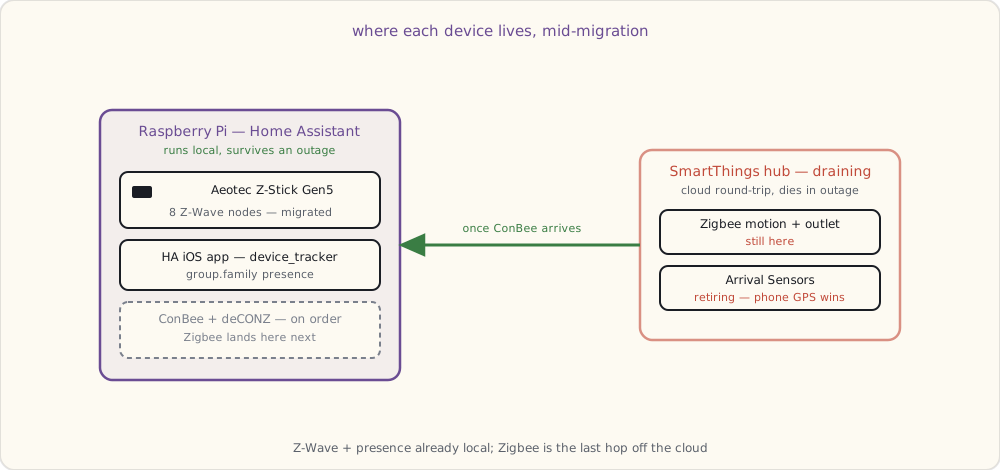
- The Zigbee HA devices (motion sensors, the Smart Outlet). Need the ConBee stick to migrate.
- The Arrival Sensors. Going to retire these entirely — phone-based presence via the HA iOS app is more reliable.
- The SmartThings hub is going into a drawer once Zigbee migrates. The v2 hub I'm draining has had the hardware for local execution since 2015 and Samsung still barely uses it; I'll re-evaluate if they ever ship firmware that runs a real slice of automations on the box instead of in their cloud.
What I want next
- dresden elektronik ConBee Zigbee stick ($40, on order). Migrates the SmartThings Zigbee devices to local on HA via deCONZ.
- A second presence signal beyond phone GPS. Phone GPS is good but not great in the basement / dense urban areas. Looking at iBeacons or BLE room-level presence as a secondary.
- An actual siren. The Z-Wave Aeotec Siren Gen5 does 105 dB with a backup battery. Ordering one for the basement so a verified break-in does more than light a hallway.
- A real dashboard to look at all this. The default states UI is functional but ugly. The community route right now is HADashboard (the AppDaemon dashboard add-on) or a hand-built panel of
group:cards withcustomize:icons. Project for next month.