WiFi as smart-home transport — the always-on tax
Wemo has been shipping WiFi smart plugs for six months. Belkin's about to add light switches, light bulbs (rebranded GE/Wemo bulbs), and a motion sensor to the lineup. A handful of smaller vendors are queuing up too — Quirky's Spotter, Lowe's Iris-branded outlets, a few smaller startups. WiFi is the cheap path to smart home for any vendor that doesn't want to design a hub.
Notes on why WiFi wins for vendors and what it costs the homeowner.
What WiFi smart devices actually are
A WiFi smart plug, at minimum:
- A 2.4 GHz WiFi SoC — typically TI's CC3000 (announced 2012, in volume this year) or one of the comparable embedded-WiFi modules from Atmel/Microchip and the GainSpan/Roving-Networks crowd. Around $3-5 in volume at 2013 pricing.
- A small companion microcontroller (8-bit AVR or low-end Cortex-M0) to drive the relay and shuttle data to/from the WiFi part.
- A relay capable of 10-15 A switching.
- A small AC-DC converter to power the electronics.
- Firmware that:
- Joins home WiFi via WPA2-PSK
- Advertises itself via mDNS or UPnP
- Holds an open TCP connection to a vendor cloud
- Listens for on/off commands from cloud + local network
That's it. No hub, no mesh. Plug into outlet, install vendor app, scan QR or enter credentials in a temporary AP mode, done.
The discovery problem
How does your phone find the smart plug on first install? Three approaches in use:
1. Temporary access point mode (the Wemo approach). Plug boots advertising its own SSID (e.g., WemoNet.PlugN-A1B2). Your phone joins that SSID, the app sends your home WiFi credentials to the plug, the plug joins your home WiFi, your phone rejoins your home WiFi. Five user actions, two SSID switches, fragile.
2. WiFi Protected Setup (WPS). Press a button on the router, press a button on the device, they handshake automatically. Fast — but WPS has known PIN brute-force vulnerabilities (4-10 hours), and many routers ship with WPS disabled.
3. Bluetooth-assisted onboarding (in theory). Device has BLE + WiFi. Phone pairs via BLE, sends WiFi credentials over BLE, device joins WiFi. Two transports, more BOM. No mainstream consumer product is shipping this approach today — the BLE radios cost too much for a $25 plug — but it's the obvious next step once BLE chip prices come down.
For now, almost everyone uses Approach 1. Bad UX, free to implement.
mDNS, UPnP, and finding the device after install
Once on the WiFi, your phone needs to discover the device locally. Two protocols dominate:
mDNS / Bonjour (RFC 6762). Device advertises as wemo-plugN-a1b2._smartplug._tcp.local.. Phone issues a multicast DNS query for _smartplug._tcp.local. and gets back the IP + port. Apple invented this for printers; the smart-home crowd adopted it.
UPnP / SSDP (Simple Service Discovery Protocol). Device listens on UDP port 1900 for M-SEARCH multicasts. Phone broadcasts a search:
M-SEARCH * HTTP/1.1
HOST: 239.255.255.250:1900
MAN: "ssdp:discover"
ST: urn:Belkin:device:**
MX: 2
Device responds with a LOCATION URL pointing to its XML device description. Older protocol (1999), still ubiquitous in 2013. Wemo uses it.
Once discovered, the plug usually speaks a vendor-specific REST/SOAP API. More on the Wemo SOAP API next post.
The always-on tax
A 2.4 GHz WiFi radio cannot enter the microsecond sleep states a BLE radio does. WiFi association requires:
- Periodic beacon listening (every 100 ms by default).
- DTIM intervals (typically 1-3 beacons).
- ARP probes from the router every few minutes.
- Re-authentication on roaming or after timeout.
Minimum idle current on a CC3000-class WiFi part with active association: ~70-100 mA at 3.3V, or 0.25-0.33 W for the chip alone. Add the relay's holding coil (~50 mA on/off depending on type), the AC-DC converter's standby loss (~0.5 W), and the indicator LED:
Total per-device idle draw: 1.0-1.5 W.
Multiply across a smart home:
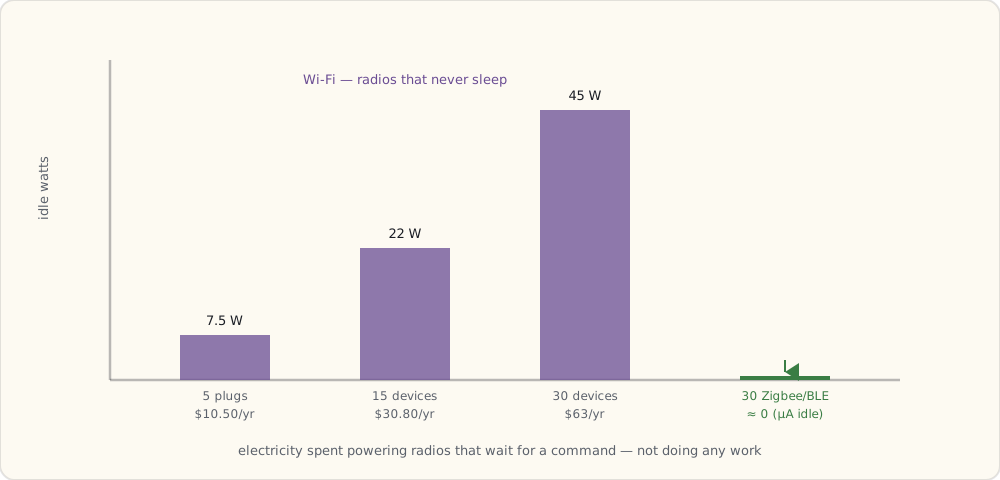
| Device count | Idle draw | Annual cost (US avg $0.16/kWh) |
|---|---|---|
| 5 plugs | 7.5 W | $10.50 |
| 15 plugs + switches | 22 W | $30.80 |
| 30 devices | 45 W | $63.00 |
This is the always-on tax. Zigbee and BLE peripherals draw microamps idle; WiFi devices draw nearly a thousand times more.
Architectural cost — cloud by default
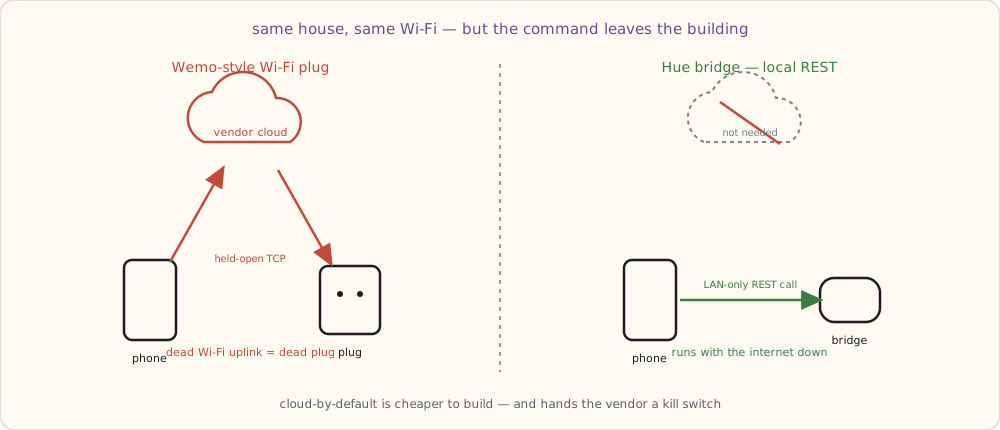
Most WiFi vendors don't bother with a local API. The plug holds a persistent TCP connection to the vendor cloud; commands route through that cloud even when phone and plug are on the same WiFi.
This is cheaper to engineer (no local discovery server, no per-vendor SDK quirks) and gives the vendor telemetry they can sell separately. It also gives the vendor a kill switch.
Compare to Hue: bulbs talk Zigbee to the bridge, bridge has a local REST API, the whole thing runs without internet. The contrast couldn't be sharper.
Most consumer-WiFi vendors will not expose a local API until forced by regulation. That's still years off in 2013.
When WiFi is the right choice
Despite the costs, WiFi wins for:
- Plug-in devices on permanent power. Energy cost is real but small; no battery to worry about.
- Single-room deployments. No mesh complexity.
- Vendors who don't want to ship a hub. Lower BOM, faster onboarding.
- High-bandwidth devices. Cameras, smart speakers, anything streaming. Zigbee/BLE can't carry the throughput.
The right call for me going forward: WiFi for plugs and cameras, lights stay on Zigbee. Mixed-protocol is the future of any non-trivial smart home — a hub will be needed to bridge them.
Channel congestion math (the real-world hit)
A 2.4 GHz home network in an urban apartment building is already crowded with neighbors' WiFi, microwaves, Bluetooth, and now smart-home devices. Channel 6 is usually the worst.
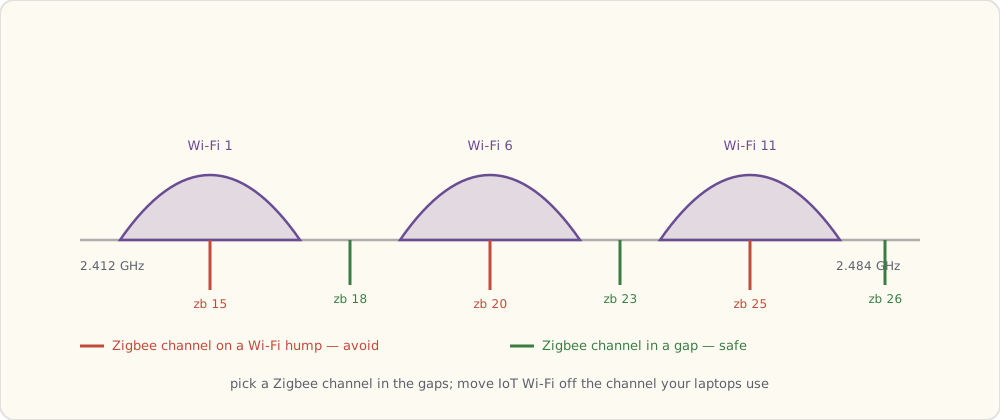
- WiFi channels 1, 6, 11 are non-overlapping in the US 2.4 GHz band.
- Zigbee channels 11-26 sit between the WiFi channels but channels 15, 20, 25 overlap WiFi's 1, 6, 11 worst.
- Many smart-home WiFi devices are stuck on 2.4 GHz (no 5 GHz radio to save BOM).
- 30 WiFi smart devices on the same channel can knock 802.11n throughput down 30-50%.
The takeaway: planned smart homes split WiFi 5 GHz for laptops/phones and use 2.4 GHz only for IoT. Most consumer routers don't make this easy in 2013.
What's next
Next post: my first Wemo plug, SOAP-over-HTTP, the multi-vendor app problem starting in earnest.