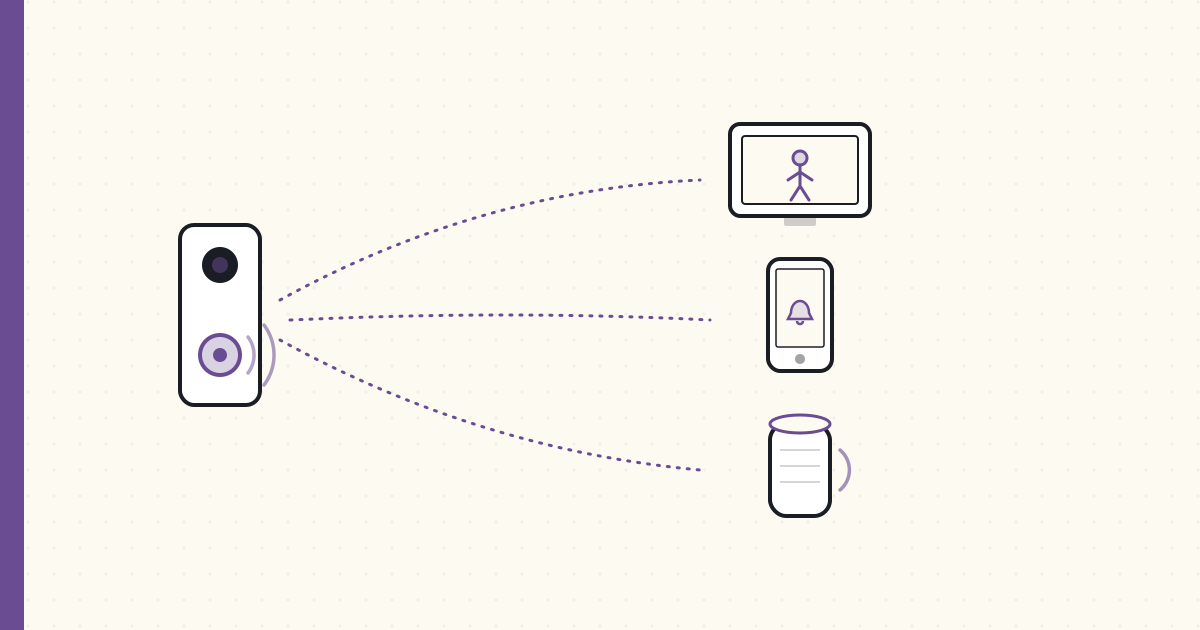
Doorbell camera on the Google Home Hub display
The PoE doorbell camera arrived in May. Took until August to make the full experience work end-to-end. Notes.
Hardware
Dahua VTO2311R-P PoE video doorbell — one of the very few true PoE, ONVIF-speaking doorbells you can actually buy in 2021 (most "smart doorbells" are Wi-Fi-and-cloud; this one is wired and local):
- 2MP camera + microphone + speaker + doorbell button.
- PoE — single Cat6 from the basement up to the door frame; no battery, no Wi-Fi.
- RTSP streams (main + sub), ONVIF events, two-way audio.
- IP65 weatherproof.
- ~$150.
It's an unapologetically commercial/industrial unit — the Dahua firmware is clunky and the app is forgettable — but it does the one thing I need: it speaks open protocols (RTSP + ONVIF) so I can wire it into my own stack instead of theirs.
Mounting: replaced the existing 1980s chime + button with the Dahua unit. Used an external angled mount to point the camera 15° downward (kid-height visitor capture). Cable runs through the existing 18-gauge bell wire conduit; ran a parallel Cat6 alongside it.
The plumber-electrician-camera-installer hat I wore for 3 hours was its own experience.
The protocol chain
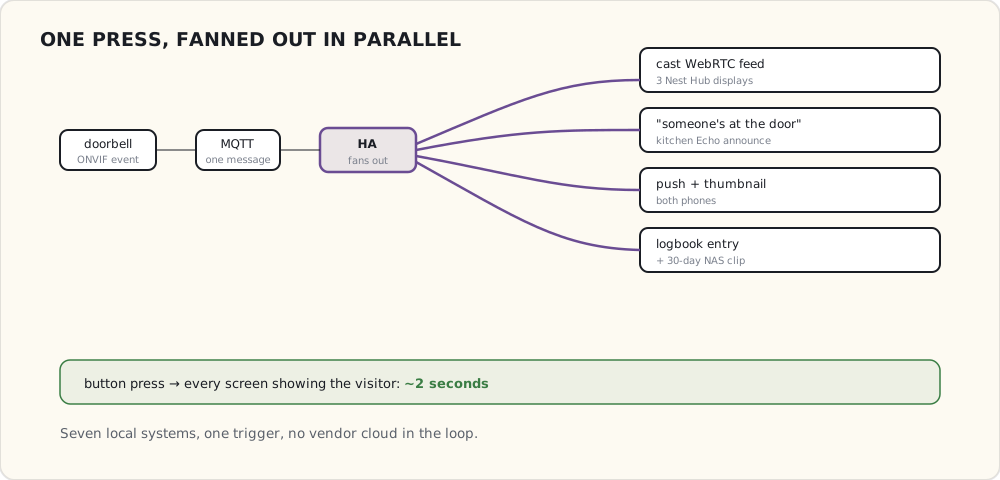
Doorbell button pressed
  → Dahua ONVIF event ("DoorBellRing" / CallNoAnswered)
  → an HA ONVIF/MQTT bridge publishes: frigate/doorbell/event = "ring"
  → HA automation fires:
     • Cast camera feed to Google Home Hub displays (3 of them)
     • Echo announcement on kitchen Echo
     • Push notification to both phones with thumbnail
     • Log event in HA logbook
Total end-to-end latency from button press to all-displays-showing: ~2 seconds.
Casting the camera feed to Google Home displays
This is the part that took most of the August troubleshooting.
Google Home / Nest displays cast video via the Google Cast protocol. They accept either:
- A YouTube / Cast-API video URL.
- An HTTP/MJPEG stream (low quality, high CPU).
- A WebRTC stream (high quality, native).
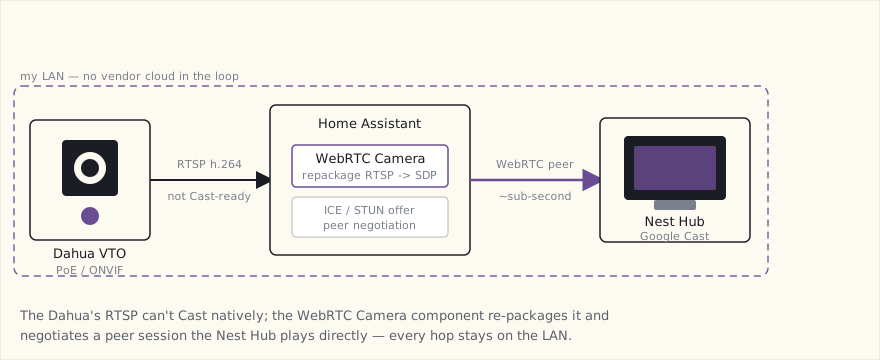
The Dahua's RTSP isn't natively Cast-compatible. The bridge I'm using is the WebRTC Camera custom integration (AlexxIT's webrtc HACS component) — it stands up a WebRTC endpoint from an RTSP source so a browser or a Cast device can play it with near-zero latency:
# configuration.yaml
webrtc:

camera:
  - platform: generic
    name: doorbell
    stream_source: rtsp://admin:!secret_pw@192.168.30.30:554/cam/realmonitor?channel=1&subtype=1
The integration runs inside HA (no separate add-on needed in this 2021 setup). HA → WebRTC Camera → the Chromecast/Nest Hub negotiates a WebRTC session → display shows the live feed.
# automations.yaml
- alias: "Doorbell ring → cast to displays"
  trigger:
    - platform: mqtt
      topic: frigate/doorbell/event
      payload: "ring"
  action:
    - service: media_player.play_media
      data:
        entity_id:
          - media_player.kitchen_nest_hub
          - media_player.master_bedroom_nest_hub
          - media_player.living_room_chromecast
        media_content_type: "application/webrtc"
        media_content_id: "/api/webrtc/doorbell"
    - service: notify.alexa_media_kitchen
      data:
        message: "Someone is at the door."
        data:
          type: announce
    - service: notify.mobile_app_luke_iphone
      data:
        title: "Doorbell"
        message: "Person at the door at {{ now().strftime('%H:%M') }}"
        data:
          image: "/api/frigate/notifications/{{ states('sensor.frigate_doorbell_person').last_event_id }}/thumbnail.jpg"
The Echo announce trick
The kitchen Echo is the most-listened device in the house. Voice announcements through Alexa Media Player + the "announce" type bypass Alexa's normal "say it back to you" voice and use a different, more attention-grabbing tone.
When the doorbell rings, the Echo says: "Someone is at the door." Across the open-plan kitchen-dining-living-room space, that's how everyone knows to look at the nearest display.
What works after 3 months
- Casting reliability: 95% — the Google Hub displays show the feed within 2 seconds, 9 out of 10 button presses. Occasional WebRTC negotiation timeout when the Hub display has been idle for hours.
- Frigate person detection on the doorbell stream: 99% — every actual person ringing the doorbell gets detected and classified.
- Two-way audio: works (the WebRTC session is bidirectional) but my kids are afraid of the doorbell speaker so I rarely use it.
- Recording: 30 days of doorbell events with thumbnails saved on the NAS.
What doesn't (yet)
- Person recognition on the doorbell stream. Frigate can detect a person but doesn't know if it's me or the mail carrier. Face-detection-via-FaceBox or DeepStack would do this; both are heavy ML add-ons and I haven't found the value yet.
- iPhone displays. No iPhone-equivalent of Cast for a "show me the doorbell view automatically." The Companion App push notification + tap-to-open is the workaround.
- Outdoor temperature in the doorbell feed. Would be nice to overlay current temp + weather as a HUD on the display. Frigate has zone-overlay; doesn't do data-overlay.
The integration loop closes
Three years ago, the smart-home stack was multiple parallel systems (SmartThings, Hue, Lutron, Wemo) that each handled their own slice. The doorbell experience touches:
- Dahua (camera + button event)
- Frigate (person detection)
- HA (orchestration)
- Google Home (displays + announcement)
- Amazon Alexa (audio announcement)
- iPhones (push notifications with thumbnail)
- NAS (recording storage)
Seven systems, all participating in one experience, all triggered by a single button press. That's the smart-home maturity that takes about ten years to assemble.