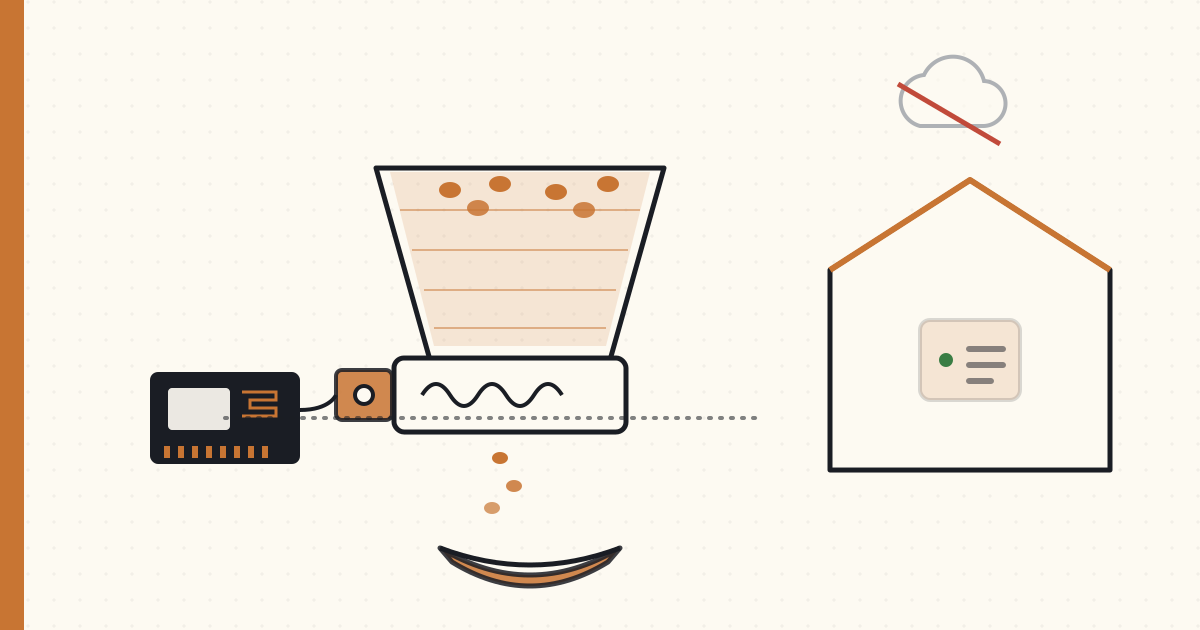
DIY ESP32 pet feeder — vendor-cloud independence for $35
Built a DIY pet feeder for Boson over a weekend. ESP32 + servo + 3D-printed hopper. ESPHome firmware. Integrates with Home Assistant. Total cost: $35 in parts.
The thing I should have built right after Petnet's 9-day cloud-failure catastrophe in 2020. Five years late, but here.
The build
Parts:
| Part | Source | Cost |
|---|---|---|
| ESP32 dev board (WROOM-32) | AliExpress / Amazon | $8 |
| MG996R servo motor (high-torque) | Amazon | $7 |
| Auger-style 3D-printed hopper + dispenser | Printables.com (free model) | $0 + filament (~$3) |
| Power supply (5V 2A USB-C) | Amazon | $7 |
| Misc wire, screws, food-safe bowl | Around the house + $3 | $3 |
| Microswitch (low-food sensor) | Amazon | $2 |
| Optional: HX711 + load cell (food-weight sensor) | Amazon | $5 |
| Total | ~$35 |
3D printing took about 8 hours (4-color filament, food-safe PETG for the hopper interior surfaces). The mechanical assembly took an hour.
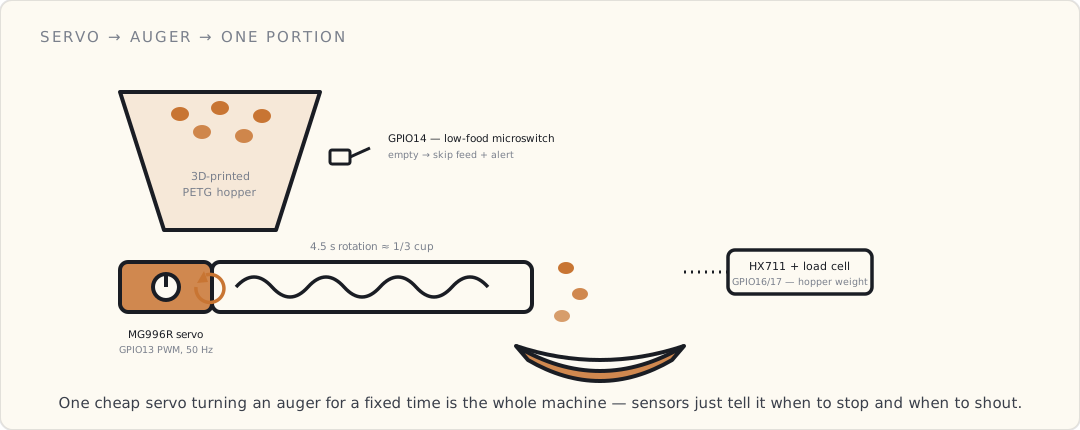
Mechanically it's almost embarrassingly simple. A servo turns an auger — a printed screw — under the hopper; spin it for a fixed time and a known volume of kibble walks out the end and drops into the bowl. The only "smarts" are two cheap sensors: a microswitch that trips when the hopper runs low, and an optional load cell under the bowl so I can read how much is actually in there.
The firmware — ESPHome
ESPHome is YAML-based firmware for ESP-class microcontrollers. Compiled and flashed via Home Assistant; integrates with HA automatically.
esphome:
  name: boson-feeder
  platform: ESP32
  board: esp32dev

wifi:
  ssid: !secret iot_ssid
  password: !secret iot_password

api:
  encryption:
    key: !secret api_encryption_key

ota:
  password: !secret ota_password

servo:
  - id: feeder_servo
    output: feeder_pwm

output:
  - platform: ledc
    id: feeder_pwm
    pin: GPIO13
    frequency: 50 Hz

binary_sensor:
  - platform: gpio
    pin:
      number: GPIO14
      inverted: true
      mode: INPUT_PULLUP
    name: "Low food sensor"
    id: low_food

sensor:
  - platform: hx711
    name: "Hopper weight"
    dout_pin: GPIO16
    clk_pin: GPIO17
    gain: 128
    update_interval: 60s

script:
  - id: dispense_portion
    then:
      - servo.write:
          id: feeder_servo
          level: -1.0   # rotate auger forward
      - delay: 4.5s     # ~1/3 cup of kibble
      - servo.write:
          id: feeder_servo
          level: 0.0    # stop
      - logger.log: "Boson fed"

button:
  - platform: template
    name: "Feed Boson now"
    on_press:
      - script.execute: dispense_portion
About 50 lines. Compiled with esphome boson-feeder.yaml run. Flashed via USB. Device joins my IoT VLAN.
The HA integration
Once the ESPHome device joins, HA auto-discovers it. Entities:
button.feed_boson_now— manual dispense.binary_sensor.low_food_sensor— triggers when hopper is empty.sensor.hopper_weight— current kibble weight.
HA automation for scheduled feeds:
- alias: "Boson feeding schedule"
  trigger:
    - platform: time
      at: ["07:00:00", "18:00:00"]   # twice daily
  condition:
    - condition: state
      entity_id: binary_sensor.low_food_sensor
      state: "off"   # only feed if hopper isn't empty
  action:
    - service: button.press
      target:
        entity_id: button.feed_boson_now

- alias: "Low food alert"
  trigger:
    - platform: state
      entity_id: binary_sensor.low_food_sensor
      to: "on"
  action:
    - service: notify.mobile_app_luke_iphone
      data:
        title: "🐱 Refill Boson's feeder"
        message: "Hopper is empty. Refill by next scheduled feed."
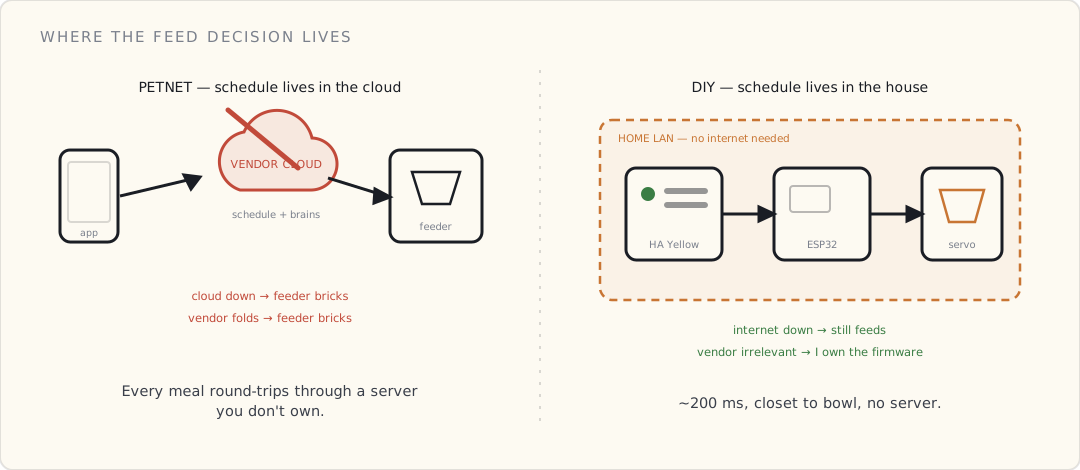
End-to-end latency from "scheduled feed" to "kibble dispensed": about 200 ms. Zero cloud dependency. The feed automation runs on the HA Yellow in my closet; the dispense executes locally on the ESP32.
What this gives me vs Petnet
| Petnet (2020 collapsed) | DIY ESP32 | |
|---|---|---|
| Cost | $149-199 + (depleted by company failure) | $35 once |
| Schedule storage | Cloud only | Local (HA + ESP32 redundant) |
| Internet outage tolerance | Bricks | Keeps working |
| Vendor solvency dependency | High | Zero |
| Failure modes | Cloud, vendor financials, app issues | Servo wear, kibble jam, power loss |
| Maintenance | Vendor controls firmware | I control firmware |
| Privacy | Vendor cloud | LAN-only |
The DIY pet-IoT is strictly better on every dimension that matters for me.
The difference that actually mattered the day Petnet's servers went dark isn't in any spec row — it's where the feed decision lives. Petnet kept the schedule and the "is it time to feed?" logic in its cloud, so every meal round-tripped through a server I didn't own; when that server went away, the feeder forgot how to feed. The DIY version keeps the schedule on the HA box in my closet and the dispense logic on the ESP32 itself. The internet can be down for a week and Boson still eats at 07:00 and 18:00.
What this lacks vs Petnet
The DIY version doesn't have:
- A polished consumer iOS app.
- Wife-friendly UI (HA dashboard is OK, not great).
- Plug-and-play setup (mine took a weekend).
- A "scheduled portion control by weight" feature (mine uses time-based + crude HX711 weight tracking).
Most non-engineer pet owners won't build one of these. The DIY path is for engineers + tinkerers.
What I'd do differently
If I were starting fresh:
- Use a load-cell-based dispense instead of time-based. The HX711 + load cell can measure exact dispensed weight, dispense until target weight reached. Mine is timed (~4.5 seconds = ~1/3 cup); load-cell would be more accurate.
- Add a camera. ESP32-CAM module for $8 — verify the food actually got dispensed visually. Catches dispenser jams.
- PETG instead of PLA for the hopper. PLA softens at warm temps; PETG handles it.
- A backup mechanical timer parallel to the DIY one. The "what if the ESP32 firmware crashes" question. (PetSafe Smart Feed remains in the house for this reason.)
What's next
The thirteen-year retrospective coming this summer. Twelve years of pet-IoT documented; this is the closer.
The DIY pet-IoT category is where the post-Petnet era of consumer pet hardware should have landed. It mostly didn't (because the vendor incentive is subscription, not local). The community has built it instead.