The AWS spend audit I do every quarter
Once a quarter, the Friday before the budget meeting, I block four hours and audit our AWS spend. I've done this at three different companies now. The four leaks I find are always the same four leaks. Writing them down so the next engineering leader can skip the rediscovery.
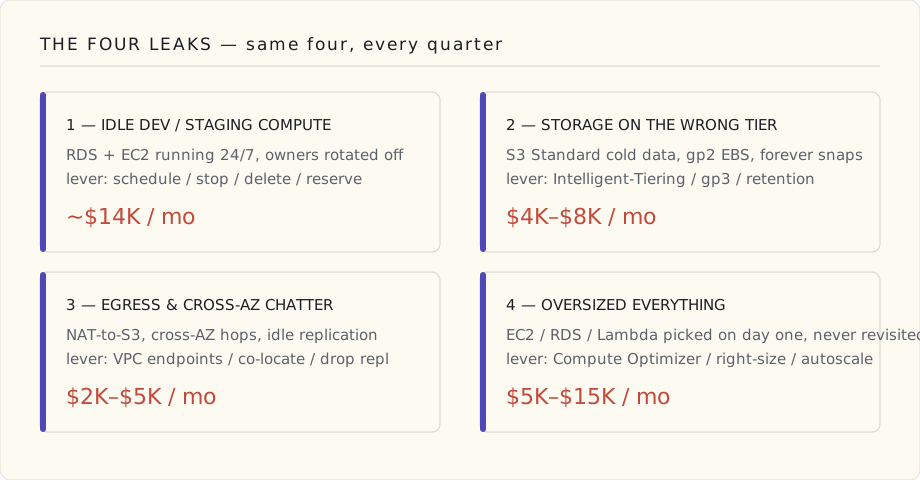
The map is always the same shape: four buckets, each with its own tell and its own lever. Here's what I'm looking for before I open Cost Explorer.
Leak 1: idle dev / staging compute
The single biggest finding, every time.
The shape: a dev account, half a dozen RDS instances and EC2 boxes from old projects, running 24/7 at full size. The team that owned them has rotated, the projects have shipped or died, nobody's looked at the dashboard in six months. The bill is 70% steady-state.
What I do: filter Cost Explorer to the dev / staging accounts, sort by service descending, find anything > $200/month, ask the owning team (look up tags, fall back to "ask in #engineering") whether it's still needed. Schedule the answer: weekday-only auto-stop for "yes but only during the day," delete for "no," reservation for "yes and constant."
Typical find at our company: $14K/month, mostly in three forgotten RDS instances and one auto-scaling group that scaled up during a 2023 load test and never scaled back down.
Leak 2: storage that should be cheaper
S3 standard everywhere, EBS gp2 instead of gp3, snapshots accumulating forever.
The shape: every team's S3 buckets default to S3 Standard. Most of the data is accessed once and then sat on indefinitely — logs, analytics dumps, backups. They should be on Intelligent-Tiering or, for proven cold data, Glacier Instant Retrieval.
What I do:
- Run S3 Storage Lens across the org. Look at the "% of data not accessed in 90 days" stat per bucket. Anything over 50% should be on Intelligent-Tiering at minimum.
- Audit EBS volumes. Anything on gp2 should be on gp3 (same or better performance, ~20% cheaper). Anything on io1/io2 should be inspected for whether it actually needs provisioned IOPS.
- Audit EBS snapshots. There's almost always a snapshot policy that runs daily and never expires. Set a retention policy. The first run will delete a lot.
Typical find: $4K – $8K/month. The gp2 → gp3 conversion alone is usually $1K/month at scale.
Leak 3: data egress and inter-AZ chatter
The leak that's hardest to see and hardest to fix.
The shape: services in one AZ talking to a database in another, or a service in one VPC talking through a NAT gateway to S3 instead of through a VPC endpoint. Each individual call is fractions of a cent; the bill adds up to four figures a month because the architecture has the wrong topology and there are billions of calls.
What I do:
- Pull the VPC Flow Logs or use Network Manager's "Cross-AZ data transfer" report. Look for unexpected cross-AZ traffic between services that should be co-located.
- Audit NAT Gateway data processing charges. If you're using NAT to reach S3 or DynamoDB, you're paying for nothing — those have VPC endpoints (Gateway endpoints, free). Audit which services should be on Interface endpoints (paid but cheaper than NAT at any real volume).
- For multi-region: check whether replication is actually used. Cross-region replication on S3 is fine if you need it; if you don't, it's a 2x storage bill for no reason.
Typical find: $2K – $5K/month. The NAT-to-S3 trap is the most common single fix; one VPC endpoint deployment can save $1K/month immediately.
Leak 4: oversized everything
The leak the team will defend the hardest.
The shape: every EC2 instance, every RDS class, every Lambda memory setting was picked on day one based on a guess. Nobody has revisited. Compute Optimizer has been telling you to right-size for nine months. Nobody has looked.
What I do:
- Open Compute Optimizer. Look at the recommendation list. Find anything with "high savings opportunity" labeled.
- For Lambda specifically: most teams overprovision memory because they read once that "more memory = more CPU" and never re-evaluated. Right-sizing Lambda is measurably my fastest single source of savings — about 30% cost reduction across our Lambda footprint last quarter, ~$3K/month saved.
- For RDS / Aurora: look at CloudWatch Insights for CPU and memory utilization. Anything chronically under 40% should be one size down.
Typical find: $5K – $15K/month, depending on size of fleet. Often the team will push back ("but we might need it during a spike"). The right answer is auto-scaling, not over-provisioning the baseline.
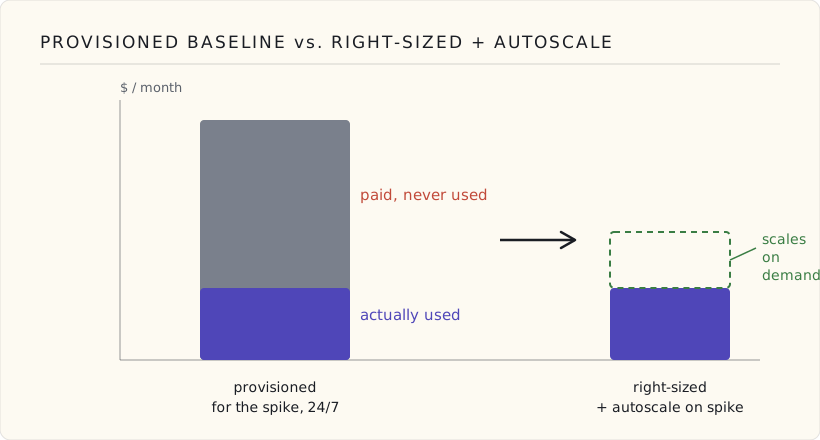
The picture is the whole argument: you can pay for the spike's headroom every hour of every day, or you can pay for it only in the hours the spike shows up. Provisioning the baseline to the peak is buying insurance you already have — that's what auto-scaling is.
What I don't audit
A few things I deliberately don't touch on quarterly audits:
- Reserved Instances / Savings Plans changes. Those are annual commitments — I revisit once a year, in tandem with our capacity-planning conversation, not quarterly.
- Bedrock cost optimization. That's a different audit. Bedrock prompt caching went GA last week — finally — and it's already the biggest single lever I have on our LLM bill (it bills cached input tokens at a fraction of the read rate, so the long, repeated system-prompt context stops costing full freight on every call). Intelligent prompt routing is the other lever I'm watching, but it's still in preview as I write this, so I'm evaluating it, not committing a budget line to it yet. I do a separate AI-cost audit monthly because the workload is moving too fast for quarterly to keep up.
- Anything below $100/month. Time is finite. The audit budget is $5K minimum-find before I'll pull the thread.
The script that runs every Monday
Beyond the quarterly audit, the team runs a small Lambda every Monday at 8am that posts to a Slack channel:
- This month's spend vs the same period last month
- Top three services by spend
- Anything that crossed +20% week-over-week
Most weeks the channel is boring. The week when it isn't, we catch the leak the same week instead of three months later.
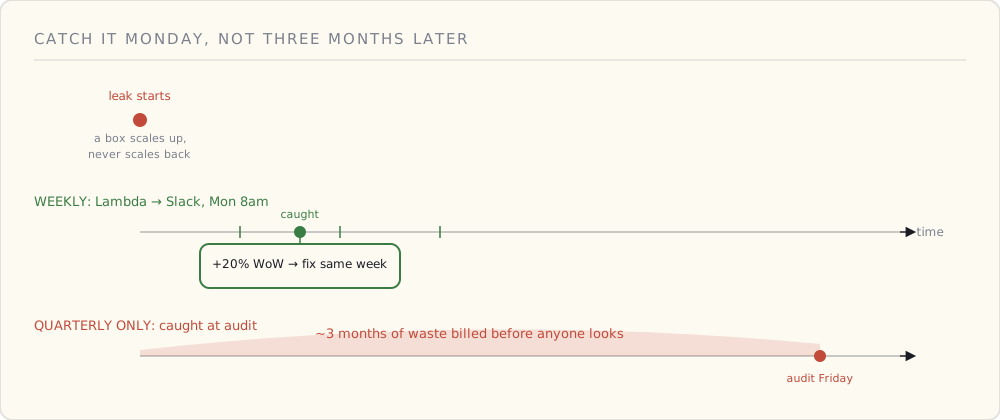
The quarterly audit finds the big structural leaks; the weekly Lambda is what keeps a new one from running unnoticed for a full quarter between audits. Different tools for different failure modes.
The framing that lands with execs
When I present the spend audit findings to the CFO, the framing I use is:
AWS doesn't optimize your bill. AWS optimizes their revenue. The two are not the same hobby. Every dollar that's optimizable is a dollar AWS has no incentive to surface unless you go look for it.
That sentence has unlocked more "yes, do the audit" from leadership than any cost-savings number has. It's not anti-AWS; it's accurate. AWS Cost Explorer is a real product, but Cost Explorer makes data discoverable, not actionable. Actioning the data is a human in a chair, four hours a quarter.
That human is me, on Fridays before budget meetings. The same four leaks, every time.