 Notebook · 13 parts
 Building IoT Connected Products v2
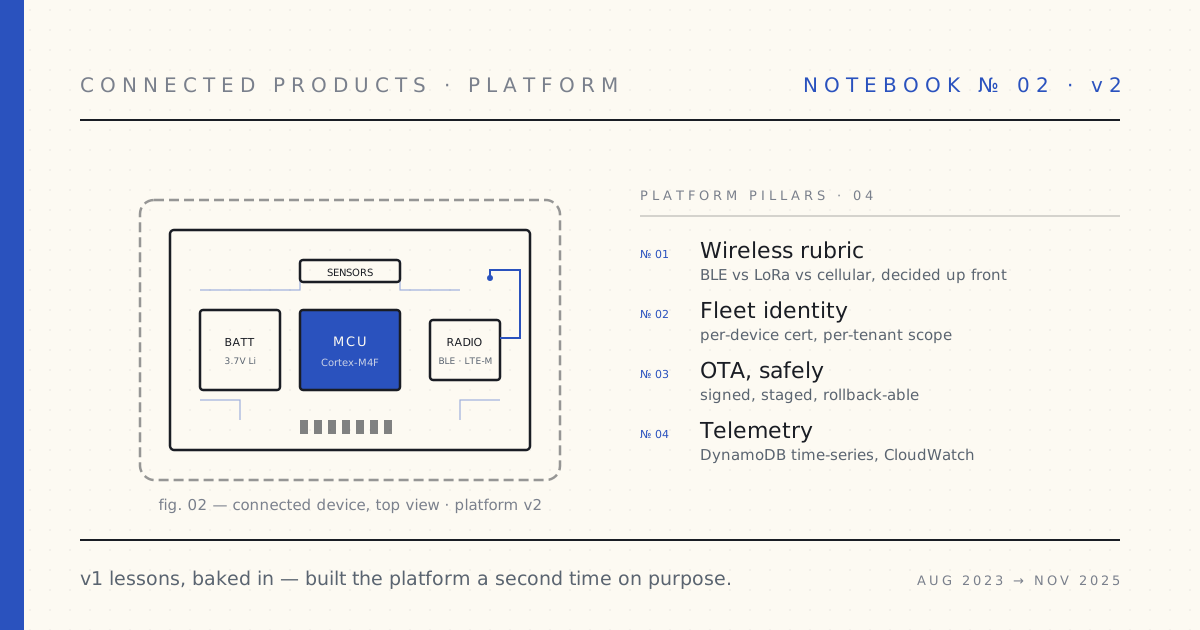
The PRD for v2 was a list of v1's mistakes, inverted. Wireless: don't pick the protocol before you know the duty cycle. Identity: per-device cert from boot zero, not bolted on at scale. OTA: signed, staged, rollback-able, or don't ship. Building the same kind of platform a second time — on purpose.
The first time I built a connected-product platform — v1, in medical hardware — every PRD section had a hidden cost we paid for later. Wireless protocol picked before the duty cycle was understood. Identity scoped to the fleet, not the device. OTA shipped without rollback. None of it was wrong — it was what we knew at the time.
The second time — on purpose, with the v1 receipts in hand — I started by writing those costs down and inverting them. The v2 PRD opens with a wireless rubric (BLE vs LoRa vs cellular, decided up front), per-device identity from boot zero, OTA signed and staged. Every section traces back to a specific moment in v1 when the architecture cost us a sprint or a customer.
What follows is what happened when the v2 PRD met reality — what survived the trip from blueprint to fleet, and what didn't.
 Part 01 of 13
 v2 PRD, Part 1 — hardware specs for a battery device
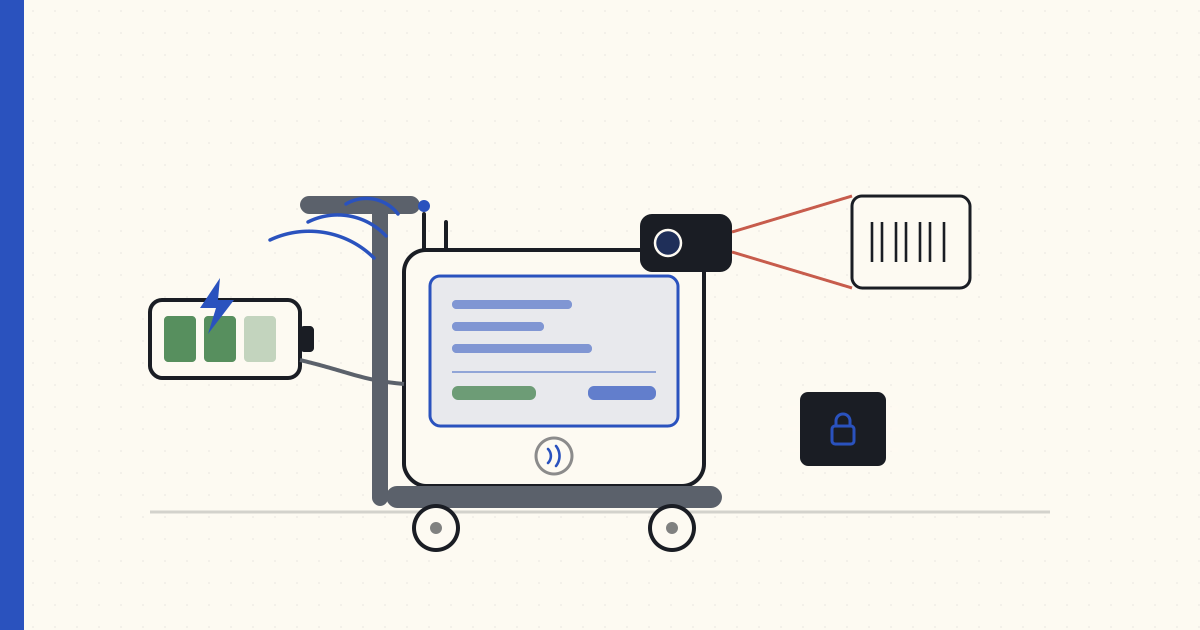
The PRD I'm writing before v2 hardware goes into prototyping. Part 1 of three — the hardware spec for a wheeled scanner-and-payment workstation.
I'm writing the product requirements document for the v2 connected hardware product. This is my second time writing one of these. I led the API platform for a BLE-connected consumer-health portfolio from 2017 to 2019 — the v1 series is the full story. That experience is shaping every section of this PRD. The team is freshly chartered, the budget just landed, and we have eight weeks to decide what we're building before we run out of "Q3 is for figuring it out" runway.
The PRD runs to 47 pages internally, structured in three parts. I'm publishing all three here, edited for public consumption and with brand-specific details abstracted. The product in the spec is a wheeled scanner-and-payment workstation — a "smart cart," in industry parlance — that lets a customer scan items as they shop and check out without queueing for a cashier. That's the worked example. The architecture and the constraints map cleanly to a broader family of "device-identifies-AND-bills-the-user" products — transit gates, parking meters, factory-floor PPE tracking — but the cart makes everything concrete.
This is Part 1 of 3: the hardware spec and system-level constraints. Part 2 covers application capability, data model, and cloud architecture. Part 3 covers identity, payment, PII, and the compliance threat model.
Product premise (the one paragraph)
A battery-powered, network-connected workstation that travels with the customer through a supermarket. The customer scans items into the station as they shop, sees a running total, and checks out — paying directly at the station — without ever queueing for a cashier. The station identifies itself to the cloud (so we know where each cart is, what state it's in, when it needs charging, when it's been kicked into a wall) and helps the customer identify themselves (loyalty card, tap-to-pay) so we can bill them. The station does not require the customer's phone to function — it has its own radio and its own cloud connection. The customer can choose to use their phone for receipts and history, but the cart shops with or without them.
That paragraph is what we're showing to legal, finance, and the supermarket-partner business-development team in week one. Every detail in the rest of the PRD answers a question that paragraph raises.
User stories — four golden paths and three edge cases
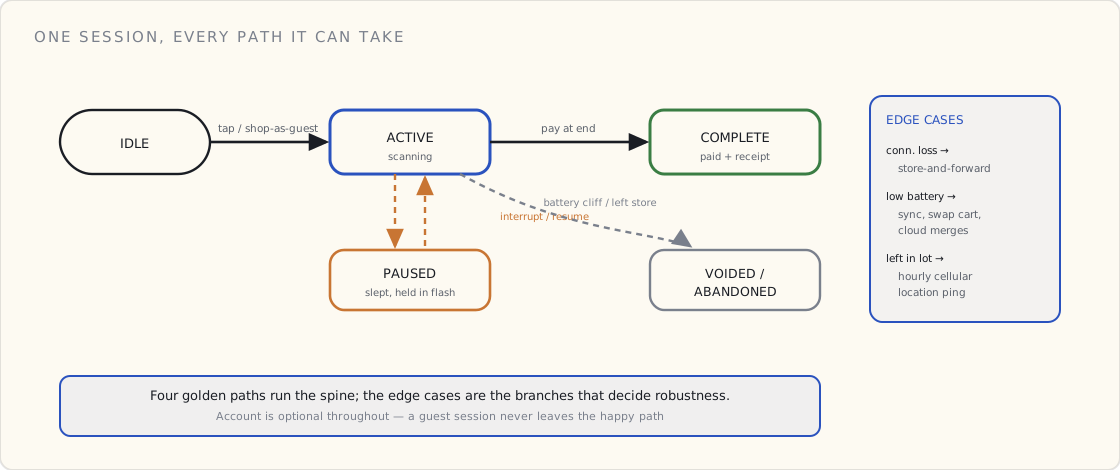
Golden path 1 — known customer, full trip. Customer walks up to a cart at the dock. Cart is awake, charged, idle. Customer taps loyalty card on the cart's reader. Cart greets them by first name on the display. Customer shops, scanning items. Cart maintains a running total. Customer wheels to the checkout zone, taps payment card. Cart sends a "session complete" event with contents. Cloud authorizes payment, returns a receipt. Customer leaves.
Golden path 2 — anonymous customer, full trip. Customer walks up. Skips loyalty tap (chooses "shop as guest"). Scans items. Pays at end. Cart never learns who they were. Cloud knows the transaction but not the human.
Golden path 3 — mid-shop loyalty add. Customer starts as guest. Halfway through, they remember they meant to use loyalty for a coupon. Tap loyalty card. Cart links the in-progress session retroactively. Continues normally.
Golden path 4 — interrupted shop. Customer parks the cart at customer service and leaves the store for ten minutes to retrieve a forgotten coupon. Cart goes to sleep, holding the in-progress session in flash. Customer returns, taps to wake the cart, resumes shopping.
Edge case 1 — connectivity loss during shop. In-store WiFi goes down. Cart fails over to cellular. If cellular is also down, cart enters store-and-forward mode — scans buffer locally, payment authorization is held. Customer can finish scanning. Payment at end happens via the in-store payment terminal as a fallback, not via the cart. Cart syncs everything back when connectivity returns.
Edge case 2 — cart out of battery. Cart detects low battery, warns the customer on the display, instructs them to swap to a different cart. In-progress session syncs to cloud over its last few watts. Customer scans loyalty/payment at the new cart and the cloud merges the session.
Edge case 3 — cart left in the parking lot. Customer wheels the cart out of the store with their groceries. Cart pings via cellular every hour with location. Store staff retrieves it. Cart never enters a state where it can be used outside the store's account (carts are paired to a store, not a customer).
Functional requirements (the must-do list)
The PRD lists 47 functional requirements. The top 10:
- Scan items via 1D and 2D barcode (95% scan success in <500 ms).
- Maintain a running session of scanned items with running subtotal.
- Display session contents on a 7-inch touch panel.
- Authenticate the customer via NFC loyalty card OR contactless payment card OR QR code in the mobile app.
- Accept payment via NFC contactless OR magstripe-as-fallback at session end.
- Communicate with the cloud via MQTT-over-TLS as the primary transport.
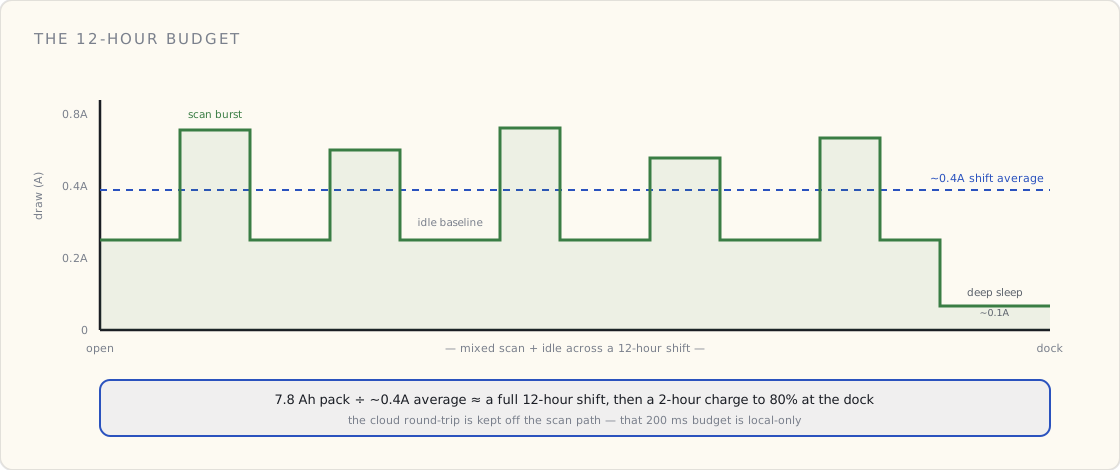
- Operate for a full 12-hour shift on a single charge.
- Survive a supermarket environment for 5 years (3-foot drops, freezer aisles, cleaning solvents, kid-kicks).
- Locate itself within the store to within 10 meters (for cart-recovery and analytics).
- Allow store staff to override any session state via a paired tablet.
The other 37 are mostly "if X then Y" branches that came out of the user-story workshops. The cleanest way to see why is to draw the one thing every story is really describing: the lifecycle of a single session.
Non-functional requirements (the don't-do list)
These are the constraints that disqualify implementations:
- Latency: a scan event must be acknowledged on the local display in under 200 ms. Cloud round-trips cannot be in this path.
- Battery: 12 hours of mixed-use on a single charge. Charge to 80% in under two hours at the dock.
- Uptime: 99% of carts in a store should be operational at any given store-open hour. Fleet-wide cloud-side uptime: 99.95%.
- Connectivity tolerance: cart must continue to function for at least one full shopping session if all external connectivity (WiFi and cellular) drops.
- Cost: BOM target $180/cart at v1 volumes (5,000 carts). Landed COGS target $240/cart. Five-year amortization; store pays $4/cart/month for the SaaS.
- Privacy: no PII on the cart at rest. Customer ID held in volatile memory only, dropped at session end.
- Security: every event signed by the cart's secure element. No cleartext payment data ever traverses the cart.
The cost line is the most load-bearing. The cart only makes sense at $4/cart/month if it can be built at $240 landed and run on $0.40/cart/month of cloud spend.
Hardware spec (the actual parts)
The PRD's hardware section is specific:
Compute
- Microcontroller: ESP32-C3 (RISC-V single-core, 160 MHz, integrated WiFi + BLE 5.0)
- 4 MB SPI flash for firmware + local session buffer
- Secure element: ATECC608A for device cert, payment-token wrapping, attestation
Radios
- WiFi 802.11 b/g/n 2.4 GHz, primary transport, MQTT-over-TLS to AWS IoT Core
- LTE-M (Cat-M1) cellular module, backup transport, MQTT-over-TLS over LTE
- BLE 5.0 (integrated in ESP32-C3) — used only for short-range pairing with the in-store payment terminal, staff-tablet override, and optional customer-phone QR sync
Sensors and I/O
- 2D imager barcode scanner (Honeywell-class, 1D + 2D, ~500 ms read time)
- Weight platform on the cart's tray, 0–30 kg, ±20g, used for anti-shrink detection
- 7-inch capacitive touch display, 1024×600
- NFC reader for loyalty/payment tap (ISO 14443, EMV-certified module from a specialist vendor)
- Speaker for scan-success feedback and accessibility prompts
- Buttons: power, scan-trigger, help
Power
- 7.4 V 7800 mAh Li-ion pack, swappable at the dock
- Charging via dock contacts at 2A
- Battery-management IC with low-battery cutoff at 6.4 V
- Estimated draw: 0.4A average across a shift (mixed scanning + idle), 0.1A in deep sleep
That 0.4A average is the number the whole power section is built around, and it's an average of very spiky behavior — short scan bursts riding on a low idle baseline, dropping to a deep-sleep floor whenever the cart is parked. Drawn out across a shift, the math is almost boring, which is the point: the pack has the headroom only because the design spends most of its time near idle.
Mechanicals
- IP54 ingress rating (dust + splash, not submersion)
- Drop tested to 3 feet onto vinyl
- Operating temperature: -10°C to +40°C (refrigerated-aisles consideration)
- Weight target: under 3.5 kg without battery, under 4.5 kg with
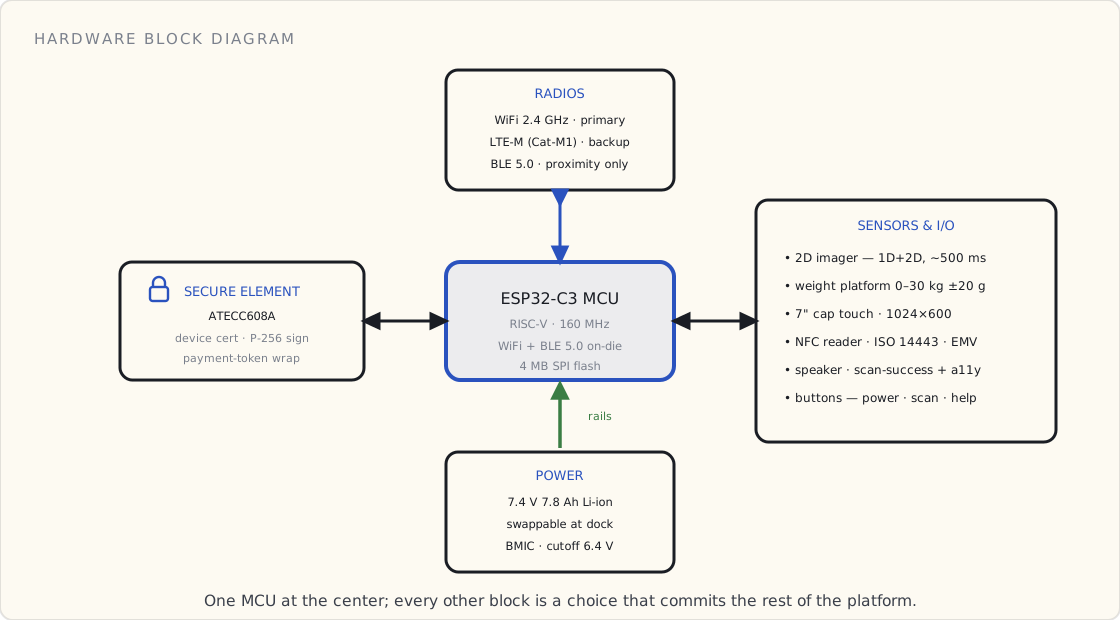
That parts list isn't a shopping cart of independent choices — it's a graph. The ESP32-C3 sits in the middle and everything else hangs off it, and every block I picked quietly commits the rest of the platform to something: the secure element fixes my crypto to P-256, the radios fix my transport to MQTT, the imager and weight platform fix what my data model has to carry. Here's the whole thing on one page.
Why MQTT over WiFi (the architecture decision the rest pivots on)
I'm summarizing the trade study here; the BLE-vs-LoRa-vs-cellular post will cover the broader rubric for connected-product wireless choice once we're past the spec phase.
Why MQTT, not HTTP REST. On a battery-powered device, HTTP costs you on every message:
- TCP three-way handshake per request (3 round trips of TX/RX over the radio)
- TLS handshake (another 4–6 round trips depending on session resumption)
- Headers (a typical signed REST request is 600+ bytes of HTTP plumbing)
- Connection teardown
A modest-sized scan event becomes a 2 KB TX/RX over a radio that's hard-on for 200–300 ms. Multiply by 50 scans/session × 3 sessions/cart/day × 365 = ~55,000 wake-cycles per year. Each wake-cycle costs battery and shaves cart-uptime.
MQTT, by contrast, holds a single persistent TLS connection. After the initial handshake (which happens once per cart power-up or radio re-association), every subsequent message is ~50 bytes of MQTT framing + 50 bytes of TLS framing. The radio can be in low-power-listen mode between messages, kicked into TX for milliseconds to publish, back to listen. Battery savings on the radio path are measured in 3–5×.
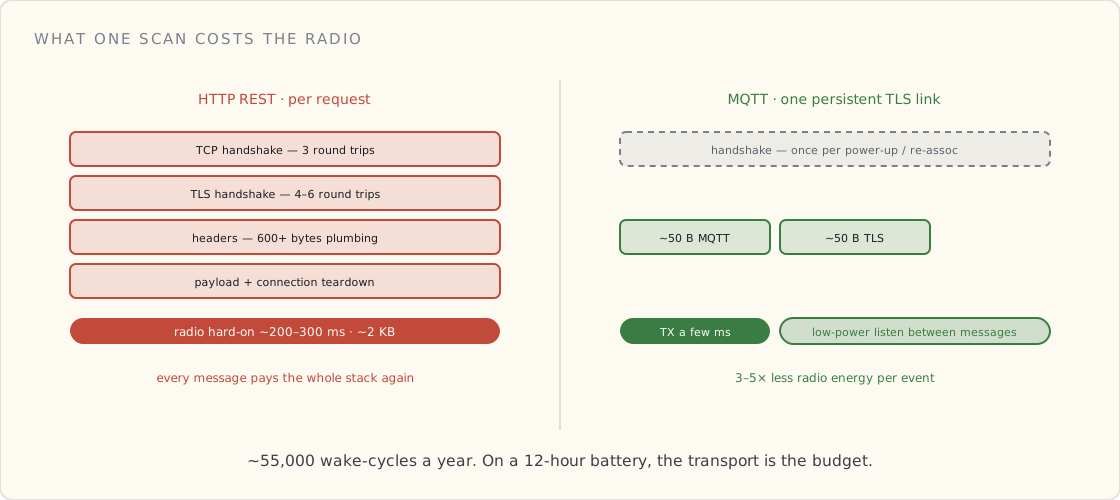
For a cart that has to last 12 hours on a single charge, MQTT is the only transport that hits the budget.
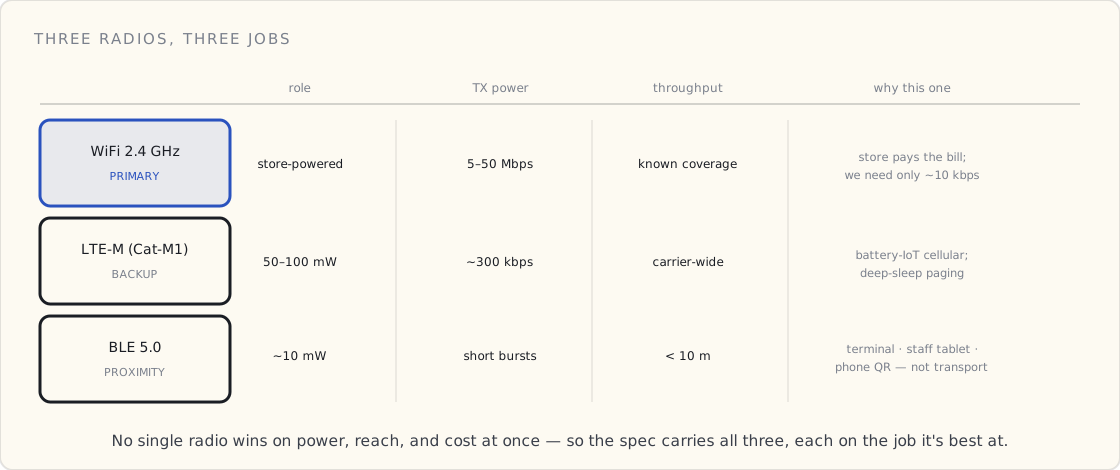
Why WiFi primary. Every supermarket has WiFi. We're paired to a specific store; in-store WiFi has known coverage and known QoS. The store pays the WiFi bill. We can negotiate priority on the corporate SSID. WiFi throughput is 5–50 Mbps, more than we need (we need ~10 kbps sustained per cart).
Why LTE-M backup. LTE-M (Cat-M1) is the cellular standard designed for battery IoT. Power profile: 50–100 mW transmit, deep-sleep paging that lets the radio sleep for minutes at a time. Data plan: $1–3/cart/month for 1 MB/day of usage, more than enough for backup. Coverage: every major US carrier, every major EU carrier. Roaming-aware. Latency: 200–400 ms — fine for "fallback only when WiFi drops" use.
Full 4G LTE (Cat-4 or higher) would give us 10× more throughput but cost 5× more power and a more expensive module. We don't need the throughput. LTE-M is the right answer.
Why BLE only for proximity. BLE in this design is not the primary radio. It's used for short-range pairing with three specific peer devices: the in-store payment terminal (for hand-off at checkout), the staff-override tablet (for incident response), and optionally the customer's phone (for app-QR-to-cart pairing). BLE bonds are stored in flash and survive reboots.
The honest reason there are three radios and not one: no single radio wins on power, reach, and cost at the same time. So each one does the job it's actually best at.
BOM target (the ugly math)
Component costs at 5,000-cart volumes, current 2023 pricing:
| Component | Unit cost |
|---|---|
| ESP32-C3 module (WROOM) | $3.20 |
| LTE-M module (Quectel-class) | $14.00 |
| ATECC608A secure element | $0.90 |
| 2D imager barcode scanner | $42.00 |
| 7" touch display | $24.00 |
| NFC reader (EMV-certified) | $11.50 |
| Weight platform | $18.00 |
| Battery pack (7.4 V 7.8 Ah) | $22.00 |
| Mechanicals / chassis / wheels | $26.00 |
| Misc (speakers, buttons, PCBs, antennas, connectors) | $14.40 |
| BOM subtotal | $176.00 |
| Assembly + test (Mexico) | $24.00 |
| Logistics / packaging | $18.00 |
| Landed COGS | $218.00 |
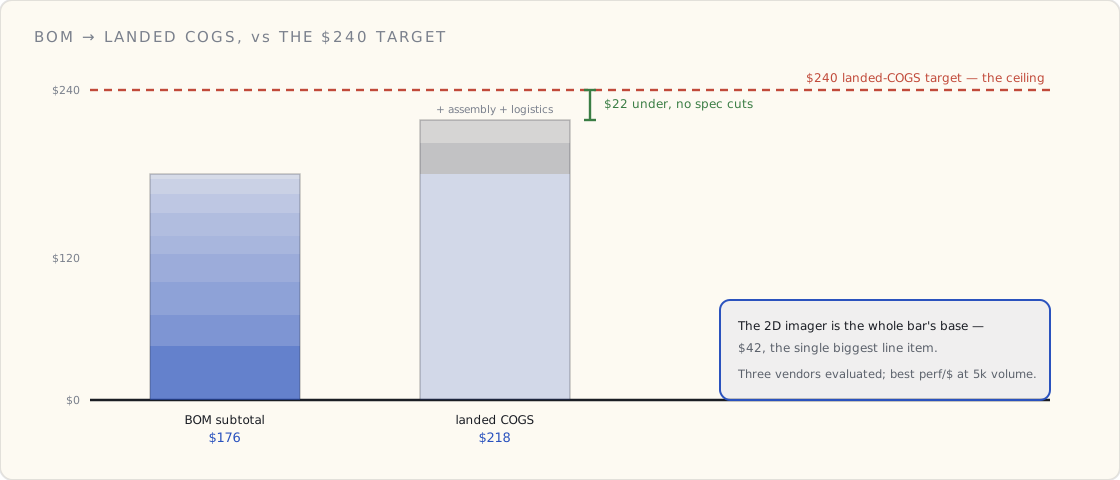
We're projecting $22 under the $240 target with no compromises on the spec. The barcode scanner is the single biggest line item; we evaluated three vendors and the Honeywell-equivalent at $42 is the best perf/$ at our volume. Stacked up against the ceiling, the headroom is real but not generous:
Where the PRD ends (Part 1)
The hardware section closes with a 3-page table of "open questions for hardware engineering" — supplier selection, mechanical revision schedule, certification timing (FCC, CE, EMV for the NFC reader), and a half-page of "things that might bite us in production."
The single biggest open question I expect to matter: EMC compliance in the refrigerated aisles. Refrigerator compressors throw off a lot of 2.4 GHz noise. We don't know yet how bad it will be — that's a prototype-against-a-real-fridge test that hasn't happened. The antenna placement and shielding plan in the current spec is a best guess; we'll learn what's actually needed once we have hardware to point at the problem.
Part 2 of the PRD covers the cloud-side and the app: what the cart talks to, what runs on the store-staff tablet, what data we store, and the entity model the platform will be built on. Part 3 covers identity, payment, PII, and the compliance threat model — the parts of the document where legal has made me defend every comma.
 Part 02 of 13
 v2 PRD, Part 2 — applications, data model, cloud
Part 2 of the v2 PRD. What the cart, the mobile app, the staff tablet, and the ops dashboard each do — the three-store cloud, the entity model that links them, and where the encryption boundary lands so PII has exactly one place to live.
This is Part 2 of 3 in the v2 PRD I'm writing this month. Part 1 covers the hardware spec. Part 3 covers identity, payment, PII, and compliance.
Part 2 is about what each piece of the system does — the cart, the customer's mobile app, the store-staff tablet, the ops dashboard — and the entity model that links them in the cloud. The cart is the visible product; the entity model is the load-bearing platform decision. I learned that the hard way the first time around. Previously I consolidated eight separate device APIs into one entity domain model over 13 months — work that should have been done at the start, not after eight teams had each built their own incompatible version. This time the entity model is the first artifact, not a retrofit.
System architecture (the one diagram everyone uses)
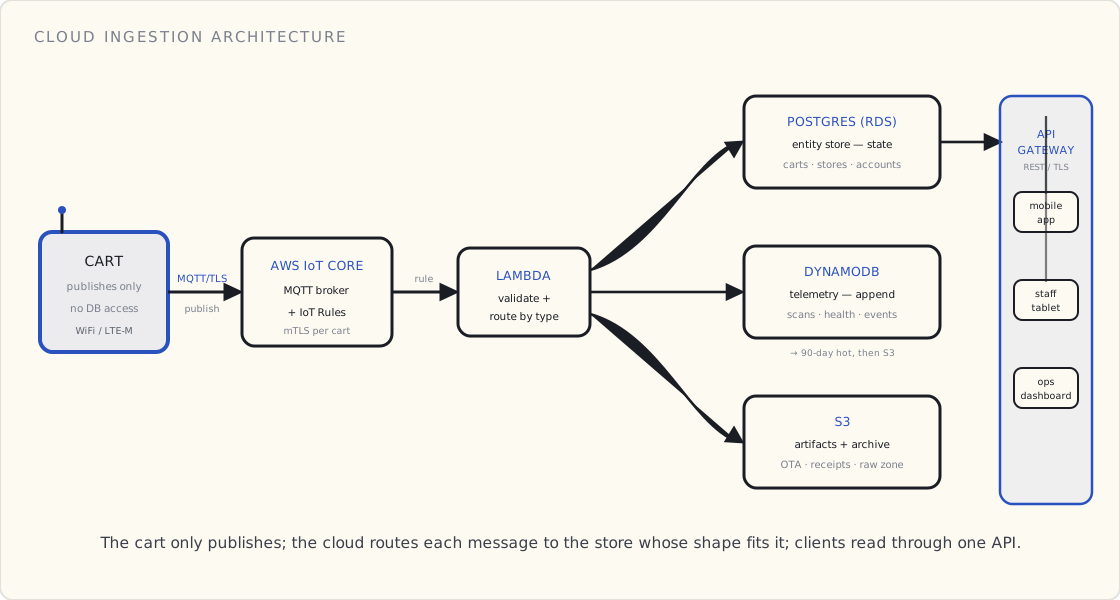
The PRD has a one-page architecture diagram I'm already drawing on whiteboards. It's the picture I want every engineer, every legal reviewer, and every supermarket-partner BD person to have in their head, so it has exactly one rule: the cart is on the far left, it only ever publishes, and everything to its right is the cloud deciding where that message belongs.
In prose:
- Cart ↔ in-store WiFi (or LTE-M backup) ↔ AWS IoT Core (MQTT broker)
- AWS IoT Core → IoT Rules → Lambda functions → Postgres entity store + DynamoDB telemetry store
- Postgres ↔ API Gateway ↔ mobile app, staff tablet, ops dashboard
- DynamoDB → analytics pipeline → store-partner BI dashboards
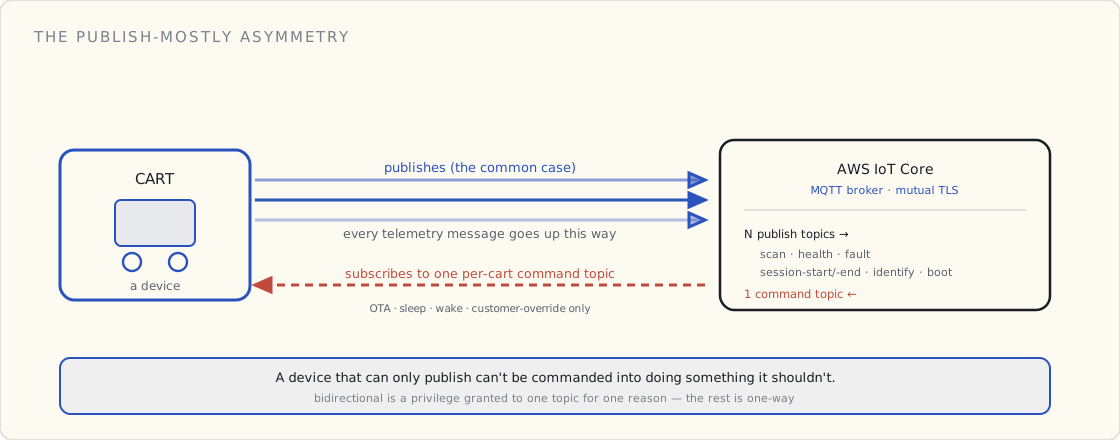
The cart never queries Postgres or DynamoDB directly. It publishes to MQTT topics. The cloud processes the message, writes to the appropriate store, and (if needed) sends a response on a response topic. Carts subscribe to a per-cart command topic for cloud-initiated commands (firmware updates, sleep, wake, customer-override). One-way most of the time; bidirectional only when explicitly required. That asymmetry is deliberate: a device that can only publish is a device that can't be commanded into doing something it shouldn't, and the identity work in Part 3 leans hard on it.
Three data stores by design
The single most common pushback I get on this diagram is "why three databases?" The answer is that we don't have one kind of data, we have three, and they have nothing in common except the cart that produced them.
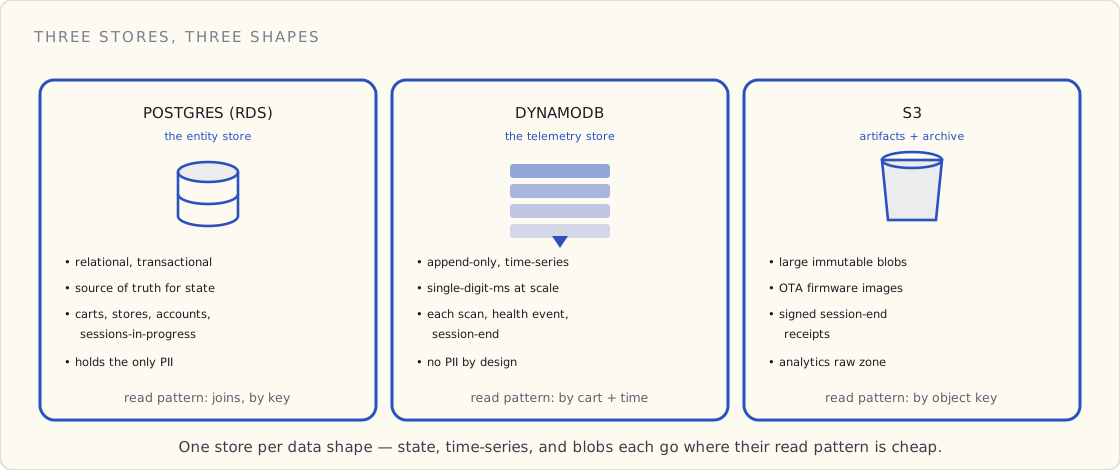
- Postgres (RDS) for the entity model — carts, stores, accounts, sessions-in-progress. Relational, transactional, the source of truth for state. When a question is "what is true right now," it's answered here.
- DynamoDB for telemetry — each scan, each device-health event, each session-end. Append-only, time-series, single-digit-ms writes and reads at fleet scale. When a question is "what happened," it's answered here.
- S3 for OTA firmware artifacts, signed session-end receipts, and the analytics raw zone. Large, immutable, write-once objects that don't belong in either of the other two.
The temptation — and I've watched a team give in to it — is to put everything in one Postgres instance because relational is familiar. Telemetry then arrives at tens of thousands of rows per store per day, the table that the whole entity model depends on gets locked behind a write storm, and six months later you're doing the migration anyway, under duress, with live traffic. Picking the store by the shape of the data on day one is the cheap version of a decision you will otherwise make the expensive way.
What each surface does
There are four pieces of software in this product, and they reach the cloud through exactly two doors. The cart speaks MQTT — it's a device, and MQTT is the transport the hardware spec in Part 1 is built around. The three human-facing surfaces — the customer's phone, the store-staff tablet, the ops dashboard — are all just REST clients of the same API. None of them talks to the broker, and none of them touches a database directly.
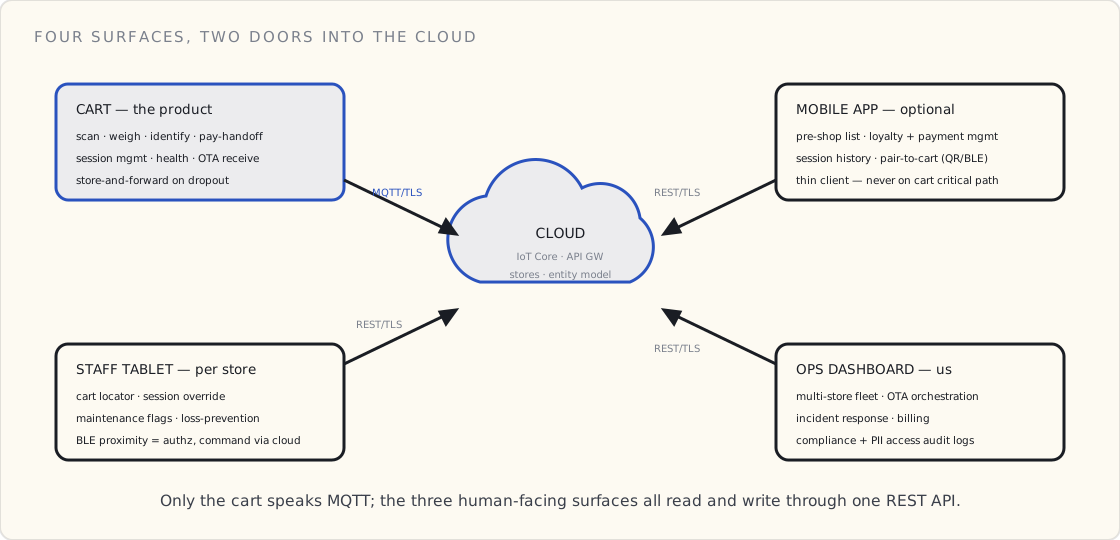
What the cart does (the device-side capabilities)
The cart's firmware will have these top-level capabilities:
Session management. Start, hold, resume, end. A session corresponds to one shopping trip. Multiple sessions per cart per day.
Item scanning. The 2D imager fires when the user pulls the trigger. The cart decodes, posts a scan event to MQTT, updates the display. Local cache of product info for the top 2,000 SKUs (so the display can show "Bananas" without a cloud round-trip on the happy path).
Weight verification. Each scan's expected weight is checked against the platform's actual delta. Mismatches don't block the session — they're flagged in telemetry for the loss-prevention dashboard.
Customer identification. Reads loyalty cards, payment cards, app QR codes. Posts an identify event that joins the session to a customer ID.
Payment hand-off. At session end, the customer taps payment. The cart hands the payment leg off to the in-store EMV terminal via BLE proximity (the cart never handles raw payment data — see Part 3). The cart receives an authorization token, posts a session-end event with cart contents + auth-token, and the cloud reconciles.
Health telemetry. Battery level, signal strength, scanner laser temperature, weight-platform-calibration drift. Posted every 60 seconds when active, every 5 minutes when idle.
OTA receive. Listens for firmware updates on a per-cart command topic. Verifies signature, writes to B-bank, verifies, reboots into new firmware. The OTA pipeline gets its own design doc — out of scope for the PRD.
Local store-and-forward. If connectivity drops, all events buffer to local flash. On reconnect, the cart re-publishes in order with original timestamps. The cloud dedups using (cart-id, monotonic-counter).
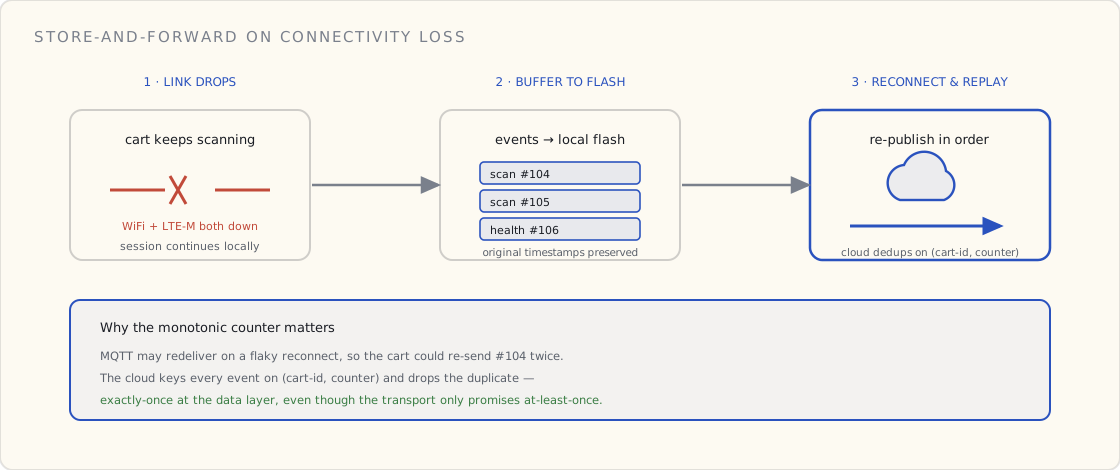
The cart will not do:
- Payment processing (handed off to EMV terminal)
- Customer profile management (lives entirely in the cloud)
- Long-term storage of PII (no PII at rest on the device)
- Direct database access (everything goes through MQTT)
What the mobile app does
The customer-facing mobile app is optional — the cart works fully without it. The app adds:
Pre-shop list. Customer builds a list at home. App syncs to cloud. When the customer pairs their cart at the store, the cart's display highlights list items as they're scanned.
Loyalty + payment management. Add/remove loyalty cards, payment methods, manage receipts.
Session history. Past shopping trips, receipts, item lookups.
Pair to cart. Scan a QR on the cart's display, or use BLE auto-pair if the user has explicitly opted in.
The app is a thin client over the cloud's customer-facing API. It is not on the cart's critical path for any functional requirement.
What the staff tablet does
Each store has 5–10 store-staff tablets paired to that store's fleet of carts. Capabilities:
Cart locator. Floor-plan view showing every cart's last-known location with state (idle, in-use, low-battery, fault).
Session override. When a customer needs help — a scan won't go through, a payment fails, a child has wandered off with the cart — staff pair their tablet via BLE proximity and can pause/cancel/restart the cart's session.
Maintenance flags. Mark a cart as out-of-service for cleaning, charging, repair. Cloud routes future customers to other carts.
Loss-prevention dashboard. Real-time view of weight-vs-scan-expected mismatches in the store. Staff can investigate suspicious sessions before checkout.
Fleet status. Battery levels, signal strength, firmware versions across the fleet.
The tablet doesn't connect to AWS IoT Core directly. It uses the cloud's REST API. The cart-to-tablet BLE pairing is for proximity authorization only — the actual command ("cancel session 12345") goes through the cloud.
What the ops dashboard does (the cloud-side admin)
The ops dashboard is for the company running the platform — us, not the supermarket. Capabilities:
Multi-store fleet view. Every cart in every store, sliced by store, region, firmware version, battery health, uptime.
OTA orchestration. Build firmware images, sign them, define rollout cohorts, monitor rollout health.
Incident response. Per-store paging, per-cart audit trail, customer-support escalation tooling.
Billing. Per-store usage metering, per-cart-month cost reporting, invoice generation.
Compliance reporting. PII access audit logs, payment-data-handling reports, regional data-residency dashboards.
The entity model (the contract with your future self)
This is the section of the PRD that will matter most for the next several years. Get the entity model wrong and every feature pays interest. Get it right and every new feature gets cheaper.
The seven entities:
Account. The human customer. One per person. Held in Postgres. Includes email, optionally name, optionally payment methods, optionally loyalty memberships. Account is the only entity that can hold PII.
Store. A physical supermarket location. Owned by a supermarket-chain partner. Has a geofence, a WiFi SSID, a fleet of carts.
Cart. A physical device. Belongs to one Store. Has a serial number (factory-burnt), a per-device cert, a current firmware version, a current location, a current battery level, a maintenance status.
Session. One shopping trip. Belongs to one Cart and (optionally) one Account. Has start-time, end-time, status (active, paused, complete, abandoned, voided).
Scan. One barcode read. Belongs to one Session. Has a timestamp, product SKU, quantity, weight-platform-delta, price-at-scan.
Item. A SKU. Belongs to one Store (or a regional catalog). Has product name, price, expected weight, category. Items are the only entity not owned by us — they're synced in from the store's POS system.
Payment. One authorization. Belongs to one Session. Has a token (never raw card data), amount, status, timestamp. PCI-DSS scope is bounded to this entity and the EMV-terminal handoff (see Part 3).
The cardinalities:
- Account 1 → N Sessions
- Store 1 → N Carts
- Cart 1 → N Sessions
- Session 1 → N Scans (typically 30–80)
- Session 0..1 → Payment
- Session 0..1 → Account (can be anonymous)
- Scan N → 1 Item
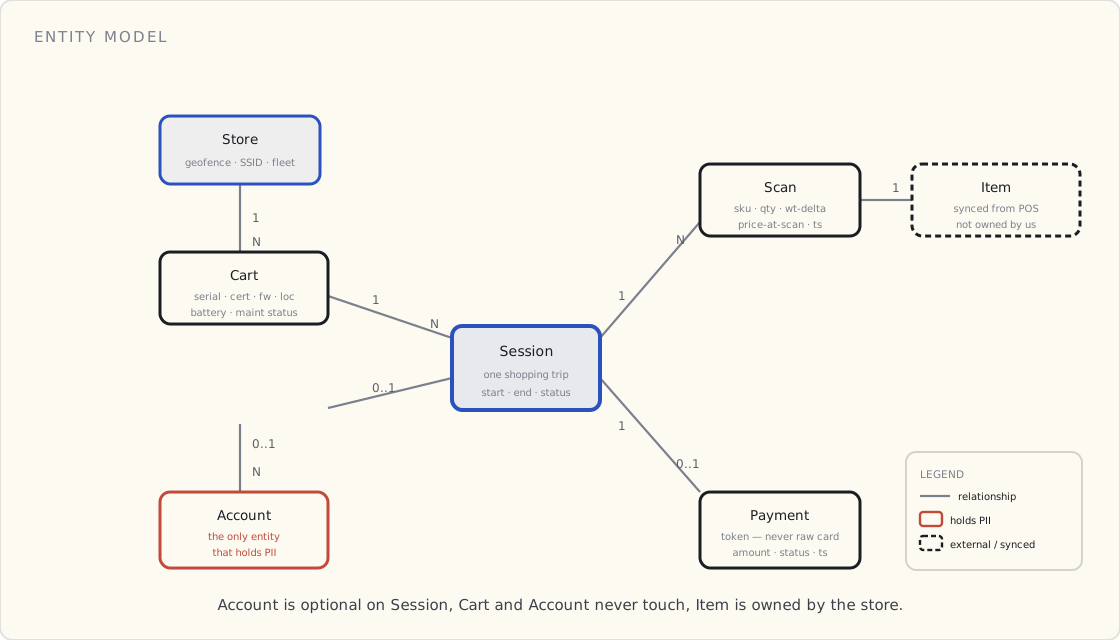
Three things this model gets right that I want to flag:
Account is optional on Session. A session can exist without an account (the guest-shopper case). This is non-negotiable — you cannot force customer identification before they're willing to give it, and the cart has to work without it.
Cart and Account are independent. Carts belong to Stores. Accounts belong to themselves. A customer can use any cart in any store; the cart doesn't "remember" them. This decouples identity from devices and keeps PII isolation clean.
Item is not owned by us. We sync from the store's POS system. The store owns its catalog. We never become the source of truth for product data — which means we never become responsible for product recalls, price corrections, or inventory.
Telemetry payloads (the wire format)
Every cart-to-cloud message is one of seven types. JSON over MQTT with a binary signature appended:
scan— barcode read eventsession-start— session begansession-end— session complete (with item count, total, payment token)identify— customer authenticated to sessionhealth— periodic device telemetryfault— error event (scanner jam, payment fail, battery cliff)boot— firmware boot, used for OTA verification
Each message is 200–800 bytes. The binary signature (ECDSA P-256 over the message body) is 64 bytes. We considered Protocol Buffers for size; we're picking JSON for debuggability, and because the size win isn't load-bearing at our message rate.
A wire format is only half the contract — the other half is what happens when a payload doesn't match it. MQTT acks the moment the broker receives a message, so by the time validation runs, the cart already thinks it succeeded. Whether the cart ever finds out it sent garbage is an architecture decision, not a detail, and it splits three ways depending on whether the device needs to know. That question gets its own post on validating at ingestion — for the PRD, the relevant line is that routine telemetry takes the async-filter path and the payment leg takes the synchronous one.
Encryption — in motion and at rest
This is the section legal reads twice. The rule the PRD states up front is blunt: nothing crosses the wire in the clear, and nothing sits on disk in the clear. Both halves matter, and they fail in different ways, so I spec them separately.
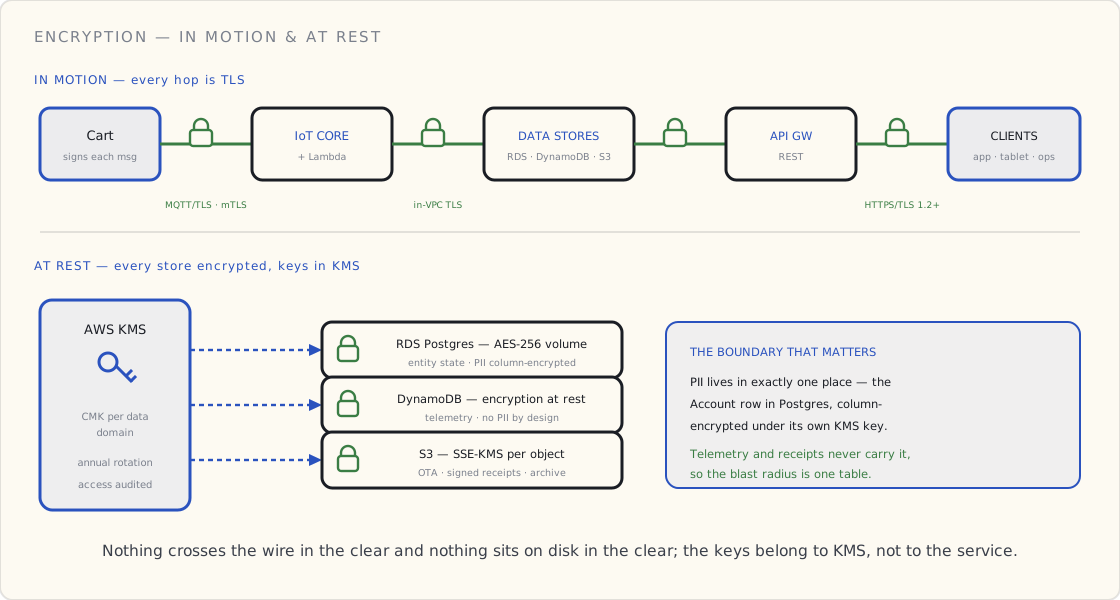
In motion. Every hop is TLS, no exceptions. The cart-to-cloud leg is MQTT-over-TLS 1.2 with mutual TLS — the cart authenticates the cloud against a pinned CA, and the cloud authenticates the cart against the per-device certificate burned in at the factory (Part 1 specified the ATECC608A that holds the private key). There is no anonymous or username/password path to the broker; a cart without a valid client cert never gets a session. Inside the VPC, Lambda-to-RDS and Lambda-to-DynamoDB ride TLS as well — "it's inside our network" is not a reason to send a Postgres connection in the clear. The three client surfaces reach API Gateway over HTTPS, TLS 1.2 minimum, with the weak cipher suites disabled in the gateway's security policy.
At rest. Every store is encrypted, and — this is the part that matters — the keys live in AWS KMS, not in the service. RDS gets AES-256 volume encryption under a customer-managed key. DynamoDB gets encryption at rest under its own key. S3 gets SSE-KMS, per object, for firmware images, signed receipts, and the archive zone. One KMS customer master key per data domain, rotation enabled, and — the reason you bother with customer-managed keys instead of the default AWS-managed ones — every decrypt is a CloudTrail event. When legal asks "who could read the account table, and when did they," the answer is a query, not a shrug.
The boundary that actually does the work is narrower than "encrypt everything," and it's the one I'd defend hardest: PII lives in exactly one place. It's the Account row in Postgres, and inside that row the genuinely sensitive columns — email, payment-method references, loyalty identifiers — are column-encrypted under their own KMS key, separate from the volume key. Telemetry never carries PII. Receipts in S3 reference an account by opaque ID, not by name. So a compromise of the telemetry store, or the receipts bucket, or a leaked DynamoDB backup, exposes no person — it exposes cart serials and timestamps. The blast radius of the scariest failure is one table, encrypted twice, behind an audited key. That containment is a data-model decision as much as a crypto one, which is why it belongs in this PRD and not in a separate security appendix nobody reads.
What I got wrong the first time. On the v1 health platform I treated "TLS everywhere + RDS encryption on" as done, and called it encrypted. It technically was. But PII was scattered across four tables because the schema grew organically, so when a regulator asked the blast-radius question, the honest answer was "most of the database," and the remediation was a quarter of schema surgery to corral PII into one place after the fact. The lesson I carried into this PRD: encryption is the easy 80%; deciding where the sensitive data is allowed to live is the 20% that's actually load-bearing, and it has to be a constraint on the entity model from day one, not a cleanup later. The detailed PII classification and the regulatory framing are Part 3's job — but the architecture that makes Part 3 tractable is decided right here, in where the bytes are allowed to sit.
Per-device cloud cost model
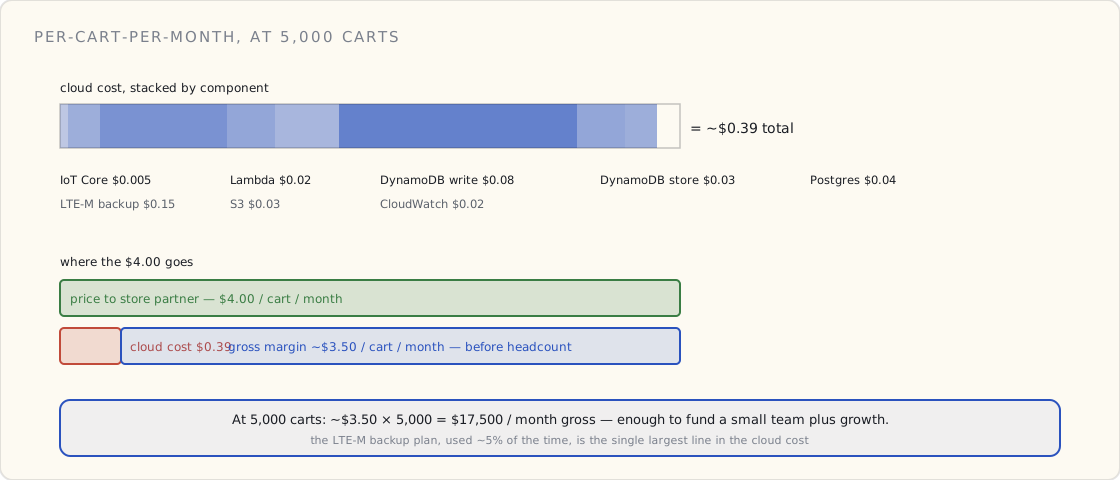
The PRD's cost section has a per-cart-per-month spreadsheet. Components:
- AWS IoT Core: ~5,000 messages/cart/month × $1/million = $0.005
- Lambda processing: ~$0.02/cart/month
- DynamoDB writes (PROVISIONED capacity): ~$0.08/cart/month
- DynamoDB storage (90 days hot, then to S3): ~$0.03/cart/month
- Postgres (entity store, t3.medium baseline): amortized $0.04/cart/month at 5,000 carts
- LTE-M data plan (backup transport, ~5% of traffic): $0.15/cart/month
- S3 (OTA + receipts + archive): ~$0.03/cart/month
- CloudWatch logs: $0.02/cart/month
Total: ~$0.39/cart/month at 5,000-cart scale.
Customer-facing pricing is $4/cart/month to the store partner. Margin: ~$3.50/cart/month before engineering and ops headcount. At 5,000 carts that's $17,500/month — enough to fund a small team plus growth investment.
Phasing — v1 vs v1.5 vs v2
The PRD scopes the phases hard.
v1 (launch). Scan, weigh, pay, OTA, fleet ops, store-staff tablet, anonymous + loyalty + tap-to-pay customers. No mobile app on the customer side. No pre-shop list. No advanced loss-prevention beyond weight-mismatch flagging.
v1.5 (six months post-launch). Customer mobile app for receipts and history. Real-time inventory integration with store POS. Cart-recovery for the "left in the parking lot" case.
v2 (twelve months post-launch). Pre-shop list with cart-side highlighting. Advanced loss-prevention with computer-vision on a future hardware rev. Optional in-app payment. Optional store-loyalty-only mode (no payment-at-cart, hand-off to manual checkout).
The hard cut on what's in v1 vs not is the thing the PRD does that matters most for shipping on time. Every feature pulled into v1 costs six weeks of v1 schedule. Every feature deferred to v1.5 is a feature we'll revisit with a quarter of field data informing the design.
What I'd tell a team writing the same document
- Write the entity model before you write the features. Every capability above is a sentence about entities and the edges between them. If the nouns aren't settled, the features are quicksand. We did this backwards once and paid 13 months consolidating eight incompatible models back into one.
- Pick the data store by the shape of the data, not by what's familiar. State, time-series, and blobs want different engines. Cramming them into one is a decision you make for free now or expensively later.
- Decide where PII is allowed to live, and make it a constraint, not a convention. One entity, one place, encrypted under its own key. "Encrypt everything" is the easy part; containing the sensitive data is what shrinks your blast radius and your audit.
- Keep the device on the publish side of the asymmetry. A cart that can only publish can't be told to misbehave. Bidirectional is a privilege you grant a specific topic for a specific reason.
- Spec the error and audit paths in the same breath as the happy path. Who reads the reject topic, who can decrypt the account table, who finds out when a payload is garbage — write those down now, because they're the questions you'll be asked under pressure.
The cart is the part everyone wants to talk about in the demo. The entity model and the encryption boundary are the parts that decide whether this thing is still cheap to build on in year five. Get the visible product wrong and you ship late. Get the data layer wrong and you pay interest forever.
What's next
Part 3 of the PRD takes the boundary this part drew — PII in one place, payment reduced to a token — and turns it into the identity, payment, and compliance design. Those are the sections where legal is making me defend every comma. They're also the ones that lock in the security architecture for the entire life of the product, which is exactly why the data model had to come first.
 Part 03 of 13
 v2 PRD, Part 3 — identity, payment, PII, compliance
Part 3 of the v2 PRD. The identity model, the payment-data-handling architecture, the PII classification scheme, and the compliance threat model.
This is Part 3 of 3 in the v2 PRD I've been writing across August and September. Part 1 covered the hardware spec. Part 2 covered application capability and the entity model.
Part 3 is the section that's taken three weeks of back-and-forth with legal and the CISO's team. Identity, payment, PII — these are the design decisions that determine the regulatory surface area of the product for its entire life. Get them right at the PRD stage and the next five years of audits go smoothly. Get them wrong and every feature negotiation has to relitigate fundamentals. I learned this from the wrong side on v1 — the three-tier PII classification we settled on with the privacy office in early 2018 is the architecture I wish I'd had on paper in week one. The regulatory regime here is different (PCI-DSS + GDPR instead of HIPAA + FDA Class I) but the architecture-of-boundaries principle is identical. This time the three-tier model is in the PRD from day one, not retrofitted six months in.
The three regulatory regimes that apply
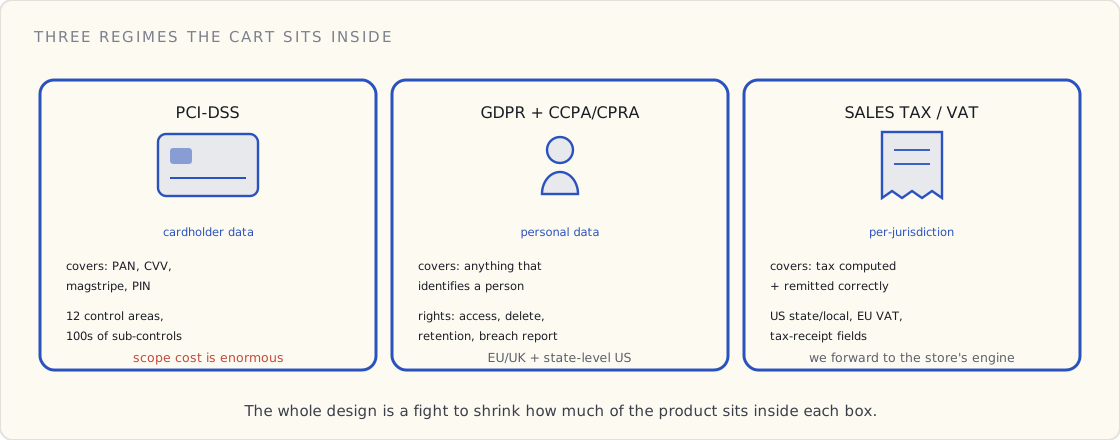
The cart sits at the intersection of three regulatory regimes:
PCI-DSS. Any system that "stores, processes, or transmits cardholder data" is in PCI scope. Cardholder data is the primary account number (PAN) plus optionally cardholder name, expiration, service code, and sensitive authentication data (CVV, magnetic stripe, PIN). PCI-DSS has 12 control areas with hundreds of sub-controls. The cost of being in scope is enormous.
GDPR and state-level US equivalents (CCPA, CPRA, etc). Personal data of EU/UK/California residents has data-subject rights, retention limits, breach reporting, and right-to-deletion. The definition of "personal data" is broad — anything that "directly or indirectly identifies" a natural person.
Local sales-tax + payment compliance. Varies by jurisdiction. In the US: sales tax must be computed and remitted correctly per state and local jurisdiction. In the EU: VAT. In some jurisdictions: tax-receipt requirements with specific data fields.
The PRD addresses each in turn. The PCI-DSS section is the longest by far.
The identity model — three layers, isolated
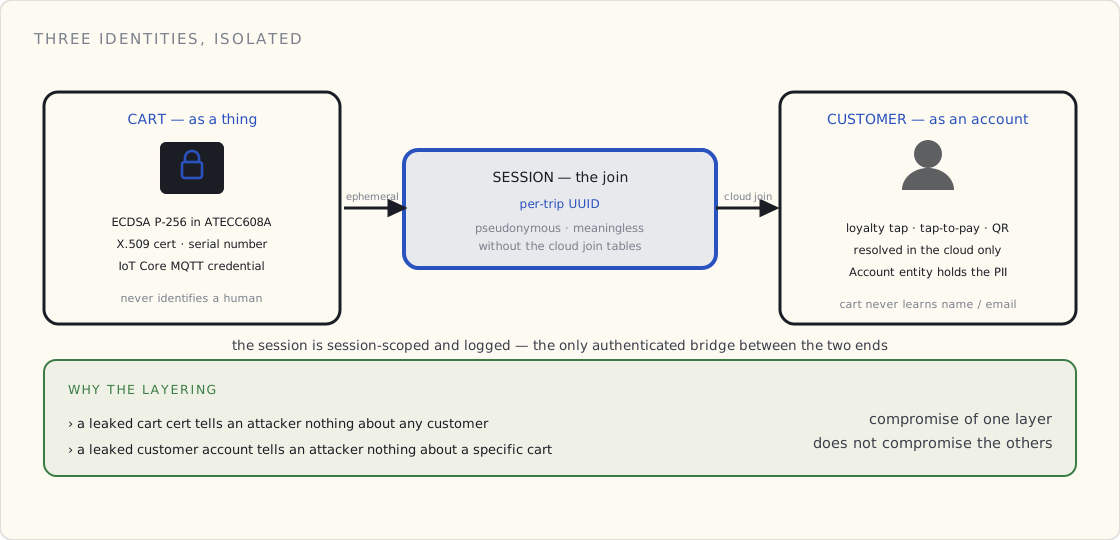
Identity in the cart system is layered. Three distinct identities, with explicit isolation between them.
Cart identity (cart-as-thing). Every cart has a unique cryptographic identity, established at factory provisioning:
- An ECDSA P-256 keypair generated inside the ATECC608A secure element. The private key never leaves the chip.
- An X.509 certificate signed by our internal CA, embedding the cart's serial number.
- A per-cart credential for AWS IoT Core authentication, derived from the cert.
Cart identity is used for: signing every telemetry message, authenticating MQTT connections to AWS IoT Core, attesting firmware integrity to the cloud during OTA, proving the cart is in a known-good state at session start.
Cart identity is not used for: identifying customers, holding payment data, or anything related to a human being. The cart-as-thing identity is orthogonal to all customer identity.
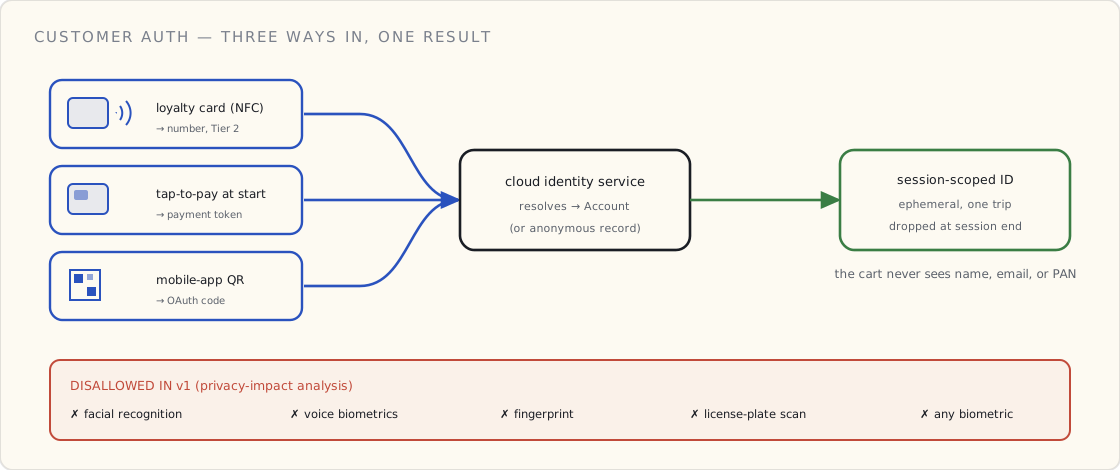
Customer identity (customer-as-account). A customer who chooses to be identified provides one of:
- A loyalty card number (low-PII, just a number, no biometric or financial component).
- A tap-to-pay event at session-start (resolves to a payment-method token, see below).
- A mobile-app QR code (resolves to an account ID via OAuth).
Customer identity is stored only in the cloud, in the Account entity (see Part 2). The cart receives a session-scoped customer ID — an ephemeral identifier good only for the duration of one session, dropped from cart memory at session end. The cart never knows the customer's email, name, address, payment method, or loyalty history.
Session identity (the per-session pseudonym). Every session has a UUID generated at session-start. The session ID is what links scans, payment, and (optionally) customer in the cloud. The session ID is what appears in receipts, audit logs, and analytics. It's pseudonymous — meaningful only in conjunction with the cloud's join tables, which require authenticated API access.
The point of this layering: the cart-as-thing and the customer-as-account are independently controlled, with the session as the disposable join between them. A leaked cart cert tells an attacker nothing about customers. A leaked customer account tells an attacker nothing about a specific cart. Compromise of one identity layer does not compromise the others.
Customer authentication options
The PRD specifies three customer-auth options in v1 and explicitly disallows others.
Loyalty card tap (NFC). Customer taps a loyalty card on the cart's NFC reader. The reader returns the loyalty card's identifier (typically a 16-digit number). The cart posts an identify event with the loyalty number. The cloud's identity service resolves the loyalty number to an Account, returns a session-scoped customer ID. Cart binds the session to the customer.
The loyalty card number is treated as Tier 2 PII (see classification below) — pseudonymous, joinable to Account by us, not by anyone without API access.
Tap-to-pay at session start. Customer taps a contactless payment card on the NFC reader. The EMV-certified NFC module performs the tap, returns a payment-method token — not the PAN (see PCI-DSS section below). The cart sends the payment-method token to the cloud's payment service in the identify event. The payment service resolves the token to an Account if one exists (the customer has registered this card before), or creates an anonymous "card-holder" record if not.
Mobile-app QR. Customer opens the mobile app, scrolls to a "Pair to Cart" screen. The app shows a QR code. The customer holds the phone up to the cart's scanner, which reads the QR. The QR contains a short-lived OAuth code. The cart exchanges it via the cloud for a session-scoped customer ID. The customer's account is now bound to the session.
Explicitly disallowed in v1: facial recognition, voice biometrics, fingerprint, license-plate scan, anything that requires the cart to capture a biometric. The privacy-impact analysis rules these out.
Payment scope (the PCI-DSS box)
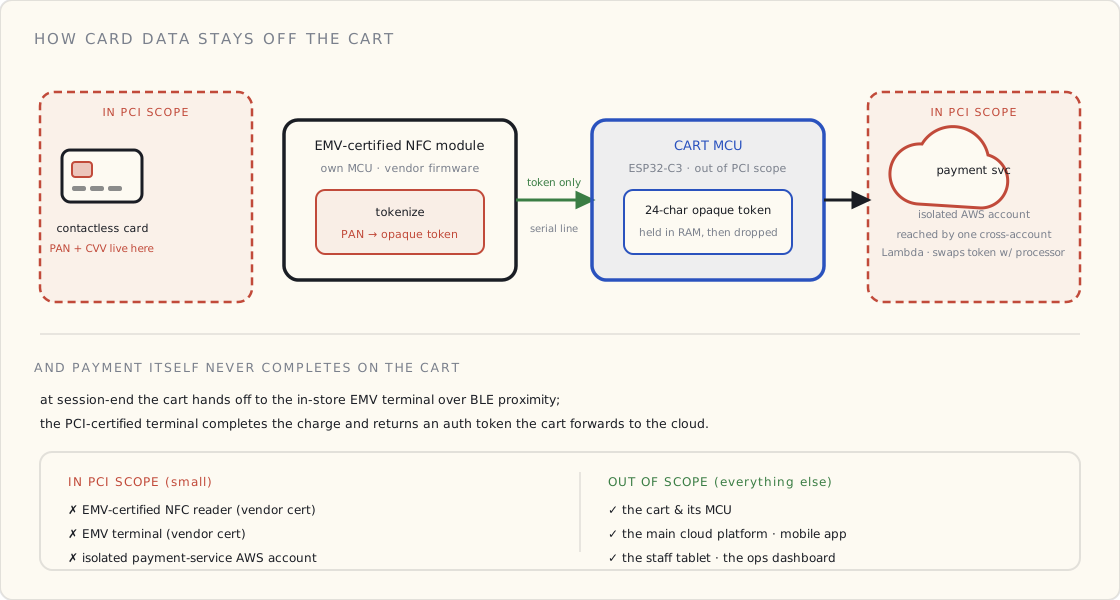
This is the section that matters most. PCI-DSS scope is the single biggest determinant of audit cost and certification burden. The architectural goal: the cart is not in PCI scope.
How we achieve that:
Raw payment data never enters the cart's main MCU. The NFC payment reader is an EMV-certified module from a specialist vendor. It has its own internal microcontroller, runs vendor-certified firmware, and connects to the cart's main MCU via a serial line that carries only EMV-defined responses — never raw PAN, never CVV, never magstripe data. The EMV module produces a payment-method token via tokenization; that's all the cart's main MCU ever sees.
The cart's MCU treats payment-method tokens as opaque. The token is a 24-character string. The cart can store it briefly in RAM, send it to the cloud, and then forget it. The token is not a card number — it can't be used to make a transaction without the merchant's tokenization service authorizing it.
Payment authorization is server-side, in a separate AWS account with PCI scope. The cloud's payment service runs in an isolated AWS account that is in PCI scope. It receives tokens from the cart, exchanges them with the payment processor for authorizations, returns auth tokens to the cart. The PCI-scope AWS account has cross-account-IAM access from exactly one Lambda function in the main platform account; no other service can reach it.
The cart cannot complete payment by itself. At session-end, the cart hands off to the in-store EMV terminal via BLE proximity. The EMV terminal (PCI-certified, vendor-managed) completes the payment, returns an auth token. The cart sends the auth token plus session contents to the cloud. The cloud reconciles, sends a receipt.
Result: PCI-DSS audit scope is bounded to (a) the EMV-certified NFC reader vendor's certification, (b) the EMV terminal vendor's certification, and (c) our isolated payment-service AWS account. The cart itself, the main cloud platform, the mobile app, the staff tablet, and the ops dashboard are all out of PCI scope.
This isolation is worth, in 2023 dollars, somewhere between $400K and $1.5M per year in saved audit and compensating-control costs.
PII classification (the three-tier model)
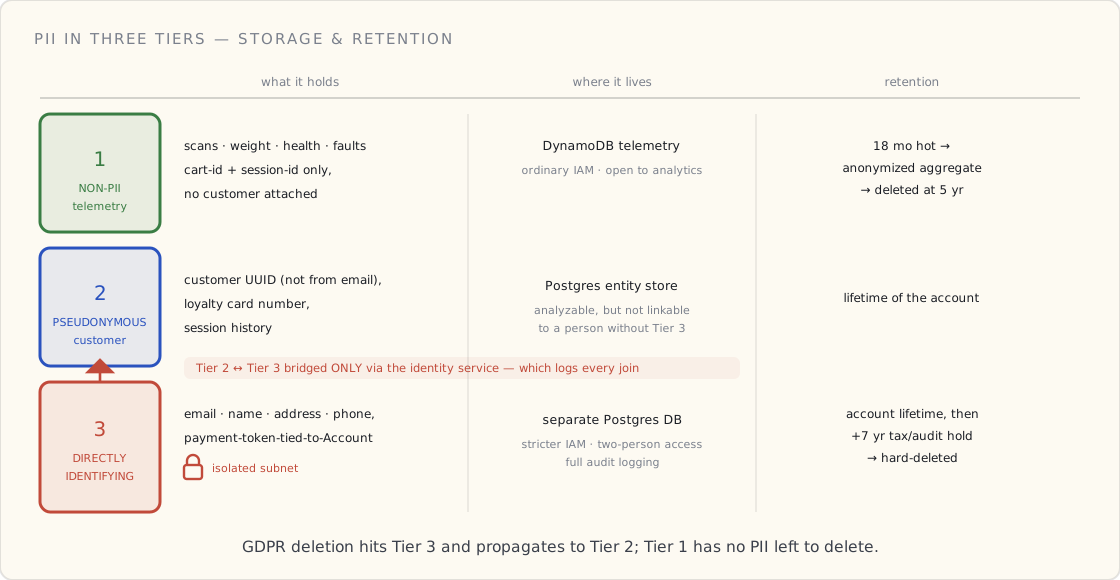
The cloud-side data is classified into three tiers, with separate storage paths, IAM policies, and access logging. Same model I've used at every connected-product platform I've owned.
Tier 1 — non-PII telemetry. Anything tied only to a cart ID and a session ID, with no customer attached server-side. Scan events, weight events, health events, fault events. Stored in DynamoDB telemetry, available to analytics, no special access controls beyond ordinary IAM.
Tier 2 — pseudonymous customer data. Customer ID (a stable UUID, not derived from email or payment info), loyalty card number, session history. Stored in Postgres entity store. Can be analyzed at the customer level but cannot be linked to a real person without access to Tier 3.
Tier 3 — directly identifying PII. Email, name, address, payment-method tokens-tied-to-Account, mobile phone number. Stored in a separate Postgres database in an isolated subnet with stricter IAM, two-person access controls for raw access, and full audit logging. Bridged to Tier 2 only via the identity service, which logs every join.
Each tier has a published retention policy:
- Tier 1: 18 months hot, then anonymized aggregation, then deleted after 5 years.
- Tier 2: lifetime of the account.
- Tier 3: lifetime of the account, plus 7 years post-deletion for tax/audit (where required by jurisdiction), then hard-deleted.
GDPR data-subject rights (access, correction, deletion) are honored against Tier 3 directly and propagate to Tier 2. Tier 1 is not affected because it has no PII to delete — the cart-and-session events are not personal data once disconnected from the customer.
The threat model (the high-level)
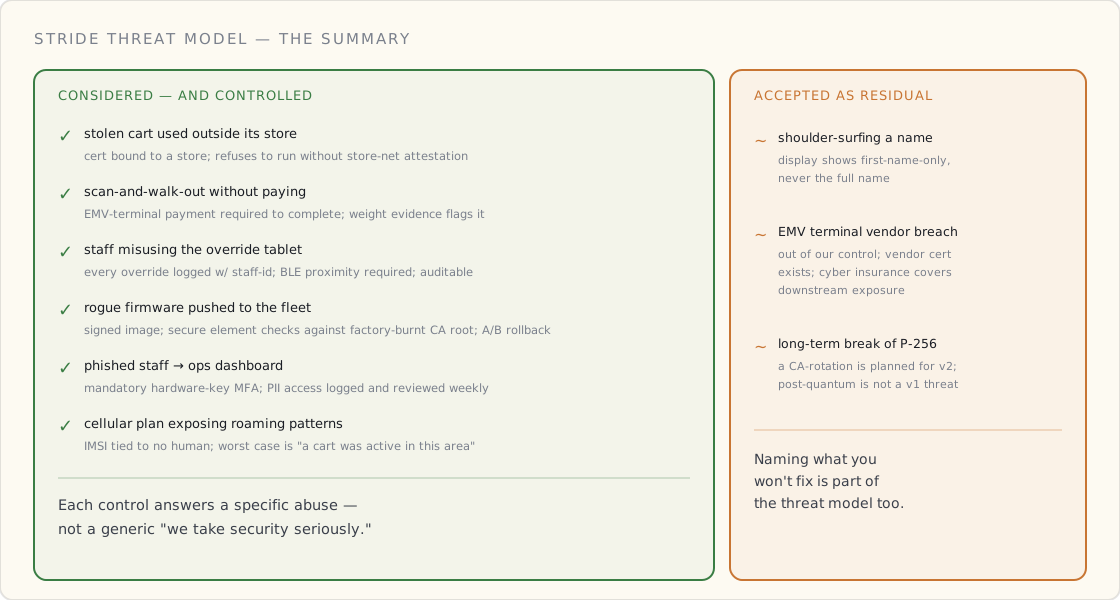
The PRD includes a STRIDE threat model that runs 14 pages. The summary:
Threats we considered and have controls for:
- A stolen cart used outside an authorized store. Mitigation: cart cert is bound to a specific store; the cart refuses to operate without an authenticated store-network attestation.
- A malicious customer scanning items and walking out without paying. Mitigation: payment at the EMV terminal is required for session completion; an "exit-without-pay" is a flagged fault, alerts staff, and (with weight-sensor evidence) supports loss-prevention.
- A staff member with the override tablet adjusting sessions improperly. Mitigation: every staff-tablet override is logged with the staff ID, requires BLE proximity to the cart (preventing remote abuse), and is auditable.
- A rogue firmware build pushed to the fleet. Mitigation: OTA requires a signed firmware image; cart's secure element validates the signature against a CA root burnt at factory time; cart bootloader has dual-bank rollback.
- A phishing attack on a staff member that compromises the ops dashboard. Mitigation: mandatory hardware-key MFA on dashboard logins; PII access logged and reviewed weekly.
- A compromised LTE-M data plan exposing roaming patterns. Mitigation: the cellular module's IMSI is not associated with any human identity; even with full carrier-records access, the most an attacker learns is "this cart was active in this geographic area."
Threats we explicitly accept as residual:
- A customer photographing the cart's display to learn another customer's name (if they pair with loyalty card). Mitigation: display never shows full name; first-name-only.
- An EMV terminal vendor breach. Mitigation: out of our control; certification exists; cyber insurance covers downstream exposure.
- A long-term cryptographic break of ECDSA P-256. Mitigation: we'll plan for a CA-rotation in v2; current threat is post-quantum and not v1-relevant.
Cross-border data flows
The cart system is being designed for US launch with planned EU expansion. The PRD calls out four cross-border considerations:
Data residency. EU customer PII will live in EU regions only (eu-west-1 or eu-central-1, depending on store location). US PII lives in US regions. We do not co-locate. This costs more in cloud infra but avoids EU-US data-transfer complications.
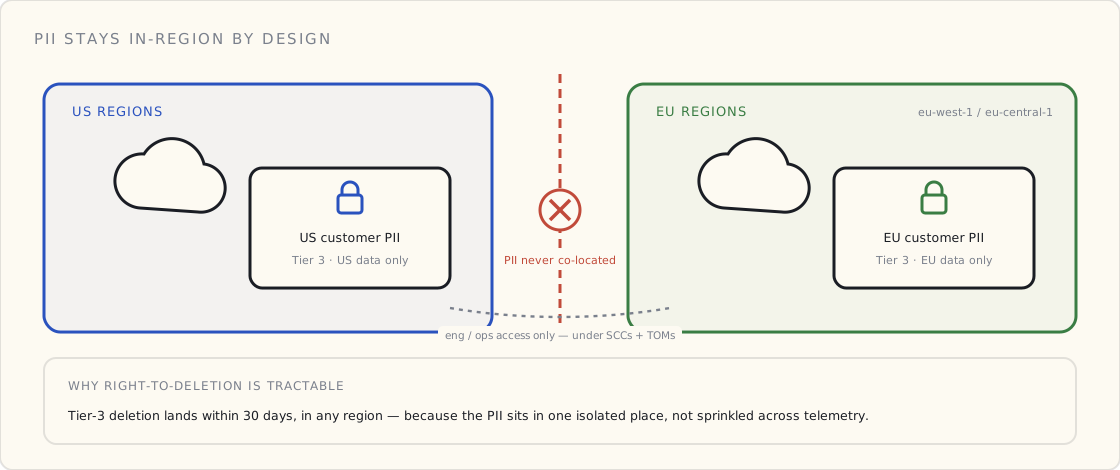
Standard Contractual Clauses. For any unavoidable data flow between regions (engineering access, ops dashboard from US team), SCCs will be signed with appropriate technical and organizational measures.
Right to deletion. Tier 3 PII deletion can be honored within 30 days for any region. The cloud's PII isolation makes this tractable; if PII were sprinkled across telemetry, this requirement would be far harder.
Tax handling. Sales tax and VAT computation are integrated with the store's POS system. We don't make tax decisions; we forward sale data to the store's tax engine and surface the resulting receipt to the customer.
What this PRD prevents
A useful exercise: look at the PRD and ask "what bad outcome does each section prevent?" The Part 3 sections specifically prevent:
- A PCI-DSS audit failure (avoided by scope minimization).
- A GDPR fine (avoided by data residency + retention + right-to-deletion infrastructure).
- A cross-tenant PII leak (avoided by the three-tier classification).
- A "single key compromises everything" failure (avoided by cart-cert / customer-account / session-id separation).
- A "we can't ship to Europe" project delay 18 months in (avoided by designing for residency from day one).
The cost of Part 3 has been approximately three weeks of my time, two weeks of legal review, and one week of security engineering review. The return on that investment is measured in not-having-to-rebuild for the entire life of the product.
The PRD's final paragraph
The actual final paragraph of the PRD:
This document is the v1 baseline. Every variance from it requires explicit approval from product, engineering, security, and legal. The product we ship in v1 will be the product described here. Subsequent versions will revise this document; this version is the contract for the first twelve months of build.
Next in the series: the first-month-of-build post, where the PRD meets reality.
 Part 04 of 13
 Building a connected hardware product — month one
Notes from the first month leading a connected-product team for the second time. What changed from v1 (2017-2019) to v2, what didn't, and the three decisions that mattered more than the rest.
I'm leading the engineering team building a connected hardware product. We're a month in. This is my second time around — 2017 to 2019 I led the API platform side of a BLE-connected consumer-health portfolio (the v1 series is the full story). This time the device has WiFi and I own the hardware and the firmware too. Different stack, different scale, mostly the same mental model.
Notes from the first month, in case it helps the next person — or the next-me, four years from now.
What I underestimated
One. The hardware decision is a five-year contract with your past self. The microcontroller we picked in week three sets a ceiling on what we can do in firmware in year four. There is no npm install for "different chip." The same is not true for a SaaS feature, where you can refactor underneath the UI for a year and nobody knows.
On v1 I argued for two more bytes in a device-ID byte format. I lost the argument. I then built workarounds in the API for 18 months. This time the room is mine — I'm the one picking the chip, the BOM, and the radio. The five-year contract with my future self is one I'm signing in my own handwriting. That's more nerve-wracking than I expected.
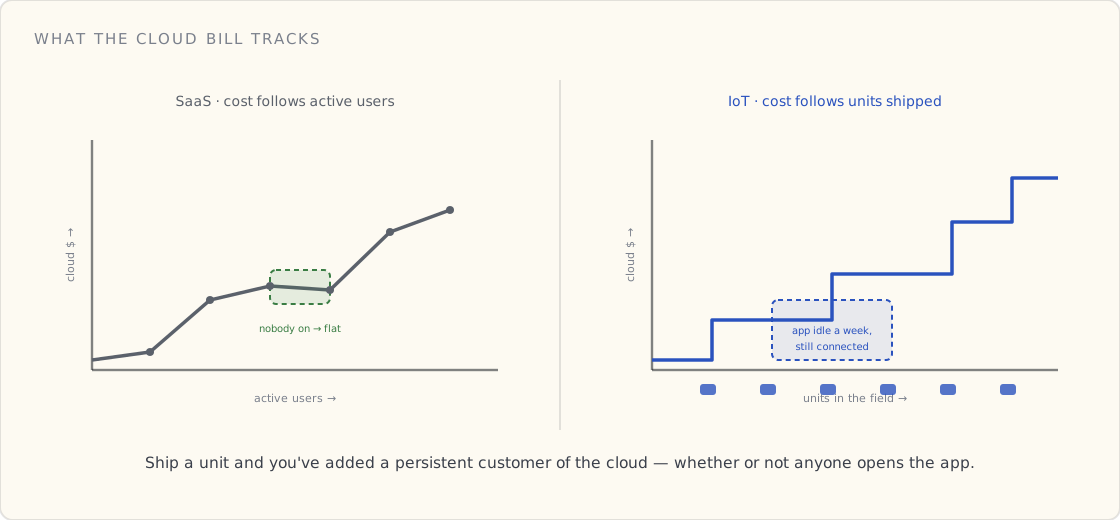
Two. The cloud bill scales with the device count, not the user count. I learned this previously and had to re-explain it to the team here in a budget meeting that did not go great. With IoT, every device you ship is a persistent customer of the cloud whether the user opens the app or not. We're used to "if a feature gets popular, infra grows." With IoT, "if hardware ships, infra grows" — and hardware ships even when nobody opens the app for a week.
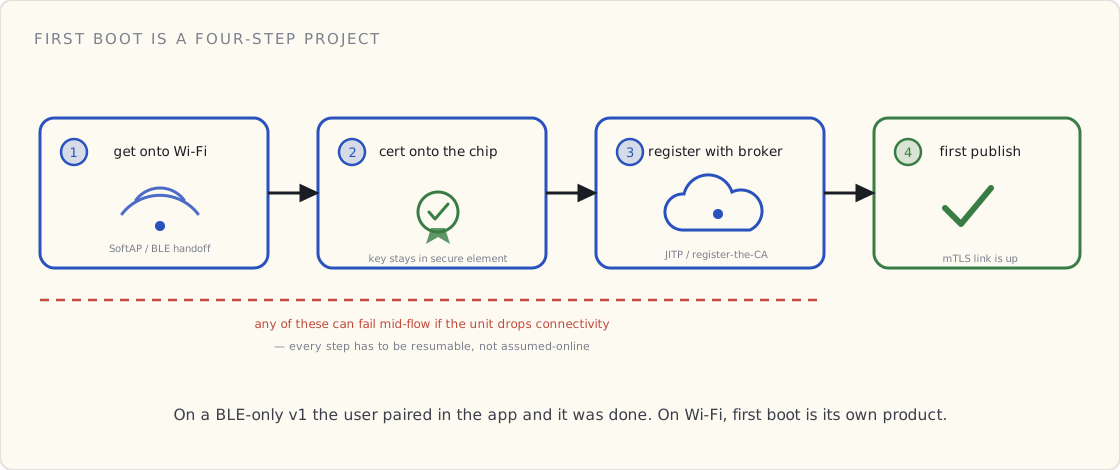
Three. Provisioning is its own product. On v1 this was almost trivial — the device had only BLE, the user paired in the app, done. On v2 the device has WiFi, which means putting a device on Wi-Fi for the first time, getting a certificate onto it, getting that certificate registered with the IoT broker, and having all of that survive the user being out of cell range — that flow is its own project. We are still on the first draft.
What we got right (informed by v1)
Two things we did almost reflexively that I'd recommend in writing now:
We picked a managed IoT broker + MQTT for the cloud side and didn't try to roll our own. On v1 we'd rolled our own — home-grown REST — because the BLE-only device topology didn't fit a device-direct-MQTT broker. Here, the device has WiFi. The managed broker fits. There is still a strong temptation, when you have engineers who've built distributed systems, to "just run a few Mosquitto containers" anyway. Don't. The certificate-management story alone is a six-week project we didn't have to take on. MQTT-over-TLS into the broker, one cert per device, a routing rule into a serverless function. Boring. Works.
We scoped the v1 to telemetry one-way, no cloud-to-device commands. Same call I made on the first connected product — telemetry up first, commands down later. Same reasoning: telemetry up is one problem; commands down is a different problem (idempotency, retries, acknowledgment, queueing) and combining the two in v1 is how teams ship six months late. We'll add commands in a later release.
What I'm worried about for v2
Three things on the watch list:
- OTA firmware updates. We're going to need this. We don't have it yet. I shipped OTA on the first connected product and I know what it costs to ship without it — every minor firmware bug becomes a customer-support escalation, every sensor-calibration issue an RMA. We're deferring out of capacity, not naïveté, which is worse in some ways. The cost is going to come due in 12-18 months.
- Per-device certificates at fleet scale. A cert per device is fine when there are five devices on a desk. Previously we got this right by accident — the hardware team baked the cert into the firmware at factory provisioning and we never rotated. We won't get away with that here; this market has cert-rotation expectations. I'm reading about Just-in-Time Provisioning and Multi-Account Registration this weekend.
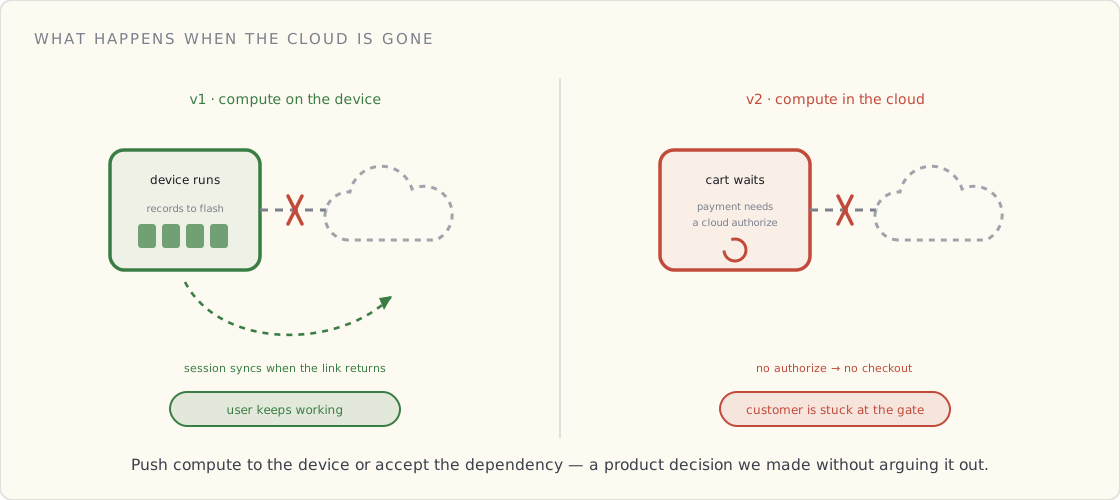
- What we do when the cloud has an outage. Our device is useless without the cloud right now. On v1 the device worked offline — the device ran, the user used it, the session got recorded to flash, synced later. Here the cart can't accept payment offline. That's an architecture choice we made and didn't think hard enough about. Whether to push compute to the device or accept the dependency is a real product question, not a tech question.
The framing that's helped most
Two sentences I keep repeating to the team — both lifted directly from v1:
The device is the customer. Every wire-format change is a backward-compatibility problem. Every cert rotation is a fleet operation. Every firmware version is something we have to support for the life of the unit, which is probably longer than my tenure.
Treat ship date as the start of operations, not the end. When you ship a SaaS feature, you turn it on. When you ship hardware, you start a relationship that goes for years and that you can never quite finish.
The team isn't always thrilled when I say either of those, but it changes which arguments we even have, which is the only point of a framing.
More from the field next month.
 Part 05 of 13
 DynamoDB for time-series IoT — when the relational urge is wrong
Every six months an engineer on my team proposes putting our device telemetry into Postgres. Every six months I have to explain why DynamoDB is the right answer. Here it is, in writing.
Every six months a senior engineer on my team has the same idea, with the same energy, and pitches putting our device telemetry into Postgres. We know SQL. We have an RDS instance running. We could just add a table. Every six months I have to explain why the answer is no.
I'm writing it down once so the next person can read this instead of me re-explaining it in a meeting.
Note before the argument: previously, on my first connected product (the v1 series, 2017-2019), we put a million devices' worth of telemetry into Postgres and it worked fine. So I've actually run the experiment the engineers are proposing. It worked at v1's shape of workload — ~3 sessions per device per day, ~500 bytes per session, mostly relational access patterns. It would not have worked at v2's shape, which is what this post is about.
Why the relational urge happens
It's not a bad instinct. Postgres is well understood, our team has decades of collective experience with it, the query language is more expressive, and operationally a database the team already runs is cheaper to add to than a database they haven't.
The relational urge breaks specifically on the shape of IoT telemetry:
- Writes are append-only and continuous. Devices publish every N seconds, forever, never updating an old row.
- Reads are almost always recent — "last 100 events for this device" — and almost never aggregated across the whole table.
- The schema is wide-ish, low-cardinality on most columns, and never JOINs to anything meaningful.
- The volume grows linearly with device count, not user count. A successful product has 100K devices each writing once a minute. That's 144 million writes per day. Every day. Forever.
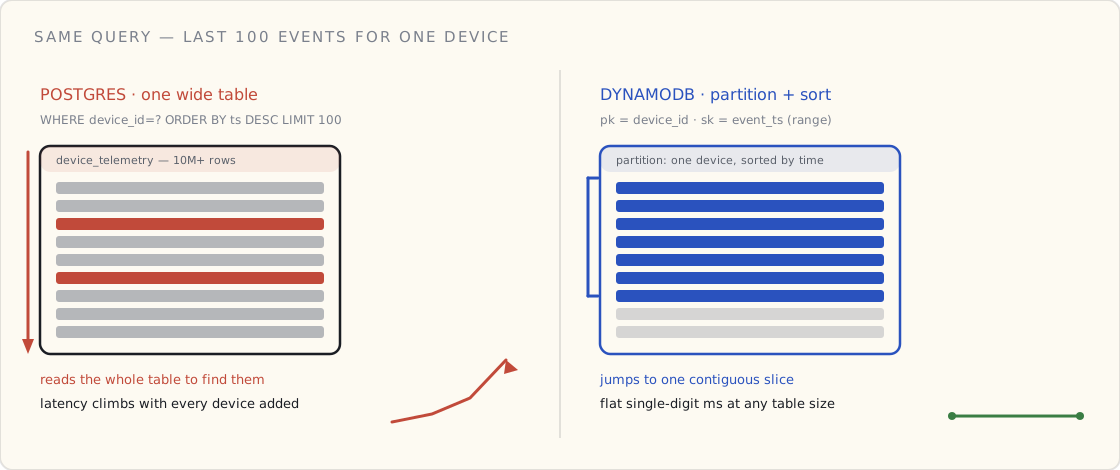
The relational urge wins for the first two months and then explodes around month four when the table gets to ten million rows and your WHERE device_id = ? ORDER BY ts DESC LIMIT 100 query starts doing a sequential scan against an under-tuned index.
Why DynamoDB fits the shape
DynamoDB's data model is exactly the shape of IoT telemetry, by accident:
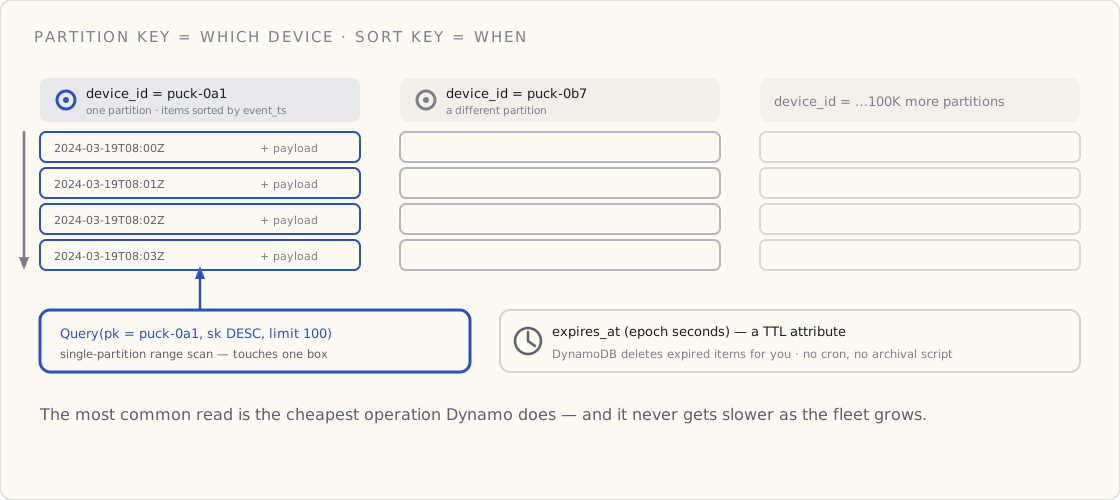
- Partition key =
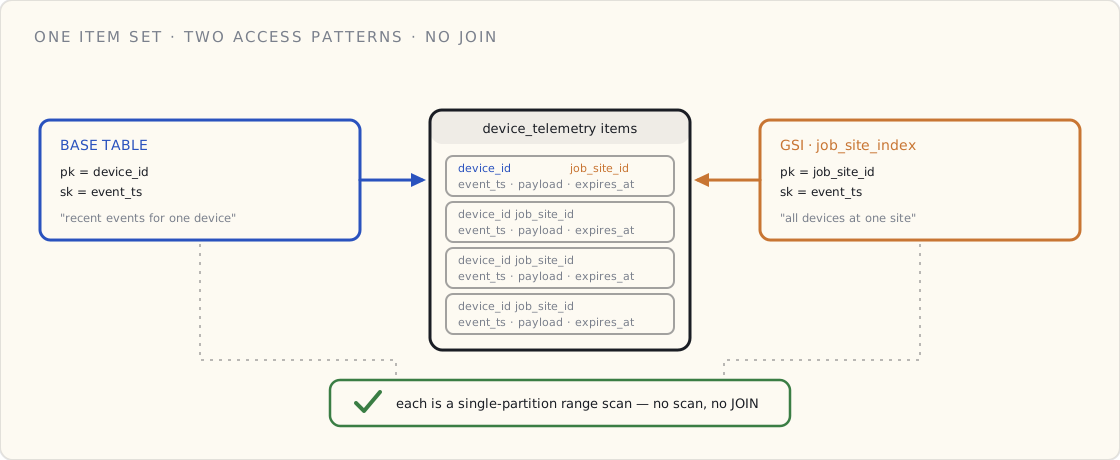
device_id, sort key =event_ts. The most common query — recent events for one device — is a single-partition range scan, the fastest operation Dynamo does. It costs single-digit milliseconds at any table size.
- Pay-per-request mode matches the spiky-but-steady write pattern of a device fleet. You don't have to size provisioned capacity for peak; you don't have to autoscale based on guesswork.
- TTL is a first-class attribute. Set
expires_aton every record; DynamoDB deletes them for you when the time comes. No cron job, no archival script. - Streams are built in. When you eventually want analytics — and you eventually will — you turn on a stream and pipe it to Kinesis Firehose, which lands the data in S3 as Parquet, which Athena can query like a data lake. The transactional and analytical paths split cleanly.
The shape, in a handful of lines
Table: device_telemetry
  Partition key: device_id (S)
  Sort key:      event_ts  (S — ISO 8601)
  TTL attribute: expires_at (N — epoch seconds)
  Billing:       PAY_PER_REQUEST
  GSI:           job_site_index (job_site_id, event_ts) — for site queries
  Streams:       NEW_IMAGE → Kinesis Firehose → S3 (Parquet) → Athena
That's it. A handful of lines that handle 144M writes a day without you thinking about indexes again.
The one line that does real work there is the GSI. The base table answers "recent events for one device." The job_site_index re-indexes the same items under a different partition key — job_site_id — so "all devices at one site, by time" becomes its own single-partition range scan. No JOIN, no second table to keep in sync: one write, two ways to read it.
The honest tradeoffs
Three things you genuinely lose by leaving Postgres:
- Ad-hoc analytical queries. You cannot write
SELECT job_site_id, AVG(battery_pct) FROM device_telemetry GROUP BY job_site_idagainst Dynamo. That's what the Firehose-to-S3-to-Athena path is for, and it adds a layer to your infra. For our team, that's been a worthwhile tradeoff; for a smaller team without a data engineer, it's friction.
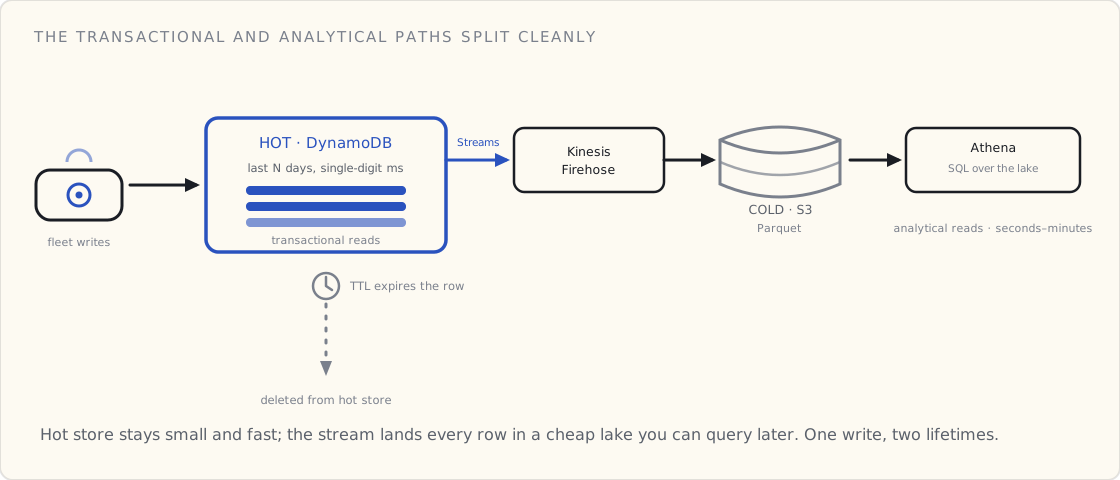
- Joins. Dynamo is the wrong store for relational lookups. Use Postgres for the things that need joins — your customer table, your device-to-customer mapping, your job sites — and keep Dynamo for the telemetry. Two stores, two purposes.
- Pay-per-request can be more expensive at very high steady volumes. If you're writing a billion rows a day and the load is predictable, provisioned-capacity Dynamo (or even moving to a purpose-built time-series store like Timestream) is cheaper. We're not at that scale yet; when we get there I'll revisit. For now, pay-per-request is the right shape for a starting team.
When I'd reach for something other than Dynamo
Two cases:
- You need sub-second analytical queries against months of data. Dynamo + S3 + Athena does this but Athena queries take seconds-to-minutes. If you need OLAP latency, Timestream is purpose-built for this exact use case (Timestream LiveAnalytics now, with the recent rebrand). I'd evaluate Timestream first.
- You're doing tight per-device aggregations server-side. Greengrass on the device pre-aggregates so the cloud sees one summary row per minute instead of 60 raw rows. This is an edge-compute decision more than a database decision, but it changes the math on which store you need.
The lesson, in one sentence
The Postgres urge is your team's experience talking, not their judgment. Listen to the urge, write down the volume and access patterns, and the urge usually retracts itself. The pattern that wins in IoT is partition-key + sort-key + TTL + stream-to-S3-for-analytics. Get that right and the relational urge dies on its own.
Next service we build, I expect the same engineer to suggest Postgres again. The argument is more pleasant now that I can hand them this.
What's next
This post settles where telemetry lands. It says nothing about whether the telemetry that lands is any good — a corrupted SKU, a calibration that drifted, malformed JSON from a half-bricked device mid-update. A single-partition range scan over garbage is still fast, and still garbage. Keeping the bad data out at ingestion — and deciding whether the device even needs to know it sent garbage — is the next post.
 Part 06 of 13
 BLE vs LoRa vs cellular — the connected-product decision matrix
Five questions, one table, one answer. The wireless choice on a connected product is usually decided by the time you finish question two.
The engineering team I lead has now argued about wireless choice on three different connected-product designs. The argument always goes the same way, and ends the same way: I ask the same five questions, and the choice picks itself by question two.
I am writing the questions down so I can stop having the argument.
(The rubric started as a one-pager I sketched on my first connected product back in 2018 — the v1 series — where the answer was always BLE because the device had no WiFi antenna. That constraint forced the choice and we never had to argue about it. Without the constraint, the argument expands to fill the room. Hence the rubric.)
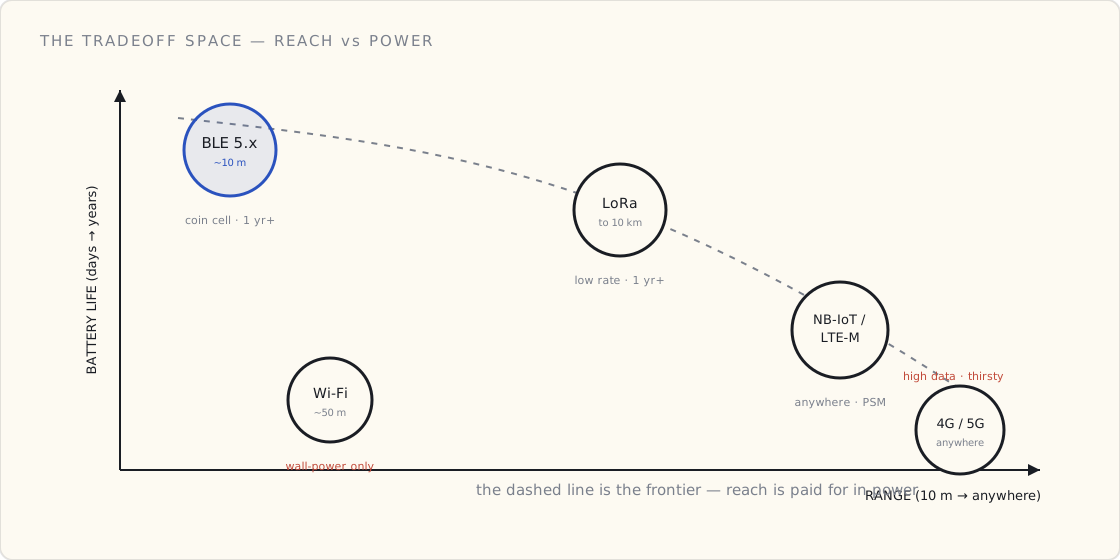
The reason the argument is winnable at all is that the four radios don't actually compete across the whole space — they each own a corner of it. Plot reach against how long the device can run on a battery and you get a frontier: nothing buys you more range without spending more power. BLE lives in the short-range, sips-power corner; cellular lives in the go-anywhere, drinks-power corner; LoRa threads the needle on range if you accept a trickle of data; and Wi-Fi is the odd one out — middling range and the worst battery story of the lot, which is why it only shows up where there's a wall socket.
The five questions, in order
1. How far is the device from the nearest gateway, phone, or router?
| Distance, worst case | Likely answer |
|---|---|
| ≤ 30 m, line-of-sight to a phone | BLE |
| ≤ 100 m indoor, no walls | Wi-Fi if the router exists; BLE mesh otherwise |
| 100 m to 10 km outdoors | LoRa / LoRaWAN |
| Truly anywhere | Cellular (LTE-M / NB-IoT for low data, 4G/5G for high) |
You don't move to the next question until this one is answered. Range is the wireless decision; everything else is a tax on the choice you've already made.
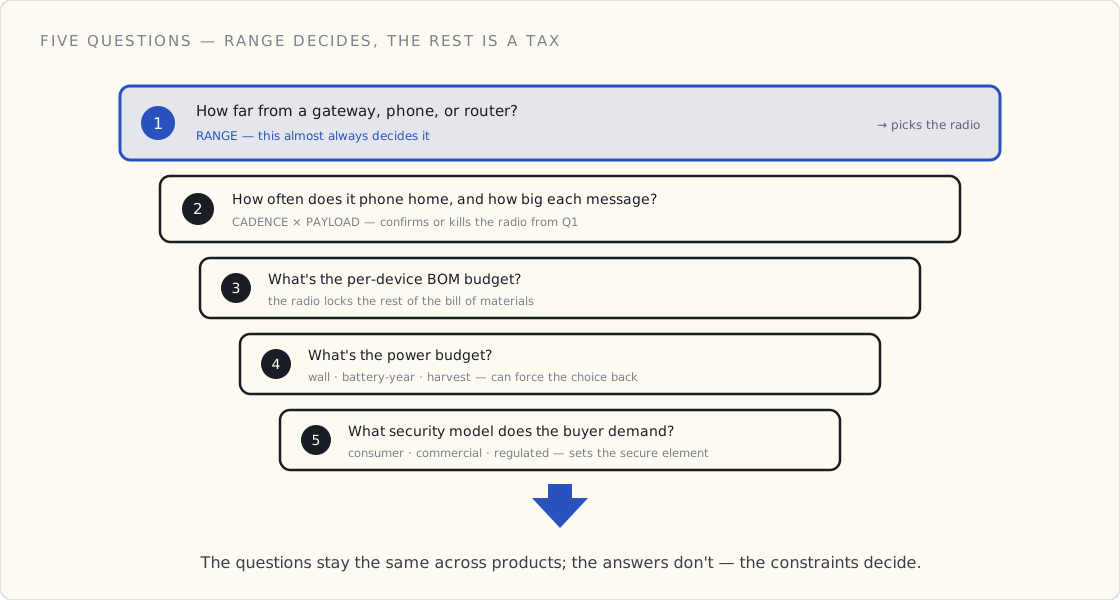
2. How often does it phone home, and how big is each message?
Frequency × payload = bandwidth need × power draw. Both go up linearly; battery life goes down exponentially.
| Cadence | Survives? |
|---|---|
| Once per hour, < 100 bytes | BLE, LoRa, NB-IoT all fine |
| Once per minute, < 1 KB | BLE, Wi-Fi, cellular fine; LoRa marginal |
| Once per second | Wi-Fi or cellular; LoRa is out |
| Real-time / event-driven | Wi-Fi or cellular with sticky connection |
The trap here: if your PRD says "real-time" and your power budget says "two AA batteries for a year," your PRD is wrong. Renegotiate before you pick a chip.
3. What's the BOM-cost budget per device?
Per-unit cost dominates everything at scale. Rough 2024 numbers:
| Component | Per-device BOM |
|---|---|
| ESP32-C3 module (Wi-Fi + BLE) | $1.50 – $3 |
| LoRa module (RAK, Murata) | $7 – $12 |
| Cellular LTE-M module | $12 – $25 |
| GPS module (u-blox) | $4 – $8 |
| Cellular eSIM + data plan, per year | $5 – $20 |
A $40 device with cellular + GPS spends most of its BOM on radios. A $40 device with BLE has $35 left for everything else. The radio choice locks the rest of the BOM, which is why you can't defer it.
4. What's the power budget?
Three regimes, very different design constraints:
- Wall powered — anything goes. Wi-Fi, cellular always-on, frequent polling — no problem.
- Battery, replaceable, year+ lifetime — sub-1 mA average. BLE advertising, LoRa with long intervals, NB-IoT PSM mode. Aggressive sleep states; no Wi-Fi.
- Energy-harvest (solar, kinetic) — sub-100 µA average. Backscatter protocols, beacon-only, no acknowledgments. Real engineering problem.
The power budget often forces the wireless choice retroactively. A year-on-two-AAs spec rules out Wi-Fi before any of the other constraints kick in.
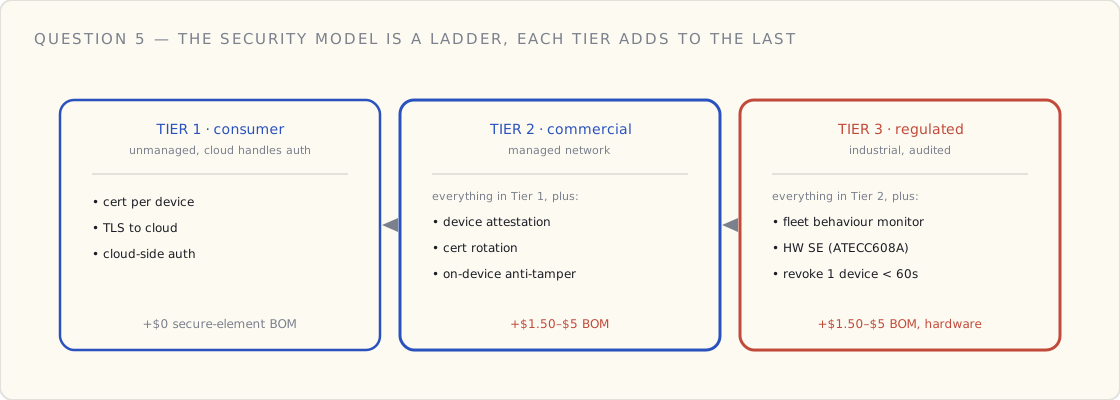
5. What's the security model the buyer demands?
Consumer, commercial, and industrial deployments have wildly different threat models.
- Consumer / unmanaged — cert per device, TLS to cloud, cloud handles auth.
- Commercial / managed network — add device attestation (TPM, secure element), cert rotation, on-device anti-tamper.
- Industrial / regulated — everything above + fleet behavior monitoring, hardware secure element (ATECC608A, NXP A71CH), the ability to revoke a single device in < 60 seconds.
Tier 2 and 3 add $1.50 – $5 of BOM for the secure element. If the buyer is regulated and your BOM doesn't include this, you have a problem before you ship.
Two worked examples — same rubric, very different answers
Example 1: a connected power tool
Pretend we're scoping a connected power tool — the kind of thing a construction company tracks across a job site.
| Question | Our answer | Implication |
|---|---|---|
| 1. Range? | ≤ 30 m to operator's phone, sometimes 200 m to a job-site gateway | BLE + LoRa dual radio |
| 2. Cadence? | Telemetry every 10 minutes, event-driven on error | Both BLE and LoRa survive |
| 3. BOM? | $8 of radios on a $300 tool | Within range; LoRa pricey but acceptable |
| 4. Power? | Tool's 20V battery — wall-equivalent | All options open |
| 5. Security? | Commercial; fleet-managed by the construction company | Add secure element ($2), cert per tool, anti-tamper |
End result: BLE + LoRa dual radio, secure element, fleet management via AWS IoT Core Thing Groups. The five questions did the work.
Example 2: a consumer Bluetooth tracker (Samsung-SmartTag-style)
Same rubric, a wildly different product. Pretend we're scoping a $30 retail Bluetooth tracker — a tag you stick on your keys, your bike, your kid's backpack — that finds itself via a crowdsourced finder network.
| Question | Our answer | Implication |
|---|---|---|
| 1. Range? | ≤ 10 m to the owner's phone; crowdsourced via every nearby phone running the vendor's app beyond that | BLE only — finder network does the long range |
| 2. Cadence? | Advertising every 2-10 seconds; no scheduled telemetry uplink | BLE advertising mode (no persistent connection) |
| 3. BOM? | $4 of radio on a $30 retail product | BLE single-chip ($1-2 in volume) — only option that fits |
| 4. Power? | CR2032 coin cell, 12+ months expected | BLE 5.0 advertising-only, sub-µA average draw |
| 5. Security? | Consumer privacy + anti-stalking | Rotating identifier per 15 min, AES-128, finder-network E2E encryption (Apple Find My / Samsung SmartThings Find spec) |
End result: BLE 5.0 only. No LoRa. No cellular. Crowdsourced finder network (the vendor's existing installed-base of phones) for the long-range case. Anti-stalking via rotating identifiers — the pressure on this category comes from state anti-stalking legislation and the Apple/Google "Detecting Unwanted Location Trackers" spec finalized this month, which standardizes the unwanted-tracker alerts the platforms now expect.
Same rubric, opposite answer
The same five questions on two products: one wants BLE + LoRa + secure element + fleet management; the other wants BLE-only + finder network + rotating IDs + a sub-microamp average draw. The rubric isn't a recipe. It's a question-list that surfaces the constraints. The constraints decide.
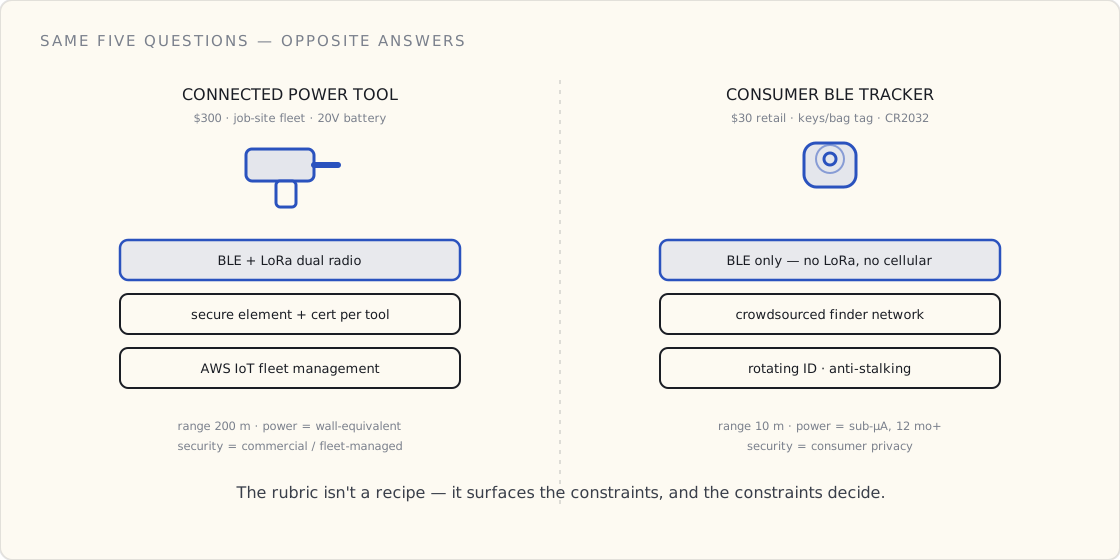
This is the part that makes the matrix portable across product categories: it doesn't tell you what to build, it tells you what to think about. Power tool vs key fob vs medical device vs cattle tracker — the questions stay the same. The answers don't.
What about Sigfox?
Briefly: not anymore. Sigfox filed for bankruptcy in early 2022 and the remaining network has been on uncertain footing since. NB-IoT and LTE-M cover most of the same use cases with operator backing. I would not start a new product on Sigfox in 2024.
The thing the matrix doesn't decide
The matrix decides wireless. It doesn't decide cloud, doesn't decide protocol layer (MQTT vs HTTP — almost always MQTT), doesn't decide topology (device-to-cloud vs device-to-gateway-to-cloud), and doesn't decide OTA strategy. Those are separate decisions that follow the wireless one.
But if you can get the wireless choice settled in twenty minutes instead of three meetings, the rest of the architecture conversation goes much faster. Tape the matrix to the wall.
 Part 07 of 13
 Keeping garbage out of the fleet — validating IoT data at ingestion, three ways
MQTT acks the moment the broker receives a message — so by the time your validation runs, the cart already thinks it succeeded. That gap between 'received' and 'actually good' decides your whole ingestion architecture. Three patterns, one question: does the device need to know it sent garbage?
There's a detail about MQTT that quietly shapes your entire data architecture: the broker acknowledges a message the moment it receives it. The cart publishes a scan event, AWS IoT Core acks it, the cart moves on and assumes everything went perfectly. Your validation logic hasn't even run yet.
But the payload might be garbage. A corrupted SKU from a flaky 2D imager. A weight-platform delta of 40,000 lbs because a calibration drifted. Malformed JSON from a half-bricked firmware mid-OTA. By the time anything checks, the device already believes it succeeded.
That gap — between "the broker received it" and "the data was actually good" — is where you make one decision that everything downstream inherits:
Does the device need to know it sent garbage?
Answer that, and the pattern picks itself.
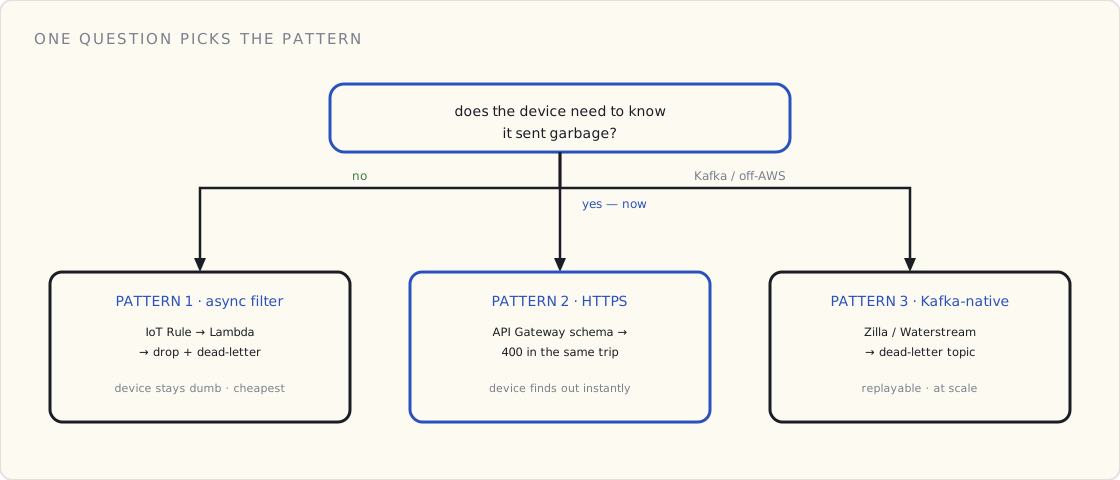
Pattern 1 — the async filter (device stays dumb)
The default, and what I shipped for the cart fleet. Keeps the broker fast and the firmware simple.
cart → MQTT → AWS IoT Core → IoT Rule → Lambda
                                          ├─ valid?  → DynamoDB / Postgres
                                          └─ invalid → drop + log + publish to
                                                       devices/errors/<cart-id>
The IoT Rule routes every message to a Lambda. The Lambda validates the payload against a JSON schema (or a Glue schema). Valid messages get written to the telemetry store; invalid ones get dropped and logged to CloudWatch and an error topic.
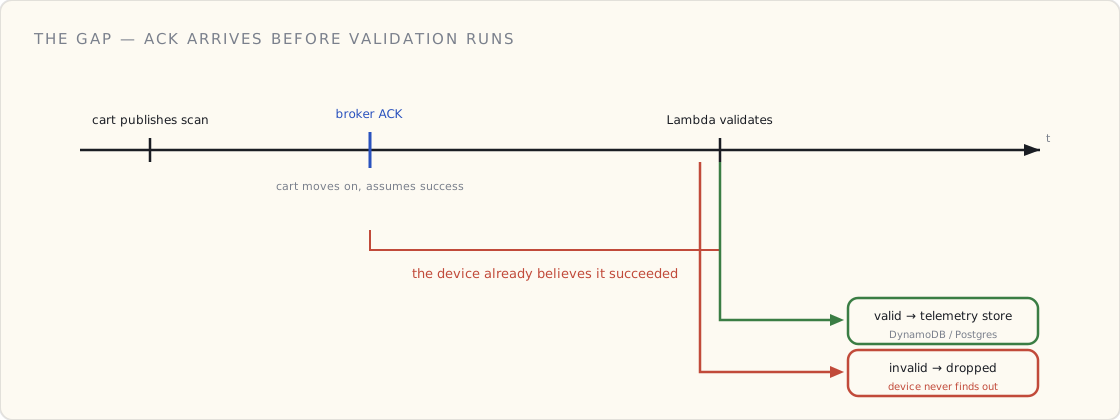
The catch is structural: the cart has no idea its data was rejected. It already got its ack. Unless you explicitly publish a message back to a per-device error topic — devices/errors/<cart-id> — and unless the firmware subscribes to it, the rejection is invisible to the device.
And here's the thing AWS docs won't tell you: the error path is the part everyone skips. We wired devices/errors/<cart-id>. Then nothing subscribed to it for six months. Garbage got dropped silently into a topic no one was watching. We only discovered a batch of carts had miscalibrated weight platforms when the loss-prevention dashboard started showing impossible weight deltas — the rejects had been piling up, unread, the whole time. The async filter doesn't free you from the error path. It just makes it easy to pretend you have one.
Pattern 1 is the right call when a dropped message is an annoyance, not a safety event. A dropped scan event becomes a flagged-for-review session. Nobody gets hurt; loss-prevention catches it later.
Pattern 2 — HTTPS + API Gateway (device finds out instantly)
When the device must know immediately, you bypass MQTT for ingestion and use HTTPS.
cart → POST → API Gateway (native JSON schema validation, zero Lambda)
                ├─ valid   → forward to IoT Core / DynamoDB → 200 OK
                └─ invalid → 400 Bad Request, returned to the cart in the same round trip
API Gateway has built-in request validation against a JSON schema model — no Lambda required to reject a malformed body. Valid requests forward on; invalid ones get a 400 synchronously, in the same connection the cart is already holding open.
What you give up: MQTT's fire-and-forget efficiency, the store-and-forward buffering on connectivity loss, and the per-message cost advantage. HTTPS request/response is heavier per event than an MQTT publish.
You pay that cost when a bad payload is something the device can act on — retry with corrected data, surface an error to the user, halt and wait. The cart's session-end payment leg is the obvious case: a malformed checkout can't be silently dropped, because the customer is standing there with a cart full of groceries and a tapped card. That message gets the synchronous path. The 5,000 routine health pings a day do not.
Pattern 3 — Kafka-native (at scale, or off-AWS)
If your backbone is Kafka instead of AWS IoT Core — because you already run it, or you want the replay and multi-consumer story Kafka gives — you put a Kafka-native MQTT layer in front:
- Zilla (Aklivity) — open-source, multi-protocol, Kafka-native proxy. Handles MQTT connections (including over WebSocket and UDP/QUIC), maintains the state of millions of devices, and translates MQTT payloads straight into Kafka records.
- Waterstream — a Confluent-verified, Kafka-native MQTT broker. A thin layer where MQTT messages are written immediately as native Kafka records, and all MQTT state (subscriptions, retained messages) lives directly in Kafka topics.
Validation moves into stream processing: a consumer validates each record, routes good ones downstream, and sends bad ones to a dead-letter topic. Same "drop and log" shape as Pattern 1, but the dead-letter topic is a first-class Kafka topic you can replay, reprocess, and alert on — which makes the error path harder to forget than an MQTT topic nobody subscribed to.
The decision table
| Pattern 1: Async filter | Pattern 2: HTTPS webhook | Pattern 3: Kafka-native | |
|---|---|---|---|
| Device learns of rejection | No (unless you wire it back) | Yes, instantly (400) | No (dead-letter topic) |
| Transport efficiency | Best (MQTT) | Worst (HTTP req/resp) | Best (MQTT) |
| Validation cost | Lambda per message | Free (API Gateway schema) | Stream consumer |
| Store-and-forward on dropout | Yes | No | Yes |
| Best for | High-volume routine telemetry | Payloads the device can act on | Kafka shops / replay needs |
The regulated angle
My first connected-product platform was a medical device, and it could not use Pattern 1. When the payload is a physiological reading or a dose confirmation, "drop it and log it to a topic" is not an acceptable failure mode — the device and the user have to know the data didn't land. Regulated devices force you toward Pattern 2, or toward Pattern 1 with a mandatory, monitored, acknowledged error path (the kind you can prove exists in an audit).
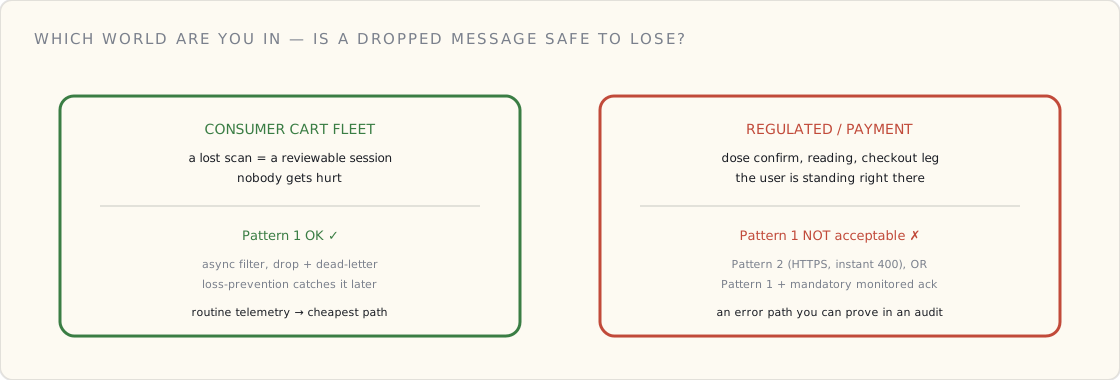
The consumer cart fleet had the luxury of Pattern 1 because a lost scan is a reviewable session, not a clinical event. Knowing which world you're in is the first thing the identity-and-compliance work forces you to write down.
What I'd tell past me
- Decide the "does the device need to know?" question before you pick a transport, not after. It's easier to start on HTTPS for the payloads that need it than to bolt synchronous feedback onto MQTT later.
- If you choose Pattern 1, build the error path on day one and put a consumer on it. A reject topic nobody reads is worse than no reject topic — it's the illusion of handling.
- Alert on reject rate, not just reject events. A slow climb in the reject rate is a fleet-wide firmware or calibration problem announcing itself early. We learned that the expensive way.
- API Gateway's free schema validation is underused. For the subset of payloads that genuinely need synchronous rejection, getting it with zero Lambda code is a real win.
What's next
The reject rate is now a first-class metric on the observability dashboard — which is the next post: what good IoT observability actually looks like when you're watching a fleet instead of a server.
 Part 08 of 13
 What good IoT observability looks like in CloudWatch
Six months into running a connected-product fleet in production, here's the CloudWatch setup we wish we'd had on day one. Three dashboards, four alarms, one log query.
We've been running our connected-product fleet in production for about six months. The first incident, predictably, was an observability incident — we couldn't tell whether 200 devices had stopped talking because the devices were broken, the network was broken, the cloud was broken, or our parsing of the data was broken. It took us a full day to figure out which.
This is the CloudWatch setup we'd have built on day one if we'd known better.
(Previously, on v1, we built our own dashboards from scratch in 2018. The IoT-native cloud metrics weren't mature yet, and we ended up running everything off custom metrics emitted from serverless functions. On v2 the native side is much better. The setup below would have saved us about two engineer-months on the v1 build. It's now ~one engineer-week.)
The whole thing hangs off one decision made at the ingest Lambda: every metric and every log line carries the device's thing_name as a dimension. Get that wiring right and the dashboards, the alarms, and the Logs Insights queries all fall out of it.
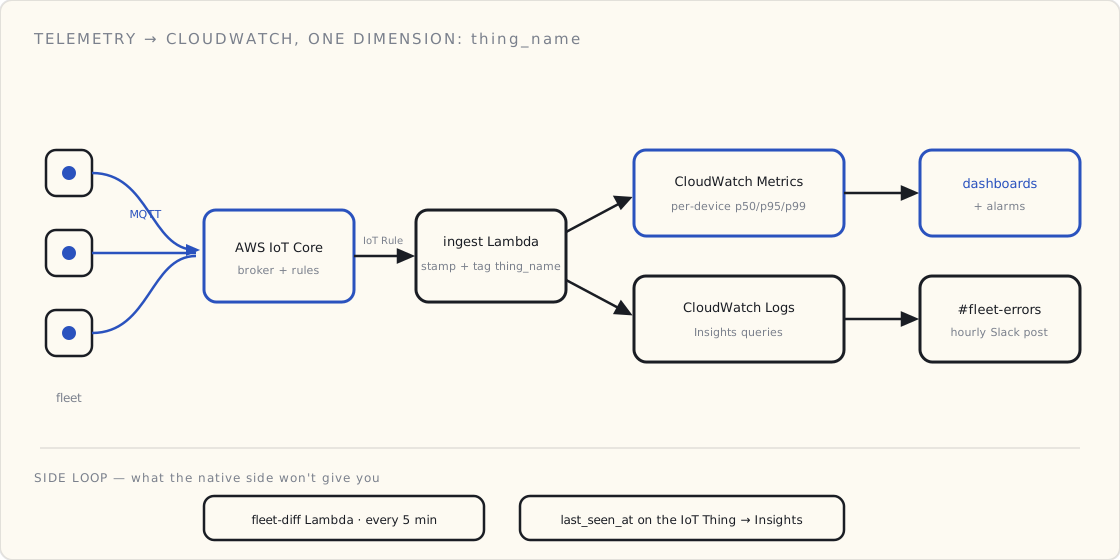
The three dashboards
Dashboard one: fleet health, one row per device class.
Five metrics, plotted as time series across the last seven days:
- Connected device count. A
BinaryStateValuemetric we emit when an MQTT connect/disconnect happens on IoT Core, summed across the fleet. Sudden drops here are the first thing to look at in any incident. - Messages per minute. Volume of
iot:Publishevents from CloudWatch Metrics for IoT Core. If devices are connected but not publishing, the firmware is wedged. - Per-device p50 / p95 / p99 publish-to-cloud latency. From our IoT rule pipeline — we stamp the message with a server timestamp on arrival, compare to the device-side timestamp, emit the delta as a custom metric. p99 tells you tail behavior; p50 alone hides everything.
- MQTT auth failures. Suspicious if it spikes. Either we have a cert-rotation problem or somebody's trying to talk to our endpoint with a stolen credential.
- Lambda error rate on the ingest function. If devices are happy but we're 5xx'ing on ingest, we're losing data.
Dashboard one is the only thing the on-call rotation looks at by default. Everything else is for diagnosis after that dashboard says something's wrong.
Dashboard two: per-device drill-down.
When dashboard one says "something's wrong," dashboard two is how you find the which. CloudWatch Contributor Insights with a rule that ranks thing_name by error rate. Top ten, last hour. Click one, jump to that device's logs and metrics.
We use thing_name as the partition key on our ingest Lambda's emit, so every metric we publish has the device dimension. This is the one decision that paid off most — every metric is per-device or per-job-site, never just an aggregate.
Dashboard three: pipeline health.
This one is for the engineers, not the on-call. It tracks:
- IoT Rule SQL failures (a count that should be near zero).
- Lambda concurrent executions and throttling.
- DynamoDB write throttles, write latency p99.
- Kinesis Firehose backlog (we pipe to S3 for analytics; backlog means analytics will lag).
If dashboard three is red, the infrastructure is unhealthy. If only dashboard one or two is red, the fleet is.
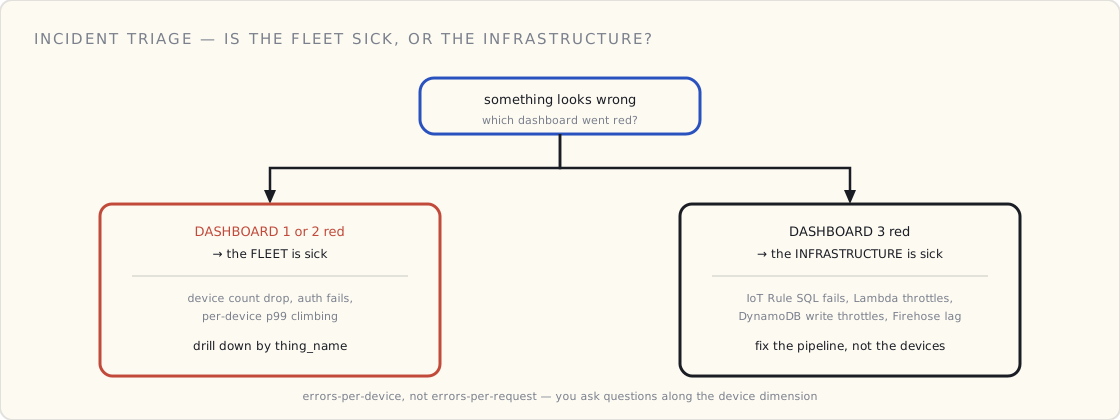
The four alarms
We have four production alarms. Anything beyond four is noise.
- Connected device count drops > 20% in 5 minutes. Paged. Either a cloud-side outage or a connectivity event in a region — either way, somebody needs to look right now.
- Ingest Lambda 5xx rate > 1% for 10 minutes. Paged. We're losing data.
- Per-device p99 publish-to-cloud latency > 2x baseline for 15 minutes. Slack-only, no page. Investigates next morning.
- MQTT auth failures > 100 in 5 minutes. Paged. Either fleet-wide cert issue or someone's poking at our endpoint with stolen keys.
Notice what's not on this list: total message volume drops, individual device offline, individual Lambda invocation errors. Those are too noisy to alarm on directly. They all show up on the dashboards; they don't fire pages.
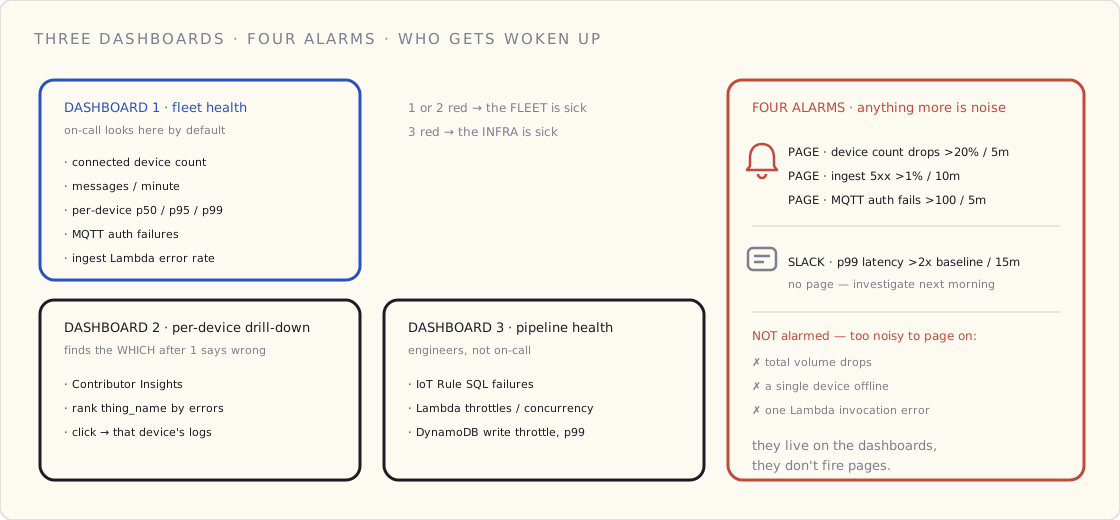
The one CloudWatch Logs Insights query
We have a saved query that I run more than anything else in the console:
fields @timestamp, thing_name, error_code, battery_pct
| filter ispresent(error_code) and error_code != ""
| stats count() as errors by thing_name, error_code
| sort errors desc
| limit 20
"For the time range in the toolbar, which devices are reporting errors, what errors, and how many?" Twenty rows of output. The answer to ninety percent of "is something wrong" questions.
Insights queries are also schedulable now (via Lambda or EventBridge), so we've got the same query running hourly and posting to a Slack channel. If a device's error count for an hour exceeds a threshold, it shows up in #fleet-errors with the thing-name, error code, and a deep link to the device's recent events.
What we built ourselves that I'd recommend
Two pieces of code that paid for themselves the first month:
A "fleet diff" Lambda. Runs every five minutes. Pulls the list of currently-connected devices from IoT Core. Compares to the list of devices we expect to be online (from our customer database). Emits the diff as a metric. When 200 devices fell silent, this Lambda noticed within five minutes, instead of us noticing the next day.
A per-device "last seen" attribute. We update a last_seen_at attribute on the device's IoT Thing every time it publishes, via the IoT rule. Then a CloudWatch Insights query against the IoT Things index gives us "devices that haven't published in N hours." Predictably useful.
What I'd skip
A few things I tried that didn't earn their keep:
- X-Ray tracing on every Lambda invocation. Too noisy at fleet scale and the cost adds up. We turn it on for specific debugging sessions, not always.
- Per-device CloudWatch Logs streams. Don't do this. CloudWatch Logs is priced per ingested GB; if you're emitting structured logs from every device every minute, you'll regret it. Aggregate at the rule layer; emit logs from the cloud side only.
- Synthetic device pingers from another region. Tempting, but the failure mode it catches is "AWS region is broken," which CloudWatch will already tell you about. Not worth the complexity.
The bigger framing
The lesson of the six months: an IoT product is a fleet operations product, not a software product. Software products have errors per request. Fleet ops products have errors per device, per device class, per firmware version, per job site. You instrument for the dimension you'll ask questions along, and you ask questions along devices.
Six months from now I'll know whether we got the dashboards right. Six months ago, we didn't have dashboards. That's the bigger move.
 Part 09 of 13
 OTA firmware updates without bricking the fleet
We finally rolled OTA to production last quarter. Eighteen months of planning, two months of execution, three near-misses. The pieces that actually mattered, written down.
We rolled OTA firmware updates to the cart fleet last quarter. It took eighteen months of planning, two months of execution, and produced three near-misses that I'll be writing into our runbook for a long time. This is the post I wish I'd had when we started — the operational mechanics of getting an update onto the fleet without bricking it. (The security of updates — signing, blast radius, anti-rollback, rotating the signing key — is its own post in the security series; this one assumes the image you're shipping is already one you trust.)
The four pieces, in dependency order
OTA is not one feature. It's four, in a fixed dependency order. Skip one and the rest are pretending.
1. A/B firmware slots on the device. The device has two firmware regions — A and B — and a tiny bootloader that picks which to run. New firmware goes into the inactive slot, the bootloader is told to try the new slot next boot, and the new firmware has to "phone home, mark itself good" within N minutes or the bootloader rolls back automatically.
There is no version of OTA that works without this. We tried — we considered an in-place update with backup-to-flash-and-restore. It fails the first time a device loses power mid-update. A/B is the cost of doing this responsibly.
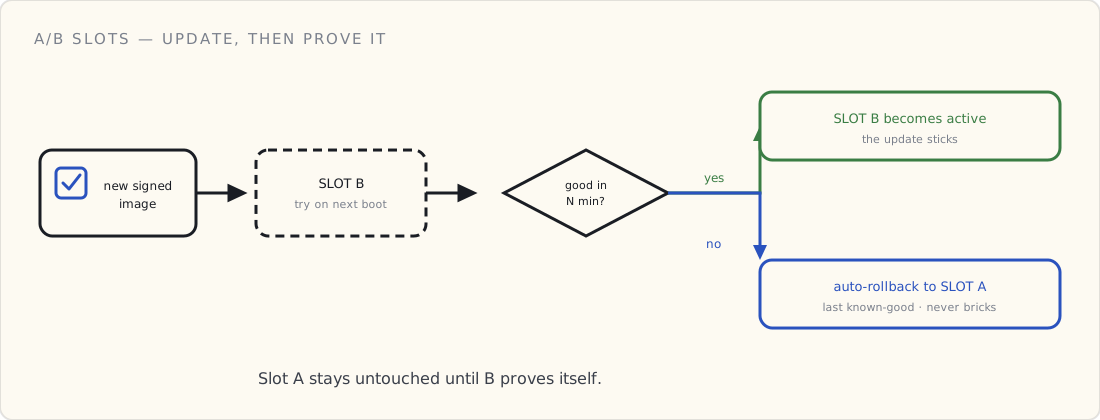
2. Signed images. Every firmware image is signed with a private key we hold; the device firmware has the public key compiled in (and ideally in a secure element). Before flashing the inactive slot, the device verifies the signature. Unsigned or wrong-signed image → reject, no flash.
This is the difference between OTA-as-feature and OTA-as-attack-vector. There's a reason the regulated-product folks make this Step One. We made it Step Two; in hindsight it should've been simultaneous with the A/B work.
3. Staged rollouts. Never ship a firmware update to the whole fleet at once. Stages:
- Canary — 10 internal devices. Always-on monitoring. 24 hours.
- Early — 1% of the fleet, selected to span hardware revisions, geographies, and use patterns. 72 hours.
- General — 10%, then 25%, then 100% in steps. Each step has a "halt rollout" condition tied to fleet metrics.
The halt-rollout condition is the part most teams skip. Ours is hard-coded: if the per-firmware-version error rate in the new version exceeds 1.5× the baseline of the old version over a 30-minute window during rollout, the next stage is held automatically and a human has to release it.
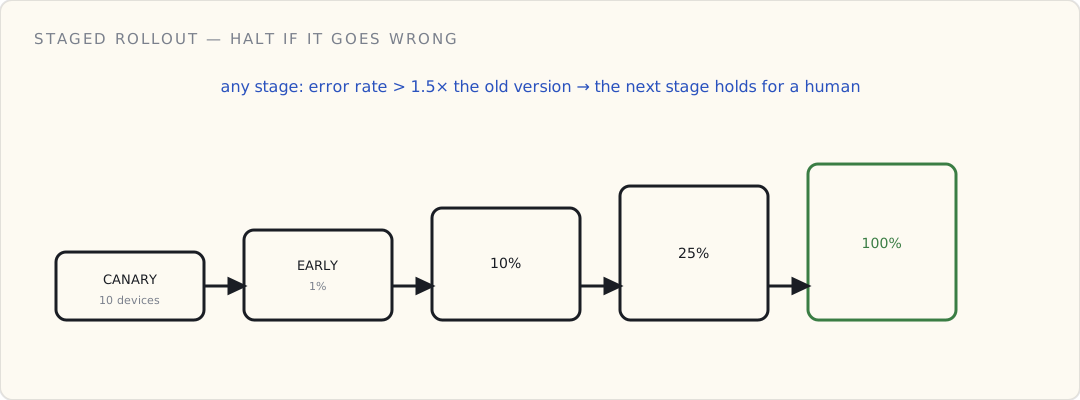
4. Observable rollback. When a device rolls back, the cloud needs to know it happened. Otherwise you have a quiet failure — the device reverts to old firmware, looks fine, and the rollout dashboard says "shipped" while reality says "rolled back."
We have a metric (firmware_rollback_count, dimension: target version) that goes up every time a device boots into the old slot after a failed update attempt. The rollout dashboard shows both "% on new version" and "% that rolled back from new version." The second number being non-zero is always a humans-look-now signal.
What we use to orchestrate it
AWS IoT Jobs for the orchestration. Each rollout is a Job; each device is a Job target. Jobs handles the queueing, the per-device acknowledgments, the failed-device handling. Greengrass v2 is the alternative if you have devices doing edge compute; we don't, so Jobs alone is enough. (The equivalents elsewhere: Azure's Device Update for IoT Hub; on GCP, with no managed IoT service since 2023, you orchestrate the rollout yourself.)
Two things to know about Jobs:
- The Job document is what the device interprets. Keep it as boring as possible: target version, signed-image URL (S3 presigned), expected SHA256. Everything else is firmware logic.
- The Job execution status flow is asymmetric. A device reports
IN_PROGRESS→SUCCEEDED(orFAILED). The "rolled back after success-reported" case isn't in the protocol. That's why the rollback metric (#4 above) is a separate channel from Jobs status. You need both.
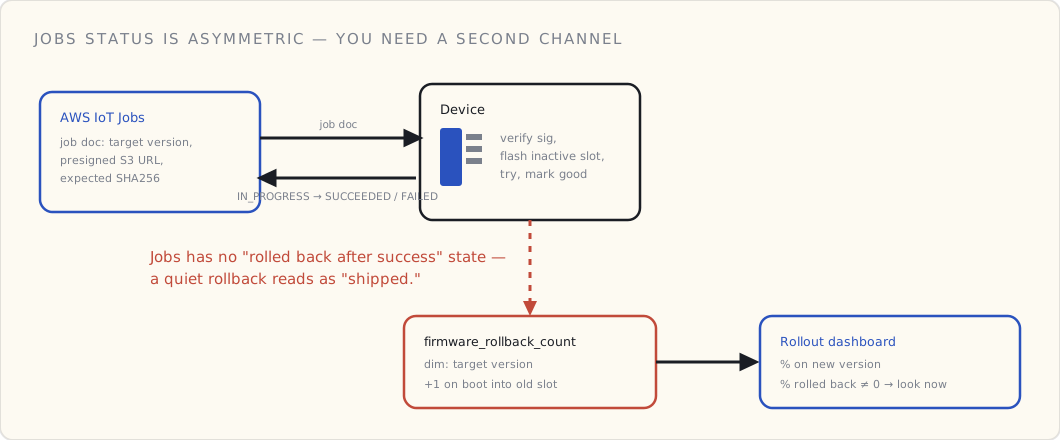
The three near-misses
1. The clock-skew rollback storm
A subset of devices in one geography had their clocks drift by ~12 hours. The firmware's signature verification was using a server-validated timestamp range and rejected the new image as "not yet valid." Devices rolled back, retried at next interval, rolled back again. We caught it in the canary stage but it would have been a fleet-wide problem at 100%.
Fix: signature validation no longer uses the local clock; it uses an explicit issued/expires range that lives in the signed metadata, validated against a server-time challenge during the actual update process, not the device's idea of time.
2. The "the eval set was a subset of the test set" mistake
The QA team's OTA eval set was a subset of the firmware test set. Both passed. In the canary stage, devices started crashing on a particular sensor configuration we hadn't included in either set. Three devices rebricked themselves the old-fashioned way (sensor read at boot crashed before the "mark new firmware good" code ran; A/B rollback saved them).
Fix: OTA eval set now includes ten representative deployed hardware configurations, not the lab-bench config. The lesson: your firmware test environment is not your deployed fleet. They will diverge.
3. The certificate-rotation deadlock
Six months into our cert-rotation effort, we shipped a firmware update that needed the new CA cert to validate the image. Some devices hadn't received the new CA yet (the cert rotation was on a separate schedule). Those devices couldn't validate the new image, rejected it, and stayed on the old firmware which couldn't be updated until they had the new CA. Deadlock.
Fix: the device firmware now carries the old AND new CA simultaneously for a 90-day overlap window during any planned rotation. We also added an explicit dependency check in our rollout planning: the OTA system refuses to start a rollout that requires a cert the fleet hasn't fully received.
What I'd build differently if starting over
Two changes:
- Treat OTA as a security feature first, an operations feature second. We treated it as ops first and bolted on signing as Step Two. The right ordering is signing + A/B in v1, staged rollout in v2.
- Build the rollback observable from day one. We didn't have the
firmware_rollback_countmetric until we had a near-miss that taught us we needed it. It should have been part of the design before the first device shipped.
What's next
Two improvements queued for the next quarter:
- Delta updates — ship the diff between firmware versions, not the whole image. Cuts bandwidth and update window. AWS IoT Jobs supports this; we just haven't done the firmware-side work.
- Per-device opt-out. Some customers want to control when their fleet updates. Currently rollouts are timezone-targeted; we want explicit opt-in tiers.
OTA is the kind of feature where the bad version of it is worse than not having it at all. Bricking a hundred devices is a quarter you don't get back. The four pieces above are the minimum to do this without inducing that quarter.
If you're in the middle of designing OTA: print the four pieces. Tape them to your firmware engineer's monitor. Go.
 Part 10 of 13
 Open-sourcing the Connected Products Starter Kit
Two years of private notes, runbooks, and reference code from leading connected-product teams. Cleaned up, scoped down, and pushed to a repo. The starter kit I wish someone had handed me on day one.
I started a private sandbox in late 2023, two months into running a connected-product engineering team for the second time around. (My first was 2017-2019 — a BLE-connected consumer-health platform, covered in the v1 series.) The sandbox started as one Python script that pretended to be a sensor. By mid-2024 it had grown into a full reference stack — device firmware, CDK infrastructure, a tiny dashboard — that I'd hand to new engineers on day one with a "read this before we have the architecture conversation." Most of the patterns in it carried forward from v1; the implementations are all v2-era.
This week I cleaned it up and pushed it public.
→ github.com/drlukeangel/Connected-Products-Starter-Kit-Product-Management
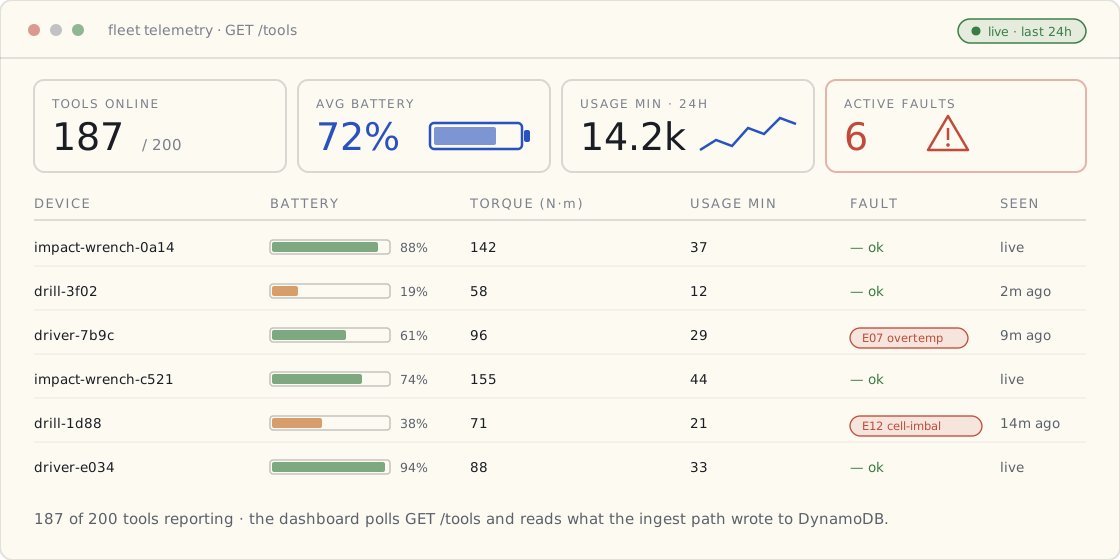
What's in the box
A reference IoT stack that runs end to end:
| Path | What it is |
|---|---|
docs/rubric.md | The five-question wireless decision rubric |
docs/ARCHITECTURE.md | The reference architecture + the trade-offs behind it |
device/python/ | Pure-Python MQTT simulator — quick start, no hardware required |
device/rust/ | ESP32-C3 firmware — production-shaped, ready to flash |
cloud/cdk/ | TypeScript CDK stack: AWS IoT Core + topic rule + Lambda + DynamoDB + HTTP API |
cloud/lambda/ | TypeScript ingest + query Lambdas, shared Zod schema |
dashboard/ | Minimal Vite + TS reference dashboard |
Stack is intentionally boring: typescript (CDK + lambda + dashboard) · python (device simulator) · rust (embedded) · aws iot core / lambda / dynamodb.
The whole point is that one cdk deploy stands up everything between the device and the dashboard:
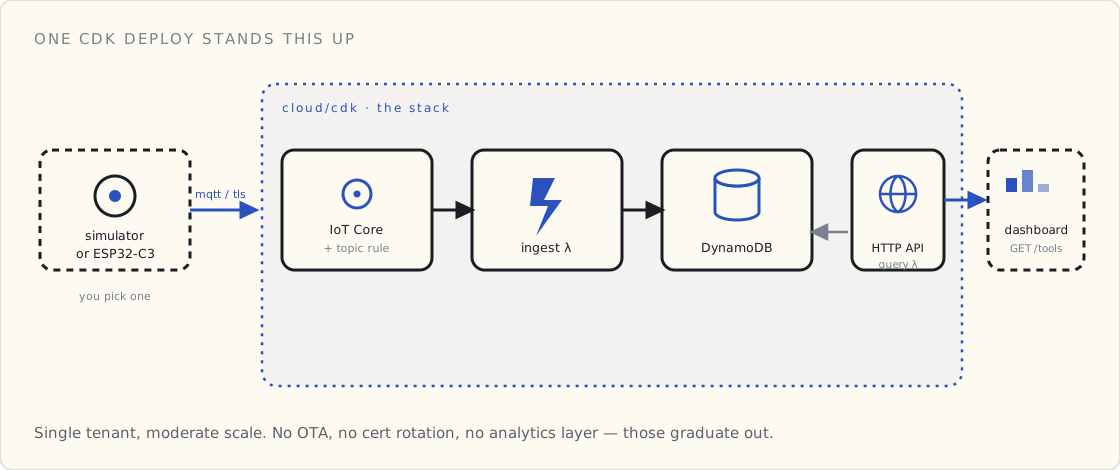
Who this is for
Different audiences read different files. From the README:
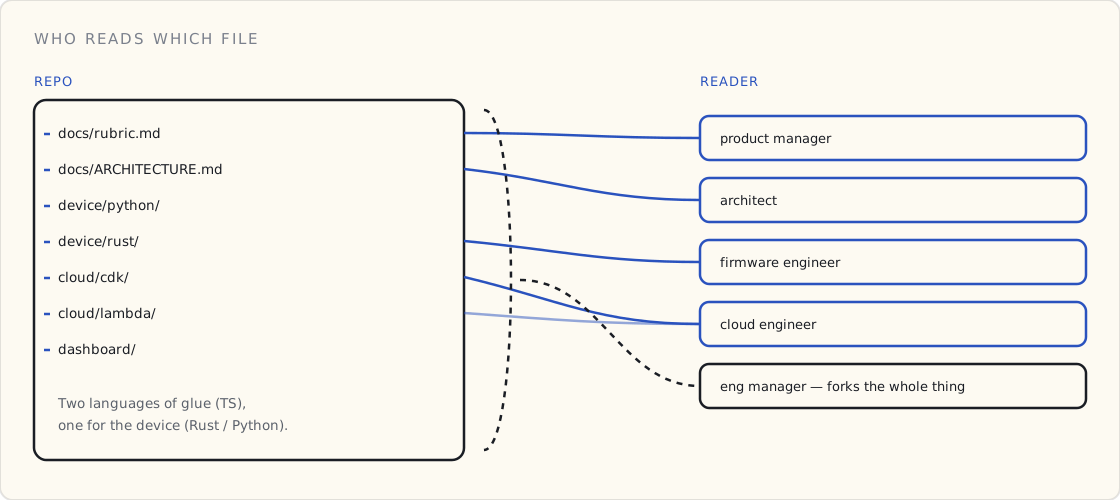
- Engineering managers — fork the whole repo as a starting template for a new connected-product squad. The CDK stack, Lambda, and device code are reference shape you'll evolve, not artifacts you'll keep verbatim.
- Product managers — read
docs/rubric.mdand stop there. The rubric is the conversation; the rest is implementation detail. - Architects — read
docs/ARCHITECTURE.md, push back on the trade-offs, fork the CDK stack as the basis for the team's real infrastructure. - Firmware engineers — lift
device/rust/as a known-good MQTT + TLS starting point on ESP32-C3, then replace the synthetic sensors with the real ones. - Cloud engineers —
cloud/cdk/is the smallest production-shaped IoT-Core-to-DDB stack I know how to write.
Why this exists
Every PM and engineering manager I've worked with on connected hardware has run the same first 30 days: they Google "AWS IoT Core tutorial," follow a six-screen wizard, end up with a single device publishing MQTT with a hardcoded cert, and have no idea how to scale it to 10,000 units.
The kit collapses those 30 days into a Wednesday afternoon. You clone it, you deploy one CDK stack, you choose either the Python simulator or the Rust firmware, you watch data show up in the dashboard. Then you read the rubric and the architecture doc — which is where the real product-management work lives, and which is the part of the kit that's the same whether you're building a connected drill, a connected coffee machine, or a connected anything.
The decision rubric
The single most-stolen artifact from this kit is going to be the five-question wireless rubric. I'll restate it here because it's the part that doesn't require running any code:
- How far is the device from the nearest gateway, phone, or router? Range is the wireless decision; everything else is a tax on it.
- How often does it phone home, and how big is each message? Frequency × payload = power draw × bandwidth need.
- What's the BOM-cost budget per device? The radio choice locks the rest of the BOM.
- What's the power budget? Wall-powered, battery-replaceable, or energy-harvest — three different design constraints.
- What's the security model the buyer demands? Consumer, commercial, or industrial — three different secure-element tiers.
Five questions, one table per question, the wireless choice usually picks itself by question two. Full version with worked examples in docs/rubric.md.
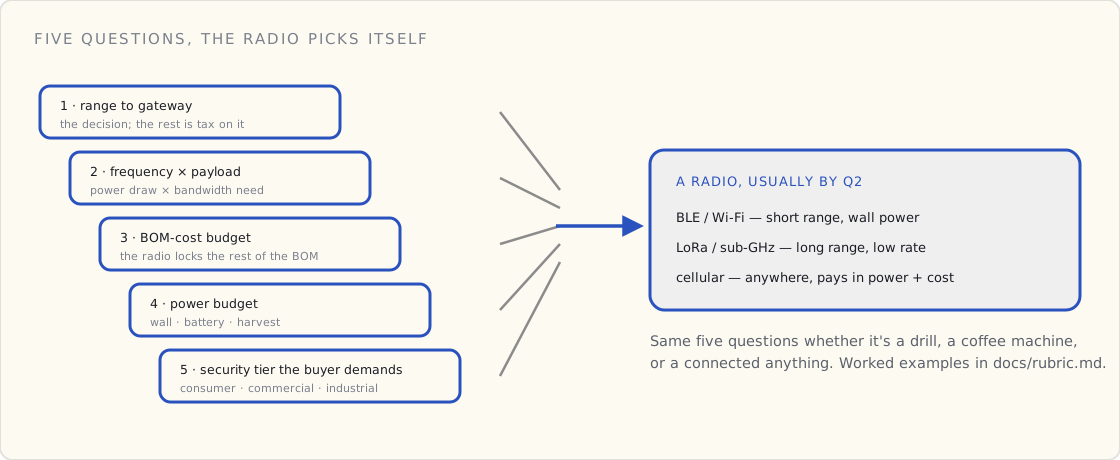
What the kit deliberately doesn't do
Worth being explicit about scope:
- No multi-tenant fleet management. Single-tenant fleet at moderate scale. Graduate to AWS IoT FleetWise when you need vehicle / equipment fleet management at real scale.
- No OTA firmware updates. The OTA story deserves its own kit; I wrote about the playbook we eventually landed on earlier this year. AWS IoT Jobs is the obvious next step.
- No certificate rotation. The starter provisions a single device cert. Rotation at fleet scale — just-in-time registration, per-device policies, revocation — is a separate problem the kit deliberately leaves out; deserves its own write-up.
- No data engineering / analytics layer. Pair this with a PII masking pipeline when telemetry contains operator PII (it usually does). I'll write that up separately when that kit is ready.
When you outgrow it
Listed honestly in the README. Short version:
- AWS IoT FleetWise — vehicle and equipment fleet management with edge-side filtering. Use when you have ≥ 1k devices and per-device data volumes that make raw forwarding expensive.
- AWS IoT Greengrass v2 — push compute to the device. Use when latency, bandwidth, or air-gap requirements rule out cloud-only.
- AWS IoT SiteWise — industrial telemetry with built-in asset models. Use when devices map to physical assets with hierarchy.
- AWS IoT Device Defender — fleet security audits + behavioral anomaly detection. Plug it in once you have more than a handful of devices.
This kit is the smallest useful thing. Graduate when it stops fitting.
What's next
I have a paired data-engineering kit (PII masking for tool-telemetry pipelines) that's been a private working draft for nine months. That's likely to be next quarter once I've had a chance to harden it. The two go together — one ingests the data, the other masks it before it goes anywhere downstream.
If you fork this and ship a connected product on the back of it, tell me how it went. I'm collecting feedback to fold into the next revision.
For now: clone, deploy, run the simulator, ship something connected. The kit isn't sophisticated. The discipline is.
 Part 11 of 13
 4.5 years of connected products — what I'd do again
Across two connected hardware products and 4.5 years of active build — a BLE-connected consumer-health platform 2017-2019, a payment-and-identity cart 2023-2025.
Two years ago, almost to the week, I wrote down what I was underestimating about leading my second connected-product engineering team. (My first was 2017-2019 — a BLE-connected consumer-health platform, covered in the v1 series.) Ten thousand cart devices in the field later, this is the long-form follow-up across both eras.
What compounded from v1 to v2, what I still got wrong the second time around, and what v2 had to figure out from scratch because v1 didn't prepare me for it.
The arc, across two devices
v1 — BLE-connected consumer-health platform, 2017–2019. Two years leading the API platform behind a BLE-connected toothbrush portfolio. About a million units shipped. Phone-as-gateway architecture (no WiFi on the device), home-grown REST instead of a managed IoT broker (those were still emerging at the time), HIPAA / FDA Class I compliance, three-tier PII classification, OTA over BLE through the phone. The v1 series is the full story.
v2 — The cart, 2023–2025. Two and a half years leading both hardware and platform on a wheeled scanner-and-payment workstation. Ten thousand units in supermarkets. WiFi-primary + LTE-M backup, MQTT-over-TLS to a managed IoT broker, PCI-DSS / GDPR / EMV compliance, the same three-tier PII model (it worked on v1, it still works), OTA over WiFi directly to the device (no phone in the loop this time).
Net: four years of active build, plus six months of PRD work on v2 at the front, plus a four-year gap in between. The patterns that survived the gap are the ones in the open-sourced starter kit now.
The topology is the cleanest place to see what changed and what didn't. v1 had no radio on the device — it spoke BLE to the user's phone, and the phone relayed home-grown REST up to a custom API tier. v2 puts a WiFi radio (with LTE-M backup) on the device and talks MQTT-over-TLS straight to a managed broker, no phone in the path. The link got shorter and more reliable. The security principle underneath it — the device signs, the cloud verifies, you never trust the wire — did not move an inch.
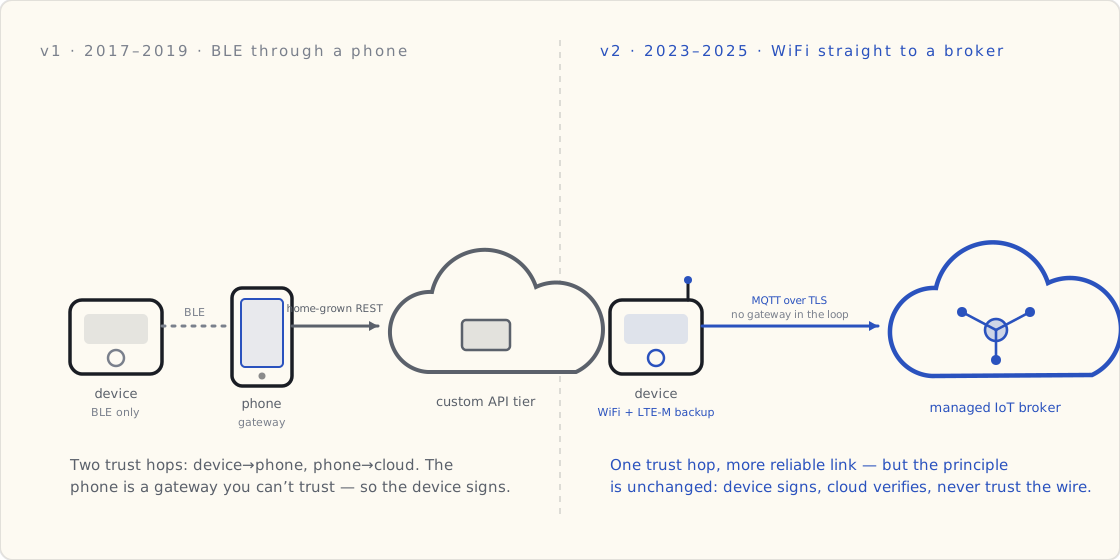
v2's timeline, by quarter
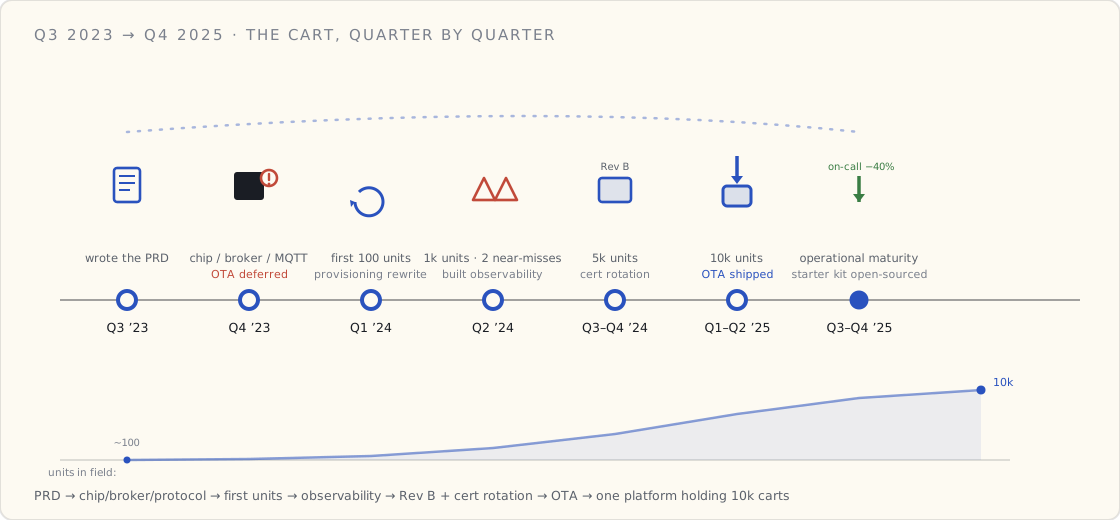
Q3 2023 — wrote the PRD. The three-part PRD for v2 was the first thing the team did. Every section had a v1 lesson sitting behind it: the entity model, the three-tier PII classification, the phone-as-gateway debate (this time, no — the device has its own radio), the OTA architecture (this time, signed firmware direct to device, no phone relay).
Q4 2023 — picked the chip, picked the cloud, picked the protocol. ESP32-C3 because it had the best price/feature ratio. A managed IoT broker because we didn't want to roll our own again. MQTT-over-TLS because that's what works. (On v1 we'd done home-grown REST. The reason was the BLE-only topology; that constraint is gone here.)
Q1 2024 — shipped the first hundred devices to internal testers. Found out our provisioning flow assumed Wi-Fi credentials would be entered by an end-user, not a factory worker. Rewrote it twice in three weeks.
Q2 2024 — first 1,000 devices in the field with paying customers. Two near-incidents (one cert misconfiguration, one IoT-rule SQL bug that lost six hours of data) that made us build observability we should have had on day one. Both were new failure modes — v1's BLE-only architecture didn't have either.
Q3 – Q4 2024 — scale to 5,000 devices. Hardware Rev B (board respin to fix EMC issues in the refrigerated aisles — a problem v1 never had, because consumer-health devices don't live in front of supermarket compressors). Started the cert-rotation work that took most of Q4. The device-identity post came out of this.
Q1 – Q2 2025 — scale to 10,000. Shipped OTA firmware updates. It's the feature I knew from v1 we'd regret deferring, and I deferred it anyway. More below.
Q3 – Q4 2025 — operational maturity. Reduced engineering-team-on-call burden by 40% through better observability and dashboard hygiene. Open-sourced the starter kit that captures lessons from both v1 and v2.
v1 lessons that compounded in v2
The three-tier PII classification. The model I built with the privacy office on v1 in early 2018 — Tier 1 non-PII telemetry, Tier 2 pseudonymous user-linked, Tier 3 directly identifying — ported directly to the cart. The regulatory regime is different (PCI-DSS + GDPR, not HIPAA + FDA Class I) but the data architecture is identical. I dropped that section into the v2 PRD by editing the v1 memo. Saved roughly two weeks of analysis.
The entity domain model. Account / Device / Session / Event was the spine of the v1 platform. On v2 I kept Consumable (which existed on v1 for the brush-head case) and added Store + Cart + Scan + Item + Payment for the retail context. Same shape, more entities. The v2 model in PRD Part 2 is essentially the v1 model with retail-specific entities added.
Sign on the device, verify in the cloud, never trust the gateway. On v1 the gateway was the user's phone. On v2 the gateway is the in-store WiFi network. Same principle: device cert in a secure element, every event signed, cloud verifies. v2's gateway is more reliable than v1's; that didn't change the architecture — it just made the failure modes less frequent.
Bond authorization to physical events. On v1 a re-pair required a button press on the device. On v2 a cart re-bind to a different store requires physical access to the cart's service port. Same principle: software alone can't change a trust relationship.
The bootloader is load-bearing. Boot-counter failsafe always. The OTA post from v1 and the OTA post from v2 describe the same bootloader pattern. Different chip family, different signing infrastructure, same structure.
What I still got wrong, the second time around
Deferring OTA out of v2's v1. I had the v1 OTA post on my desk when I scoped v2. I knew exactly what it cost on v1 to ship without OTA. I deferred it anyway in Q4 2023 because the team capacity wasn't there and OTA didn't seem like it would matter until we were past 5,000 devices.
Then a board-level sensor calibration bug shipped in Q3 2024, we hit 5,000 devices in Q4 2024, and every device with the bug needed an RMA. We finally shipped OTA in Q1 2025. The cost of those RMAs alone funded the OTA project several times over.
The mistake wasn't ignoring the v1 lesson — I understood it. The mistake was assuming the cost curve looked the same as v1. On v1, shipping OTA was hard (BLE through a phone, ~18 engineer-months of work). On v2, OTA was easy (WiFi direct to device with a managed jobs orchestrator, ~4 engineer-months). Because v2's version was easier, I undervalued shipping it early. Backwards: if the implementation is easy, ship it sooner.
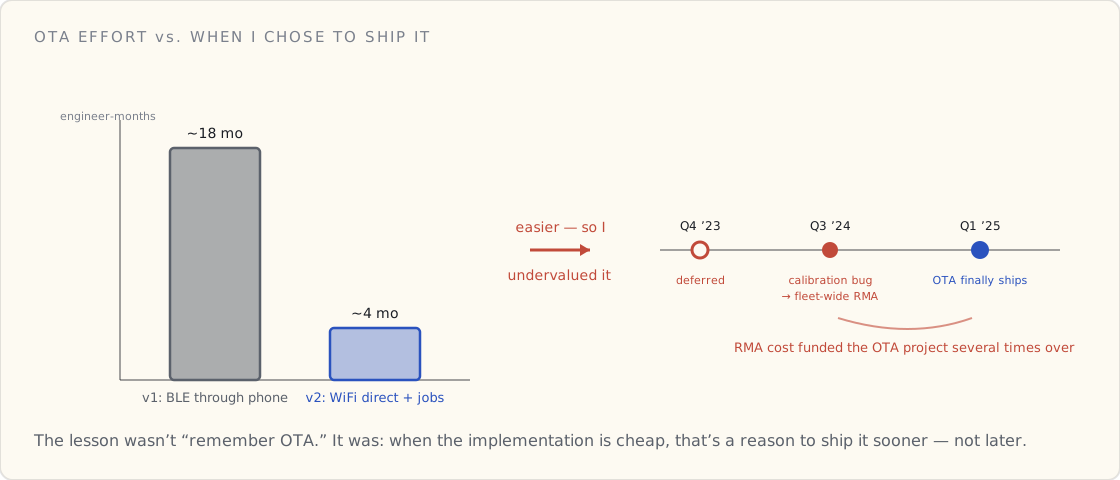
Treating the dashboard as engineering-only. On v1 a partner-facing portal showed me what a customer-facing dashboard looks like. I built v2's first dashboard for engineers anyway. Customer-support rebuilt it from scratch nine months later. I'd build that one first next time.
Picking a single cell-carrier MVNO for our cellular variant. This one had no v1 lesson — v1 was BLE-only, no cellular. We picked one carrier; their service had a regional outage in Q2 2025; 300 devices went offline for 14 hours. We've since dual-SIM'd new cellular devices. v1 didn't prepare me for this because the situation didn't exist there. v2 paid the new-domain tax.
What v2 had to figure out from scratch
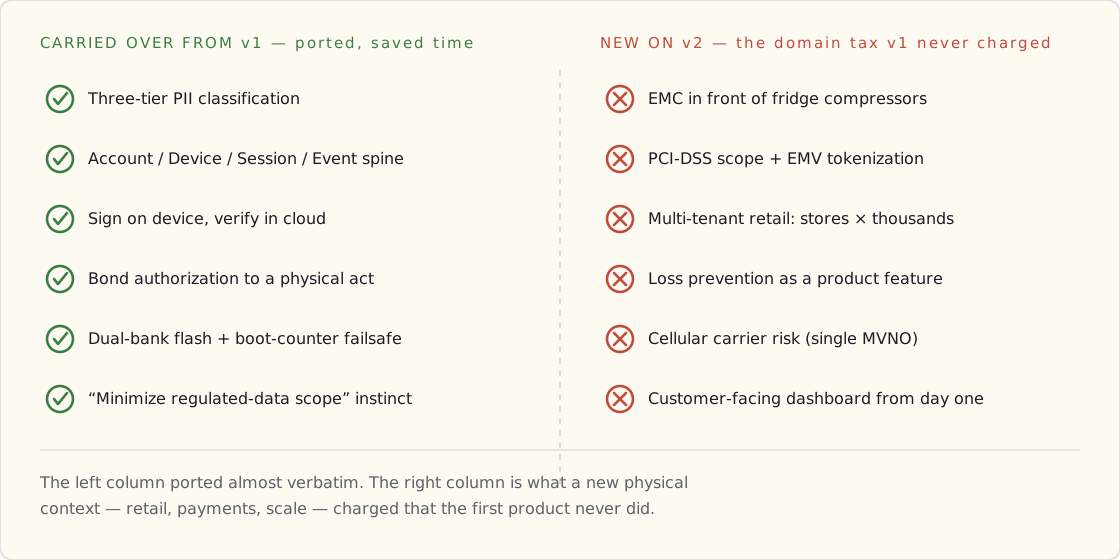
Things v1 didn't prepare me for because they didn't exist on v1:
EMC compliance in retail physical environments. Refrigerator compressors throw off a lot of 2.4 GHz noise. We learned that the hard way in Q3 2024. Hardware Rev B fixed it with antenna placement. Consumer-health devices don't live in front of compressors — there's no v1 lesson here.
PCI-DSS scope minimization. On v1 we handled HIPAA + FDA. Neither covers payment data. v2 had to learn PCI-DSS scope from scratch — EMV-certified NFC reader, isolated payment account, tokenization at the hardware boundary. The principle (minimize scope) carried from v1's HIPAA work; the specifics were new.
Multi-tenant retail at scale. On v1 every customer had one device. On v2 every supermarket chain has thousands of devices spread across hundreds of stores. The store-staff tablet, the per-store fleet ops, the per-store SLA — none of that existed on v1.
Loss prevention as a feature. v1's biggest fraud risk was someone faking usage data for marketing analytics. v2's biggest fraud risk is someone walking out of a supermarket with un-scanned groceries. Totally different problem.
The one decision I'd make twice as fast next time
Building the wireless-decision rubric as a written artifact and forcing the team to use it.
When we picked BLE + LoRa dual-radio for our second product line in Q3 2024, the architecture conversation that previously took three meetings took twenty minutes. The rubric was written; we walked through five questions; the answers picked the design. The first product took 11 weeks to land that decision. The second took an afternoon.
The rubric is in the open-sourced kit now. If I could go back and hand it to my Q4 2023 self, I'd save the team about eight weeks of architecture-review meetings. That's the post-mortem lesson with the highest leverage.
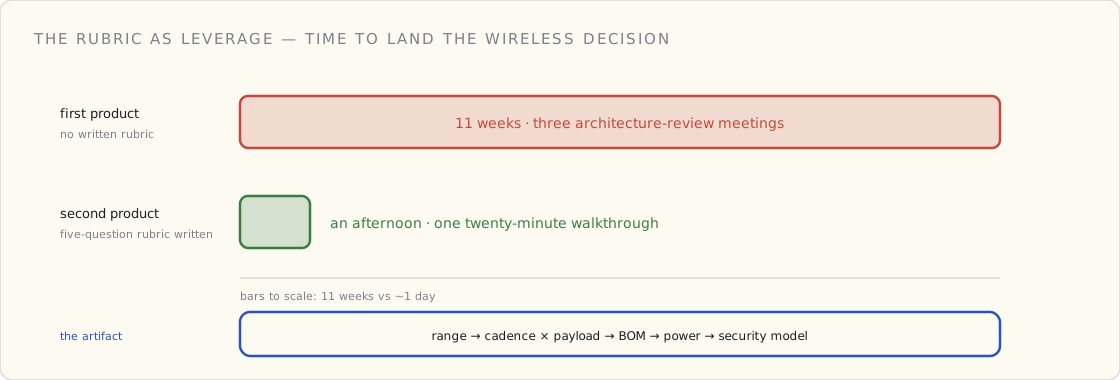
What I'm watching for the next two years
Three things I expect to learn:
- Edge ML on small chips. Running a tiny model on a more capable chip variant (vector instructions, more RAM) for anomaly detection on sensor data. Will the inference quality be good enough to act on without a cloud round-trip? I genuinely don't know yet.
- The fleet-management abstraction layer. A purpose-built fleet manager is the obvious next step once we cross a certain device count. The transition is non-trivial; teams I've talked to who did it earlier are happier than teams that waited.
- Operator-facing ML features. "Tell me which devices in the fleet are about to fail" is the killer app for connected hardware data. We're building the first version; the post-mortem on this one will be six months from now.
The bigger framing
Across two devices and four-plus years of active build, the constant is this: connected hardware products are operations products that happen to have software on top. The teams that succeed are the ones that internalize that early. The teams that struggle are the ones that try to ship a connected product the way they'd ship a SaaS product — quarterly releases, fast pivots, "let's iterate."
You can iterate the cloud side. You can sort of iterate the firmware side. You cannot iterate the hardware. You cannot iterate the certificate. You cannot iterate "the thing in someone's hand that's been there for two years."
The discipline that comes with that — the slower-on-purpose decisions, the boring rubrics, the staged rollouts, the inflexible signing process — is what makes connected products be products instead of be science projects.
I have a list now. The list survived a four-year gap between projects. The list got better the second time through. The kit is open-sourced. The next leader doesn't have to invent it.
Four and a half years in. Onto whatever comes next.
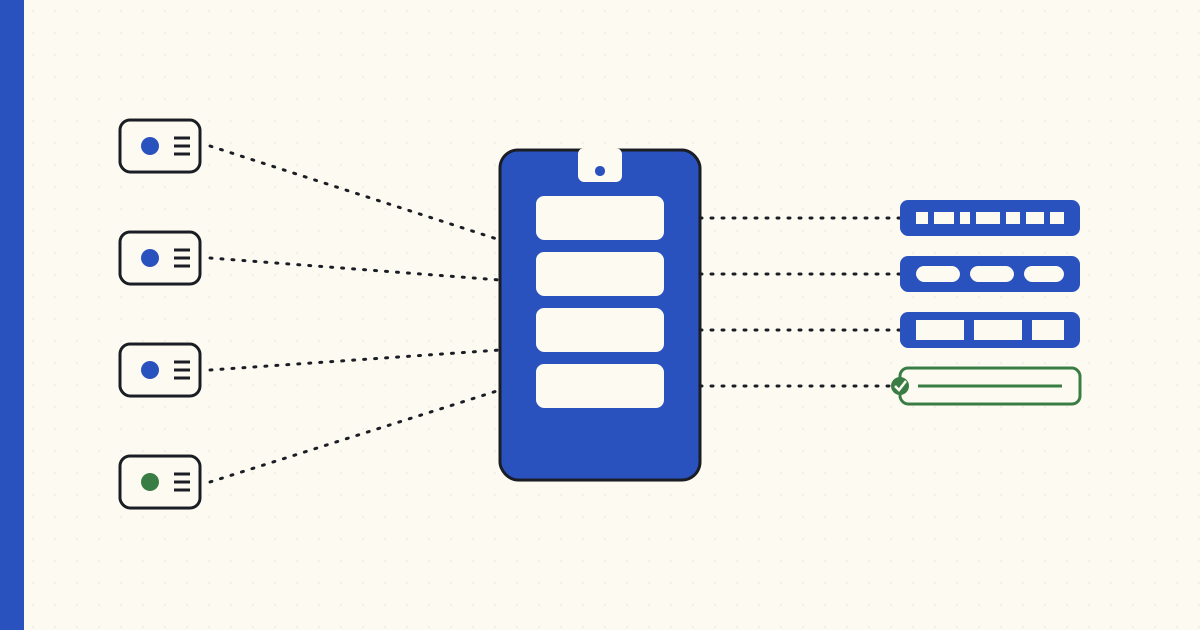 Part 12 of 13
 Open-sourcing the PII Masking Starter Kit
A four-bucket PII rubric, a runnable PySpark Glue job, an AWS DataBrew recipe, and a verify script that fails CI when the rubric drifts. The privacy layer that sits on the telemetry a connected-product fleet emits — open-sourced today after nine months of running it in private.
A connected-product fleet emits telemetry, and a lot of that telemetry is about a person. Who used the tool, where they used it, when, for how long. The moment that data leaves the device and lands in a cloud bucket, you own a privacy problem — and "we'll mask it later" is how that problem becomes a breach notification.
Nine months ago I started writing down a PII rubric for the connected-products data pipeline the team I lead runs in production. The rubric got reused on a second pipeline last quarter. Then a third. It's been the most-screenshot artifact in our internal docs for about half a year — because it's the layer that sits between the fleet and everything downstream, and every team that ships connected hardware eventually needs it.
Today I cleaned it up, paired it with the runnable infrastructure code that enforces it, and pushed it public.
→ github.com/drlukeangel/PII-Masking-Starter-Kit-Product-Management
What's in the box
Five files and a rubric:
| Path | What it does |
|---|---|
rubric.md | The four-bucket PII rubric — categories × treatment, one page |
data/generate_synthetic.py | Generate fake tool-telemetry data with realistic PII surface |
data/sample_tool_telemetry.csv | 20 rows of synthetic data, ready to run |
glue/pii_masking_job.py | PySpark job — production path |
databrew/recipe.json | DataBrew recipe — analyst-friendly path |
verify.py | Post-mask invariants check that fails CI on rubric drift |
Stack: python · pyspark · aws glue · aws databrew. The whole repo runs locally (with PySpark installed) or deploys as a Glue Job in AWS unchanged.
The rubric, in one paragraph
PII isn't one thing. It's four:
- Direct identifiers (email, device serial, government ID) → hashed with a rotating salt (HMAC-SHA256). Output is irreversible and unjoinable across rotation windows.
- Quasi-identifiers (name, employee ID, MAC) → tokenized to a stable random string. Same value maps to the same token within the dataset, so joins still work. Mapping table lives in a separately-secured location.
- Sensitive attributes (location, biometric, health, salary) → generalized. GPS to 0.01° grid (~1.1 km). Ages bucketed in five-year bins. Timestamps rounded to the hour. Free text run through NER and redacted.
- Behavioral / non-PII (battery level, usage minutes, error codes) → kept. This is what the product runs on; don't touch it.
That's the rubric. Three questions decide which bucket any new column lands in. Full table and worked example in rubric.md.
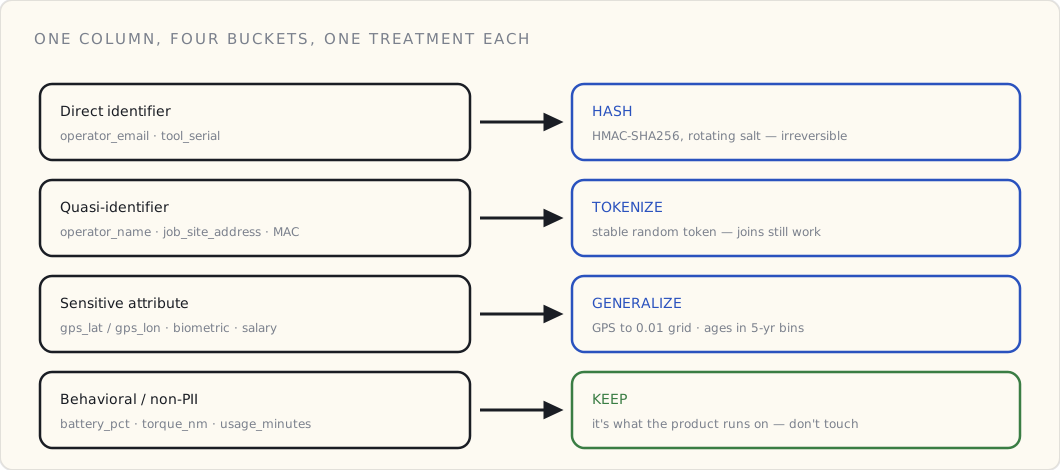
The "rotating salt" on the direct-identifier bucket is doing two jobs at once, and it's worth seeing why. Run the same operator_email through HMAC-SHA256 with this quarter's salt and you get a digest no key can reverse. Rotate the salt next quarter and the same email produces a different digest — so the value can't be used to join one rotation window to the next. Irreversible and unjoinable, from one cheap primitive.
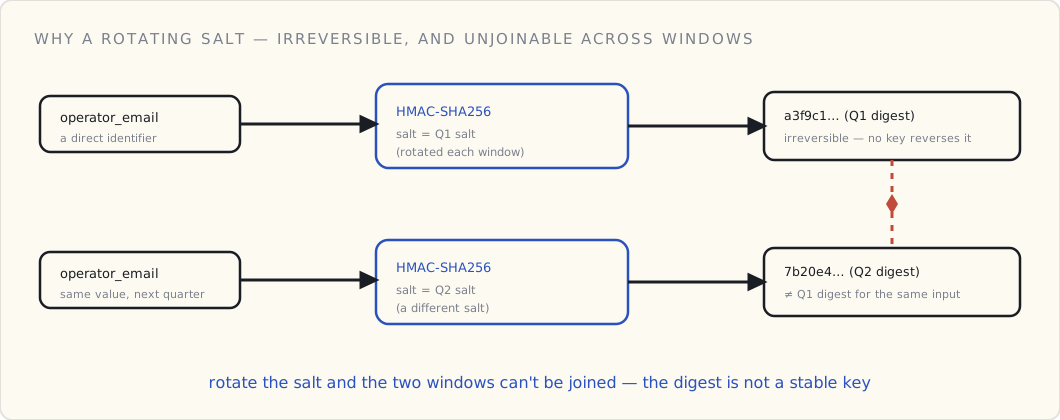
Why it exists (and why it's small)
Most teams handle PII three ways: ignore it (illegal), hash everything (useless), or argue about it for six weeks before a single byte moves (expensive). The rubric is the minimal opinionated alternative — short enough that legal will read it, runnable enough that engineering will use it.
I kept the repo deliberately small. Five files. One rubric. No framework. No abstractions you have to learn before you can read the code. The whole thing fits in your head after 30 minutes; the whole thing runs end-to-end in 10 minutes.
How teams use it
Different audiences read different files. From the README:
- Engineering managers fork as a starting template for the data-pipeline repo.
- Product managers read
rubric.mdand stop there. The rubric is the conversation, not the code. - Data engineers lift the Glue job structure, swap in their own schema, keep the rubric.
- Privacy and legal partners audit
rubric.mdandverify.py. The verify script is the contract — if it passes, the rubric is honored.
The shape that's worked for us: hand legal the rubric, hand engineering the Glue job, run verify.py in CI on every pull request that touches the data pipeline. The argument moves from "what counts as PII" (which is a six-week conversation with no end) to "is this column a direct identifier, quasi-identifier, sensitive attribute, or behavioral data" (which is a five-minute conversation that ends).
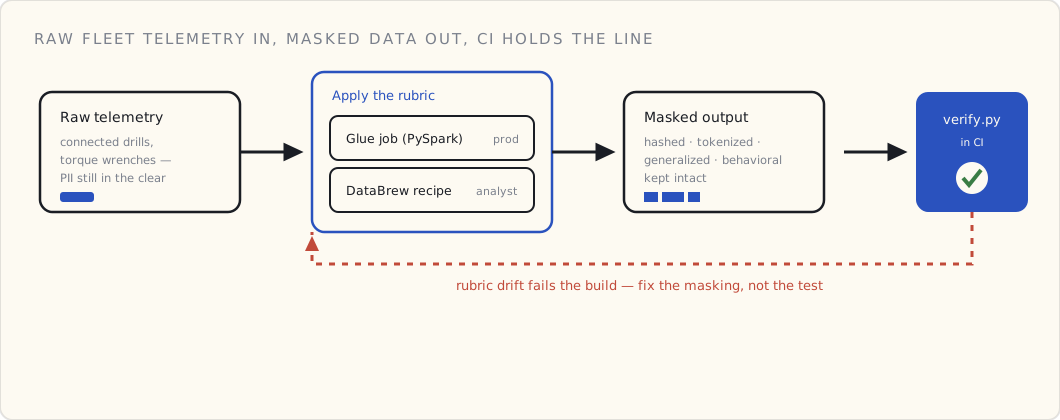
The verify.py step is the part that keeps this honest. A rubric in a doc rots — a new column lands, someone forgets which bucket it's in, and three months later there's an operator_email column sitting unmasked in the analytics warehouse. The verify script re-derives the invariants from the rubric and asserts them against the masked output: no value in a hashed column is reversible, every quasi-identifier is tokenized, no raw GPS survives. If the masking drifts from the rubric, the build goes red. You don't get to merge a pipeline change that quietly de-anonymizes the fleet.
Why the example is tool telemetry
The synthetic dataset isn't e-commerce customers — it's industrial tool telemetry: connected drills and torque wrenches sending readings to the cloud, tagged with the operator who used them and the job site they were on. The PII surface looks like this:
tool_serial— direct identifier of the deviceoperator_id,operator_email,operator_name— direct PIIgps_lat,gps_lon— sensitive (location)job_site_address— quasi-identifierbattery_pct,torque_nm,usage_minutes— behavioral, no PII
That's a real PII surface anyone running a connected-product pipeline hits in week two. The rubric handles each. If your dataset has a different shape, the buckets still apply — only the column-to-bucket mapping changes.
What it pairs with
This kit ships data; the Connected Products Starter Kit emits it. The two kits work together: one ingests telemetry from the fleet, the other masks it before anything else touches it.
For most connected-product teams, the masking is the hard part to get right early — not the ingestion. If you're standing up a fleet today and don't yet have a PII story for the data it produces, start with the rubric. The infrastructure follows from the decisions you make there.
When to outgrow it
Listed in the README. Short version:
- Privacera for enterprise data-access governance integrated with Glue and Lake Formation.
- Immuta for policy-as-code data masking, especially Snowflake-heavy stacks.
- Microsoft Presidio (open source) for PII detection in free-text — pairs nicely with the rubric for the columns that contain user-generated content.
- AWS Macie for PII discovery in S3 — run it on your raw bucket to surface columns the rubric missed.
This kit covers the first 80%. Graduate when it stops fitting.
What I'll write up later
Two follow-up pieces I'm planning:
- A three-months-in reflection on running this in production — what worked, what we'd change, what the auditors made us add.
- A deeper dive on the structured-data masking path that doesn't fit cleanly in the rubric (free-text fields containing PII, semi-structured logs).
For now: clone, run, mask. The repo's job is to make the PII conversation cheaper. The discipline is in the rubric. The code is the part that makes the rubric load-bearing.
 Part 13 of 13
 PII masking with Glue DataBrew — the rubric we ended up with
Three months after open-sourcing the PII masking kit. What held up, what didn't, and the one bucket the rubric got wrong.
Three months ago I open-sourced the PII Masking Starter Kit. The rubric had been in private use for nine months at that point; I figured it was settled.
Three months of real-world contact later — including one audit and three new pipelines that adopted it — I have a slightly different rubric. This is the follow-up.
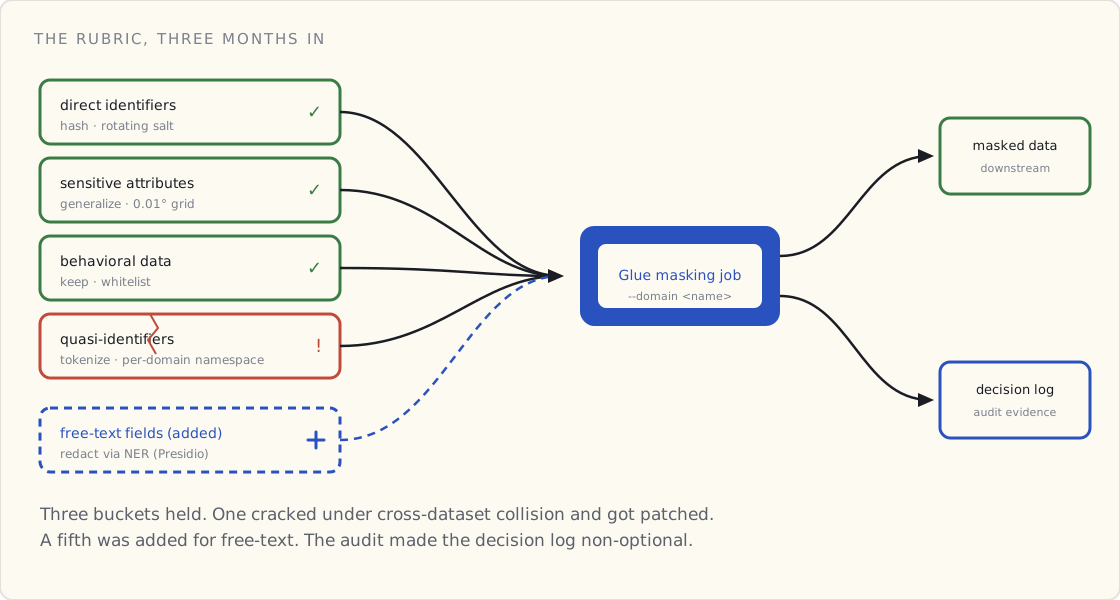
What held up
Three of the four buckets survived contact with the auditors and the new pipelines without changes:
Direct identifiers (hash with rotating salt). Held up. The salt-rotation discipline turned out to be the thing the auditors cared about most, more than the hash itself. Quarterly salt rotation with old-salt-readable-for-30-days was the pattern that satisfied both "rotation happens" and "you can still join against last quarter's data for 30 days."
Sensitive attributes (generalize). Held up. The 0.01° GPS grid (≈1.1 km) is the bucket size that the privacy team agreed on. Smaller (0.001° ≈ 110m) was deemed too identifying given typical job-site density. Larger (0.1° ≈ 11km) made the analytics useless.
Behavioral data (keep). Held up. The discipline of naming the columns we deliberately kept turned out to matter — when a new data source came in with an unfamiliar column, the conversation became "is this behavioral or did someone sneak PII in?" instead of "should we mask it." The whitelist is more useful than the blacklist.
What didn't hold up
The quasi-identifier bucket is where the rubric needed work.
Original rule: tokenize quasi-identifiers (employee ID, MAC address, names) to stable random strings, so within-dataset joins work but cross-dataset re-identification breaks.
What went wrong: stable tokenization across multiple datasets in the same org turned out to create a cross-dataset join key by accident. When two pipelines tokenized the same operator name using the same namespace, the resulting tokens matched. The privacy team's whole point in tokenizing was to prevent cross-dataset linking; we'd defeated the purpose without realizing it.
The fix that landed: namespace tokens per data domain, not per organization. The PII masking job now takes a --domain argument (e.g., tool-telemetry, support-tickets, billing) and the token namespace is mixed into the hash so the same name in different domains gets different tokens.
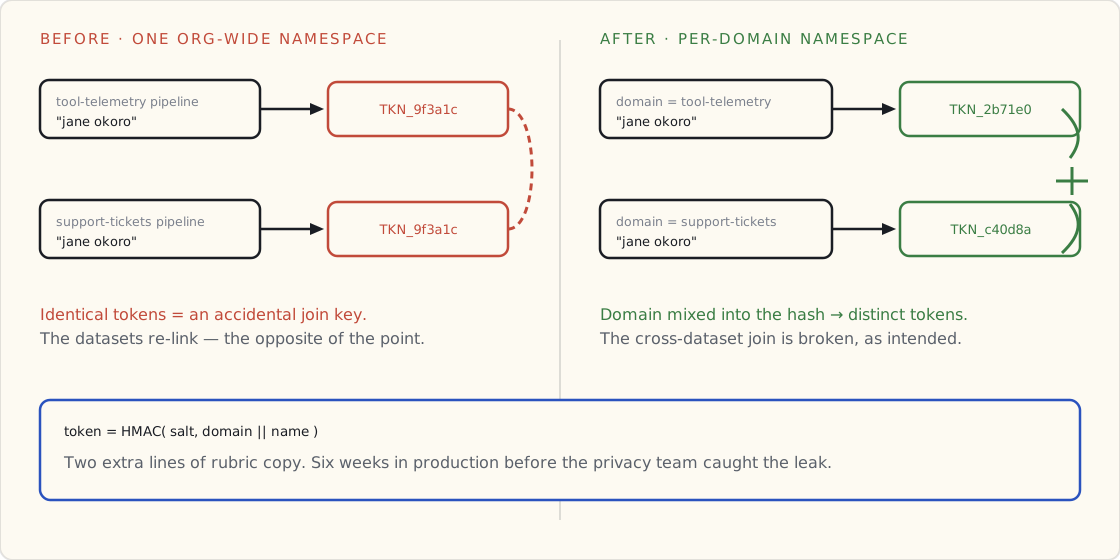
This was a real bug that ran in production for six weeks before someone in the privacy team caught it during a routine audit. Embarrassing. The rubric now has a much louder note about it.
What we added
A fifth bucket — free-text fields with embedded PII.
The original rubric covered structured columns. It didn't really address free-text fields where PII appears in arbitrary positions — error message strings that contain operator emails, notes fields users have typed names into, comment columns with phone numbers.
Our first attempt: regex. Worked for emails and phone numbers (mostly); failed for names, addresses, and anything not pattern-shaped.
What we landed on: Microsoft Presidio for named-entity recognition on free-text columns. The Glue job now routes free-text columns through Presidio, redacts identified entities, and passes the redacted text downstream. Presidio is open source, integrates cleanly with the PySpark pipeline, and gets us about 92% recall on the entity types our docs contain.
Added to the rubric as Bucket 5: Free-text → redact via NER, log identified entities for audit, fail closed on suspect columns.
What the audit asked for
We had our first external audit on this pipeline in March. The auditors asked for three things I hadn't built:
A masking decision log. For every column we mask, log: which bucket, which treatment, which version of the rubric. Append-only. The auditor wanted "show me, for this exact row, exactly what was done to it." We added a per-row metadata block to the masked output that records the rubric version applied. Not free in storage, but bounded.
A "what was kept, and why" report. The auditor wanted us to defend the behavioral bucket — which columns we'd kept and the reasoning. We had this informally in the rubric file; the audit needed it as a structured artifact. Added a kept_columns.md per dataset that gets reviewed in PR.
A rollback story. "If we discover next year that a column we classified as behavioral was actually PII, what's the remediation?" Forced us to write a runbook for re-masking historical data with an updated rubric. The runbook is uncomfortable but the audit pushed us to write it down, which I'm grateful for.
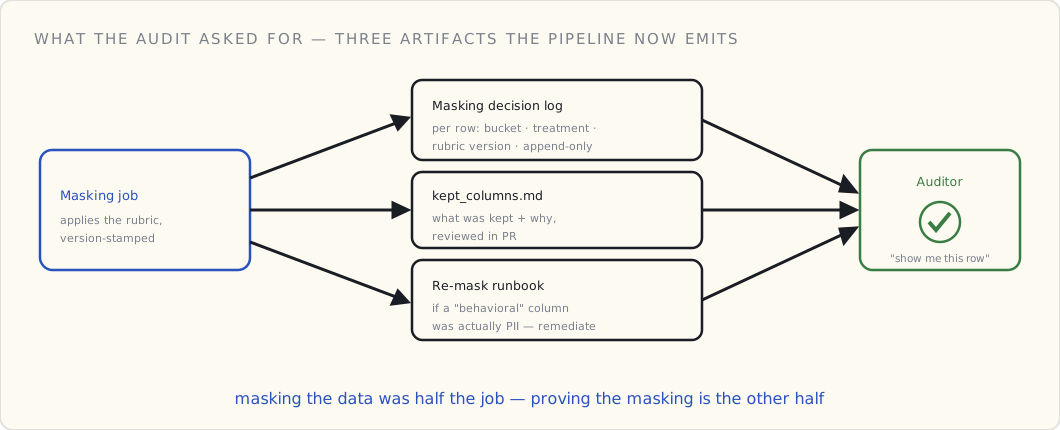
What I'd change in the rubric, if starting over
Three things, ordered by regret:
Make domain-namespacing explicit from day one. The six-week cross-dataset leak was the worst find. Two extra lines of rubric copy could have prevented it.
Include the audit-evidence shape in v1. Building "what counts as PII" without simultaneously building "how do we prove we masked it correctly" is doing half the job. Auditors are downstream stakeholders; design for them.
Free-text isn't optional; it's everywhere. I left it out of v1 because it was hard. It came back as Bucket 5 within six months because the problem doesn't care that you found it hard.
What's in the next revision
I'll push a v2 of the kit to GitHub later this quarter. Changes from v1:
- Domain-namespacing on quasi-identifier tokenization
- Free-text Bucket 5 with the Presidio integration
- The masking decision log
- The kept_columns / audit-evidence templates
- An updated
rubric.mdthat incorporates all of the above
The first ten teams to adopt the v1 rubric were our internal teams. The next ten are external — engineering managers who emailed me after the launch post. The fact that v2 exists at all is because of the questions they asked. Open-sourcing the kit was the single most useful thing I did to improve the kit, which is the whole reason to open-source things.
The framing that lasted
The bigger lesson from three months of running the rubric is the one I started with: get the rubric right, the rest is bookkeeping. A rubric that survives contact with auditors, with new pipelines, with hostile re-identification attempts, is a rubric. Everything else is a draft.
We're three drafts in now. The fourth one ships next quarter.