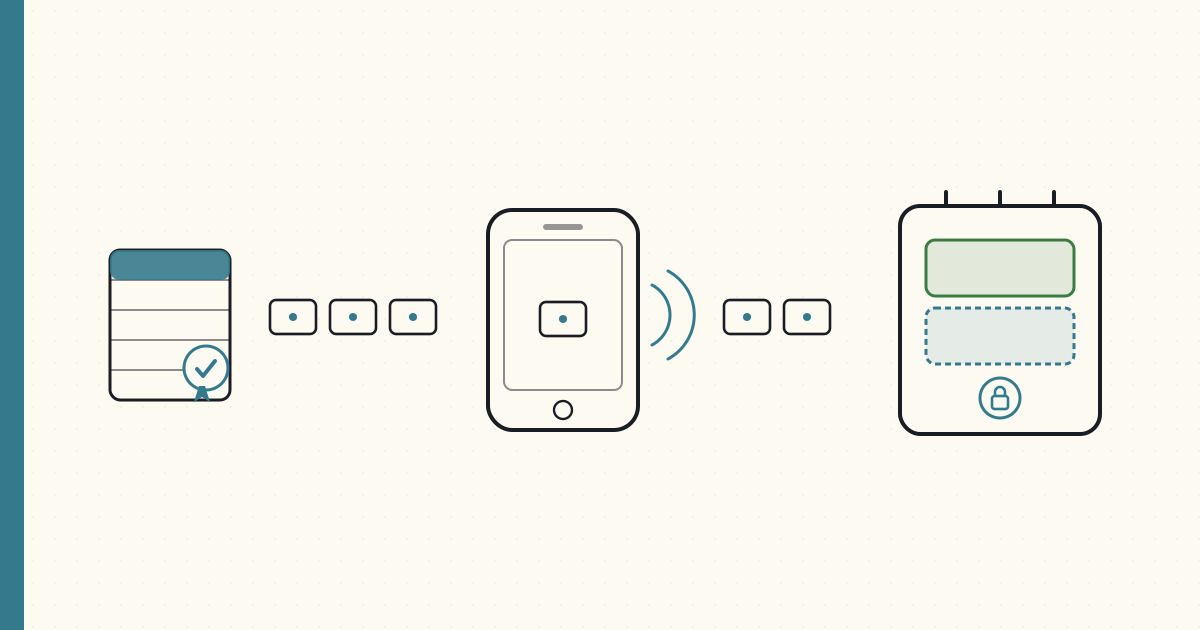
OTA firmware over Bluetooth — pushing the ROM through the phone
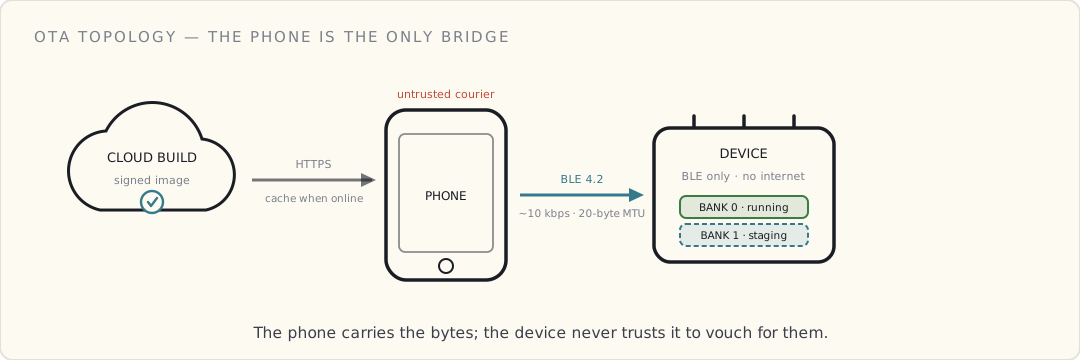
The single hardest problem on our connected-health platform is over-the-air firmware updates — and it isn't close. Not because firmware is hard; it isn't, particularly. Because the topology is hostile on every axis at once, and a firmware push is where all of it converges:
- The device has no internet. It can't download anything on its own — the only radio it has is BLE, and the only thing in BLE range is the customer's phone.
- The phone has internet, but only sometimes. It's the user's phone, not a gateway we control, and it's foregrounded near the device for maybe four minutes a day.
- BLE 4.2 throughput is ~10 kbps practical in our install base. A 200 KB image is three to four minutes of continuous transfer — and we almost never get three to four uninterrupted minutes.
- The user walks out of range mid-transfer. Closes the app. Lets their battery die. Lets the device battery die. Every one of those is the common case, not the tail.
- And the phone in the middle is hostile by default. When the payload was a session record, a forged one inflated a metric. When the payload is executable code, a forged one runs on the device. The stakes just changed completely.
A failed update on a deployed unit is a support call, a return, and a one-star review. We've shipped about a million units. So the design assumption, stated up front: every transfer will be interrupted, and every image might be hostile. The system is built to be unsurprised by both.
Where this sits in the series
The two posts before this one set the table. The BLE-4.2 post established the physics — no Wi-Fi on the device, a 20-byte MTU, a flaky phone as the sole gateway — and the phone-as-gateway auth post established the trust model: sign on the device, verify in the cloud, never trust the thing in the middle. That post carried telemetry up through the hostile phone. This one is the harder direction — pushing a new ROM down through that same phone — and it inherits both problems. The 20-byte pipe makes the transfer slow and interruptible; the untrusted phone means the device cannot take the bytes it's handed on faith.
The flow, end to end
An OTA update moves through seven stages:
- Cloud build and sign. Engineering builds an image and signs it with our firmware-signing key — the same private key whose public half is burned into every unit at the factory. The signed image lands in a versioned artifact store (S3, behind our platform API) tagged with target hardware revision and version.
- Cohort selection. The platform decides which units are eligible — by hardware rev, current firmware version, region, and canary tier. Nobody gets an update because they asked; they get it because the cohort logic released it to them.
- Phone fetch. On its next sync, the app learns the bonded device has an update waiting and downloads the signed image over HTTPS — even if the device isn't in range right then. The phone caches it. This decouples the slow internet fetch from the slow Bluetooth push.
- Transfer. Next time the user opens the app with the device in range, the app offers the update. They tap install, and the phone streams the image into the device's staging flash bank, one chunk at a time.
- Verify, then commit. The device receives the whole image into its second bank, checks a SHA-256 over it against the manifest, then verifies the signature against the on-chip key. Only if both pass does it set "boot the new bank next time" and reboot. Verify first; commit second. Never the other way around.
- Boot and attest. The device boots the new bank and, within the first seconds, sends a "booted clean, version X.Y.Z" up the same signed-telemetry path the session records use. The phone relays it to the cloud.
- Roll back if it doesn't check in. If that attestation never arrives within a few boot cycles, the bootloader concludes the new bank is bad and reverts to the old one — with no app, no phone, and no user involvement.
Laid out across the three tiers it touches, the path looks like this:
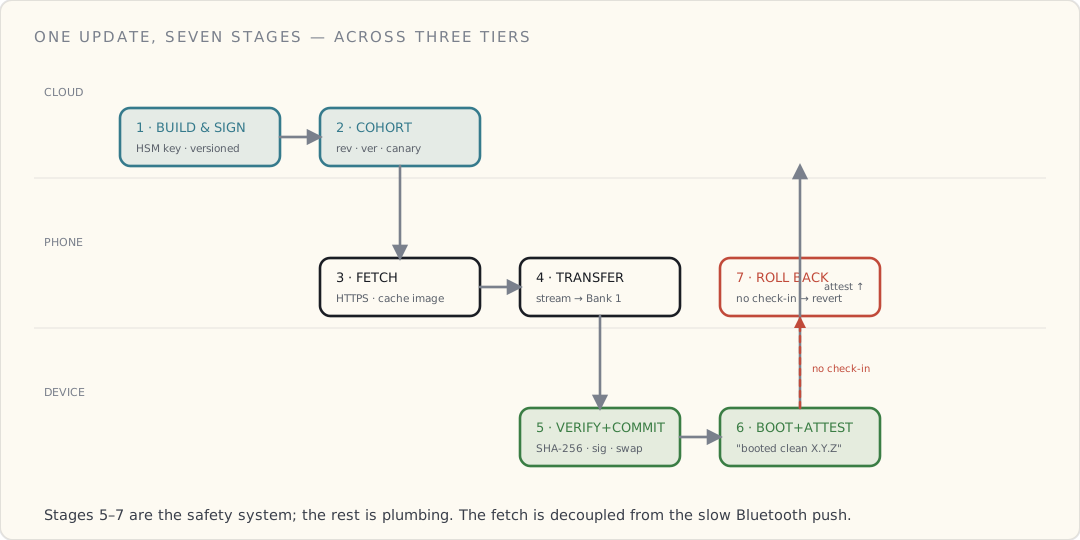
Stages 5, 6, and 7 are the entire reason a botched push doesn't become a brick. The rest is plumbing; those three are the safety system.
We didn't invent the bootloader — Nordic did
Worth being honest about what we built versus what we bought. The brush runs a Nordic nRF52-series SoC, and Nordic's nRF5 SDK ships a secure bootloader with background DFU that already does the load-bearing work: a dual-bank flash layout, a bootloader region that an update never touches, and — critically — a bootloader that refuses to activate an image unless it's signed with the key we provisioned. We didn't reinvent that. We configured it, provisioned our signing key into it, and wrote the mobile and cloud halves around it.
The dual-bank layout is the whole game. Flash is divided so that Bank 0 holds the running application and Bank 1 receives the incoming image. The current firmware keeps running, untouched, the entire time the new image is crawling in over Bluetooth. Nothing about the live device degrades during a transfer that might take days of stop-and-start. Only after Bank 1 is complete, hashed, and signature-checked does the bootloader swap which bank is active. If anything goes wrong before that swap — and something usually does — Bank 0 was never disturbed, so the device just keeps running the old firmware.
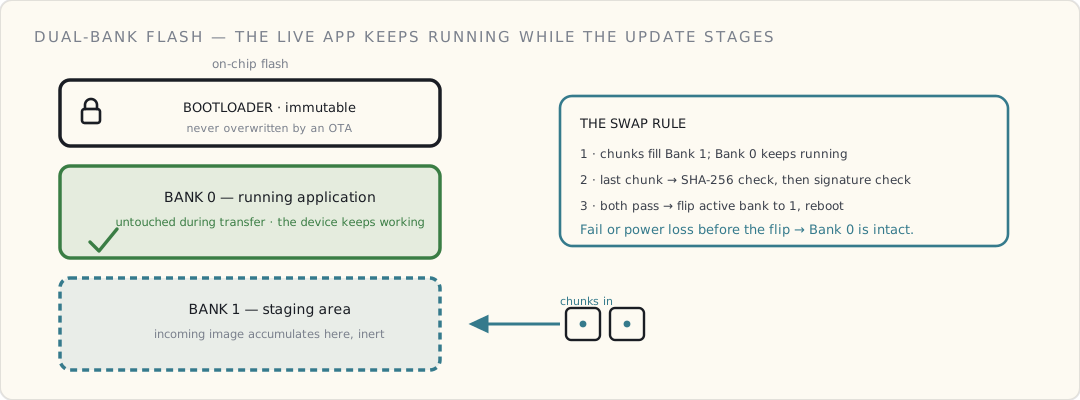
And the bootloader is sacred. We never overwrite it from an OTA. Ever. It's the one piece of firmware programmed at the factory and never replaced in the field, because it's the fallback that gets us out of every other firmware bug. If a bug in the application bricks the app, the bootloader still runs, still verifies, still rolls back. If we ever had to update the bootloader itself, we'd do it as a service-mode operation at retail — but we've never had to, and I don't plan to design for it. An OTA that can rewrite its own safety net isn't a safety net.
Chunking a ROM through a 20-byte straw
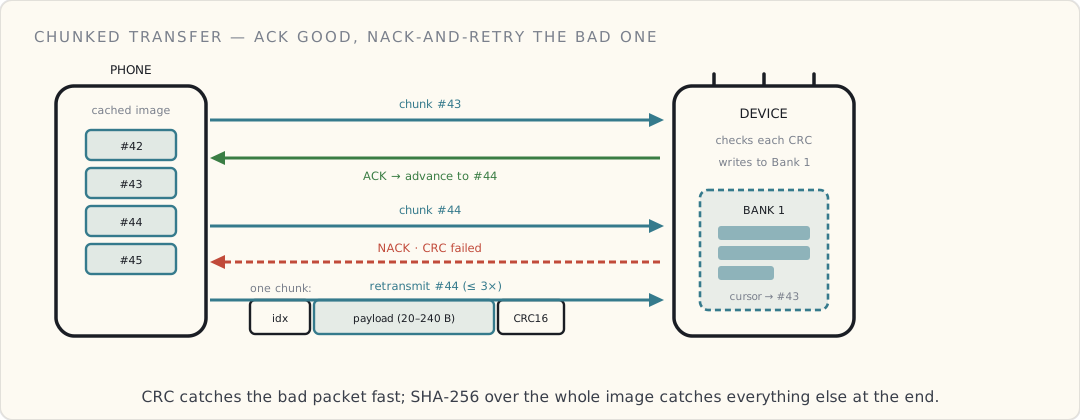
Now the transfer itself. The image goes over BLE in chunks sized to the connection's negotiated MTU. With the LE Data Length Extension — a BLE 4.2 feature — a willing phone gives us up to ~240 useful payload bytes per packet. Plenty of the older Android handsets in our base won't negotiate DLE, and there we're stuck at the BLE default: a 23-byte ATT MTU, three bytes of which are header, leaving 20 bytes of payload. Twenty. For a 200 KB image, that is ten thousand packets in the worst case, and we design against the worst case.
Each chunk carries three things:
- a 4-byte sequence index, so the device can tell exactly which chunk it's looking at and detect a gap;
- a payload sized to the negotiated MTU (20 to ~240 bytes);
- a CRC-16 over the chunk, so a corrupted packet is caught immediately rather than poisoning the image silently.
The device acks every chunk. A good chunk gets an ack-and-advance; a chunk whose CRC fails gets a nack, and the phone retransmits that one chunk. After three failed retransmits the phone gives up and declares the connection dead for now — it doesn't thrash forever on a link that's clearly gone. The CRC is the cheap, fast line of defense at the packet level; the SHA-256 at the end is the expensive, thorough one over the whole image. Two layers, two jobs.
Resume, because nobody finishes in one sitting
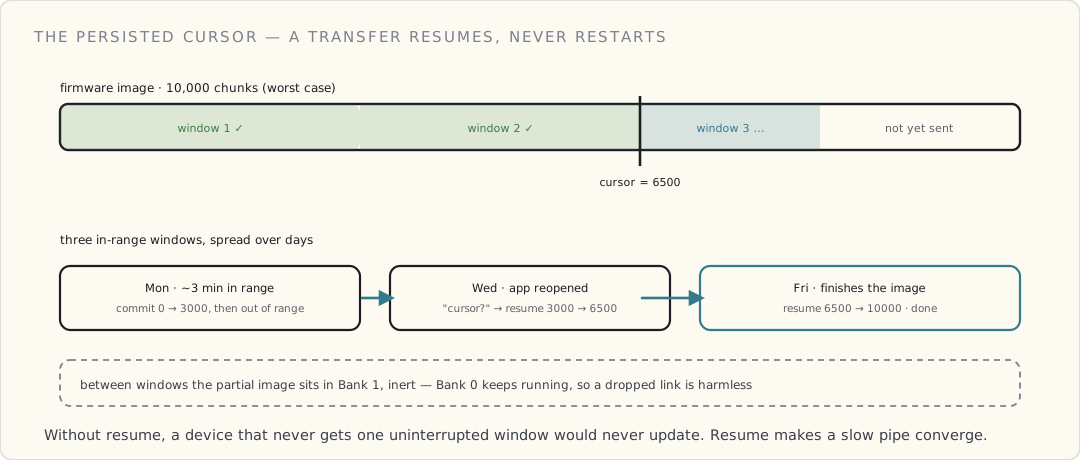
A 20-byte pipe means a transfer can stretch across many sessions, and the user has no idea a transfer is even underway. So the device tracks a persisted write cursor: the highest contiguous chunk index it has safely committed to Bank 1. When the link drops — range, app close, dead phone — the partial image just sits in Bank 1, harmless, because Bank 1 isn't the running firmware. On the next connection the phone asks the device "what's your cursor?" and resumes from the next chunk rather than restarting from zero. On a clean link the whole thing might finish in one ~3-minute window; in the field it's far more often three or four windows spread over days. Without resume, a device that never gets one uninterrupted window would never update. Resume is what makes a slow, interruptible pipe converge.
Verify, then commit — the power-loss-safe core
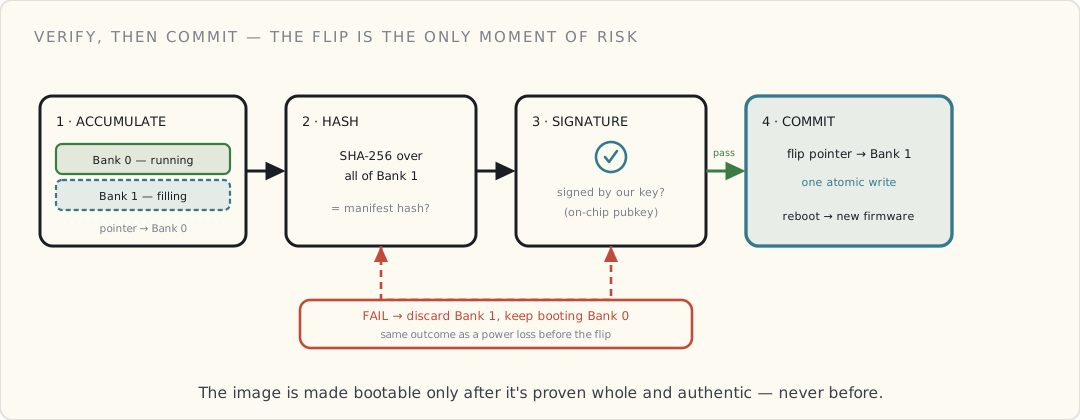
Here's the discipline that keeps a half-written update from being a brick, stated as a rule: the device never makes a staged image bootable until it has proven the image is both complete and authentic, and the running firmware is never touched until that moment. Walk it step by step:
- Chunks accumulate in Bank 1. Bank 0 keeps running. The active-bank pointer still says Bank 0.
- The last chunk arrives. The device computes a SHA-256 over all of Bank 1 and compares it to the hash in the signed manifest. Mismatch — even one bad bit the CRCs somehow let through — and Bank 1 is discarded. Nothing else happens.
- The hash matches, so the device verifies the image's signature against the public key burned into the chip. (More on why that step is non-negotiable in the next section.) Fail, and Bank 1 is discarded.
- Both pass. Now — and only now — the device flips the active-bank pointer to Bank 1 and reboots. This pointer flip is the single atomic commit. Before it, the device boots old firmware; after it, new. There is no in-between state where the device boots a half-written image, because the pointer is never set until the image behind it is whole and trusted.
That ordering is the whole power-loss story. Lose power at step 1 or 2 and Bank 0 is pristine — the device boots the old firmware and discards the partial Bank 1 on the next attempt. Lose power during the reboot at step 4 and the bootloader, on its next run, sees the new pointer and a fully-verified Bank 1, and proceeds. The dangerous operation — making code bootable — is reduced to flipping one flag, the fastest, most atomic thing the device does, and it happens only after every check has passed.
Signing — the phone is carrying executable code now
This is the step the phone-as-gateway post makes unavoidable. We already concluded that the phone is a forgeable middleman that can hand the cloud any session bytes it likes. The same phone is now handing the device a firmware image. If the device trusts what it's given, an attacker who controls the app — decompile it, re-sign it, point it at a malicious image, or just drive the BLE characteristics directly — can flash arbitrary code onto a million medical-adjacent devices. That is the worst outcome on the whole platform, by a wide margin, and it is precisely the outcome the phone's untrustworthiness invites.
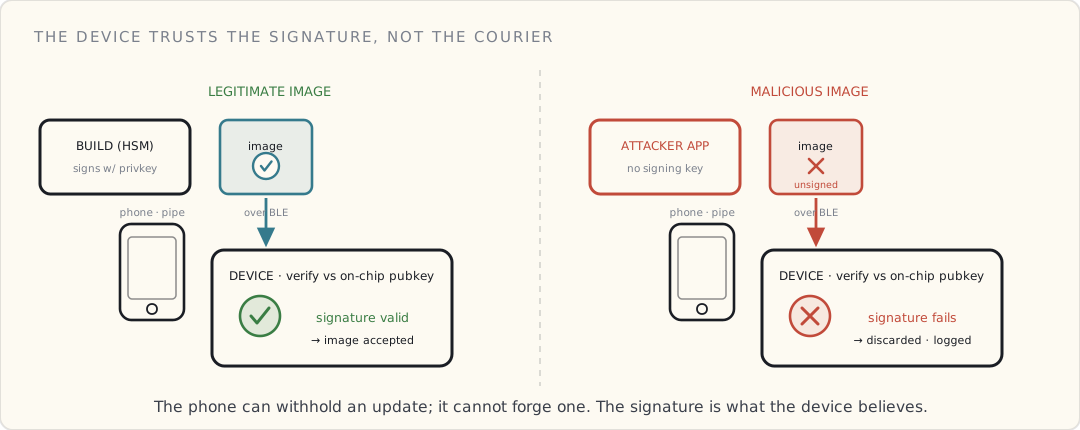
The defense is the mirror image of what we did for telemetry. There, the device signs and the cloud verifies. Here, the cloud (our build infrastructure) signs and the device verifies:
- Engineering signs every image with the firmware-signing private key, which lives in an HSM in our build pipeline and is never on anyone's laptop. A leak of that key is a fleet-wide extinction event — it would let an attacker sign images every unit we ever shipped would trust — so it's guarded like the crown jewel it is.
- The matching public key is burned into every device at the factory, in the same secure element the BLE pairing already uses. Nordic's secure bootloader checks against it, in the bootloader region the OTA can never overwrite.
- The phone never touches either key. It carries a signed blob it cannot alter without invalidating a signature it has no key to recompute. It is, once again, demoted to a pipe — load-bearing for delivery, irrelevant to trust.
So the device's question isn't "did the phone give me this?" — the phone's word is worthless and we've stopped asking for it. The question is "is this image signed by us?" The signature, not the courier, is what the device trusts. A malicious image flashed by a compromised app fails the signature check and gets discarded at step 3 above, exactly like a corrupt one. The phone can refuse to deliver an update, or deliver a stale one — denial of service we can live with — but it cannot make the device run code we didn't sign.
Every interruption, and what the device does about it
Because the design assumes interruption, each failure mode has a defined, boring outcome — boring is the goal:
- User closes the app mid-transfer. Phone stops. Partial image sits in Bank 1, inert. Next launch, the transfer resumes from the persisted cursor. No damage.
- BLE drops out of range. Identical. The cursor survives; the next in-range window picks up where it left off.
- Phone battery dies. Identical again. The device doesn't even know the phone is gone until the next connection.
- Device battery dies mid-transfer. The device's RAM is lost, but Bank 0 is untouched, so on next charge it boots the old firmware normally. Bank 1 may hold a partial image; the device sees it's incomplete (cursor short of the manifest length) and either resumes or discards and restarts. Bank 0 was never at risk.
- SHA-256 mismatch after the last chunk. Bank 1 discarded; an event logged for the cloud to see. Device keeps running Bank 0.
- Signature check fails. Same as a hash mismatch, but it's the alarm bell, not the shrug — a signature failure on a complete image with a good hash is the fingerprint of a substitution attempt, and it's logged as a security event, not a transfer error.
- New firmware boots but hangs or crashes. The bootloader's boot-counter is the net here: the new firmware has a fixed number of boot cycles to send its "booted clean" attestation. If it doesn't check in — because it crashed, hung, or otherwise misbehaved — the bootloader swaps back to Bank 0 automatically. The user might see a flaky device for a few minutes; they never see a dead one.
The boot-counter failsafe deserves emphasis because it catches the class of failure no transfer check can: an image that arrives perfectly, verifies perfectly, and is broken anyway. A clean signature says the code is authentically ours; it says nothing about whether the code works. Those are different guarantees, and you need a separate mechanism for each.
The near-disaster
We had one genuine scare last month, and it's the most instructive thing that's happened on this platform, so I'll tell it straight.
We shipped an OTA to about 2% of the fleet as a canary. It booted fine in the lab. It booted fine on the canary units — at first. But it had a subtle interaction with one specific hardware revision: a sensor-calibration routine read a region of flash that was uninitialized on that rev, and the garbage it found there crashed the firmware roughly three days after boot. Not at boot — three days in. Every transfer check passed. Every signature verified. The boot-counter failsafe didn't fire, because the firmware did boot clean and did check in; it died long after the boot-counter had been satisfied and forgotten.
We caught it because the platform tracks "percent of cohort still online 72 hours post-update, faceted by hardware revision." That number started falling for the canary cohort on day three, and only for the one affected rev.
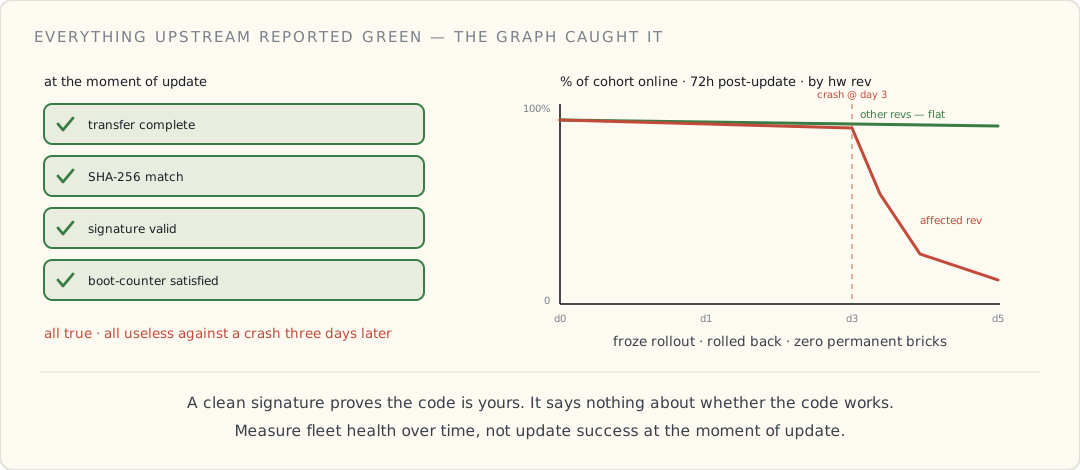 We froze the broader rollout, identified the rev, shipped a corrected image to the canary cohort, and the bootloader rolled back the units that had already crashed. Net damage: a few thousand units flaky for a day, zero permanent bricks.
The lesson is uncomfortable: a transfer that completes successfully and bricks the device three days later is a worse failure than one that never starts — because everything upstream reports green. Transfer success, hash match, signature valid, boot-counter satisfied: all true, all useless against a time-delayed crash. The only thing that caught it was measuring fleet health over time, not update success at the moment of update. That dashboard is the single most valuable piece of operational tooling we've built, and it's the kind of thing that's obvious only after it's saved you once.
The phone-as-gateway penalty, named honestly
Everything here is harder than it would be on a device with its own internet radio. AWS shipped IoT Jobs for exactly this — OTA orchestration with cohorts, staged rollouts, retries, monitoring, and, as of late last year, code-signed jobs so the device verifies the file before it runs it. If our device could open a TLS socket to IoT Core, I'd use Jobs and delete most of what we wrote. (Azure IoT Hub has device twins and its own update story; either way, a directly connected device.)
Ours can't. The nearest IP-capable thing in its world is the phone, and routing Jobs through the phone just puts the untrusted middleman back in the trust path — the exact thing we spent the last post eliminating. So we built our own: roughly 18 engineer-months across firmware, mobile, and platform. The payoff is a system that has pushed firmware to about a million units with low-double-digit permanent bricks — and most of those weren't our fault, they were clinical-pilot environments where adjacent equipment was stomping on the 2.4 GHz band hard enough to kill the BLE link past any retry budget.
What I borrowed from IoT Jobs without using it: the shape. Versioned signed artifacts, cohort rollouts, per-device attestation, server-side health tracking. The wire protocol isn't theirs and the orchestration is ours, but the model is the one a managed service would have enforced — pushed up a layer to where, for a phone-gateway product, it has to live anyway. If we ever ship a unit with Wi-Fi on board, the device connects to IoT Core and most of this collapses into configuration.
What I'd tell a team
Four principles, earned the hard way:
- The bootloader is the load-bearing piece — never let an OTA touch it. Factory-program it, treat it as the immutable fallback that survives every other firmware bug, and resist every clever argument for making it field-updatable. The thing that rescues you from a bad update cannot itself be delivered by an update.
- Verify, then commit — and make the commit a single atomic flag flip. Stage into a second bank, hash it, check the signature, and only then point the device at it. The running firmware is never disturbed until the new image has earned it. That ordering, not luck, is what makes a power loss mid-write a non-event.
- The device verifies the signature, not the courier. The phone — or any middleman — is hostile by default. Sign images in the cloud, burn the public key into the chip, and the device trusts the math instead of the messenger. A compromised app can withhold an update; it cannot forge one.
- Measure fleet health over time, not transfer success. A clean signature proves the code is yours, not that it works. Track percent-still-online N hours post-update, faceted by hardware rev, and let a slow-burn regression show up before the full rollout does. It's the only instrument that catches the failure that reports green.
What's next
The OTA system is the most extreme example of why the firmware, hardware, and API teams have to negotiate specs together rather than over a wall — a dual-bank layout, a signing key in the bootloader, a boot-counter contract, and a manifest format all have to be agreed before a single line ships, and none of them belong to one team. The next post is the cross-functional one: how hardware specs and API contracts get hammered out across those teams, with the brush-head identification protocol as the running example.