What good IoT observability looks like in CloudWatch
We've been running our connected-product fleet in production for about six months. The first incident, predictably, was an observability incident — we couldn't tell whether 200 devices had stopped talking because the devices were broken, the network was broken, the cloud was broken, or our parsing of the data was broken. It took us a full day to figure out which.
This is the CloudWatch setup we'd have built on day one if we'd known better.
(Previously, on v1, we built our own dashboards from scratch in 2018. The IoT-native cloud metrics weren't mature yet, and we ended up running everything off custom metrics emitted from serverless functions. On v2 the native side is much better. The setup below would have saved us about two engineer-months on the v1 build. It's now ~one engineer-week.)
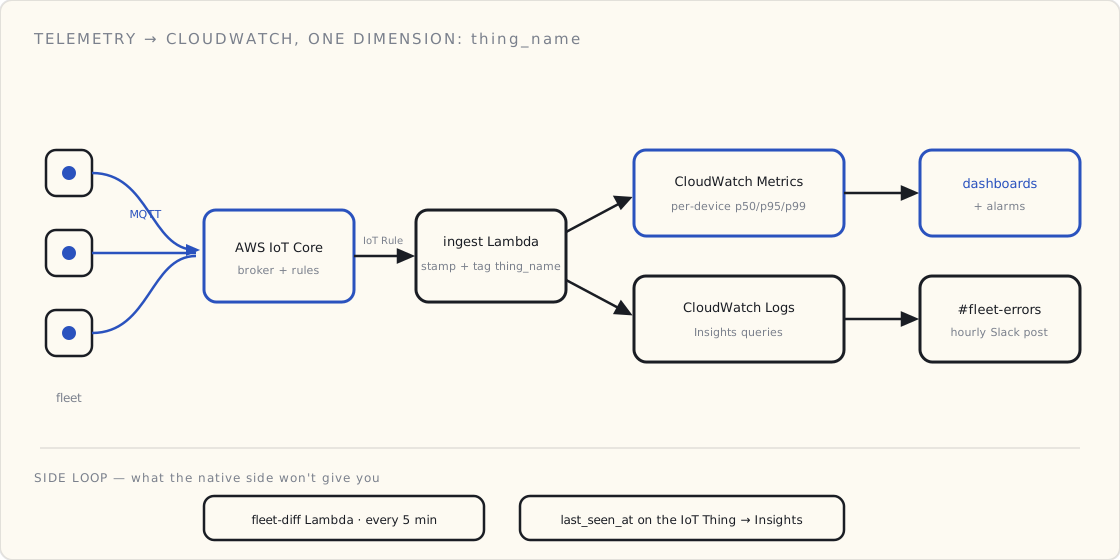
The whole thing hangs off one decision made at the ingest Lambda: every metric and every log line carries the device's thing_name as a dimension. Get that wiring right and the dashboards, the alarms, and the Logs Insights queries all fall out of it.
The three dashboards
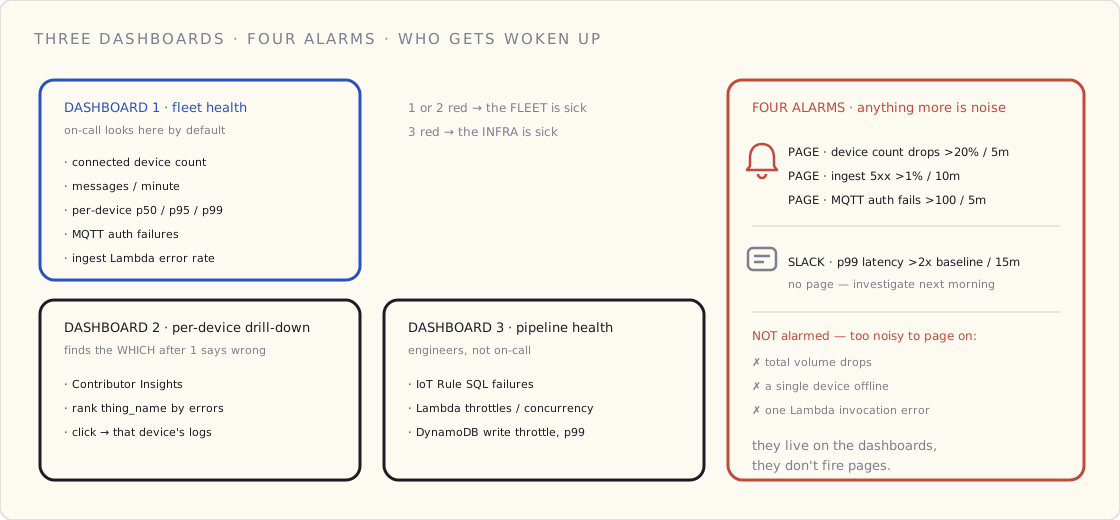
Dashboard one: fleet health, one row per device class.
Five metrics, plotted as time series across the last seven days:
- Connected device count. A
BinaryStateValuemetric we emit when an MQTT connect/disconnect happens on IoT Core, summed across the fleet. Sudden drops here are the first thing to look at in any incident. - Messages per minute. Volume of
iot:Publishevents from CloudWatch Metrics for IoT Core. If devices are connected but not publishing, the firmware is wedged. - Per-device p50 / p95 / p99 publish-to-cloud latency. From our IoT rule pipeline — we stamp the message with a server timestamp on arrival, compare to the device-side timestamp, emit the delta as a custom metric. p99 tells you tail behavior; p50 alone hides everything.
- MQTT auth failures. Suspicious if it spikes. Either we have a cert-rotation problem or somebody's trying to talk to our endpoint with a stolen credential.
- Lambda error rate on the ingest function. If devices are happy but we're 5xx'ing on ingest, we're losing data.
Dashboard one is the only thing the on-call rotation looks at by default. Everything else is for diagnosis after that dashboard says something's wrong.
Dashboard two: per-device drill-down.
When dashboard one says "something's wrong," dashboard two is how you find the which. CloudWatch Contributor Insights with a rule that ranks thing_name by error rate. Top ten, last hour. Click one, jump to that device's logs and metrics.
We use thing_name as the partition key on our ingest Lambda's emit, so every metric we publish has the device dimension. This is the one decision that paid off most — every metric is per-device or per-job-site, never just an aggregate.
Dashboard three: pipeline health.
This one is for the engineers, not the on-call. It tracks:
- IoT Rule SQL failures (a count that should be near zero).
- Lambda concurrent executions and throttling.
- DynamoDB write throttles, write latency p99.
- Kinesis Firehose backlog (we pipe to S3 for analytics; backlog means analytics will lag).
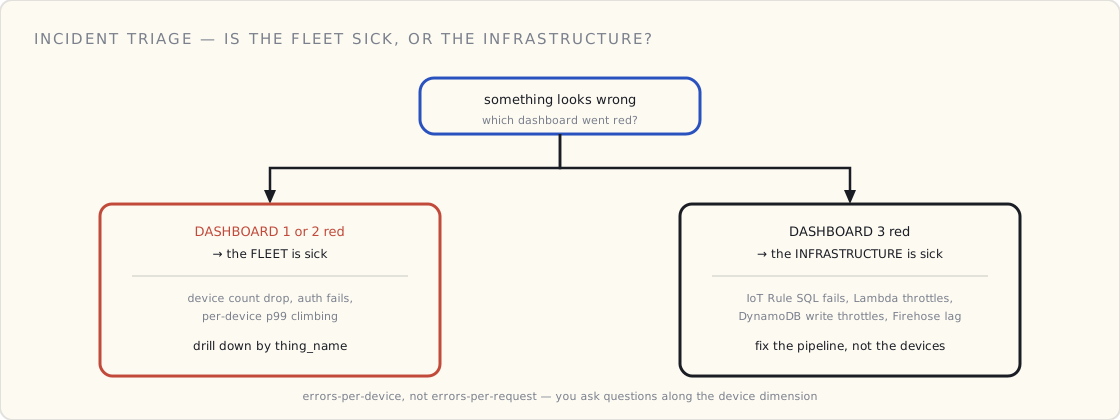
If dashboard three is red, the infrastructure is unhealthy. If only dashboard one or two is red, the fleet is.
The four alarms
We have four production alarms. Anything beyond four is noise.
- Connected device count drops > 20% in 5 minutes. Paged. Either a cloud-side outage or a connectivity event in a region — either way, somebody needs to look right now.
- Ingest Lambda 5xx rate > 1% for 10 minutes. Paged. We're losing data.
- Per-device p99 publish-to-cloud latency > 2x baseline for 15 minutes. Slack-only, no page. Investigates next morning.
- MQTT auth failures > 100 in 5 minutes. Paged. Either fleet-wide cert issue or someone's poking at our endpoint with stolen keys.
Notice what's not on this list: total message volume drops, individual device offline, individual Lambda invocation errors. Those are too noisy to alarm on directly. They all show up on the dashboards; they don't fire pages.
The one CloudWatch Logs Insights query
We have a saved query that I run more than anything else in the console:
fields @timestamp, thing_name, error_code, battery_pct
| filter ispresent(error_code) and error_code != ""
| stats count() as errors by thing_name, error_code
| sort errors desc
| limit 20
"For the time range in the toolbar, which devices are reporting errors, what errors, and how many?" Twenty rows of output. The answer to ninety percent of "is something wrong" questions.
Insights queries are also schedulable now (via Lambda or EventBridge), so we've got the same query running hourly and posting to a Slack channel. If a device's error count for an hour exceeds a threshold, it shows up in #fleet-errors with the thing-name, error code, and a deep link to the device's recent events.
What we built ourselves that I'd recommend
Two pieces of code that paid for themselves the first month:
A "fleet diff" Lambda. Runs every five minutes. Pulls the list of currently-connected devices from IoT Core. Compares to the list of devices we expect to be online (from our customer database). Emits the diff as a metric. When 200 devices fell silent, this Lambda noticed within five minutes, instead of us noticing the next day.
A per-device "last seen" attribute. We update a last_seen_at attribute on the device's IoT Thing every time it publishes, via the IoT rule. Then a CloudWatch Insights query against the IoT Things index gives us "devices that haven't published in N hours." Predictably useful.
What I'd skip
A few things I tried that didn't earn their keep:
- X-Ray tracing on every Lambda invocation. Too noisy at fleet scale and the cost adds up. We turn it on for specific debugging sessions, not always.
- Per-device CloudWatch Logs streams. Don't do this. CloudWatch Logs is priced per ingested GB; if you're emitting structured logs from every device every minute, you'll regret it. Aggregate at the rule layer; emit logs from the cloud side only.
- Synthetic device pingers from another region. Tempting, but the failure mode it catches is "AWS region is broken," which CloudWatch will already tell you about. Not worth the complexity.
The bigger framing
The lesson of the six months: an IoT product is a fleet operations product, not a software product. Software products have errors per request. Fleet ops products have errors per device, per device class, per firmware version, per job site. You instrument for the dimension you'll ask questions along, and you ask questions along devices.
Six months from now I'll know whether we got the dashboards right. Six months ago, we didn't have dashboards. That's the bigger move.