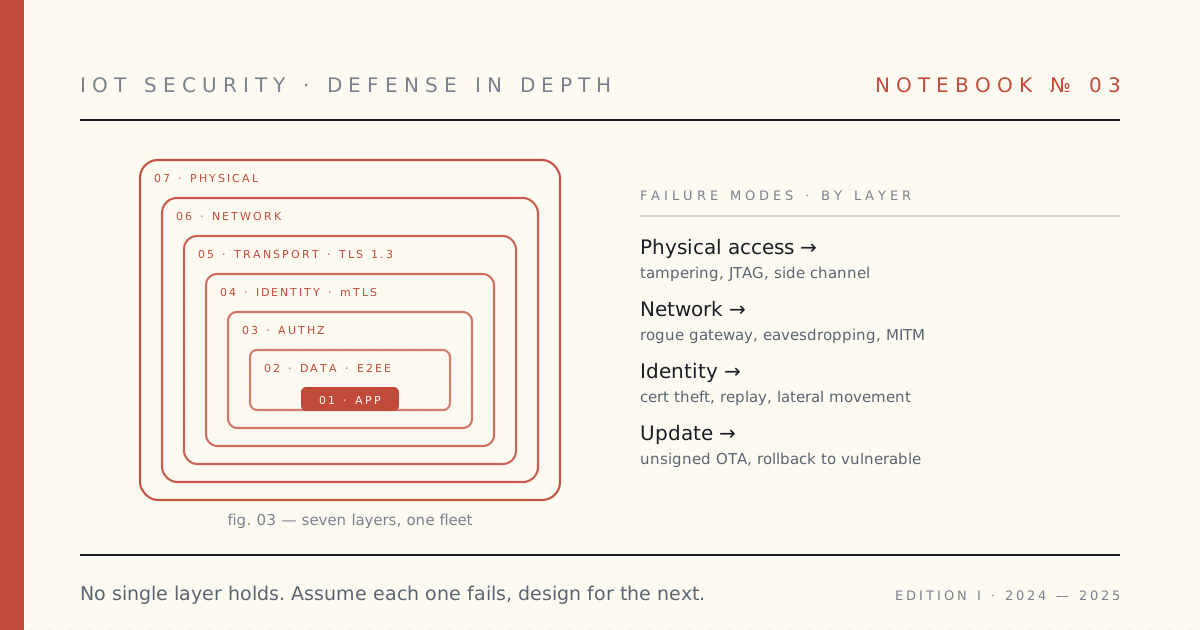
 Notebook · 08 parts
 IoT Security — The Full Stack
Per-device identity that scales clean to a million devices, seven layers of defense you can actually deploy, and an OTA pipeline you can sleep through a Friday rollout on. The connected-product security posture I'd ship with confidence — and a playbook you can lift directly.
Every connected product is under attack from the day it boots. Not in the abstract — in the actual logs. The question isn't whether the perimeter eventually fails. It will. The question is whether the next layer holds when it does.
Three things have to be right or the fleet doesn't ship: per-device identity that scopes a single cert leak to a single device; defense in depth where each layer assumes the one above will fall; and an OTA pipeline that can update a million devices in production without bricking the one in your customer's hand at 3 AM.
This is the posture I'd insist on before any connected-hardware launch — written from the engineering team that's had to defend the breach in person, and the post-mortems where it almost didn't hold.
 Part 01 of 08
 Defense in depth for a connected-product fleet
The whole connected-product security stack, end to end: seven layers from the silicon up, how they sit on the data path device-to-cloud, and where each one gets its own deep-dive. Start here.
This is the map for the whole series. Every other post takes one layer of connected-product security down to the studs; this one is the shape of the whole thing — how the layers sit on the real data path, device to cloud:
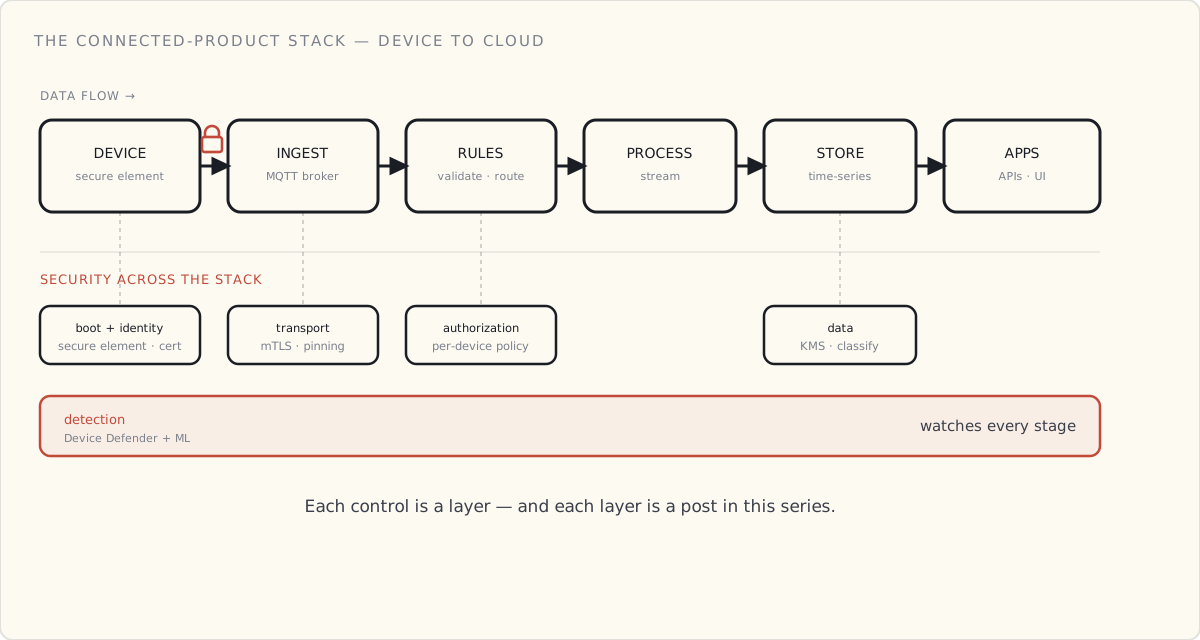
The series walks that stack one layer at a time:
- Hardware — Secure Boot: a device learns to trust its own code.
- Identity — the device-and-cloud handshake: proving who's who, both ways.
- Authorization — authenticated isn't authorized: least privilege.
- Data — at rest and in motion: encryption and classification.
- Updates — securing what you flash: blast radius, signing, key rotation.
- Detection — the smoke alarm, not the lock: anomaly detection and response.
- The fleet — identity at scale: provisioning, rotation, revocation.
The rest of this post is the layer model itself — seven owners, seven failure modes, seven remediation costs, and what I'd rebuild differently next time.
The framing
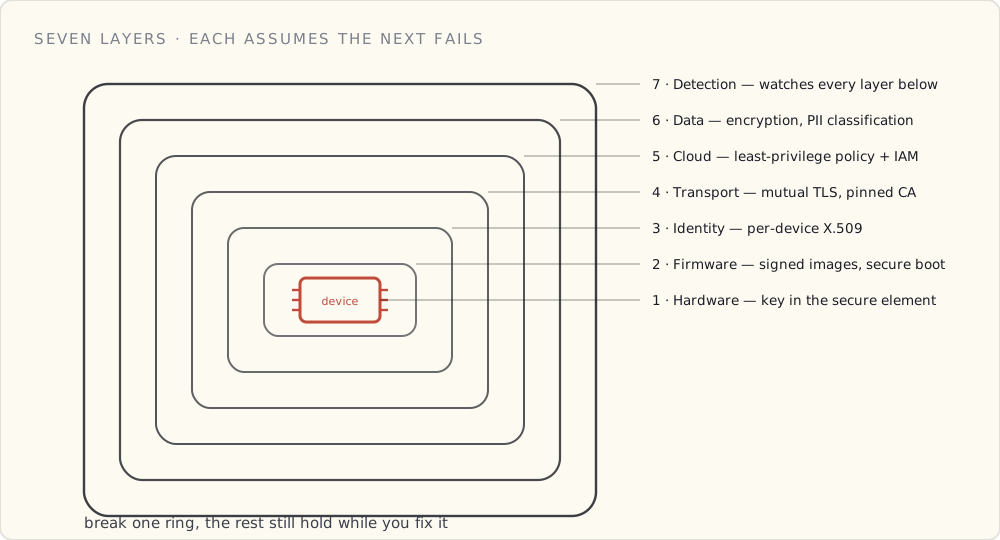
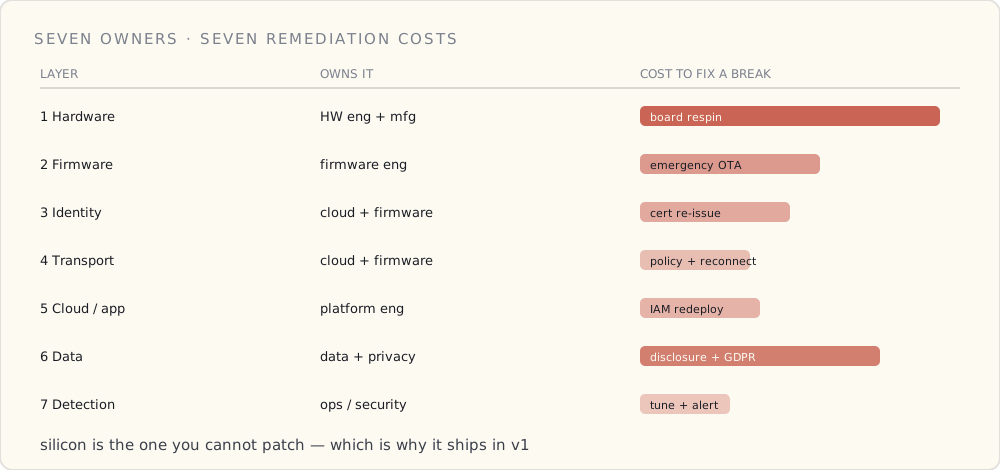
A connected-product fleet has roughly seven layers where security decisions get made. Each layer has a different owner, a different failure mode, and a different remediation cost. Defense in depth means treating each layer as independent and assuming the layer above and below will, eventually, be compromised.
| # | Layer | Owns it | Worst failure mode |
|---|---|---|---|
| 1 | Hardware | Hardware engineer + manufacturing | Key extracted from device via probe |
| 2 | Firmware | Firmware engineer | Unsigned image flashed to fleet |
| 3 | Identity | Cloud + firmware (shared) | Stolen cert used to impersonate device |
| 4 | Transport | Cloud + firmware (shared) | MITM downgrade, TLS termination at wrong point |
| 5 | Cloud / Application | Cloud / platform engineer | Misconfigured IAM, overly broad IoT policy |
| 6 | Data | Data engineer + privacy team | PII leak, GDPR exposure, replay attack |
| 7 | Detection + Response | Ops / security engineer | Compromised device runs undetected for weeks |
The order isn't strict — many of these run in parallel — but it's the order in which compromise cascades. A broken Layer 1 invalidates 3 and 4. A broken Layer 5 invalidates 6 and 7.
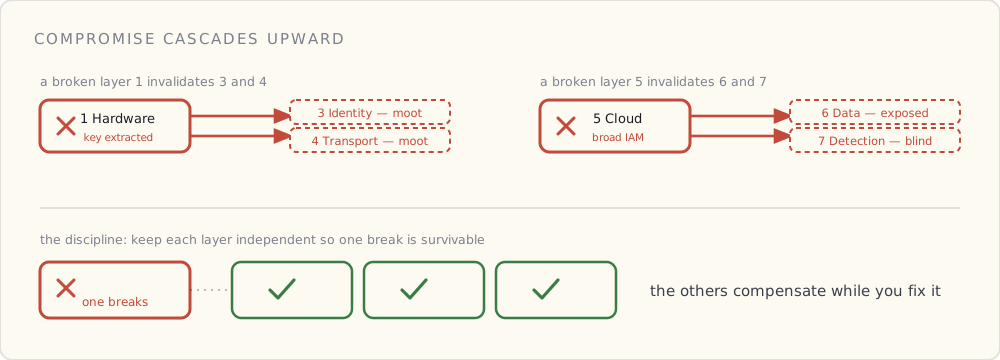
Below is the same seven-layer model laid out by owner and by what a break actually costs to remediate — the silicon at the bottom is the one you can't patch:
Layer 1 — Hardware
The non-negotiable. A secure element on the board (we use the ATECC608A; NXP SE05x and Microchip's CryptoAuthentication family are equivalent). The device's private key is generated inside the secure element at first boot and never leaves. Sign things with it, yes. Read it out, no — even physical access to the chip doesn't expose it.
Add to that: anti-tamper indicators (a switch that trips if the case is opened), secure boot with a fuse-locked root key, and disabled debug interfaces (JTAG fused off in production firmware).
What this costs: $1.50 – $4 of BOM, depending on which secure element. It is the single highest-leverage security investment a connected-product team will ever make. If you defer it to v2, you ship v1 with a defect that will cost you a board respin.
Layer 2 — Firmware
Three things, every release:
- Signed firmware images. The device firmware embeds the public key of our signing CA (in the secure element, ideally). Before any update is flashed, the bootloader verifies the signature. Unsigned or wrong-signed → reject.
- A/B firmware slots with auto-rollback. New firmware goes into the inactive slot, the bootloader is told to try it, and the new firmware has to "phone home, mark itself good" within N minutes or the bootloader reverts. I covered the OTA-side details in a later post; the security relevance here is that a compromised firmware can't permanently brick a device.
- Secure-boot chain. The bootloader is signed; the bootloader verifies the application image; the application verifies any loaded modules. Chain of trust rooted in the fuse-locked secure-element key.
What this costs: real engineering time. A team that hasn't done it before should budget six weeks to do it right.
Layer 3 — Identity
Covered at length in the cert post. Short version: per-device X.509 cert, private key in the secure element, Just-In-Time Registration at first connect, cert rotation designed for staged rollout, revocation that takes minutes via real-time IoT Core policy flips.
The thing I'd add to that post in hindsight: think about the first 60 seconds of a device's life on the network as a separate threat model. A device that has bootstrapped but not yet been registered to a customer is in the most vulnerable state it will ever be in. We have a separate Lambda that handles the registration handshake, with stricter rate limits and tighter logging than normal traffic. Most teams overlook this; we did for the first nine months.
Layer 4 — Transport
MQTT over TLS 1.3, mutual auth, certificate pinning on the device side.
Three specifics:
- TLS 1.3 only. AWS IoT Core supports TLS 1.2 and 1.3. We refuse the older version at the policy layer. There is no business case to support a pre-2018 cipher suite on a device shipping in 2024.
- Mutual TLS (mTLS). Device authenticates the cloud (via the AWS Root CA the device trusts) and the cloud authenticates the device (via the per-device cert). Both directions, every connection.
- Certificate pinning on the device. The device firmware doesn't trust the system trust store; it trusts exactly the AWS Root CA(s) we've baked into firmware. Stops a hostile DNS or a rogue captive portal from terminating the connection somewhere we don't expect.
What this costs: very little if you build for it from day one. A retrofit is harder.
Layer 5 — Cloud / Application
This is the layer that fails by misconfiguration more often than by attack. The principles:
- Per-device IoT policies, not shared. The IoT policy for
device-abc-123allows publish totelemetry/device-abc-123and subscribe tocommands/device-abc-123. Nothing else. No wildcard topics. No shared policies across the fleet. AWS IoT Just-in-Time Provisioning generates these for us at registration time. - Least-privilege IAM on the cloud side. The ingest Lambda can write to one DynamoDB table. The query Lambda can read from one GSI. The CDK stack defines these tightly enough that a security review can read the IAM in five minutes and know there's nothing surprising.
- Topic schema with rule-level validation. The IoT rule SQL doesn't
SELECT *. It selects the specific fields we expect, with type coercion. A device publishing junk gets dropped at the rule layer; bad data never reaches the Lambda. - AWS IoT Device Defender Audit. Runs continuously, flags overly permissive policies, expired certs, and shared credentials. Free, on by default. If you haven't turned it on, do it before you finish reading this post.
Layer 6 — Data
The PII layer. I'll write this up in much more depth eventually — there's a whole rubric I've been running internally on operator data from tool telemetry — but the short version of the principles is:
- Direct identifiers (operator email, device serial) → hashed with a rotating salt.
- Quasi-identifiers (operator ID, name) → tokenized to a stable random string, namespaced per data domain so cross-table joins fail.
- Sensitive attributes (GPS location, biometric) → generalized (GPS snapped to a 1km grid, etc.).
- Behavioral data (battery level, torque readings, usage minutes) → kept as-is.
Behind the rubric: AWS KMS for all encryption-at-rest keys (we use a per-table CMK with rotation enabled), TLS for encryption-in-transit at every hop, and S3 bucket policies that deny aws:SecureTransport == false outright.
Pair that with AWS Macie running across the raw bucket to catch any column that should have been classified PII and wasn't.
Layer 7 — Detection + Response
The layer that catches the failures the other six layers missed.
Two pieces:
- Behavioral detection via Device Defender Detect. Baseline behaviors per device (messages per minute, topics published to, bytes per message), alert on deviations. We tune the thresholds quarterly. The false-positive rate is annoying but the true positive we caught last summer — a misconfigured firmware build talking to debug topics in production — paid for the whole program.
- Real-time revocation playbook. Incident response runbook with a one-button "revoke device" tool that flips the IoT policy in IoT Core to
deny *. The device-side state machine handles "got disconnected, can't reconnect, light the LED, stop publishing." We've tested this end-to-end on a quarterly cadence in dev. We've used it once in prod.
The runbook also covers fleet-wide compromise scenarios (revoke an entire CA, push emergency OTA, rotate all device certs). We don't expect to use it. We don't run a connected product without it.
What I'd build differently if starting over
Three things:
One: design Layer 7 first. I built layers 1–6 first and then bolted on detection. That's backwards. If you don't know how you'll detect compromise, you don't know if your other layers are doing anything useful. Build the dashboards and alarms before you ship the feature.
Two: separate the data-residency story from the data-protection story. They are different problems. Data residency (where does the byte physically live) is a cloud-architecture decision; data protection (who can read the byte) is an IAM/encryption decision. We conflated them in v1 and had to re-untangle in v2.
Three: write the threat model down. Not as a one-time exercise. As a living document the team revisits quarterly. The threat landscape changes; the threat model needs to keep up. Ours lives in our wiki next to the architecture doc, both are reviewed in the same quarterly meeting.
The bigger framing
The thing that makes defense in depth work is the discipline of treating each layer as independent. A single layer of security is hope. Seven layers, each cheap and known to its owner, is a posture.
Every layer above can be done badly. Most teams do at least one of them badly. The point of having seven is that you can survive one or two being broken, because the others compensate while you fix.
That posture is what auditors are looking for, what enterprise customers are looking for, and what your CISO is looking for. The piece I keep telling new engineering managers: don't try to make any one layer perfect. Make all seven layers acceptable.
That's the work.
 Part 02 of 08
 Secure Boot: how a device trusts its own code
Before a device has any business talking to a cloud, it has to answer a more basic question — is the code I'm about to run actually mine? That's Secure Boot: the chain of trust that starts in silicon and runs every power-on, before the network even exists.
Underneath every other layer in this series is an assumption nobody states out loud: that the device is running the code you actually wrote. Strip that away and none of the rest holds — a flawless certificate and a perfect mutual-TLS handshake are worthless if the firmware performing them was quietly swapped out by someone else.
So before identity, before the cloud, before the network even comes up, a connected device has to answer a more basic question: is the code I'm about to run mine? That's Secure Boot, and it's the literal first thing that happens every time the device powers on. It's the floor the whole stack stands on.
The root has to be something software can't touch
The job is to verify a signature: the manufacturer signs the firmware with a private key, and the device checks that signature with the matching public key before running anything. Standard asymmetric crypto — the same shape we'll use for device certificates in the next post, but pointed inward at the device's own code instead of outward at the cloud.
The catch is the obvious one: where does the device keep the public key it checks against, and where does the checking code live? If either sits in rewritable flash, an attacker with physical access just rewrites the check to "always pass" and flashes whatever they like.
So the root of trust has to be immutable — physically unchangeable by any software:
- A Boot ROM — a tiny piece of code mask-programmed into the silicon at manufacture. It cannot be updated, ever. It holds the trusted public key, or a hash of it.
- eFuses — one-time-programmable fuses on the chip. A high-voltage pulse "blows" them during manufacturing to write the key (or its hash) permanently. Once blown, no software can rewrite them.
That immutability is the entire point. The first link in the chain is trusted not because it's signed, but because it physically cannot be altered.
The chain, stage by stage
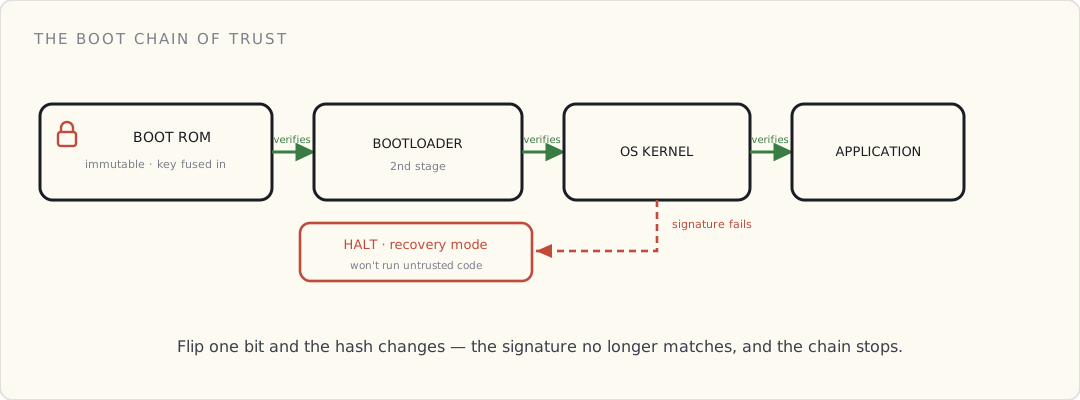
On a richer device — a Linux gateway, say — Secure Boot is a relay race where each runner checks the next one's credentials before handing over the baton:
- The Boot ROM wakes, reads the second-stage bootloader from flash, and verifies its signature against the burned-in key. Match → run it. No match → stop.
- The bootloader, now trusted, verifies the signature of the OS kernel before launching it.
- The kernel, now trusted, verifies the application image and any modules it loads.
Each stage extends trust to the next, anchored all the way down to the fused key. Flip a single bit of any image — inject one line of malware — and that image's hash changes, its signature no longer matches, and the stage checking it refuses to continue. A tampered device doesn't boot a compromised OS; it halts, or drops into a locked recovery mode.
The same idea in a $5 smart bulb
You might think this is overkill for a lightbulb. It isn't, and the bulb does the same thing in miniature.
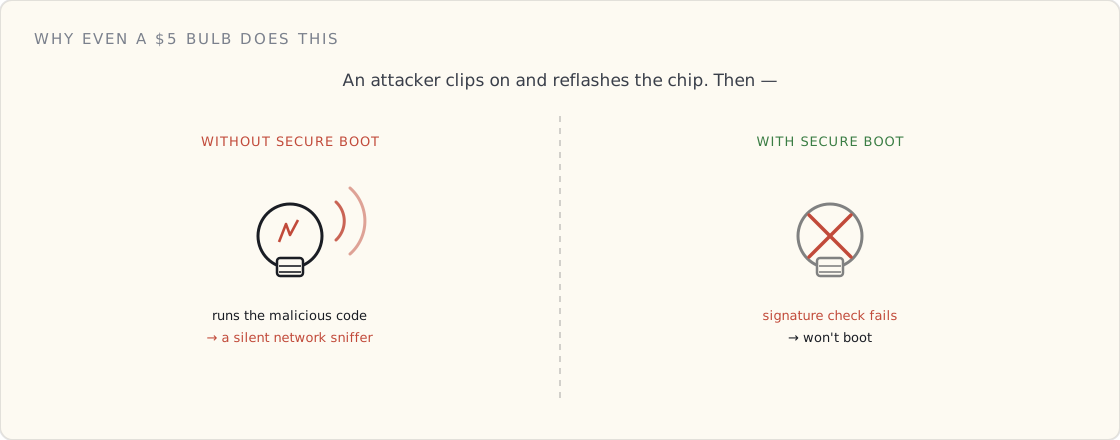
The bulb's microcontroller has the manufacturer's public key (or its hash) burned into eFuses. Every time you flip the switch, before the Wi-Fi radio even comes up, the boot ROM reads that fused key, checks the signature on the firmware sitting in flash, and runs it only if the math clears.
Why bother? Because without it, someone with ten minutes and a $20 clip-on programmer can erase the factory firmware and flash their own. A smart bulb with no Secure Boot is a foothold: reflash it and your ceiling light becomes a device on your home network — logging traffic, scanning for other targets — sitting there looking exactly like a bulb. Secure Boot is what makes "just reflash the chip" fail: the bulb won't run code the manufacturer didn't sign.
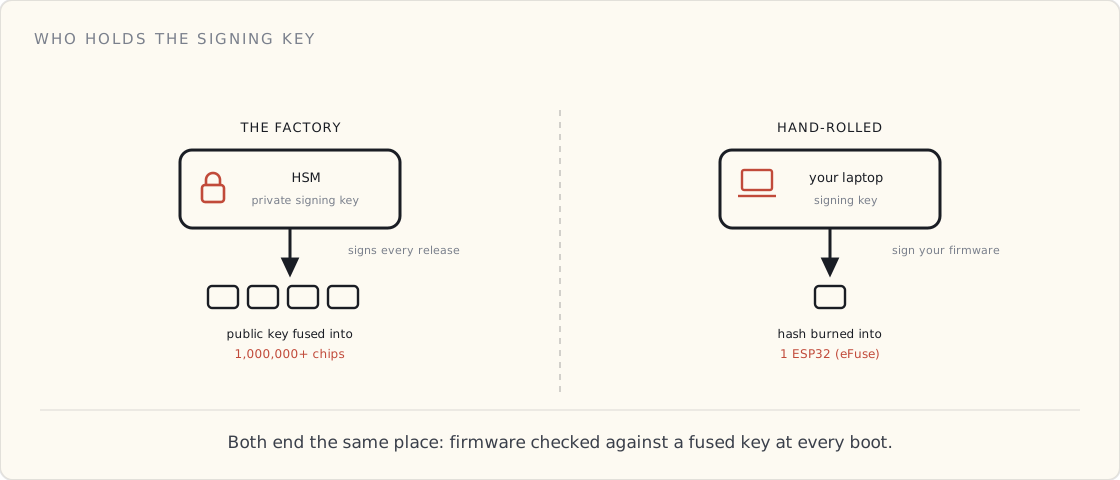
Factory vs. hand-rolled: who holds the signing key
This is the first place the two worlds — a Philips production line and you at your desk — visibly diverge, and both are worth seeing.
The factory. The manufacturer runs real signing infrastructure: the firmware-signing private key lives in an HSM, access is gated to a handful of people, and every release is signed through it. The matching public key is fused into millions of chips on the assembly line. That private key is a crown jewel — leak it and an attacker can sign malicious firmware that every device you ever shipped will happily trust. It's a single point of catastrophic, fleet-wide failure, which is exactly why it lives in hardware behind an audit log and never on a laptop.
The hand-rolled build. On an ESP32, Secure Boot is a feature you opt into, and most hobby projects skip it. If you turn it on: you generate a signing key on your laptop, burn its hash into the chip's eFuses (irreversibly — fuse the wrong thing and the chip is a paperweight), and sign your firmware before flashing. The trade-offs are real — you now own a key you can't lose (lose it and you can't ship an update the device will accept), and you've spent one-way fuses. For a single board on your bench the threat model rarely justifies it; for anything you put in someone else's house, it does.
Different scale, same destination: code verified against a hardware-rooted key before it runs.
This is a different key from the device's identity
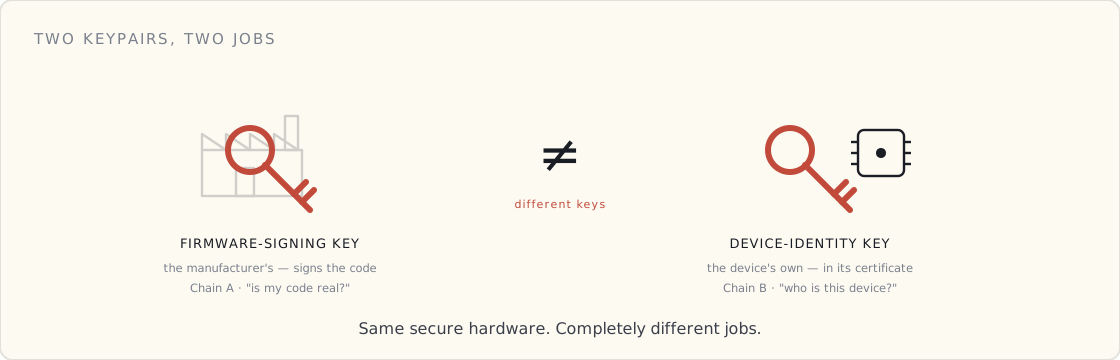
The most common confusion I see, said flatly: the Secure Boot key is not the device-identity key. Two separate keypairs doing two separate jobs.
- Secure Boot uses the manufacturer's firmware-signing key. The manufacturer signs; the device verifies. It answers "is this code authentic?"
- Identity (the next post) uses the device's own keypair, wrapped in a CA-signed certificate. It answers "is this device who it claims to be?" when it talks to the cloud.
Both live behind the secure hardware, and people smear them together — but they're as distinct as the lock on your front door and the ID in your wallet. Conflate them and you'll design something that's wrong in subtle, expensive ways.
What I'd tell a team
- Fuse the root of trust in v1. Immutability is the one property you can't add in software later. A board that shipped without a hardware root of trust can't grow one in an update.
- Treat the firmware-signing key like the crown jewel it is. HSM, strict access, audit log. It's the one key whose leak compromises the entire fleet at once.
- Fuse off the debug ports (JTAG/SWD) in production. An open debug interface is a side door that walks straight past the whole chain of trust.
- Secure Boot and signed OTA are one feature, not two. If updates aren't signed by the same chain that boot verifies, you've built a verified front door next to an unlocked back one. (Securing those updates — signing, blast radius, key rotation — is its own post.)
- Have a recovery path. Verification fails for honest reasons too — corrupt flash, a botched update. A device that bricks on every failed check is its own outage; A/B slots plus a recovery mode are the answer.
What's next
Secure Boot gets you a device running code you can trust — and, sitting in its secure hardware, the keys it will use to prove who it is. That's the next question: the device has verified its own code and its identity is on the chip. Now it connects.
 Part 03 of 08
 How a device and the cloud trust each other
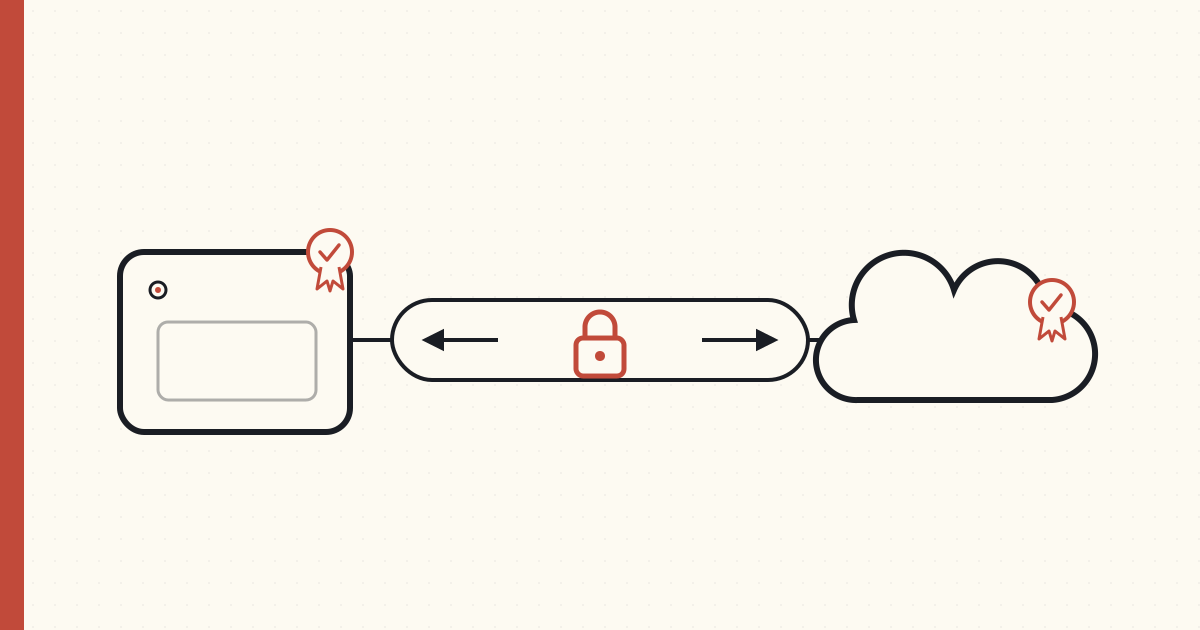
The device booted code it trusts and its keys are on the chip — but it and the cloud have never met. This is the two-way handshake where each proves who it is to the other, and the trusted channel that opens once they're both sure.
By the time a device opens a connection, two things from the last post are already true: it's running firmware it cryptographically verified, and its identity keys are sitting in its secure element. What hasn't happened yet is the part the rest of the stack depends on — the device and the cloud have never met, and neither has any reason to trust the other.
So this post is really two questions answered in a single handshake: can the cloud trust this device? and can the device trust this cloud? Get both right and you have the thing you were actually after — not a proof, but a trusted channel the two can talk over safely. (Punchline up front: that handshake is identical whether the device is a Philips bulb off an assembly line or an Arduino on your desk.)
The certificate is a chain, not a file
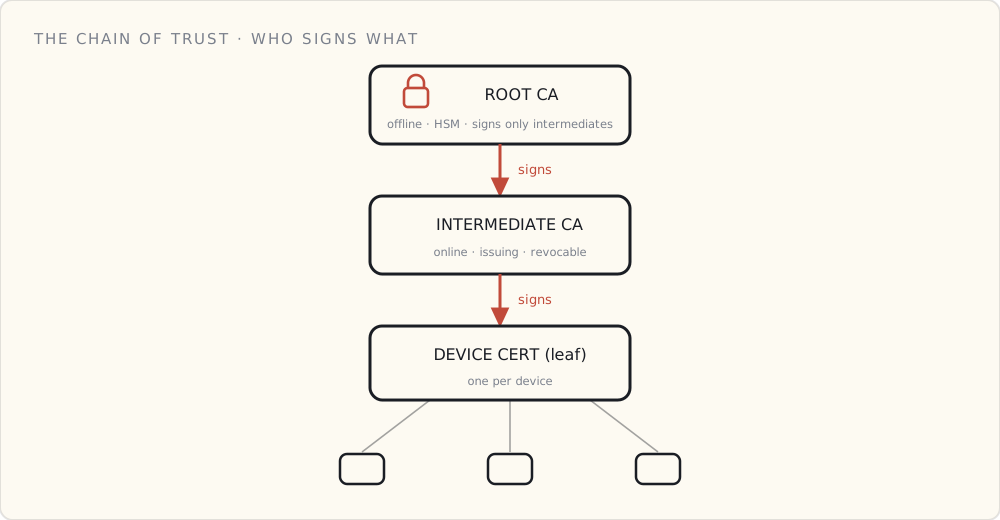
A device certificate is never trusted on its own. It's trusted because something trusted signed it, and something trusted signed that. Three links:
- Root CA — the anchor. One keypair, kept offline (an HSM, or a locked-down private CA). It signs exactly one thing: intermediate CAs. It never goes online, and most days it does nothing — which is the point.
- Intermediate (issuing) CA — the workhorse that actually signs device certs. If it's ever compromised you revoke it, stand up a new one off the still-safe root, and the damage stops at the certs it issued.
- Device (leaf) cert — one per device, carrying the device's public key and identity, signed by the intermediate.
The reason for the hierarchy is blast radius. A flat model — root signs every device directly — puts the root key in play constantly, and a root compromise is an extinction event with nothing above it to re-anchor trust to. The hierarchy buys you a layer you can afford to lose.
On AWS you register your CA with IoT Core (or use AWS Private CA). Azure trusts your root/intermediate through its Device Provisioning Service. On GCP you roll your own — Google's managed IoT Core was retired in August 2023.
What's actually in it
An X.509 certificate is a small, signed document:
- Subject — who this is. A device serial, not anything that identifies a person. Don't put customer PII in a cert; it's effectively permanent and shows up in every log.
- Public key — the device's public key, partner to the private key locked in the secure element.
- Issuer, validity, extensions — who signed it, when it's good for, and what it's allowed to do (client authentication).
- Signature — the issuing CA's signature over everything above. Change one byte and it's invalid.
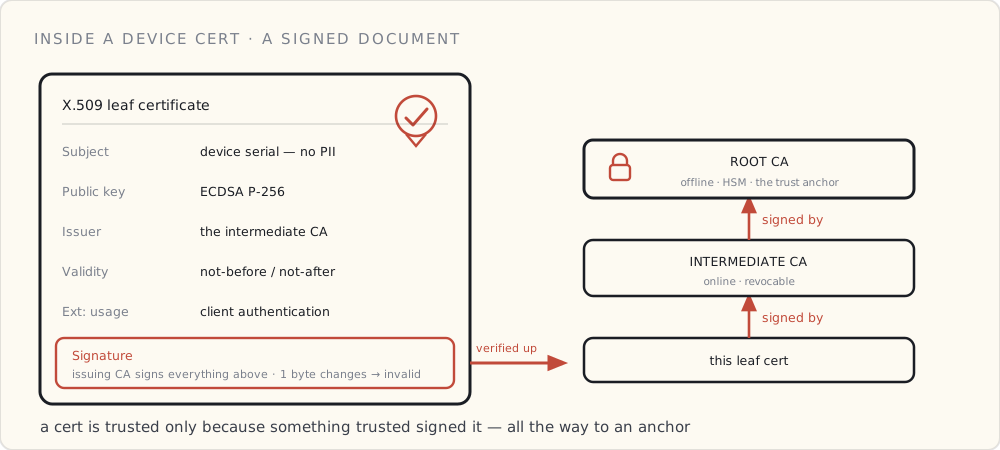
Use elliptic-curve keys — ECDSA on P-256 — not RSA. The reason is the device, not the math: P-256 gives RSA-3072-grade security with far smaller keys and signatures and far less compute to sign, which on a battery device is power you don't spend. Every mainstream secure element does P-256 in hardware.
Where a single device's cert comes from
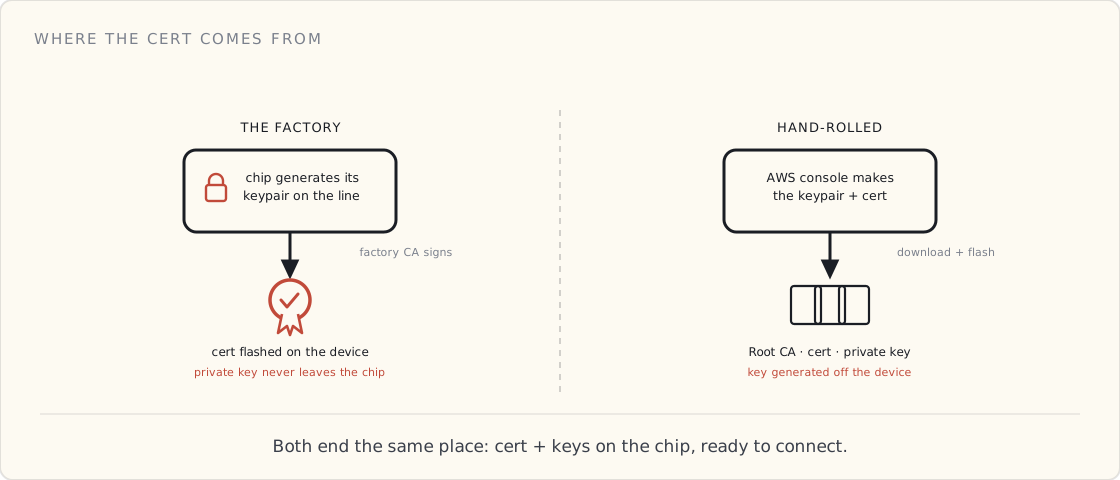
This is where a real product and a weekend project diverge — and it's worth seeing both, because they end in the exact same place.
The factory. On the assembly line, the chip generates its own keypair inside the secure element. The factory's CA signs the public key, and the finished certificate is flashed onto the device before it's boxed. The private key never left the chip; the factory's CA vouched for it. The cloud is pre-loaded with that factory CA's public key, so later it can verify any unit the factory ever made — it's a customs officer checking a passport, not the office that issues them.
The hand-rolled build. You click "create Thing" in the AWS console and it hands you three files: the Amazon root CA, your device's certificate, and its private key. You paste them into the firmware and flash. AWS already has that certificate registered, so it works in minutes — but notice what happened: the private key was generated off the device and downloaded to your laptop. Fine for a board on your bench; it's exactly the key-escrow risk a production line avoids by generating on-chip and never letting the key exist anywhere else.
Both paths end identically: the device has a certificate and its matching private key on board, ready to connect. (Doing this for thousands of units at once — claim certificates, just-in-time registration — is a fleet-operations problem of its own, and it gets its own post later in this series.)
Why the secure element is load-bearing
Strip it all back and the whole scheme reduces to one sentence: the certificate is only as trustworthy as the unextractability of its private key.
A certificate proves identity because only the holder of the matching private key can complete the handshake (next section). If that key can be read off the board with a logic analyzer and an afternoon, the cert proves nothing — anyone with the stolen key can be that device. The CA hierarchy, the X.509 fields, the handshake: all of it is scaffolding around the assumption that the leaf's private key is a hardware secret. That's why the secure element isn't optional. Spec it in v1 — you can't retrofit unextractability in software.
The handshake — proving it, every single connection
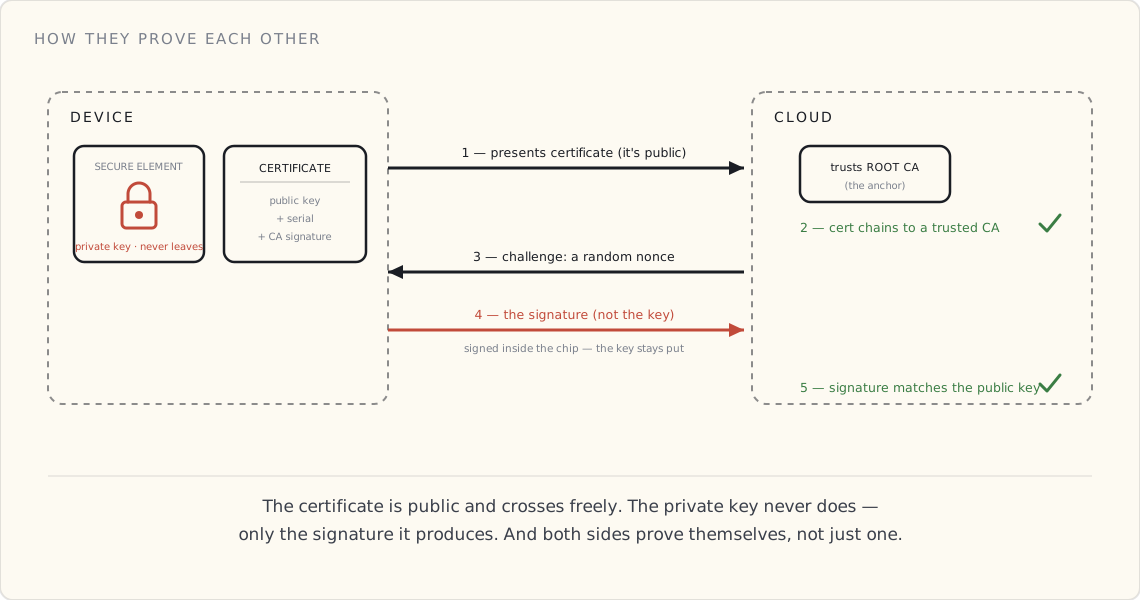
Having a certificate isn't proof. A certificate is public — anyone can copy one. The proof is showing you hold the private key that matches the public key inside it, without ever revealing that key. Here's the exchange, and it runs every single time the device connects:
- The device checks the cloud first. The cloud presents its certificate; the device verifies it against the root CAs baked into its trust store — signed by a CA it trusts, right domain, not expired. This is what stops a man-in-the-middle from impersonating your cloud. (It's mutual — both sides prove themselves.)
- The device presents its certificate. The cloud reads the public key and identity out of it and confirms the cert chains up to a CA it trusts. Now the cloud believes that public key belongs to this device.
- The cloud issues a challenge — a random nonce, something fresh the device couldn't have prepared in advance.
- The device signs the challenge with its private key, inside the secure element. That signed challenge is the device's signature. It sends the signature back — never the key.
- The cloud verifies the signature using the public key from the certificate. Only the holder of the matching private key could have produced it.
Two separate things had to check out, and the cloud verified both: the certificate (it chains to a CA the cloud trusts) and the signature (it matches the public key, and it's fresh). The private key never crossed the wire — only a signature did. And because the challenge is new every time, a signature captured off the wire is worthless on the next connection.
And the instant both checks pass — in both directions — the two have what they were really after: a mutually authenticated, encrypted channel. Not a one-time proof, but a line they can each trust for everything that follows.
The math is identical, however the keys got there
Here's the part worth sitting with. A factory-provisioned bulb and a hand-rolled Arduino run the exact same handshake. The cloud has no idea — and no reason to care — whether the certificate was minted on an assembly line or downloaded from a console. It only cares that the cert chains to a CA it trusts and the device can prove it holds the key.
So all the messy divergence — factory vs. desk, a million units vs. one — happens before the connection ever opens. From the handshake onward, a $5 light and an industrial gateway speak byte-for-byte the same language. That convergence is the whole reason this scales: you can reason about the connection without knowing a single thing about how the device was born.
What I'd tell a team
- Generate the keypair on the device. Then the private key never exists anywhere you'd have to protect — not a laptop, not a provisioning database, not a contract manufacturer's inbox.
- Keep the root CA offline; issue from an intermediate. A compromise should be recoverable without re-anchoring the universe.
- ECC P-256, unless someone makes you do otherwise on paper.
- Pin the cloud's CA in the device's trust store. Don't trust the system trust store — trust exactly the CA you expect, so a rogue or mis-issued cert can't slip in.
- No PII in the certificate. It's effectively permanent and it shows up in every log.
What's next
The device has proven who it is, and the connection is up. But authenticated isn't authorized — proving your identity is not the same as being allowed to do whatever you want. What a connected device is permitted to do, and how to scope that down to almost nothing, is the next post.
 Part 04 of 08
 Authenticated isn't authorized
The device proved who it is and the channel is up — but identity isn't permission. Authorization is the layer that decides what a verified device is actually allowed to do, and it's where most post-identity breaches really happen.
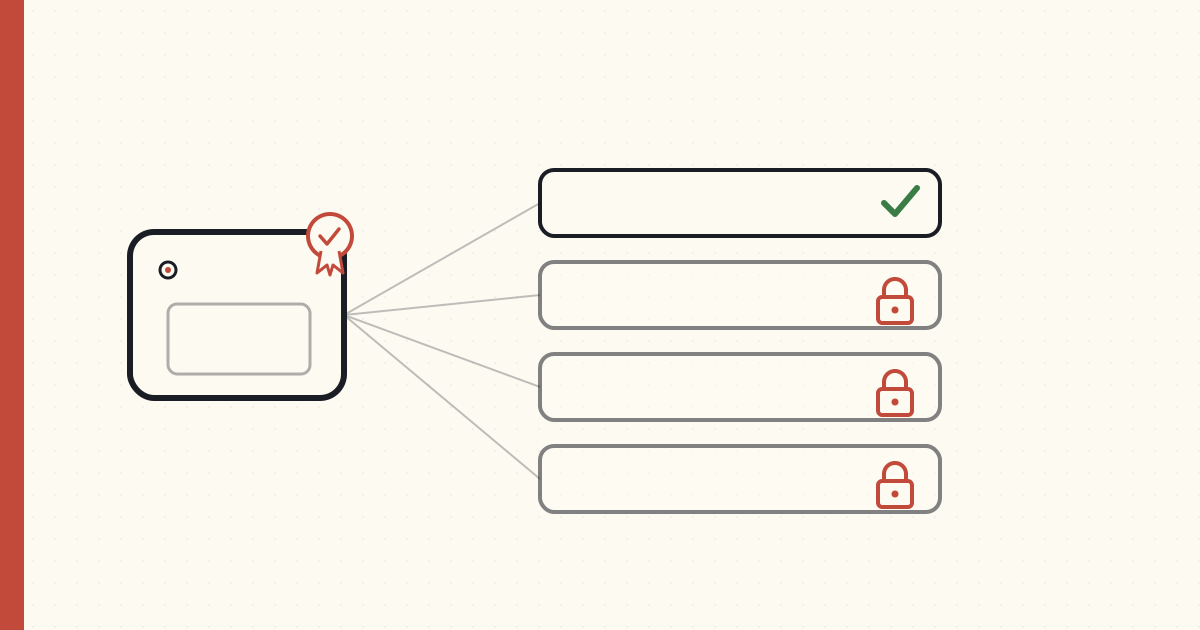
The device proved who it is and the channel is up. Here's the trap teams walk into next: they treat that proof as a hall pass. It isn't.
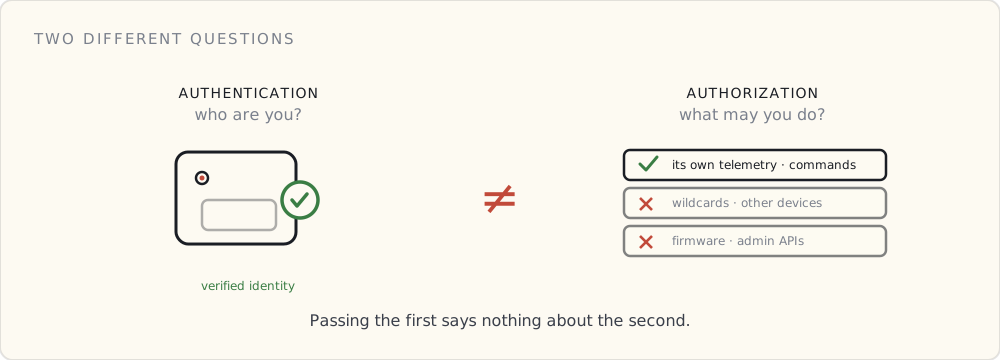
Authentication is "I know who you are." Authorization is "here is the one thing you're allowed to do." Two different layers — and the second is where most breaches that get past identity actually happen. A stolen-but-valid credential doesn't fail the handshake. What stops it is everything it's not allowed to do once it's in.
Default deny
The starting posture is deny everything, then open the smallest holes the device needs to do its job.
A telemetry sensor publishes its readings and receives its commands. That is the entire list. It has no business publishing to another device's topic, subscribing to the firmware bucket, or calling an admin API — and if your policy lets it, you're carrying a latent breach whether or not anyone's found it yet. Least privilege isn't a hardening step you do later; it's the default the device ships with.
Per-device policies, scoped by identity
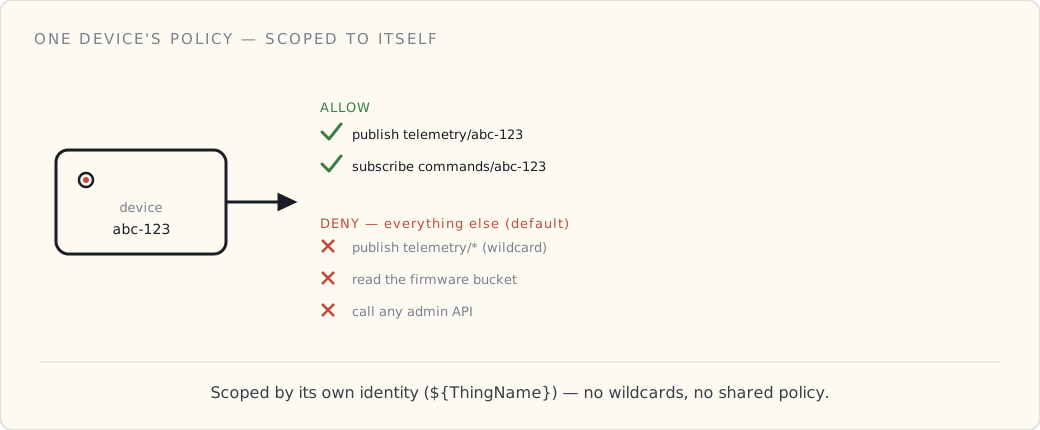
The mistake I see most: one shared policy across the whole fleet, with a wildcard topic like telemetry/*. It onboards fast and it means a single stolen cert can read or write every device's data. Don't.
The right shape: device abc-123 may publish telemetry/abc-123 and subscribe to commands/abc-123 — and nothing else.
- AWS: IoT Core policies with policy variables —
${iot:Connection.Thing.ThingName}— so one policy template scopes itself per-device automatically at connect time. No wildcards, no per-device policy sprawl, and the policy is attached to the cert at provisioning so identity and permission arrive together. - Azure: IoT Hub scopes messaging to the device's own identity; GCP: you enforce it yourself on the broker, since the managed IoT Core is gone.
The principle is the same everywhere: a device's permissions are derived from its own identity, never from a shared grant.
Authorize what it sends, not just where
Scoping topics is half of it. The other half is the shape of the payload. The ingest rule should select the specific fields you expect, with type coercion — not SELECT *. A device publishing junk — whether it's buggy or compromised — gets dropped at the rule layer before it ever reaches a Lambda or a table. Authorization includes "this doesn't even look like what this device is supposed to say." How you drop it — silently at the rule, or with a 400 the device has to reckon with — is its own architecture call worth making on purpose: three patterns for validating at ingestion →.
Least privilege is for the cloud, too
The device isn't the only actor that needs scoping. The ingest function writes to one table. The query function reads one index. The IAM is tight enough that a reviewer reads it in five minutes and finds nothing surprising. Authorization is a property of every actor in the system — the device, the function, the human with console access — not a thing you do to devices alone.
It fails by misconfiguration, not attack
Here's the uncomfortable part. The authorization layer gets breached by mistakes far more often than by clever attacks. A wildcard someone added "temporarily." An IAM role with a * because it was faster on a Friday. A shared policy that made a demo easier. The exploit is usually nothing more than someone finding the door you left open.
That's why authorization has to be audited continuously, not reviewed once and forgotten. AWS IoT Device Defender Audit flags overly-permissive policies, wildcard topics, and shared credentials automatically; it costs almost nothing. Turn it on, and treat a new wildcard the way you'd treat a failing test.
What I'd tell a team
- Default deny. Open the smallest holes the job requires.
- Per-device policies via policy variables — never a wildcard, never a shared fleet policy.
- Validate the payload shape at the rule layer, not just the topic.
- Least-privilege IAM on every cloud actor — a reviewer should read it in five minutes.
- Audit continuously. The breach is almost always a misconfiguration, not an exploit.
Authentication is the bouncer checking your ID at the door. Authorization is the rule that even a verified guest only gets into certain rooms — and that every other room is locked by default. Getting identity right and then handing a device the keys to everything isn't security. It's a single stolen cert away from being the whole story.
What's next
The device is connected, proven, and scoped to exactly its job. Now there's the data it's actually allowed to send — and protecting that, both at rest and in motion, is the next post.
 Part 05 of 08
 Protecting device data, at rest and in motion
The device is connected, proven, and scoped — now it's sending data. Protecting it means two kinds of encryption (in motion and at rest) and an honest look at which fields are harmless, which are PII, and which you shouldn't keep readable at all.
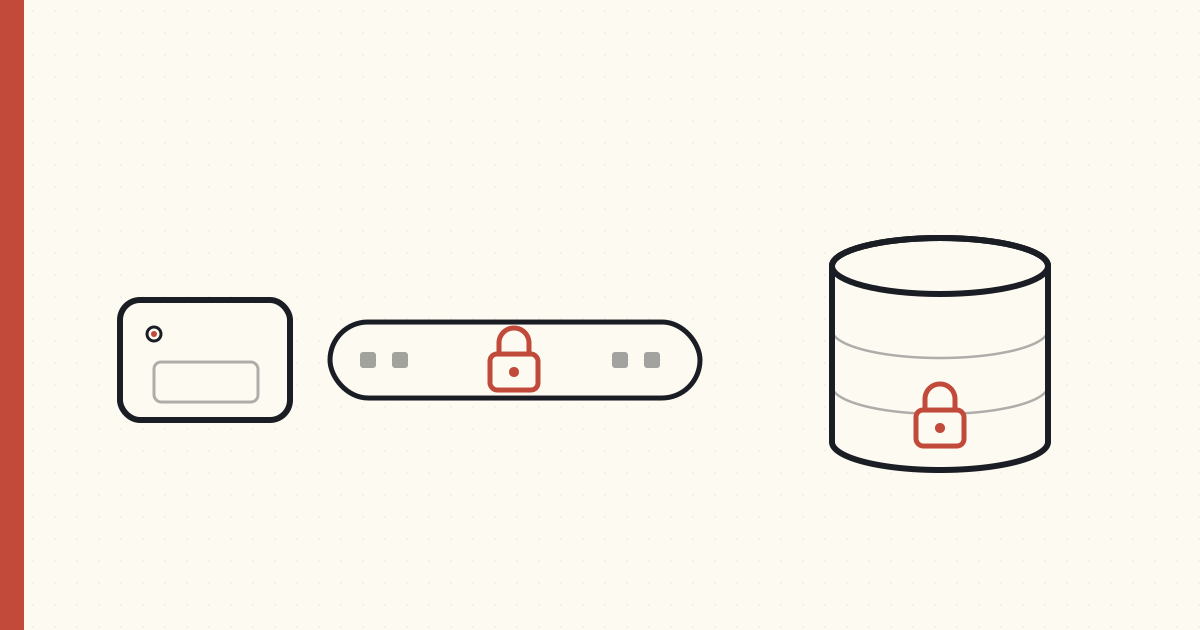
The device is connected, proven, and scoped to its job. Now it's doing the thing it exists to do: sending data. A connected product is, underneath, a data pipeline with a radio on one end — and that data has to be protected on two axes people constantly collapse into one: in motion (crossing the wire) and at rest (sitting in storage). And before either, the question most teams skip: which of this data actually needs protecting, and how much?
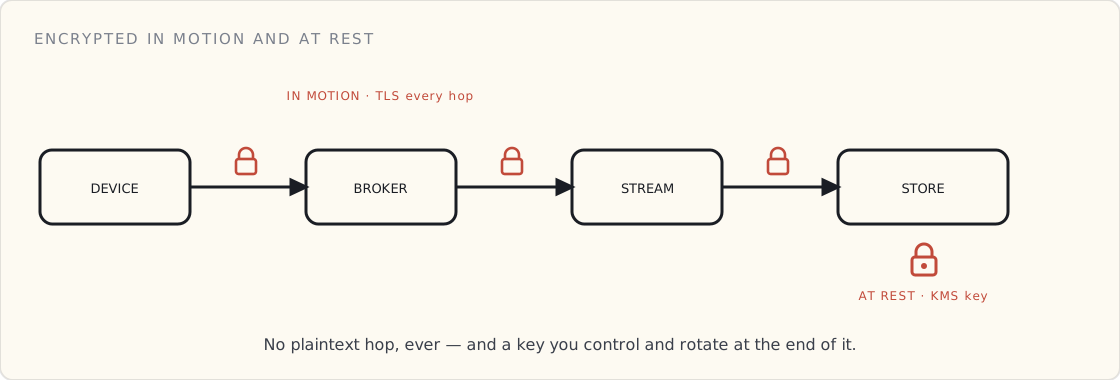
In motion: no plaintext hop, ever
The handshake already gave us an encrypted channel from device to cloud. The discipline is keeping it encrypted on every hop after that one: broker → stream processing → storage → the API that serves it back.
TLS everywhere, and actively deny the absence of it. On AWS, an S3 bucket policy that denies requests where aws:SecureTransport is false means a non-TLS request is rejected outright — not allowed-with-a-warning, rejected. Take the same posture at every hop. There is no "it's the internal network, it's fine" exception; the hop you didn't encrypt is the one in the breach writeup.
At rest: encrypted, with keys you rotate
Storage encrypted with managed keys — AWS KMS, a per-table or per-bucket customer-managed key (CMK) with rotation enabled. Azure Key Vault and GCP KMS are the equivalents.
The point of a CMK over the provider's default key is control: you rotate on your schedule, you can audit every decrypt call (CloudTrail logs them), and you can revoke. Encryption at rest with a key you can't see being used or rotate is half a control.
Not all data is equal — classify it
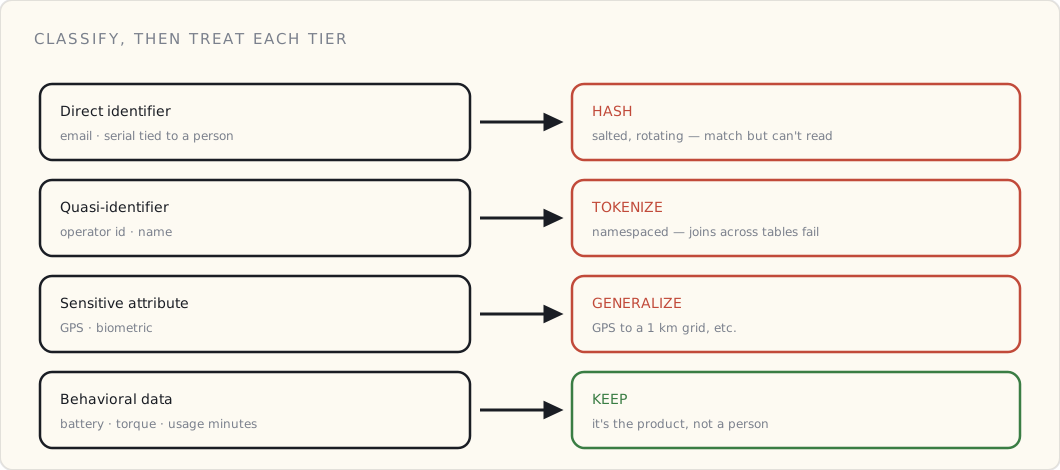
You can't protect everything to the same degree without wrecking either cost or utility. So classify it, then treat each tier on its merits:
- Direct identifiers (an operator's email, a serial tied to a person) → hash with a rotating salt. You can still match records; you can't read the value.
- Quasi-identifiers (operator ID, a name) → tokenize to a stable random string, namespaced per data domain so a token from one table can't be joined against another.
- Sensitive attributes (GPS, biometrics) → generalize. GPS snapped to a 1 km grid is useful for "where do failures cluster" and useless for following a specific person home.
- Behavioral data (battery level, torque readings, usage minutes) → keep as-is. It's the product, and it isn't about a person.
The rubric is what turns "we encrypt everything" — true, and not enough — into "we don't even store the readable version of the things that could hurt someone."
Residency and protection are two different problems
People conflate these constantly. Residency is where the byte physically lives — a region, a sovereign cloud — and it's an architecture decision. Protection is who can read it — an IAM and encryption decision. A dataset can be perfectly resident (never leaves the EU) and badly protected (any engineer can read it in the clear), or the reverse. Solve them separately. We conflated them in an early version and had to spend a quarter untangling it.
Catch what slipped
Classification is a human process, and humans miss fields. Run a scanner over the raw store as a backstop — AWS Macie flags columns that look like PII but weren't classified as such. It's the smoke detector for "someone logged an email address into a behavioral table."
What I'd tell a team
- TLS on every hop, and deny the absence of it. No plaintext, no exceptions.
- Encrypt at rest with a rotated CMK you control and can audit.
- Classify — direct / quasi / sensitive / behavioral — and treat each tier: hash, tokenize, generalize, keep.
- Separate residency from protection. Different problems, different fixes.
- Run a scanner as a backstop. Classification will miss things.
Encryption at rest and in motion is the floor, not the ceiling. The harder, more honest question is which data you keep readable at all — and for anything tied to a person, the answer is as little as you can get away with. The owner of the device never agreed to be the product.
What's next
The data's protected and the fleet is running. The next question is how you notice when something's wrong — a device behaving in a way it shouldn't. Detection, and the machine learning that flags the anomaly, is the next post.
 Part 06 of 08
 Detection and response: the smoke alarm, not the lock
Boot, identity, authorization, encryption — all prevention. But prevention fails eventually. Detection is the layer that notices a device misbehaving, response is what you do about it, and the machine learning in the middle is a smoke alarm, not a lock.
Everything so far — boot, identity, authorization, encryption — is prevention. It's the locks. But locks fail: a cert leaks, a misconfiguration opens a door, a device gets physically compromised. Prevention is necessary and it is never sufficient. Detection is the layer that notices when something's wrong; response is what you actually do about it. Most teams build the first halfway and the second not at all.
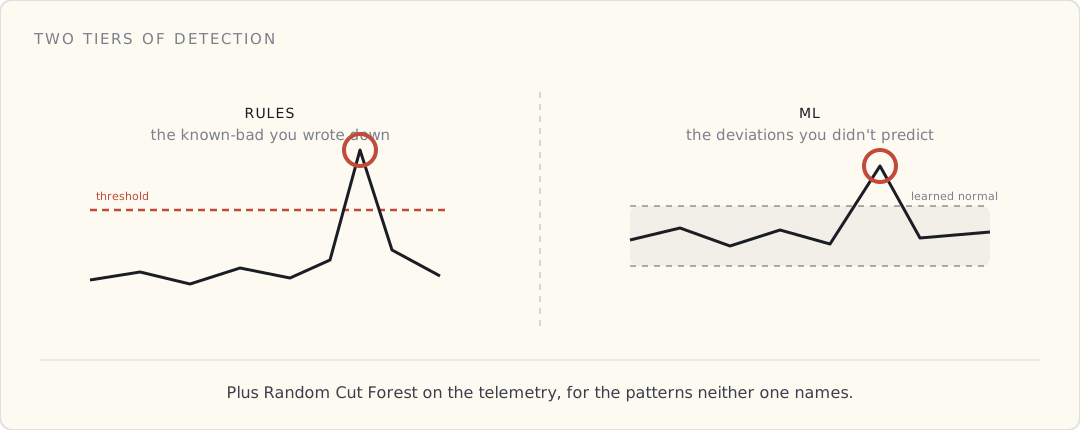
Two tiers of detection
- Rules — the things you already know are bad. Static thresholds: a device sending 100× its normal message rate, a production device publishing to a debug topic, a spike in authorization failures. AWS IoT Device Defender Rules Detect. Fast to write — and they only ever catch what you thought to write down.
- ML — the things you didn't predict. Device Defender ML Detect builds a behavioral model per security metric — messages per minute, message size, connect/disconnect rate, source IP, auth failures — learns each device's normal over a training window, and flags deviations with a confidence (low / medium / high). No thresholds to guess; it learns "normal" and tells you when a device stops looking like itself.
- Custom anomaly detection on telemetry. For the behaviors the fixed security metrics miss — "this device's torque / battery / usage pattern went weird" — run an unsupervised model like Random Cut Forest (in Kinesis Data Analytics on the live stream, or in SageMaker). These signals straddle security and fleet health: a device behaving strangely might be compromised, or it might just be failing.
The honest part about ML detection
It isn't magic, and it has two costs you pay up front.
The cold start. ML Detect needs a training window — on the order of two weeks, with enough data — before it's useful. You're effectively blind to "abnormal" until it has learned "normal." Plan for it; don't ship and assume coverage on day one.
An anomaly is not an attack. This is the cost that wears teams down. Most anomalies are benign — a firmware update shifted a traffic pattern, a region had a network blip. You will tune false positives forever, and alert fatigue is the failure mode that quietly kills detection programs. The discipline is a feedback loop: every alert gets triaged, every false positive tightens the model.
The payoff is real, though. The one true positive that earns the whole program for us: a misconfigured firmware build that started talking to debug topics in production. No static rule would have caught it — the behavioral model did, because the device stopped looking like itself.
ML is the smoke alarm, not the lock
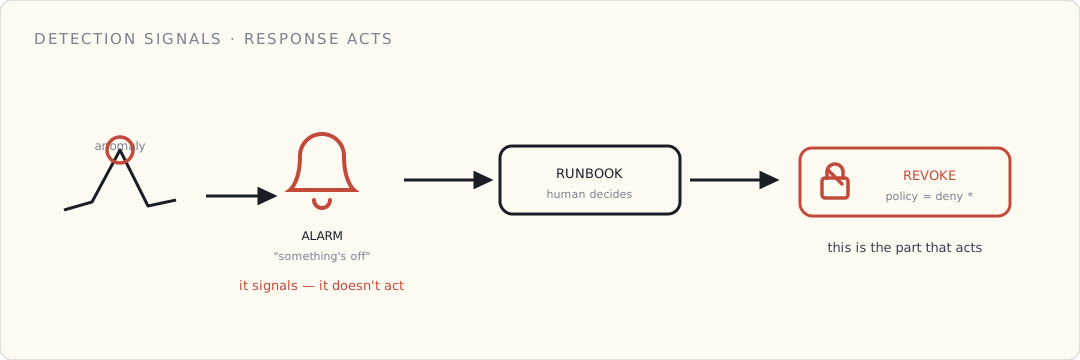
Here's the framing to hold onto: detection tells you something is wrong. It does not fix it. A smoke alarm doesn't put out the fire — it tells you there's a fire while you can still act. ML anomaly detection is exactly that. The acting is a separate thing, and it's the half teams under-build.
Response: the runbook that actually does something
A flagged anomaly is worthless without a practiced response.
- The one-button revoke. The incident runbook flips the suspect device's IoT policy to deny-all; on its next connection attempt it's refused, in under a minute. (This is the revocation from the identity and authorization layers, used in anger.) The device-side state machine handles "disconnected, can't reconnect, light the LED, stop publishing."
- The fleet-wide playbook. The scenarios you hope never to use: revoke an entire CA, push an emergency signed OTA, rotate every device cert. You don't expect to. You also don't run a connected product without the runbook written and drilled — we test ours on a quarterly cadence in dev.
Detection without response is a smoke alarm with no exit. Response without detection is an exit you never know to use.
Deployment-agnostic
- AWS: Device Defender ML Detect + Rules Detect; Random Cut Forest in Kinesis Data Analytics or SageMaker for telemetry anomalies.
- Azure: Microsoft Defender for IoT (agentless anomaly detection) + Stream Analytics' built-in anomaly functions.
- GCP: roll your own — Dataflow plus BigQuery ML's
DETECT_ANOMALIES, since the managed IoT service is gone.
What I'd tell a team
- Rules for the known-bad, ML for the unknown. You need both; neither alone is enough.
- Budget for the cold start, and tell people detection isn't live on day one.
- Treat ML output as a signal, not an action. It flags; humans and runbooks act.
- Build and drill the revoke runbook before you need it — the one-button revoke should be boring by the time it's real.
- Instrument for detection before you ship. You cannot detect what you never measured; the metrics have to exist from the very first device.
The smoke alarm doesn't make the building fireproof. It means that when prevention fails — and over a long enough fleet life, it will — you find out while you can still act, and you have a practiced way to act. That's the whole job of this layer: not to stop the fire, but to make sure it's never the first you hear of it.
What's next
Everything so far has been about one device — its boot, its identity, its permissions, its data, its behavior. The last post zooms out to the whole fleet: provisioning thousands of devices, and rotating and revoking their identities at scale, without a human in the loop.
 Part 07 of 08
 Securing OTA: what you're flashing, and who signed it
An OTA pipeline can change the code on every device you've ever shipped — which makes it the highest-value target in the whole stack. This is about whether the thing you're about to flash is one you can trust: blast radius, signing, anti-rollback, and rotating the update key.
OTA is the most powerful thing you ship. It can change the code running on every device in the field, at once. That also makes it the single highest-value target in the stack: get into the update path and you don't compromise a device, you compromise all of them, with code they'll run as gladly as the real firmware.
The operations of rolling an update out without bricking anyone — A/B slots, canaries, staged rollout, automatic rollback — is its own discipline, and it's a post of its own. This one is about the part that comes before any of that: deciding whether the thing you're about to flash is one you can trust. And that's not one question, because "an update" isn't one thing.
What you're flashing isn't one thing
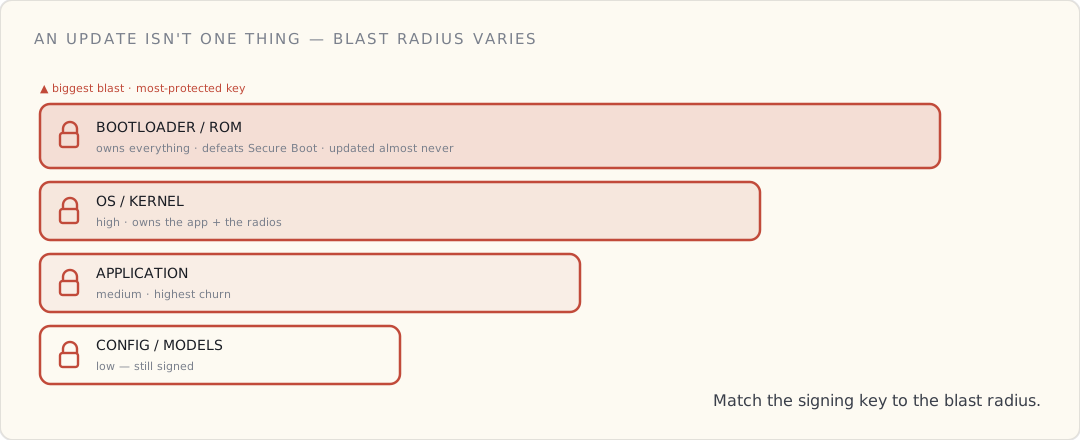
People say "OTA" like it's a single artifact. It isn't. What you push falls into tiers, and each tier has a wildly different blast radius — and therefore deserves a different signing authority and a different level of paranoia.
- Bootloader / ROM — the root of trust itself. A malicious bootloader defeats Secure Boot and owns everything above it forever. Catastrophic blast radius; signed by the most-protected key you have; updated almost never.
- OS / kernel — high blast radius. Owns the application and the radios.
- Application firmware — what you actually update most often. Medium blast radius, high churn.
- Drivers / modules — narrower, but they run privileged; a compromised driver is a compromised kernel.
- Config, schemas, ML models — the lowest blast radius, and the tier people forget to sign at all. A poisoned model or a tampered config doesn't own the device, but it can make it misbehave in the field — and "it's just config" is exactly how an unsigned update path sneaks in.
The rule that falls out of this: match the signing authority to the blast radius. The key that signs application updates must not be able to sign a bootloader. That's least privilege, applied to update authority — the same instinct as per-device cloud policies, pointed at your own release pipeline.
Every image is signed — and verified before it's flashed
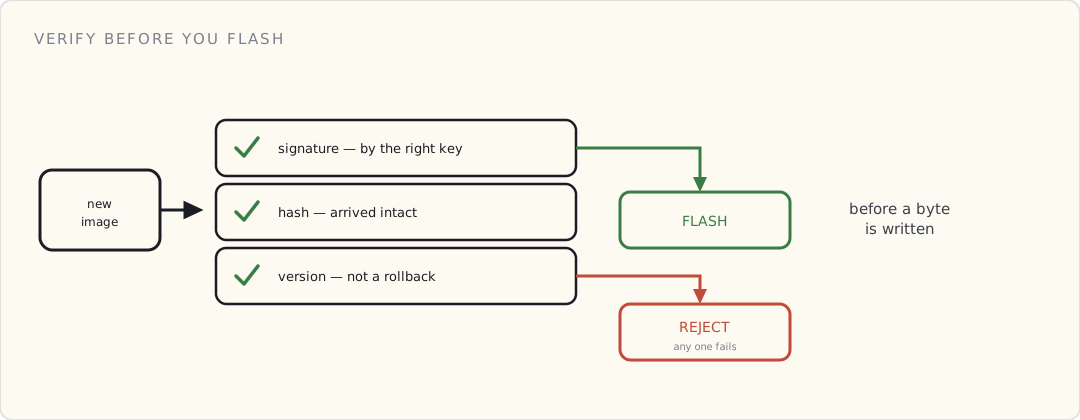
This is Secure Boot extended over the air. Before the device writes a single byte of a new image to flash, it checks three things:
- Signature — was this signed by the right key for this layer? (Not a key you trust — the specific key allowed to sign this tier.)
- Hash / integrity — did it arrive intact, bit for bit?
- Version / anti-rollback — is this not an old, legitimately-signed-but-since-patched image that an attacker is replaying to reopen a fixed hole? Anti-rollback means the device refuses to install a version below a monotonic floor (often backed by a fuse or a secure counter), so a valid signature on a stale build isn't enough.
Fail any one → reject, don't flash. Verification happens first; the A/B-and-rollback machinery from the operations post is what runs after you've decided the image is trustworthy. People conflate the two and end up with a beautiful rollback story protecting an unsigned image.
Where the updates live is an attack surface
The artifacts have to be stored and served somewhere, and that somewhere is a target. The shape that holds up:
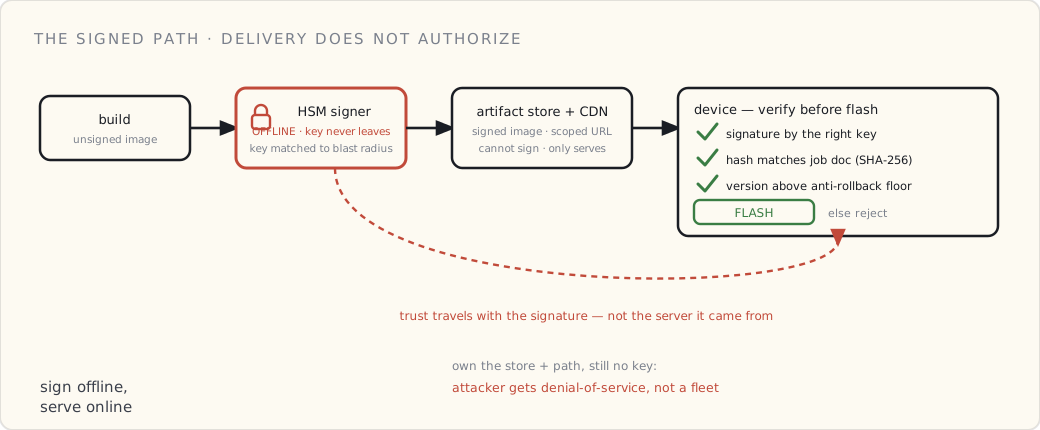
- Signed images sit in object storage; the job document the device receives carries the artifact URL and the expected SHA-256, and the job document itself is authenticated.
- Short-lived, scoped URLs for the download; TLS for every hop.
- And the load-bearing point: the signing keys are not on the update server. Signing happens offline, in an HSM. So even if an attacker fully owns your artifact store and your delivery path, they still can't push code your devices will run — because the delivery path delivers; it does not authorize. Compromising the CDN gets them a denial-of-service, not a fleet.
If your build server can both sign and serve, you've collapsed that separation, and the server is now a single box that can take the whole fleet.
Rotating the update-signing key
The update-signing key is a crown jewel, exactly like the firmware-signing key behind Secure Boot — and like any key, you will eventually need to rotate it: it's nearing end-of-life, you suspect it leaked, or the person who had access to it left.
Rotating without bricking the fleet is the same two-trust-anchor trick the cert side uses: ship devices that trust both the current and the next signing key through an overlap window, sign with the new one, then retire the old. The nightmare case is a leak: now you have to revoke the key and re-sign the fleet onto a new one — and any device that can't receive the new trusted key over a channel it can still validate is stranded. Which is the whole argument for keeping that key offline and treating it like the most dangerous object in the building. Because it is.
What I'd tell a team
- Tier your updates by blast radius and sign each tier with a separate, least-privileged key.
- Verify signature + hash + anti-rollback before flash — every image, every tier, including config and models.
- Keep signing keys offline (HSM) and out of the delivery path. The server that serves updates must not be able to sign them.
- Plan signing-key rotation before you ship — a dual-trust window is cheap up front and impossible to retrofit during an incident.
- The rollout mechanics — A/B, canary, staged, halt gates — are their own post. Get those right too, but get this right first.
The operations post keeps the fleet from bricking itself. This one keeps the fleet from quietly becoming someone else's. An update pipeline you can't fully trust is a backdoor you built, signed, and shipped on purpose.
What's next
The device boots trusted code, proves who it is, talks only over a trusted channel, sends protected data, is watched for anomalies, and updates without opening a hole. The last move is to stop thinking about one device and manage all of them at once — provisioning, rotation, and revocation at fleet scale.
 Part 08 of 08
 Field-grade device identity at fleet scale
Per-device certs are easy when there are ten devices on a desk. At ten thousand, the cert-rotation problem becomes a fleet-operations problem. Notes from designing for it.
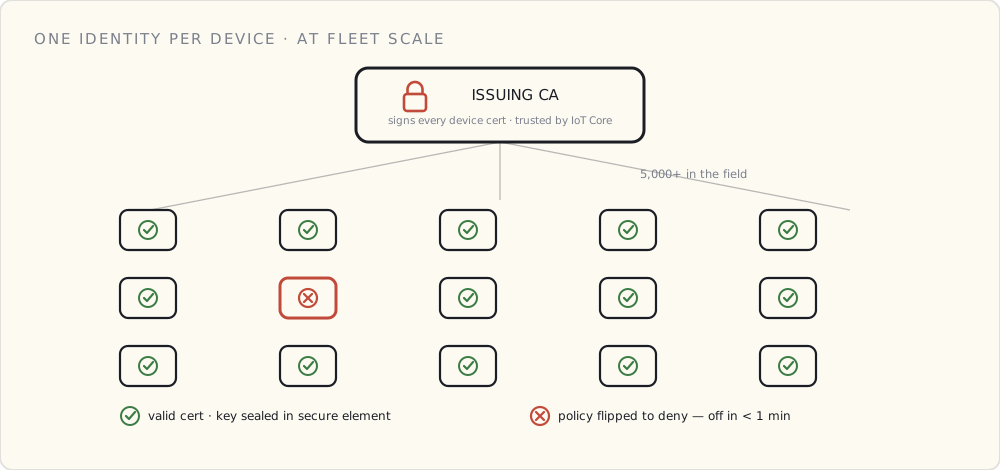
Every post in this series so far has been about a single device — how it boots, how it proves who it is and connects, what it's allowed to do. This one zooms out to the whole fleet. We crossed five thousand devices in the field last month, and cert-rotation — a quarterly chore at ten devices — became a Tuesday-morning problem. Provisioning thousands without a human in the loop, then keeping their identities current and revocable at scale, is its own discipline. This is what I'd tell the next team.
The four problems device identity has to solve
Worth being explicit about what we're actually solving, because the conversation gets confused fast.
- Authentication. When a device shows up at our cloud endpoint claiming to be
device-abc-123, how do we know it's the device, not someone with a stolen credential? - Provisioning. How does a brand-new device, fresh off the assembly line, get its first credential without a human typing anything?
- Rotation. When a credential needs to change — because the cert is expiring, because the device was sold, because we suspect compromise — how does that happen without bricking the device?
- Revocation. When a single device is compromised, how do we kick it off the network within minutes, not days?
All four are answered the same way in toy demos: "use AWS IoT Core's per-device certs." All four are different problems at fleet scale.
Authentication: mTLS with the cert in a secure element
The starting point is mutual TLS with a per-device X.509 cert. AWS IoT Core supports this out of the box. The interesting question is where the private key lives on the device.
Three options, increasing in cost and trust:
- Key in flash. Cheapest. Easiest. Anyone with the board and a logic analyzer can extract the key in about an hour. Fine for non-regulated consumer products. Not fine for anything else.
- Key in a hardware secure element. ATECC608A, NXP SE05x, Microchip's CryptoAuthentication family. Adds $1.50 – $4 to BOM. The key never leaves the chip; you can sign things with it but you can't read it out. This is what we picked.
- Key in a full TPM. $5 – $15 of BOM, way more capability, mostly used in industrial / regulated products. Overkill for our use case; right call for medical or critical-infrastructure.
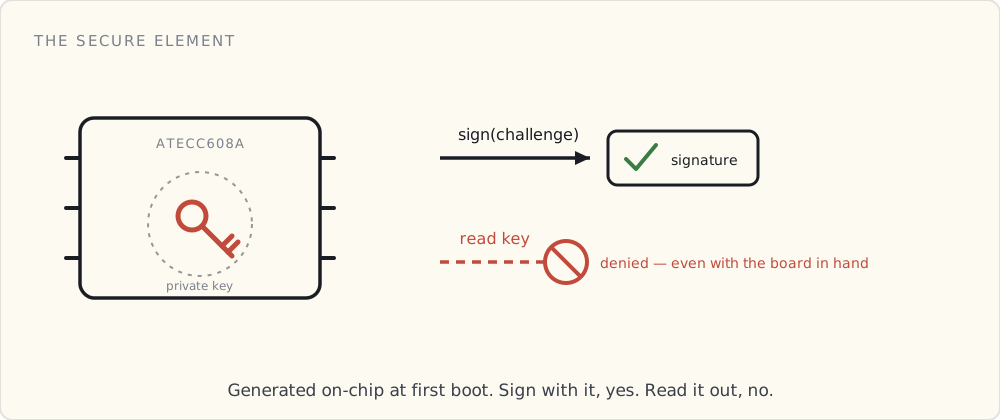
The single biggest design decision: the secure element is a BOM line item that has to be specced in v1. Adding it in v2 means a new board revision, a new firmware build, and a forked fleet. We added it in v1; teams I've talked to who deferred it regretted the decision before they hit a thousand devices.
Provisioning: Just-In-Time Registration
The dumb version of provisioning: pre-bake a cert into every device at the factory, manually upload that cert into IoT Core ahead of time. This breaks at any kind of scale — you're maintaining a database of "devices we made vs devices we've registered" and they go out of sync.
AWS IoT's better answer is Just-In-Time Registration (JITR) or its newer cousin Just-In-Time Provisioning (JITP). The shape: provision a bootstrap cert per device at the factory, signed by your CA, which IoT Core trusts. The first time the device connects, IoT Core sees the unfamiliar cert, validates the CA, runs a Lambda you wrote, and the Lambda decides whether to register the device. If yes, the device gets its real per-device cert and policy; if no, it's rejected.
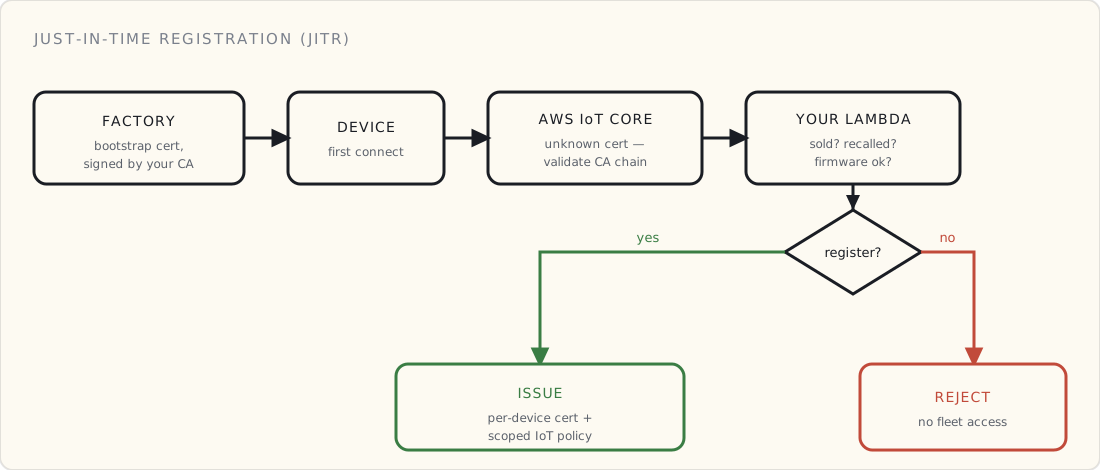
This is the right pattern. Three things to know:
- The bootstrap cert is shared at the manufacturing line, not per-device-unique. You provision the CA cert; the device cert is generated on-device at first boot and signed by the bootstrap chain.
- The first-connect Lambda is where you put your business logic. "Has this device been sold yet? Is it on the recall list? Does the firmware version match what we expect?" Anything you'd want to check before letting a device into the fleet.
- You need to think about the firmware-side state machine — what does the device do if its first attempt at provisioning fails? Retry? Wait? Phone home over a fallback channel? You will hit this and you'd rather hit it on a workbench than in the field.
Rotation: the part no one prepares for
Certificates expire. The IoT-Core-issued ones default to 30 years, which is meant to make the rotation problem go away. It does not, because:
- The CA cert (yours or AWS's) rotates. When it does, every device needs to trust the new one.
- A device gets resold. The cert tied to the previous owner needs to be revoked and a new one issued, ideally without the buyer needing to do anything.
- A device gets reflashed. The new firmware version is signed differently; the cert chain needs to follow.
We're an early-enough fleet that we haven't forced a rotation yet. We've designed for it: the firmware supports two trust anchors (current + next) for any given role, and the device-side code knows how to receive a new cert over a secured channel (IoT Jobs) and switch to it on next boot.
What I've learned reading other teams' postmortems: the worst-case is a partial rotation. Half the fleet gets the new cert, half doesn't, and the half that doesn't is offline for a week because the rotation script crashed. The mitigation is staged rollouts (10% canary, then 50%, then everything) and explicit human confirmation gates between stages.
Revocation: the test of whether you actually have identity
Here's the question I ask any team claiming to have device-identity figured out: if I tell you a specific device has been compromised, how long until it can no longer connect?
If the answer is "a couple of days, we have to update the deny list," they don't have device identity. They have hope.
The right answer is minutes, and the mechanism is one of:
- A short-lived cert + frequent rotation, so revocation is "stop signing new certs for that device." Operationally heavy.
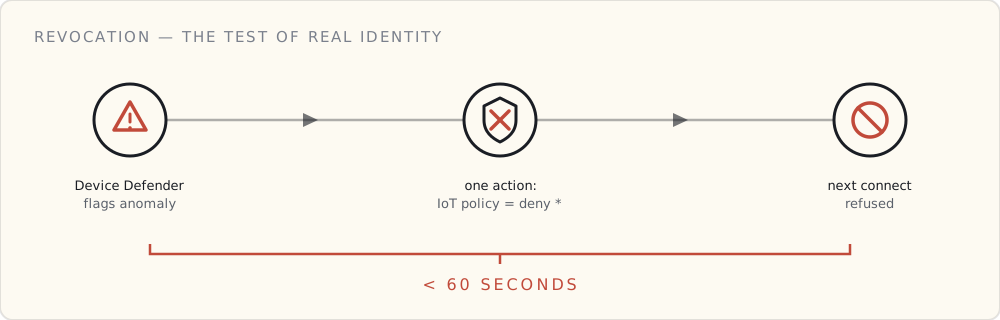
- A revocation list (CRL or OCSP-style) that IoT Core checks at connect time. AWS IoT Core supports updating device policies in real time, which is the closest thing to fast revocation in the AWS-managed flow — flip the policy to deny:* for the affected device, and within the next connection attempt (often immediate) the device can't talk.
We use the second. Our incident-response runbook has a one-button "revoke device" tool that flips the policy in IoT Core; the device-side state machine handles "got disconnected, can't reconnect, light the LED and stop publishing" appropriately.
Where Device Defender fits
AWS IoT Device Defender is the managed service for detecting the situations where you'd want to revoke. It runs behavioral analytics on the fleet — "this device suddenly started publishing to topics it never has before" — and integrates with Security Hub for alerting. We turned it on six months ago; it has caught one real issue (a misconfigured firmware build that was talking to debug topics in production) and a handful of false positives that taught us how to tune it.
It's the cheapest piece of fleet security tooling AWS offers. If you have devices in the field and you haven't turned it on, do that this week. (Detection and response is its own post — this is just where it plugs into the fleet-identity loop.)
The bigger framing
A connected product without a story for cert rotation and revocation isn't a connected product. It's a brick farm waiting to happen.
The decision that's mattered most: picking the secure element in v1, even though it cost us BOM. Every other identity decision is recoverable in software. The secure element is the one decision you can't fix without a board respin.
If you're starting a connected product today, spec the secure element in v1. Pick JITR for provisioning. Design the firmware for two-trust-anchor rotation. Test revocation end-to-end before you ship the first hundred devices. The whole thing is six weeks of work in v1 and twelve months of regret in v2.
Six months from now I'll have actually run a fleet-wide rotation. I'll write a follow-up.