 Notebook · 05 parts
 The Docker Ecosystem
A hands-on tour of the Docker ecosystem — what containers are, how they network, how to find each other, and how to orchestrate them at scale.
A guided walk through containerization. Start with the overview, work through networking and service discovery, finish with scheduling and orchestration. Written when the category was still settling; the patterns aged well even as the tools evolved.
Part 01 of 05 The Docker Ecosystem: An Overview of Containerization
Docker: An Overview of Containerization Introduction There are often many roadblocks that stand in the way of easily moving your application through the development cycle and eventually into…
Docker: An Overview of Containerization
Introduction
There are often many roadblocks that stand in the way of easily moving your application through the development cycle and eventually into production. Besides the actual work of developing your application to respond appropriately in each environment, you may also face issues with tracking down dependencies, scaling your application, and updating individual components without affecting the entire application.
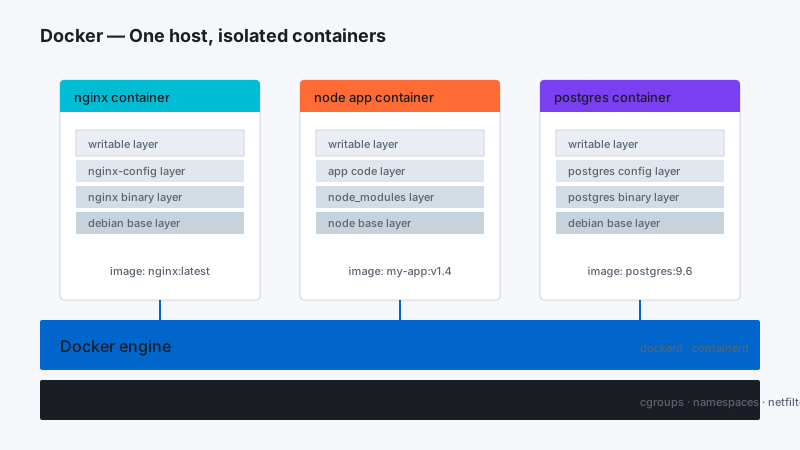
Docker containerization and service-oriented design attempts to solve many of these problems. Applications can be broken up into manageable, functional components, packaged individually with all of their dependencies, and deployed on irregular architecture easily. Scaling and updating components is also simplified.
In this guide, we will discuss the benefits of containerization and how Docker helps to solve many of the issues we mentioned above. Docker is the core component in distributed container deployments that provide easy scalability and management.
A Brief History of Linux Containerization
Containerization and isolation are not new concepts in the computing world. Some Unix-like operating systems have leveraged mature containerization technologies for over a decade.
In Linux, LXC, the building block that formed the foundation for later containerization technologies was added to the kernel in 2008. LXC combined the use of kernel cgroups (allows for isolating and tracking resource utilization) and namespaces (allows groups to be separated so they cannot “see” each other) to implement lightweight process isolation.
Later, Docker was introduced as a way of simplifying the tooling required to create and manage containers. It initially used LXC as its default execution driver (it has since developed a library called libcontainer for this purpose). Docker, while not introducing many new ideas, made them accessible to the average developer and system administrator by simplifying the process and standardizing on an interface. It spurred a renewed interest in containerization in the Linux world among developers.
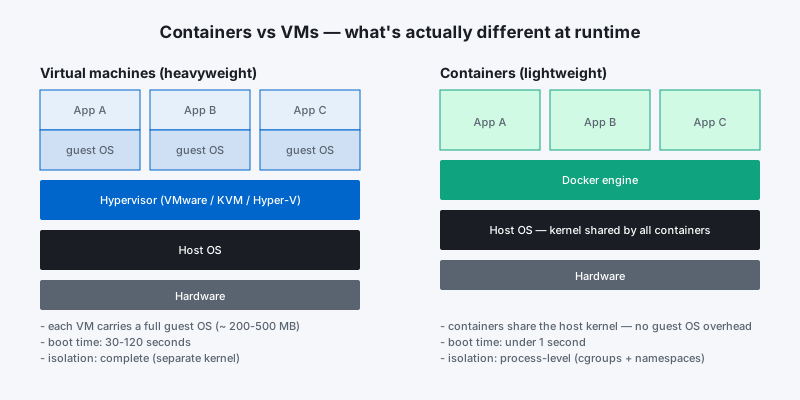
While some of the topics we will discuss in this article are more general, we will be focusing mainly on Docker containerization due to its overwhelming popularity and its standard adoption.
What Containerization Brings to the Picture
Containers come with many very attractive benefits for both developers and system administrators / operations teams.
Some of the most benefits are listed below.
Abstraction of the host system away from the containerized application
Containers are meant to be completely standardized. This means that the container connects to the host and to anything outside of the container using defined interfaces. A containerized application should not rely on or be concerned with details about the underlying host’s resources or architecture. This simplifies development assumptions about the operating environment. Likewise, to the host, every container is a black box. It does not care about the details of the application inside.
Easy Scalability
One of the benefits of the abstraction between the host system and the containers is that, given the correct application design, scaling can be simple and straight-forward. Service-oriented design (discussed later) combined with containerized applications provide the groundwork for easy scalability.
A developer may run a few containers on their workstation, while this system may be scaled horizontally in a staging or testing area. When the containers go into production, they can scale out again.
Simple Dependency Management and Application Versioning
Containers allow a developer to bundle an application or an application component along with all of its dependencies as a unit. The host system does not have to be concerned with the dependencies needed to run a specific application. As long as it can run Docker, it should be able to run all Docker containers.
This makes dependency management easy and also simplifies application version management as well. Host systems and operations teams are no longer responsible for managing the dependency needs of an application because, apart from a reliance on related containers, they should all be contained within the container itself.
Extremely lightweight, isolated execution environments
While containers do not provide the same level of isolation and resource management as virtualization technologies, what they win from the trade off is an extremely lightweight execution environment. Containers are isolated at the process level, sharing the host’s kernel. This means that the container itself does not include a complete operating system, leading to almost instant startup times. Developers can easily run hundreds of containers from their workstation without an issue.
Shared Layering
Containers are lightweight in a different sense in that they are committed in “layers”. If multiple containers are based on the same layer, they can share the underlying layer without duplication, leading to very minimal disk space utilization for later images.
Composability and Predictability
Docker files allow users to define the exact actions needed to create a new container image. This allows you to write your execution environment as if it were code, storing it in version control if desirable. The same Docker file built in the same environment will always produce an identical container image.
Using Dockerfiles for Repeatable, Consistent Builds
While it is possible to create container images using an interactive process, it is often better to place the configuration steps within a Dockerfile once the necessary steps are known. Dockerfiles are simple build files that describe how to create a container image from a known starting point.
Dockerfiles are incredible useful and fairly easy to master. Some of the benefits they provide are:
~~Easy versioning: The Dockerfiles themselves can be committed to version control to track changes and revert any mistakes**
~~Predicatability: Building images from a Dockerfile helps remove human error from the image creation process.**
~~Accountability: If you plan on sharing your images, it is often a good idea to provide the Dockerfile that created the image as a way for other users to audit the process. It basically provides a command history of the steps taken to create the image.**
~~Flexibility: Creating images from a Dockerfile allows you to override the defaults that interactive builds are given. This means that you do not have to provide as many runtime options to get the image to function as intended.**
Dockerfiles are a great tool for automating container image building to establish a repeatable process.~~**
The Architecture of Containerized Applications**
When designing applications to be deployed within containers, one of the first areas of concern is the actual architecture of the application. Generally, containerized applications work best when implementing a service-oriented design.~~**
Service-oriented applications break the functionality of a system into discrete components that communicate with each other over well-defined interfaces. Container technology itself encourages this type of design because it allows each component to scale out or upgrade independently.**
Applications implementing this type of design should have the following qualities:**
~~They should not care about or rely on any specifics of the host system**
~~Each component should provide consistent APIs that consumers can use to access the service**
~~Each service should take cues from environmental variables during initial configuration**
~~Application data should be stored outside of the container on mounted volumes or in data containers**
These strategies allow each component to be independently swapped out or upgraded as long as the API is maintained. They also lend themselves towards focused horizontal scalability due to the fact that each component can be scaled according to the bottleneck being experienced.~~**
Rather than hard coding specific values, each component generally can define reasonable defaults. The component can use these as fallback values, but should prefer values that it can gather from its environment. This is often accomplished through the aid of service discovery tools, which the component can query during its startup procedure.**
Taking the configuration out of the actual container and placing it into the environment allows for easy changes to application behavior without rebuilding the container image. It also allows a single setting to influence multiple instances of a component. In general, service-oriented design couples well with environmental configuration strategies because both allow for more flexible deployments and more straight-forward scaling.**
Using a Docker Registry for Container Management**
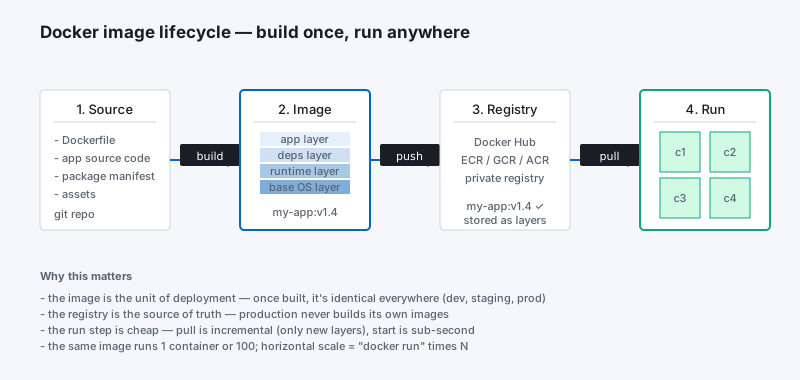
Once your application is split into functional components and configured to respond appropriately to other containers and configuration flags within the environment, the next step is usually to make your container images available through a registry. Uploading container images to a registry allows Docker hosts to pull down the image and spin up container instances by simply knowing the image name.~~**
There are various Docker registries available for this purpose. Some are public registries where anyone can see and use the images that have been committed, while other registries are private. Images can be tagged so that they are easy to target for downloads or updating.
Conclusion**
Docker provides the fundamental building block necessary for distributed container deployments. By packaging application components in their own containers, horizontal scaling becomes a simple process of spinning up or shutting down multiple instances of each component. Docker provides the tools necessary to not only build containers, but also manage and share them with new users or hosts.~~**
While containerized applications provide the necessary process isolation and packaging to assist in deployment, there are many other components necessary to adequately manage and scale containers over a distributed cluster of hosts. In our next guide, we will discuss how service discovery and globally distributed configuration stores contribute to clustered container deployments.
 Part 02 of 05
 Docker: An Introduction to Common Components
Introduction Containerization is the process of distributing and deploying applications in a portable and predictable way. It accomplishes this by packaging components and their dependencies…
Introduction
Containerization is the process of distributing and deploying applications in a portable and predictable way. It accomplishes this by packaging components and their dependencies into standardized, isolated, lightweight process environments called containers. Many organizations are now interested in designing applications and services that can be easily deployed to distributed systems, allowing the system to scale easily and survive machine and application failures. Docker, a containerization platform developed to simplify and standardize deployment in various environments, was largely instrumental in spurring the adoption of this style of service design and management. A large amount of software has been created to build on this ecosystem of distributed container management.
Docker and Containerization
Docker is the most common containerization software in use today. While other containerizing systems exist, Docker makes container creation and management simple and integrates with many open source projects.
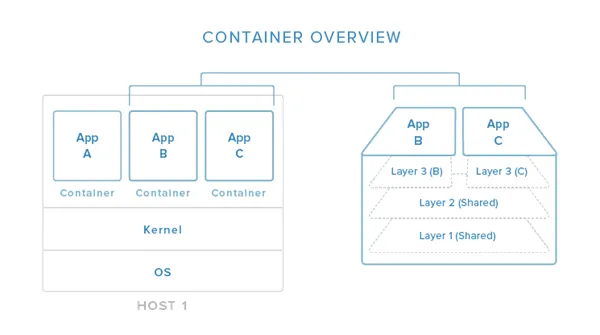
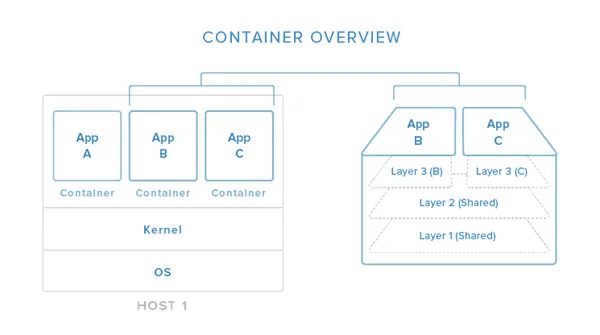
In this image, you can begin to see (in a simplified view) how containers relate to the host system. Containers isolate individual applications and use operating system resources that have been abstracted by Docker. In the exploded view on the right, we can see that containers can be built by “layering”, with multiple containers sharing underlying layers, decreasing resource usage.
Docker’s main advantages are:
~~Lightweight resource utilization: instead of virtualizing an entire operating system, containers isolate at the process level and use the host’s kernel.**
~~Portability: all of the dependencies for a containerized application are bundled inside of the container, allowing it to run on any Docker host.**
~~Predictability: The host does not care about what is running inside of the container and the container does not care about which host it is running on. The interfaces are standardized and the interactions are predictable.**
Typically, when designing an application or service to use Docker, it works best to break out functionality into individual containers, a design decision known as service-oriented architecture. This gives you the ability to easily scale or update components independently in the future. Having this flexibility is one of the many reasons that people are interested in Docker for development and deployment.~~**
To find out more about containerizing applications with Docker, click here.
Service Discovery and Global Configuration Stores**
Service discovery is one component of in an overall strategy aimed at making container deployments scalable and flexible. Service discovery is used so that containers can find out about the environment they have been introduced to without administrator intervention. They can find connection information for the components they must interact with, and they can register themselves so that other tools know that they are available. These tools also typically function as globally distributed configuration stores where arbitrary config settings can be set for the services operating in your infrastructure.~~**
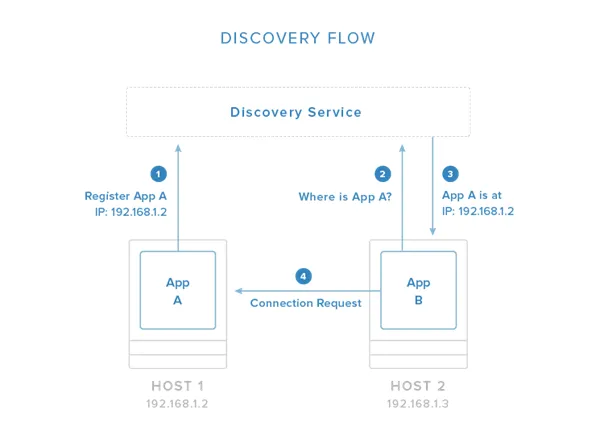
In the above image, you can see an example flow in which one application registers its connection information with the discovery service system. Once registered, other applications can query the discovery service to find out how to connect to the application.~~**
These tools are often implemented as simple key-value stores that are distributed among the hosts in a clustered environment. Generally, the key-value stores provide an HTTP API for accessing and setting values. Some include additional security measures like encrypted entries or access control mechanisms. The distributed stores are essential for managing the clustered Docker hosts in addition to their primary function of providing self-configuration details for new containers.**
Some of the responsibilities of service discovery stores are:**
~~Allowing applications to obtain the data needed to connect with to the services they depend on.**
~~Allowing services to register their connection information for the above purpose.**
~~Providing a globally accessible location to store arbitrary configuration data.**
~~Storing information about cluster members as needed by any cluster management software.**
Some popular service discovery tools and related projects are:~~**
etcd~~: service discovery / globally distributed key-value store**
consul~~: service discovery / globally distributed key-value store**
zookeeper~~: service discovery / globally distributed key-value store**
crypt~~: project to encrypt etcd entries**
confd~~: watches key-value store for changes and triggers reconfiguration of services with new values**
To learn more about service discovery with Docker, visit our guide here.**
Networking Tools**
Containerized applications lend themselves to a service-oriented design that encourages breaking out functionality into discrete components. While this makes management and scaling easier, it requires even more assurance regarding the functionality and reliability of networking between the components. Docker itself provides the basic networking structures necessary for container-to-container and container-to-host communication.~~**
Docker’s native networking capabilities provide two mechanisms for hooking containers together. The first is to expose a container’s ports and optionally map to the host system for external routing. You can select the host port to map to or allow Docker to randomly choose a high, unused port. This is a generic way of providing access to a container that works well for most purposes.**
The other method is to allow containers to communicate by using Docker “links”. A linked container will get connection information about its counterpart, allowing it to automatically connect if it is configured to pay attention to those variables. This allows contact between containers on the same host without having to know beforehand the port or address where the service will be located.**
This basic level of networking is suitable for single-host or closely managed environments. However, the Docker ecosystem has produce a variety of projects that focus on expanding the networking functionality available to operators and developers. Some additional networking capabilities available through additional tools include:**
~~Overlay networking to simplify and unify the address space across multiple hosts.**
~~Virtual private networks adapted to provide secure communication between various components.**
~~Assigning per-host or per-application subnetting**
~~Establishing macvlan interfaces for communication**
~~Configuring custom MAC addresses, gateways, etc. for your containers**
Some projects that are involved with improving Docker networking are:~~**
~~flannel: Overlay network providing each host with a separate subnet.**
~~weave: Overlay network portraying all containers on a single network.**
~~pipework: Advanced networking toolkit for arbitrarily advanced networking configurations.**
Scheduling, Cluster Management, and Orchestration**
Another component needed when building a clustered container environment is a scheduler. Schedulers are responsible for starting containers on the available hosts.~~**
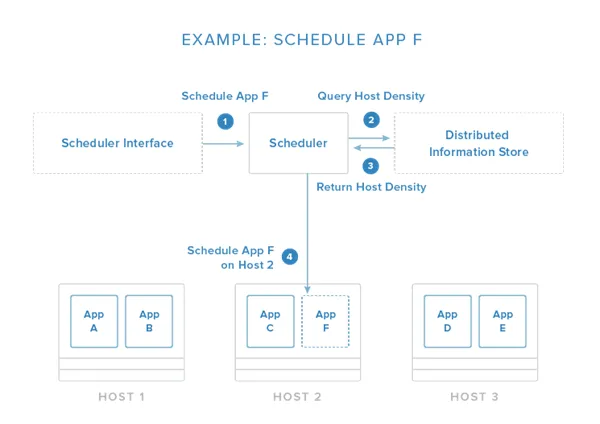
The image above demonstrates a simplified scheduling decision. The request is given through an API or management tool. From here, the scheduler evaluates the conditions of the request and the state of the available hosts. In this example, it pulls information about container density from a distributed data store / discovery service (as discussed above) so that it can place the new application on the least busy host.~~**
This host selection process is one of the core responsibilities of the scheduler. Usually, it has functions that automate this process with the administrator having the option to specify certain constraints. Some of these constraints may be:**
~~Schedule the container on the same host as another given container.**
~~Make sure that the container is not placed on the same host as another given container.**
~~Place the container on a host with a matching label or metadata.**
~~Place the container on the least busy host.**
~~Run the container on every host in the cluster.**
The scheduler is responsible for loading containers onto relevant hosts and starting, stopping, and managing the life cycle of the process.~~**
Because the scheduler must interact with each host in the group, cluster management functions are also typically included. These allow the scheduler to get information about the members and perform administration tasks. Orchestration in this context generally refers to the combination of container scheduling and managing hosts.**
Some popular projects that function as schedulers and fleet management tools are:**
fleet~~: scheduler and cluster management tool.**
marathon~~: scheduler and service management tool.**
Swarm~~: scheduler and service management tool.**
mesos~~: host abstraction service that consolidates host resources for the scheduler.**
kubernetes~~: advanced scheduler capable of managing container groups.**
compose~~: container orchestration tool for creating container groups.**
Conclusion**
By now, you should be familiar with the general function of most of the software associated with the Docker ecosystem. Docker itself, along with all of the supporting projects, provide a software management, design, and deployment strategy that enables massive scalability. By understanding and leveraging the capabilities of various projects, you can execute complex application deployments that are flexible enough to account for variable operating requirements.~~**
 Part 03 of 05
 Docker: Networking and Communication
Introduction When constructing distributed systems to serve Docker containers, communication and networking become extremely important. Service-oriented architecture, undeniably, relies heavily…
Introduction
When constructing distributed systems to serve Docker containers, communication and networking become extremely important. Service-oriented architecture, undeniably, relies heavily upon communication between components in order to function correctly.
In this guide, we will discuss the various networking strategies and tools used to mold the networks used by containers into their desired state. Some situations can take advantage of Docker-native solutions, while others must utilize alternative projects.
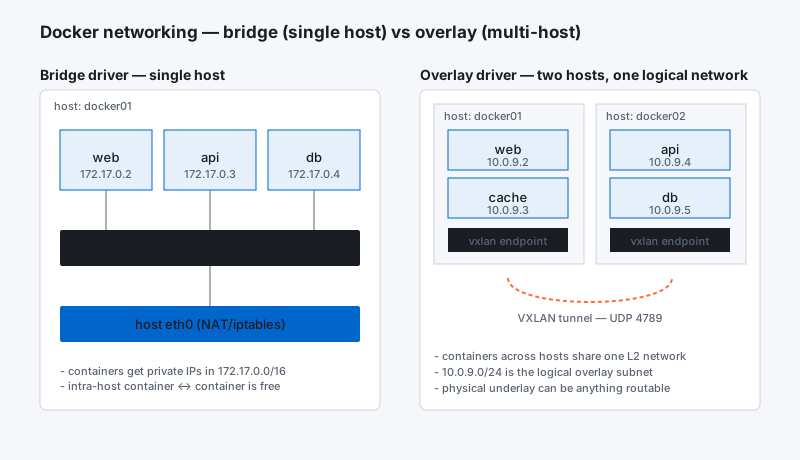
Native Docker Networking Implementation
Docker itself provides many of the networking fundamentals necessary for container-to-container and container-to-host communication.
When the Docker process itself is brought up, it configures a new virtual bridge interface called docker0on the host system. This interface allows Docker to allocate a virtual subnet for use among the containers it will run. The bridge will serve as the main point of interface between networking within a container and networking on the host.
When a container is started by Docker, a new virtual interface is created and given an address within the bridge’s subnet range. The IP address is hooked up to the container’s internal networking, providing the container’s network a path to the docker0 bridge on the host system. Docker automatically configureiptables rules to allow for forwarding and configures NAT masquerading for traffic originating ondocker0 destined for the outside world.
How Do Containers Expose Services to Consumers?
Other containers on the same host are able to access services provided by their neighbors without any additional configuration. The host system will simply route requests originating on and destined for thedocker0 interface to the appropriate location.
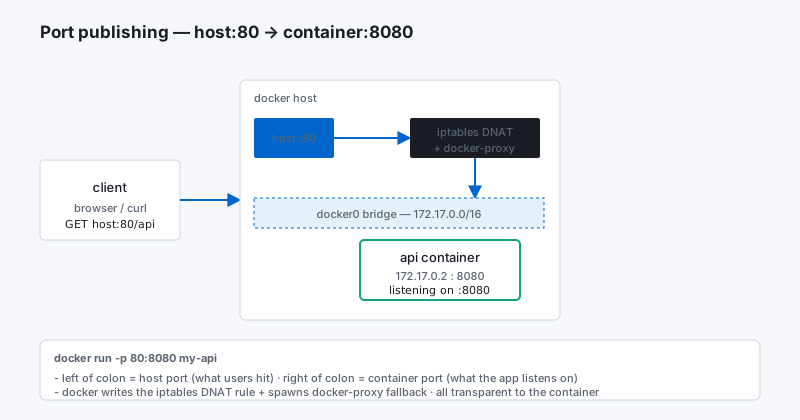
Containers can expose their ports to the host, where they can receive traffic forwarded from the outside world. Exposed ports can be mapped to the host system, either by selecting a specific port or allowing Docker to choose a random, high, unused port. Docker takes care of any forwarding rules and iptablesconfiguration to correctly route packets in these situations.
What is the Difference Between Exposing and Publishing a Port?
When creating container images or running a container, you have the option to expose ports or publish ports. The difference between the two is significant, but may not be immediately discernible.
Exposing a port simply means that Docker will take note that the port in question is used by the container. This can then be used for discovery purposes and for linking. For instance, inspecting a container will give you information about the exposed ports. When containers are linked, environmental variables will be set in the new container indicating the ports that were exposed on the original container.
By default, containers will be accessible to the host system and to any other containers on the host regardless of whether ports are exposed. Exposing the port simply documents the port use and makes that information available for automated mappings and linkings.
In contrast, publishing a port will map it to the host interface, making it available to the outside world. Container ports can either be mapped to a specific port on the host, or Docker can automatically select a high, unused port at random.
What Are Docker Links?
Docker provides a mechanism called “Docker links” for configuring communication between containers. If a new container is linked to an existing container, the new container will be given connection information for the existing container through environmental variables.
This provides an easy way to establish communication between two containers by giving the new container explicit information about how to access its companion. The environmental variables are set according to the ports exposed by the other container. The IP address and other information will be filled in by Docker itself.
Projects to Expand Docker’s Networking Capabilities
The networking model discussed above provides a good starting point for networking construction. Communication between containers on the same host is fairly straight-forward and communication between hosts can occur over regular public networks as long as the ports are mapped correctly and the connection information is given to the other party.
However, many applications require specific networking environments for security or functionality purposes. The native networking functionality of Docker is somewhat limited in these scenarios. Because of this, many projects have been created to expand the Docker networking ecosystem.
Creating Overlay Networks to Abstract the Underlying Topology
One functional improvement that several projects have focused on is that of establishing overlay networks. An overlay network is a virtual network built on top of existing network connections.
Establishing overlay networks allows you to create a more predictable and uniform networking environment across hosts. This can simplify networking between containers regardless of where they are running. A single virtual network can span multiple hosts or specific subnets can be designated to each host within a unified network.
Another use of an overlay network is in the construction of fabric computing clusters. In fabric computing, multiple hosts are abstracted away and managed as a single, more powerful entity. The implementation of a fabric computing layer allows the end user to manage the cluster as a whole instead of individual hosts. Networking plays a large part of this clustering.
Advanced Networking Configuration
Other projects expand Docker’s networking capabilities by providing more flexibility.
Docker’s default network configuration is functional, but fairly simple. These limitations express themselves most fully when dealing with cross-host networking but can also impede more customized networking requirements within a single host.
Additional functionality is provided through additional “plumbing” capabilities. These projects do not provide an out-of-the-box configuration, but they allow you to manually hook together pieces and create complex network scenarios. Some of the abilities you can gain range from simply establishing private networking between certain hosts, to configuring bridges, vlans, custom subnetting and gateways.
There are also a number of tools and projects that, while not developed with Docker in mind, are often used in Docker environments to provided needed functionality. In particular, mature private networking and tunneling technologies are often utilized to provide secure communication between hosts and among containers.
What Are Some Common Projects for Improving Docker Networking?
There are a few different projects focused on providing overlay networking for Docker hosts. The common ones are:
flannel: Developed by the CoreOS team, this project was initially developed to provide each host system with its own subnet of a shared network. This is a condition necessary for Google’s kubernetes orchestration tool to function, but it is useful in other situations.~~**
weave: Weave creates a virtual network that connects each host machine together. This simplifies application routing as it gives the appearance of every container being plugged into a single network switch.~~**
In terms of advanced networking, the following project aims to fill that vacancy by providing additional plumbing:**
- pipework: Constructed as a stop-gap measure until Docker native networking becomes more advanced, this project allows for easy configuration of arbitrarily advanced networking configurations.~~**
One relevant example of existing software co-opted to add functionality to Docker is:**
- tinc: Tinc is a lightweight VPN software that is implemented using tunnels and encryption. Tinc is a robust solution that can make the private network transparent to any applications.~~**
Conclusion~~**
Providing internal and external services through containerized components is a very powerful model, but networking considerations become a priority. While Docker provides some of this functionality natively through the configuration of virtual interfaces, subnetting, iptables and NAT table management, other projects have been created to provide more advanced configurations.~~**
 Part 04 of 05
 Docker: Service Discovery and Distributed Configuration Stores
Introduction Containers provide an elegant solution for those looking to design and deploy applications at scale. While Docker provides the actual containerizing technology, many other projects…
Introduction
Containers provide an elegant solution for those looking to design and deploy applications at scale. While Docker provides the actual containerizing technology, many other projects assist in developing the tools needed for appropriate bootstrapping and communication in the deployment environment.
One of the core technologies that many Docker environments rely on is service discovery. Service discovery allows an application or component to discover information about their environment and neighbors. This is usually implemented as a distributed key-value store, which can also serve as a more general location to dictate configuration details. Configuring a service discovery tool allows you to separate your runtime configuration from the actual container, which allows you to reuse the same image in a number of environments.
In this guide, we’ll discuss the benefits of service discovery within a clustered Docker environment. We will focus mainly on general concepts, but provide more specific examples where appropriate.
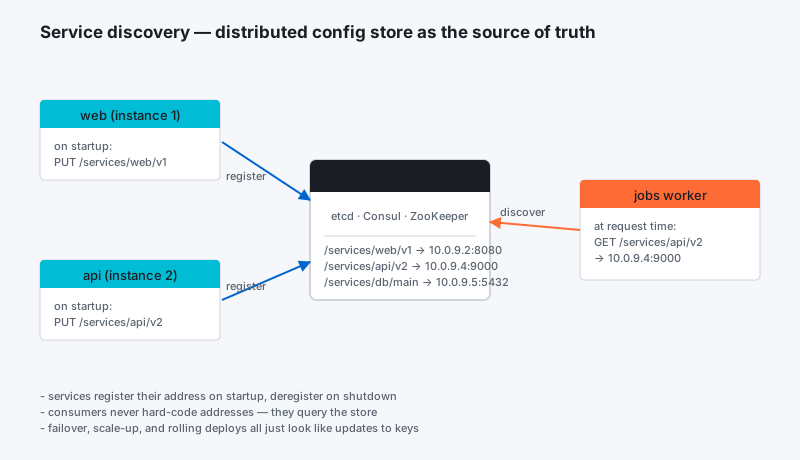
Service Discovery and Globally Accessible Configuration Stores
The basic idea behind service discovery is that any new instance of an application should be able to programmatically identify the details of its current environment. This is required in order for the new instance to be able to “plug in” to the existing application environment without manual intervention. Service discovery tools are generally implemented as a globally accessible registry that stores information about the instances or services that are currently operating. Most of the time, in order to make this configuration fault tolerant and scalable, the registry is distributed among the available hosts in the infrastructure.
While the primary purpose of service discovery platforms is to serve connection details to link components together, they can be used more generally to store any type of configuration. Many deployments leverage this ability by writing their configuration data to the discovery tool. If the containers are configured so that they know to look for these details, they can modify their behavior based on what they find.
How Does Service Discovery Work?
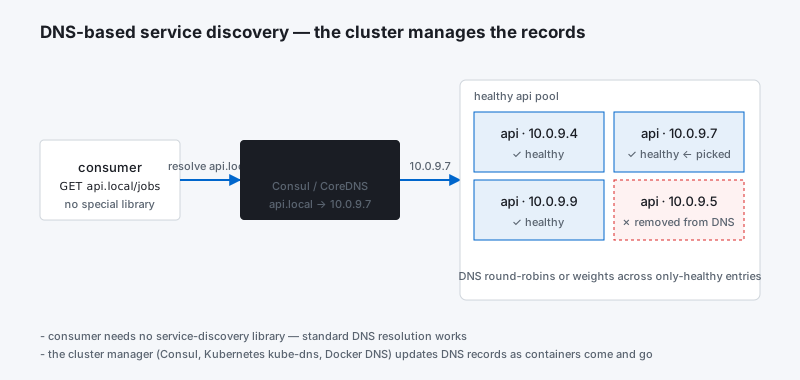
Each service discovery tool provides an API that components can use to set or retrieve data. Because of this, for each component, the service discovery address must either be hard-coded into the application/container itself, or provided as an option at runtime. Typically the discovery service is implemented as a key-value store accessible using standard http methods.
The way a service discovery portal works is that each service, as it comes online, registers itself with the discovery tool. It records whatever information a related component might need in order to consume the service it provides. For instance, a MySQL database may register the IP address and port where the daemon is running, and optionally the username and credentials needed to sign in.
When a consumer of that service comes online, it is able to query the service discovery registry for information at a predefined endpoint. It can then interact with the components it needs based on the information it finds. One good example of this is a load balancer. It can find every backend server that it needs to feed traffic to by querying the service discovery portal and adjusting its configuration accordingly.
This takes the configuration details out of the containers themselves. One of the benefits of this is that it makes the component containers more flexible and less bound to a specific configuration. Another benefit is that it makes it simple to make your components react to new instances of a related service, allowing dynamic reconfiguration.
How Does Configuration Storage Relate?
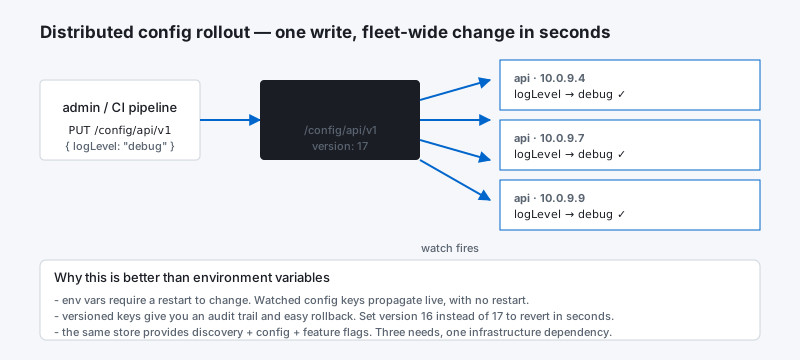
One key advantage of a globally distributed service discovery system is that it can store any other type of configuration data that your components might need at runtime. This means that you can extract even more configuration out of the container and into the greater execution environment.
Typically, to make this work most effectively, your applications should be designed with reasonable defaults that can be overridden at runtime by querying the configuration store. This allows you to use the configuration store similar to the way that you would use command line flags. The difference is that by utilizing a globally accessible store, you can offer the same options to each instance of your component with no additional work.
How Does Configuration Storage Help with Cluster Management?
One function of distributed key-value stores in Docker deployments that might not be initially apparent is the storage and management of cluster membership. Configuration stores are the perfect environment for keeping track of host membership for the sake of management tools.
Some of the information that may be stored about individual hosts in a distributed key-value store are:
Host IP addresses~~**
Connection information for the hosts themselves~~**
Arbitrary metadata and labels that can be targeted for scheduling decisions~~**
Role in cluster (if using a leader/follower model)~~**
These details are probably not something that you need to be concerned with when utilizing a service discovery platform in normal circumstances, but they provide a location for management tools to query or modify information about the cluster itself.**
What About Failure Detection?~~**
Failure detection can be implemented in a number of ways. The concern is whether, if a component fails, the discovery service will be updated to reflect the fact that it is no longer available. This type of information is vital in order to minimize application or service failures.
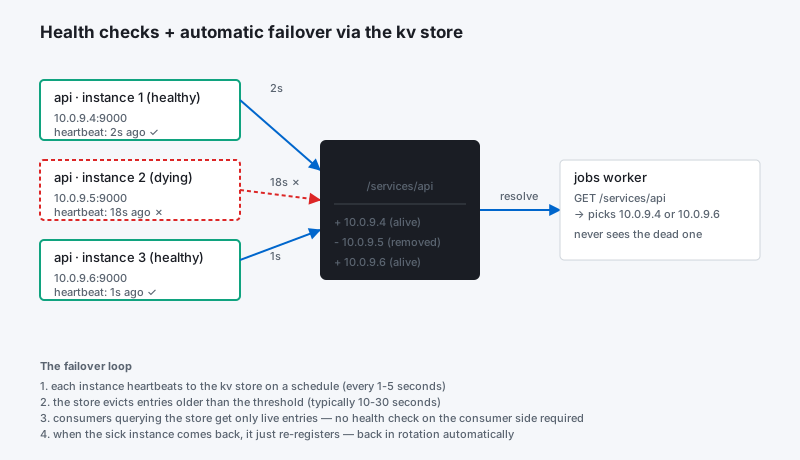
Many service discovery platforms allow values to be set with a configurable timeout. The component can set a value with a timeout, and ping the discovery service at regular intervals to reset the timeout. If the component fails and the timeout is reached, that instance’s connection info is removed from the store. The length of the timeout is largely a function of how quickly the application needs to respond to a component failure.~~**
This can also be accomplished by associating a bare-bones “helper” container with each component, whose sole responsibility is to check on the health of the component periodically and update the registry if the component goes down. The concern with this type of architecture is that the helper container could go down, leading to incorrect information in the store. Some systems solve this by being able to define health checks in the service discovery tool. That way, the discovery platform itself can periodically check whether the components registered are still available.~~**
What About Reconfiguring Services When Details Changes?~~**
One key improvement to the basic service discovery model is that of dynamic reconfiguration. While normal service discover allows you to influence the initial configuration of components by checking the discovery information at startup, dynamic reconfiguration involves configuring your components to react to new information in the configuration store. For instance, if you implement a load balancer, a health check on the backend servers may indicate that one member of the pool is down. The running instance of the load balancer needs to be informed and needs to be able to adjust its configuration and reload to account for this.**
This can be implemented in a number of ways. Since the load balancing example is one of the primary use-cases for this ability, a number of projects exist that focus exclusively on reconfiguring a load balancer when configuration changes are detected. HAProxy configuration adjustment is common due to its ubiquitousness in the load balancing space.~~**
Certain projects are more flexible in that they can be used to trigger changes in any type of software. These tools regularly query the discovery service and when a change is detected, use templating systems to generate configuration files that incorporate the values found at the discovery endpoint. After a new configuration file is generated, the affected service is reloaded.~~**
This type of dynamic reconfiguration requires more planning and configuration during the build process because all of these mechanisms must exist within the component’s container. This makes the component container itself responsible for adjusting its configuration. Figuring out the necessary values to write to the discovery service and designing an appropriate data structure for easy consumption is another challenge that this system requires, but the benefits and flexibility can be substantial.~~**
What About Security?~~**
One concern many people have when first learning about globally accessible configuration storage is, rightfully, security. Is it really okay to store connection information into a globally accessible location?**
The answer to that question largely depends on what you are choosing to place in the store and how many layers of security you deem necessary to protect your data. Almost every service discovery platform allows for encrypting connections with SSL/TLS. For some services, privacy might not be terribly important and putting the discovery service on a private network may prove satisfactory. However, most applications would probably benefit from additional security.~~**
There are a number of different ways to address this issue, and various projects offer their own solutions. One project’s solution is to continue to allow open access to the discovery platform itself, but to encrypt the data written to it. The application consumer must have the associated key to decrypt the data it finds in the store. Other parties will not be able to access the unencrypted data.~~**
For a different approach, some service discovery tools implement access control lists in order to divide the key space into separate zones. They can then designate ownership or access to areas based on the access requirements defined by a specific key space. This establishes an easy way of providing information for certain parties while keeping it private from others. Each component can be configured to only have access to the information it explicitly needs.~~**
What Are Some Common Service Discovery Tools?~~**
Now that we’ve discussed some of the general features of service discovery tools and globally distributed key-value stores, we can mention a few of the projects that relate to these concepts.**
Some of the most common service discovery tools are:~~**
etcd: This tool was created by the makers of CoreOS to provide service discovery and globally distributed configuration to both containers and the host systems themselves. It implements an http API and has a command line client available on each host machine.~~**
consul: This service discovery platform has many advanced features that make it stand out including configurable health checks, ACL functionality, HAProxy configuration, etc.~~**
zookeeper: This example is a bit older than the previous two, providing a more mature platform at the expense of some newer features.~~**
Some other projects that expand basic service discovery are:**
crypt: Crypt allows components to protect the information they write using public key encryption. The components that are meant to read the data can be given the decryption key. All other parties will be unable to read the data.~~**
confd: Confd is a project aimed at allowing dynamic reconfiguration of arbitrary applications based on changes in the service discovery portal. The system involves a tool to watch relevant endpoints for changes, a templating system to build new configuration files based on the information gathered, and the ability to reload affected applications.~~**
vulcand: Vulcand serves as a load balancer for groups of components. It is etcd aware and modifies its configuration based on changes detected in the store.~~**
marathon: While marathon is mainly a scheduler (covered later), it also implements a basic ability to reload HAProxy when changes are made to the available services it should be balancing between.~~**
frontrunner: This project hooks into marathon to provide a more robust solution for updating HAProxy.~~**
synapse: This project introduces an embedded HAProxy instance that can route traffic to components.~~**
nerve: Nerve is used in conjunction with synapse to provide health checks for individual component instances. If the component becomes unavailable, nerve updates synapse to bring the component out of rotation.~~**
Conclusion~~**
Service discovery and global configuration stores allow Docker containers to adapt to their current environment and plug into existing components. This is an essential prerequisite for providing simple, hands-free scalability and deployment by allowing components to track and respond to changes within their environment.**
In the next guide, we will discuss ways that Docker containers and hosts can communicate with customized networking configurations.
 Part 05 of 05
 Docker: Scheduling and Orchestration
The Docker Ecosystem: Scheduling and Orchestration Introduction The Docker tool provides all of the functions necessary to build, upload, download, start, and stop containers. It is well-suited…
The Docker Ecosystem: Scheduling and Orchestration
Introduction
The Docker tool provides all of the functions necessary to build, upload, download, start, and stop containers. It is well-suited for managing these processes in single-host environments with a minimal number of containers.
However, many Docker users are leveraging the platform as a tool for easily scaling large numbers of containers across many different hosts. Clustered Docker hosts present special management challenges that require a different set of tools.
In this guide, we will discuss Docker schedulers and orchestration tools. These represent the primary container management interface for administrators of distributed deployments.
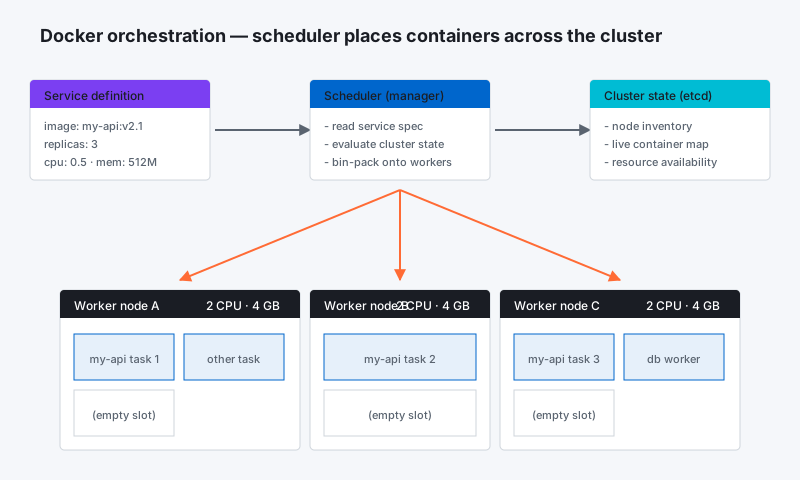
Scheduling Containers, Orchestration and Cluster Management
When applications are scaled out across multiple host systems, the ability to manage each host system and abstract away the complexity of the underlying platform becomes attractive. Orchestration is a broad term that refers to container scheduling, cluster management, and possibly the provisioning of additional hosts.
In this environment, “scheduling” refers to the ability for an administrator to load a service file onto a host system that establishes how to run a specific container. While scheduling refers to the specific act of loading the service definition, in a more general sense, schedulers are responsible for hooking into a host’s init system to manage services in whatever capacity needed.
Cluster management is the process of controlling a group of hosts. This can involve adding and removing hosts from a cluster, getting information about the current state of hosts and containers, and starting and stopping processes. Cluster management is closely tied to scheduling because the scheduler must have access to each host in the cluster in order to schedule services. For this reason, the same tool is often used for both purposes.
In order to run and manage containers on hosts throughout the cluster, the scheduler must interact with each host’s individual init system. At the same time, for ease of management, the scheduler presents a unified view of the state of services throughout the cluster. This ends up functioning like a cluster-wide init system. For this reason, many schedulers mirror the command structure of the init system’s they are abstracting.
One of the biggest responsibilities of schedulers is host selection. If an administrator decides to run a service (container) on the cluster, the scheduler often is charged with automatically selecting a host. The administrator can optionally provide scheduling constraints according to their needs or desires, but the scheduler is ultimately responsible for executing on these requirements.
How Does a Scheduler Make Scheduling Decisions?
Schedulers often define a default scheduling policy. This determines how services are scheduled when no input is given from the administrator. For instance, a scheduler might choose to place new services on hosts with the fewest currently active services.
Schedulers typically provide override mechanisms that administrators can use to fine-tune the selection processes to satisfy specific requirements. For instance, if two containers should always run on the same host because they operate as a unit, that affinity can often be declared during the scheduling. Likewise, if two containers should not be placed on the same host, for example to ensure high availability of two instances of the same service, this can be defined as well.
Other constraints that a scheduler may pay attention to can be represented by arbitrary metadata. Individual hosts may be labeled and targeted by schedulers. This may be necessary, for instance, if a host contains the data volume needed by an application. Some services may need to be deployed on every individual host in the cluster. Most schedulers allow you to do this.
What Cluster Management Functions do Schedulers Provide?
Scheduling is often tied to cluster management functions because both functions require the ability to operate on specific hosts and on the cluster as a whole.
Cluster management software may be used to query information about members of a cluster, add or remove members, or even connect to individual hosts for more granular administration. These functions may be included in the scheduler, or may be the responsibility of another process.
Often, cluster management is also associated with the service discovery tool or distributed key-value store. These are particularly well-suited for storing this type of information because the information is dispersed throughout the cluster itself and the platform already exists for its primary function.
Because of this, if the scheduler itself does not provide methods, some cluster management operations may have to be done by modifying the values in the configuration store using the provided APIs. For example, cluster membership changes may need to be handled through raw changes to the discovery service.
The key-value store is also usually the location where metadata about individual hosts can be stored. As mentioned before, labelling hosts allows you to target individuals or groups for scheduling decisions.
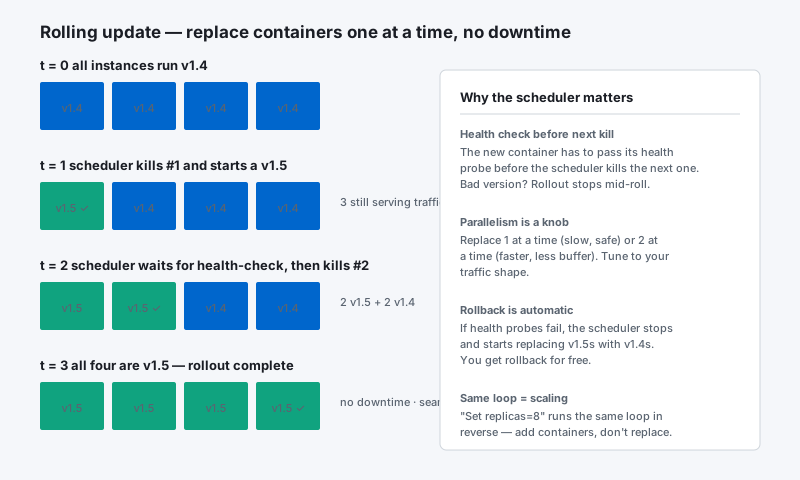
How Do Multi-Container Deployments Fit into Scheduling?
Sometimes, even though each component of an application has been broken out into a discrete service, they should be managed as a single unit. There are times when it wouldn’t make sense to ever deploy one service without another because of the functions each provide.
Advanced scheduling that takes into account container grouping is available through a few different projects. There are quite a few benefits that users gain from having access to this functionality.
Group container management allows an administrator to deal with a collection of containers as a single application. Running tightly integrated components as a unit simplifies application management without sacrificing the benefits of compartmentalizing individual functionality. In effect, it allows administrators to keep the gains won from containerization and service-oriented architecture while minimizing the additional management overhead.
Grouping applications together can mean simply scheduling them together and providing the ability to start and stop them at the same time. It can also allow for more complex scenarios like configuring separate subnets for each group of applications or scaling entire sets of containers where we previously would only be able to scale on the container scale.
What Is Provisioning?
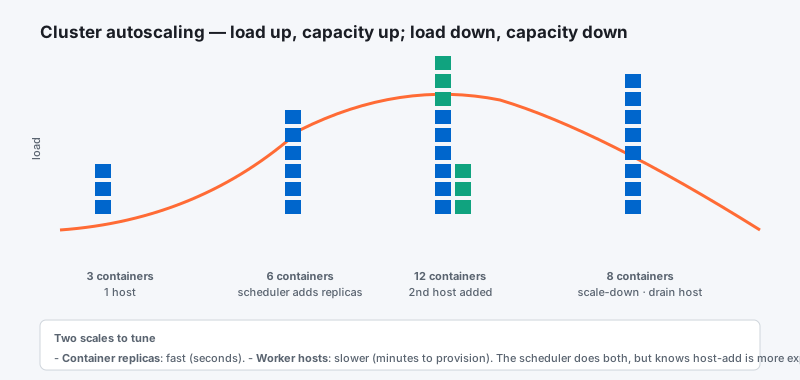
A concept related to cluster management is provisioning. Provisioning is the processes of bringing new hosts online and configuring them in a basic way so that they are ready for work. With Docker deployments, this often implies configuring Docker and setting up the new host to join an existing cluster.
While the end result of provisioning a host should always be that a new system is available for work, the methodology varies significantly depending on the tools used and the type of host. For instance, if the host will be a virtual machine, tools like vagrant can be used to spin up a new host. Most cloud providers allow you to create new hosts using APIs. In contrast, provisioning of bare hardware would probably require some manual steps. Configuration management tools like Chef, Puppet, Ansible, or Salt may be involved in order to take care of the initial configuration of the host and to provide it with the information it needs to connect to an existing cluster.
Provisioning may be left as an administrator-initiated process, or it's possible that it may be hooked into the cluster management tools for automatic scaling. This latter method involves defining the process for requesting additional hosts as well as the conditions under which this should automatically be triggered. For instance, if your application is suffering from severe load, you may wish your system to spin up additional hosts and horizontally scale the containers across the new infrastructure in order to alleviate the congestion.
What Are Some Common Schedulers?
In terms of basic scheduling and cluster management, some popular projects are:
~~fleet: Fleet is the scheduling and cluster management component of CoreOS. It reads connection info for each host in the cluster from etcd and provides systemd-like service management.**
~~marathon: Marathon is the scheduling and service management component of a Mesosphere installation. It works with mesos to control long-running services and provides a web UI for process and container management.**
~~Swarm: Docker’s Swarm is a scheduler that the Docker project announced in December 2014. It hopes to provide a robust scheduler that can spin up containers on hosts provisioned with Docker, using Docker-native syntax.**
As part of the cluster management strategy, Mesosphere configurations rely on the following component:~~**
- ~~mesos: Apache mesos is a tool that abstracts and manages the resources of all hosts in a cluster. It presents a collection of the resources available throughout the entire cluster to the components built on top of it (like marathon). It describes itself as analogous to a “kernel” for a clustered configurations.**
In terms of advanced scheduling and controlling groups of containers as a single unit, the following projects are available:~~**
~~kubernetes: Google’s advanced scheduler, kubernetes allows much more control over the containers running on your infrastructure. Containers can be labeled, grouped, and given their own subnet for communication.**
~~compose: Docker’s compose project was created to allow group management of containers using declarative configuration files. It uses Docker links to learn about the dependency relationship between containers.**
Conclusion**
Cluster management and work schedulers are a key part of implementing containerized services on a distributed set of hosts. They provide the main point of management for actually starting and controlling the services that are providing your application. By utilizing schedulers effectively, you can make drastic changes to your applications with very little effort.~~**