Introduction
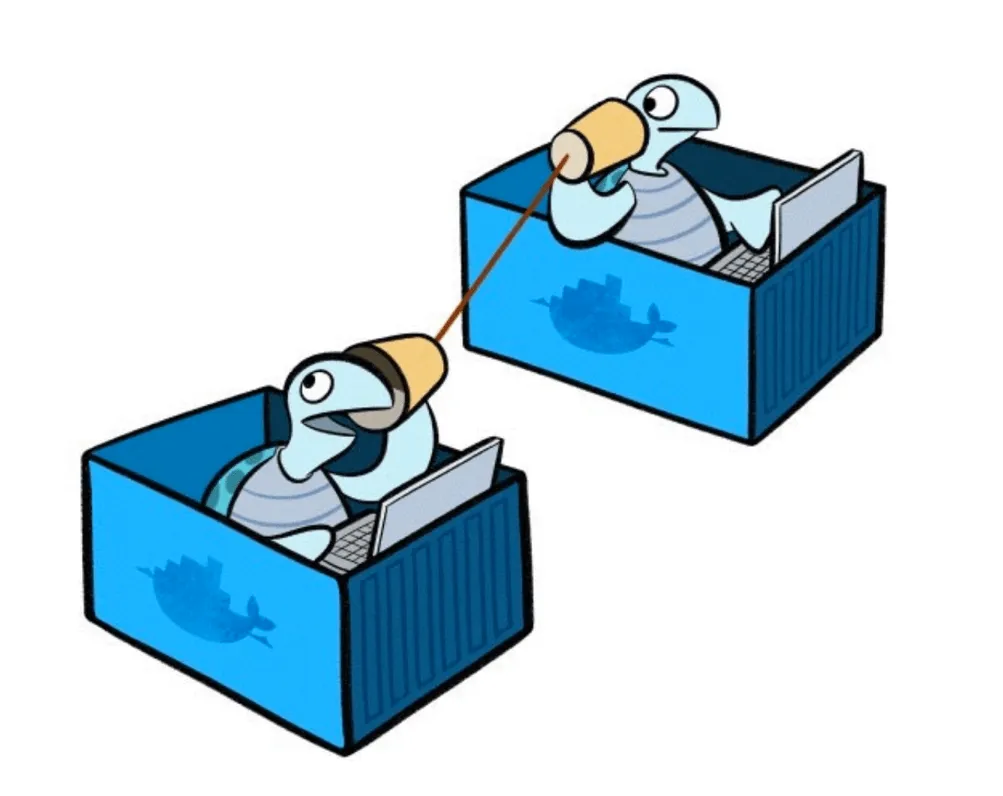
When constructing distributed systems to serve Docker containers, communication and networking become extremely important. Service-oriented architecture, undeniably, relies heavily upon communication between components in order to function correctly.
In this guide, we will discuss the various networking strategies and tools used to mold the networks used by containers into their desired state. Some situations can take advantage of Docker-native solutions, while others must utilize alternative projects.
Native Docker Networking Implementation
Docker itself provides many of the networking fundamentals necessary for container-to-container and container-to-host communication.
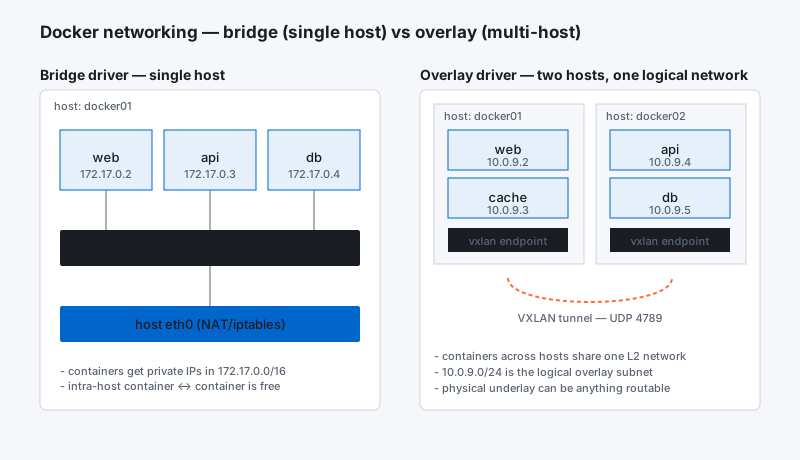
When the Docker process itself is brought up, it configures a new virtual bridge interface called docker0on the host system. This interface allows Docker to allocate a virtual subnet for use among the containers it will run. The bridge will serve as the main point of interface between networking within a container and networking on the host.
When a container is started by Docker, a new virtual interface is created and given an address within the bridge’s subnet range. The IP address is hooked up to the container’s internal networking, providing the container’s network a path to the docker0 bridge on the host system. Docker automatically configureiptables rules to allow for forwarding and configures NAT masquerading for traffic originating ondocker0 destined for the outside world.
How Do Containers Expose Services to Consumers?
Other containers on the same host are able to access services provided by their neighbors without any additional configuration. The host system will simply route requests originating on and destined for thedocker0 interface to the appropriate location.
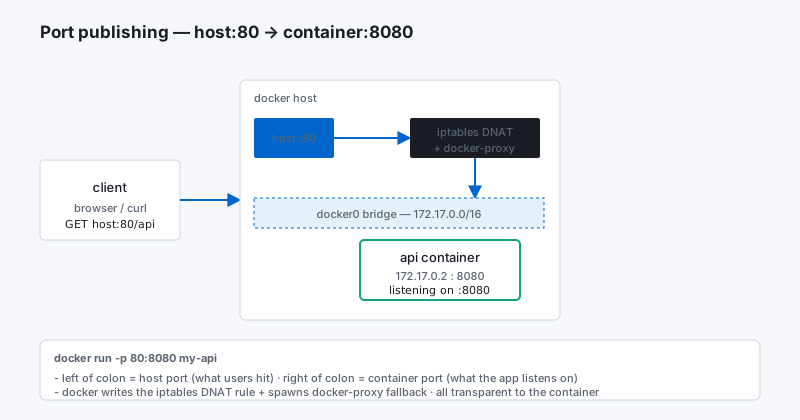
Containers can expose their ports to the host, where they can receive traffic forwarded from the outside world. Exposed ports can be mapped to the host system, either by selecting a specific port or allowing Docker to choose a random, high, unused port. Docker takes care of any forwarding rules and iptablesconfiguration to correctly route packets in these situations.
What is the Difference Between Exposing and Publishing a Port?
When creating container images or running a container, you have the option to expose ports or publish ports. The difference between the two is significant, but may not be immediately discernible.
Exposing a port simply means that Docker will take note that the port in question is used by the container. This can then be used for discovery purposes and for linking. For instance, inspecting a container will give you information about the exposed ports. When containers are linked, environmental variables will be set in the new container indicating the ports that were exposed on the original container.
By default, containers will be accessible to the host system and to any other containers on the host regardless of whether ports are exposed. Exposing the port simply documents the port use and makes that information available for automated mappings and linkings.
In contrast, publishing a port will map it to the host interface, making it available to the outside world. Container ports can either be mapped to a specific port on the host, or Docker can automatically select a high, unused port at random.
What Are Docker Links?
Docker provides a mechanism called “Docker links” for configuring communication between containers. If a new container is linked to an existing container, the new container will be given connection information for the existing container through environmental variables.
This provides an easy way to establish communication between two containers by giving the new container explicit information about how to access its companion. The environmental variables are set according to the ports exposed by the other container. The IP address and other information will be filled in by Docker itself.
Projects to Expand Docker’s Networking Capabilities
The networking model discussed above provides a good starting point for networking construction. Communication between containers on the same host is fairly straight-forward and communication between hosts can occur over regular public networks as long as the ports are mapped correctly and the connection information is given to the other party.
However, many applications require specific networking environments for security or functionality purposes. The native networking functionality of Docker is somewhat limited in these scenarios. Because of this, many projects have been created to expand the Docker networking ecosystem.
Creating Overlay Networks to Abstract the Underlying Topology
One functional improvement that several projects have focused on is that of establishing overlay networks. An overlay network is a virtual network built on top of existing network connections.
Establishing overlay networks allows you to create a more predictable and uniform networking environment across hosts. This can simplify networking between containers regardless of where they are running. A single virtual network can span multiple hosts or specific subnets can be designated to each host within a unified network.
Another use of an overlay network is in the construction of fabric computing clusters. In fabric computing, multiple hosts are abstracted away and managed as a single, more powerful entity. The implementation of a fabric computing layer allows the end user to manage the cluster as a whole instead of individual hosts. Networking plays a large part of this clustering.
Advanced Networking Configuration
Other projects expand Docker’s networking capabilities by providing more flexibility.
Docker’s default network configuration is functional, but fairly simple. These limitations express themselves most fully when dealing with cross-host networking but can also impede more customized networking requirements within a single host.
Additional functionality is provided through additional “plumbing” capabilities. These projects do not provide an out-of-the-box configuration, but they allow you to manually hook together pieces and create complex network scenarios. Some of the abilities you can gain range from simply establishing private networking between certain hosts, to configuring bridges, vlans, custom subnetting and gateways.
There are also a number of tools and projects that, while not developed with Docker in mind, are often used in Docker environments to provided needed functionality. In particular, mature private networking and tunneling technologies are often utilized to provide secure communication between hosts and among containers.
What Are Some Common Projects for Improving Docker Networking?
There are a few different projects focused on providing overlay networking for Docker hosts. The common ones are:
flannel: Developed by the CoreOS team, this project was initially developed to provide each host system with its own subnet of a shared network. This is a condition necessary for Google’s kubernetes orchestration tool to function, but it is useful in other situations.~~**
weave: Weave creates a virtual network that connects each host machine together. This simplifies application routing as it gives the appearance of every container being plugged into a single network switch.~~**
In terms of advanced networking, the following project aims to fill that vacancy by providing additional plumbing:**
- pipework: Constructed as a stop-gap measure until Docker native networking becomes more advanced, this project allows for easy configuration of arbitrarily advanced networking configurations.~~**
One relevant example of existing software co-opted to add functionality to Docker is:**
- tinc: Tinc is a lightweight VPN software that is implemented using tunnels and encryption. Tinc is a robust solution that can make the private network transparent to any applications.~~**
Conclusion~~**
Providing internal and external services through containerized components is a very powerful model, but networking considerations become a priority. While Docker provides some of this functionality natively through the configuration of virtual interfaces, subnetting, iptables and NAT table management, other projects have been created to provide more advanced configurations.~~**