

~~Multi-Host and Multi-Container Orchestration built-in
~~Docker Service and Node added to Docker Engine
~~Security is built into Swarm by default
~~New File format – Distributed Application Bundle (DAB) making it easy to distribute multi-service application stacks between hosts.
Built-In Orchestration
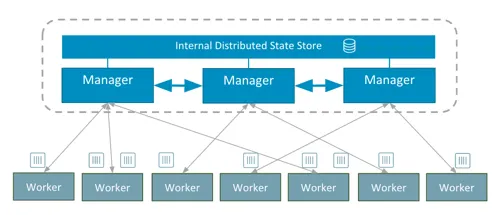
Orchestration has become an integral component in the container ecosystem. Actually it so much a key component that Docker has taken the lead and built it directly into the Docker Engine! So what does this mean for our applications?
Starting with Docker 1.12 we now can deploy and manage applications on a Docker Swarm.
If you are using Docker for Mac~~ or Docker for Windows you are lucky enough to already have Docker 1.12 installed by the latest update. Let’s install a Swarm locally for testing, shall we?
Open your CLI and run:

The docker swarm init will activate your current Docker Node (Localhost) and promote it to become the Swarm Manager.

Let’s check the status of our Swarm.

We now have a single node Swarm running on our local machine that quickly. Pat yourself on the back as previously this used to be quite some configuration and typing and now we has been achieved faster than you can finish this sentence.
Docker Service
Docker Service is similar to the Docker Run command. With Docker Service we can now build, distribute, load balance and replicate our service across our Docker Swarm.
Since we have a fresh Docker Swarm running waiting for something to do let’s use the new docker service functionality and create a service and push it to our Swarm.
Let’s create a service which Ping’s our Localhost. We will create the service with only 1 instance (replicas) and afterwords scale our service.
First, create the ping service:

This will now download the image and start the process on your Docker Swarm.
Check the status of our Ping job:

Our service is now running and pinging our Localhost. If you want to see your container running you can still run a $ docker ps to see the container which runs the service.
Docker Service Scale
Now that our service is running and successfully pinging Localhost let’s scale the ping service. The next command will scale our service from 1 to 3 instances of our process and orchestrate them onto our Swarm.

Scale the ping service:

Let’s check to see if the scaling worked.

Summary
We’ve now successfully built a local Docker Swarm on our Docker for Mac/Windows machine, created a service, and scaled this service. With these new features built into the Docker machine it is even easier to deploy distributed, scalable apps across a hybrid or global infrastructure.
Stay tuned as we provide more news from DockerCon. Also, I will take a deep dive of the Docker Service and how we can really use all the benefits combined with Docker Swarm.
What changed with built-in Swarm — and why it matters
Pre-1.12, you had three options for orchestrating containers across a fleet: standalone Swarm (separate binary), Kubernetes (steep learning curve), or build-your-own with a config-management tool. Each had a real cost. Swarm-the-separate-tool was conceptually clean but felt bolted on. Kubernetes was (and still is) operationally heavy. Build-your-own was lock-in-by-accident.
Docker 1.12's built-in orchestration changed the math by removing the install-an-orchestrator step entirely. The result: a small team could go from "I have Docker on my laptop" to "I have a three-node Swarm with a load-balanced service" in under five minutes. Below that bar, the ROI calculation for "should we orchestrate" tilts heavily toward yes.
When Swarm is the right choice (and when it isn't)
Swarm wins when:
- Team is small (1-10 engineers), wants the orchestration mental load close to zero
- The application is fairly standard — stateless services, a database, maybe a cache
- The team is already invested in Docker and Docker Compose and would rather not adopt a parallel ecosystem
- Cluster size stays modest (a few dozen nodes, hundreds of containers, not thousands)
Kubernetes wins when:
- Team is larger or has dedicated platform engineers
- You need fine-grained scheduling, sophisticated network policies, or first-class secrets/config management
- You're building a multi-tenant platform or running across many clouds
- You need the rich ecosystem of operators, service meshes, and observability that Kubernetes' size attracts
Most "we have to use Kubernetes" decisions in small startups in 2016-2017 were status-driven rather than ROI-driven. Swarm would have served those teams better. Hindsight is generous; the lesson holds.
What I'd add to this post in 2026
Two updates worth noting for readers reaching this post years later:
- Docker Swarm-the-built-in-orchestrator is still supported but development has slowed. For new projects, Kubernetes is the default expectation in most enterprises now.
- The pattern this post demonstrates — built-in orchestration as a competitive advantage — has fully won. Every modern container platform ships with orchestration baked in. The 2016 surprise of "wait, you don't have to install a separate tool?" is now table stakes.
If you're standing this up fresh today, evaluate against Kubernetes-the-managed-service (EKS, GKE, AKS) rather than Swarm. Swarm is still a valid choice for small homelab and edge deployments. The map has changed; the territory has not.
Gratitude beat
Big thanks to the Docker engineering team for shipping built-in orchestration without breaking the world. Backward compatibility is a love language.